





Valiran
Members
-
Joined
-
Last visited
Everything posted by Valiran
-
Ok so the Conbee is dying ?
-
Up! Help needed please :(
-
Hello all! I've some strange behaviour on my Home-Assistant vm since 2 monthes. It lost the Conbee-II usb key. Things to know, my tower and my HASS vm are running since something like february 2023 with no issues. I do update Unraid when it ask (and when it tells me "you can reboot, plugins are updated") and HASS too. I'm not using the USB plugin, I passed throught the Conbee-II directly : <serial type='dev'> <source path='/dev/serial/by-id/usb-dresden_elektronik_ingenieurtechnik_GmbH_ConBee_II_DE2121935-if00'/> <target type='usb-serial' port='3'> <model name='usb-serial'/> </target> <alias name='serial0'/> <address type='usb' bus='0' port='4'/> </serial> <console type='dev'> <source path='/dev/serial/by-id/usb-dresden_elektronik_ingenieurtechnik_GmbH_ConBee_II_DE2121935-if00'/> <target type='serial' port='3'/> <alias name='serial0'/> <address type='usb' bus='0' port='4'/> </console> And this was working well until ~november. From then, the VM loose the Conbee stick. Twice or thrice a day. Only solution is to stop the VM (from the unraid VM tab or from HASS, it doesn't matter) and restart it. Rebooting the VM don't fix the problem. And that's what I have in System log: Jan 7 06:01:13 ValiSRV1 kernel: x86/split lock detection: #AC: crashing the kernel on kernel split_locks and warning on user-space split_locks Jan 7 06:01:13 ValiSRV1 kernel: ACPI: Early table checksum verification disabled Jan 7 06:01:13 ValiSRV1 kernel: floppy0: no floppy controllers found Jan 7 06:01:13 ValiSRV1 kernel: EDAC igen6 MC1: HANDLING IBECC MEMORY ERROR Jan 7 06:01:13 ValiSRV1 kernel: EDAC igen6 MC0: HANDLING IBECC MEMORY ERROR Jan 7 06:01:15 ValiSRV1 mcelog: failed to prefill DIMM database from DMI data Jan 7 06:01:24 ValiSRV1 rpc.statd[5070]: Failed to read /var/lib/nfs/state: Success Jan 7 06:01:31 ValiSRV1 kernel: BTRFS info (device nvme0n1p1): using crc32c (crc32c-intel) checksum algorithm Jan 7 06:01:34 ValiSRV1 kernel: BTRFS info (device loop2): using crc32c (crc32c-intel) checksum algorithm Jan 7 06:01:37 ValiSRV1 kernel: BTRFS info (device loop3): using crc32c (crc32c-intel) checksum algorithm With the 2 EDAC lines flagged as "Error" and the rest as "Warning". I already checked the 2 ram sticks, and they are OK in Memtest. I've already tester with 2 others ram sticks, and the Syslog error remain, and the issue with the Conbee remain too. I'm lost and I don't know what to do... I have a Plex Server docker that runs flawlessly. I've pasted the Diagnostics as a zip with this post, if someone can help Big thanks and happy new year :) valisrv1-diagnostics-20240107-2217.zip
-
Hello! Sorry for responding so late, your script works fine, but I hav to put 25 sec instead of 10. Don't know why, but it works! Big thanks !
-
That's strange because my NAS is always on and accessible 0_o so the "offline" line shouldn't be. Is there a way to insert some delay after a reboot?
-
That's strange because my NAS is always on and accessible 0_o so the "offline" line shouldn't be.
-
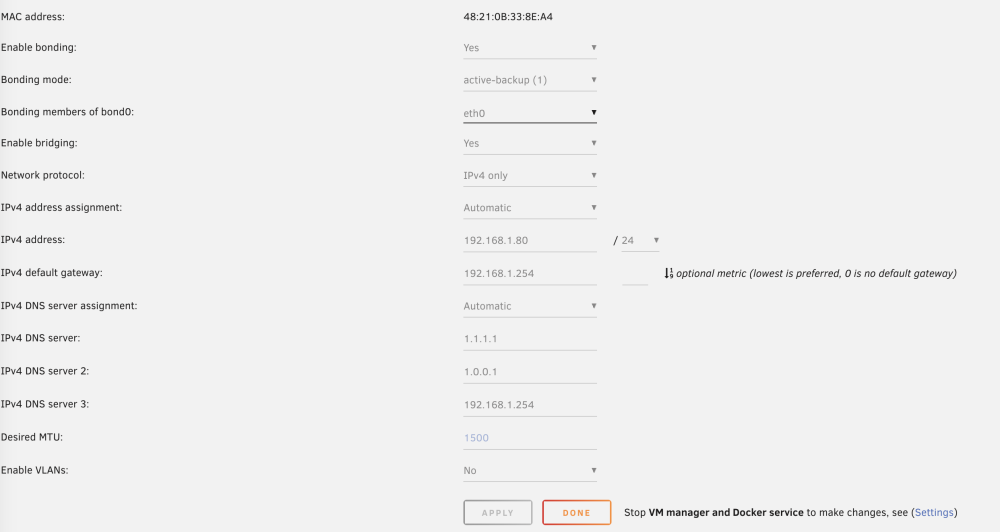
Hello! I've updated UD, removed bonding and bridging from my network config and manually set ip and gateway. And it still doesn't automount after a reboot Diagnotics joined. Thanks ! valisrv1-diagnostics-20230228-1918.zip
-
OK I will do it !
-
There !
-
My Network is configured. Diagnostics are wrong.
-
Hello! There are the Sacred Files ! Thanks! valisrv1-diagnostics-20230226-1410.zip
-
Helllo! Brand new computer (NUC12), brand new USB disk, brand new Unraid install and Unassigned Device installed and up-to-date. It doesn't want to automount my NFS share on my Synology. It sees it, I can mount it manually by clicking the little orange "mount" button, but automount, naaaaa I precise, automount is activated of course. The same NFS Share was automounting on my former computer Where can I check? Thanks !
-
Hello! On an i7-1260p, is that normal that Plex uses /dev/dri/card0 for hw transcode? Shouldn't use renderD128 instead?
-
Thank you, I'm gonna read
-
Yes if you have something to share, I may have something to read Thanks !
-
That's not a problem of skills, I can learn (btw, I work in IT with a variety of systems and technos). My main concern is do I really need to deep dive in ZFS regarding to my needs?
-
So if I have to go ZFS, I better use TrueNAS, at least until full support is added to Unraid
-
What you've linked if about command lines. The ZFS addons for Unraid are not graphical friendly?
-
Yes I know ZFS is cool, but I can't manage to find a guide for the dumb on ZFS. For example, I have 6 hdd (5*12tb + 1*18tb). On those disks I have dumb things that I don't care to loose BUT thoose dumb things are like 2Tb so I can't dedicate a HDD to that. I have my personnal photos and my plex librairies. Personnal Photos don't need to be fast, Plex Librairies need to be fast, both need to be protected by a raid system like raid5 (or raidz1?). And from there, I don't know how to create my pools and everything else That's why I want to stick to a simple thing !
-
No, what I call a high bitrate is more like 25-30MB/sec
-
Hello! Plex metadata and stuff were on cache only. Plex libraries were on unraid array and that's where I had perf issues, I barely could direct play 1 4k movie, and 4k movies with high bitrate were always buffering that's why I moved to Xpenology that works as expected EXCEPT that HDD hibernation doesn't work so HDD always spin and power consumption is high But that was like 2 years ago, I don't know if Unraid Arrays are better now!
-
Ok Thanks for your answer, no need to crush my brain in ZFS then !
-
Is ZFS pertinent for a Plex Library? I've moved from Unraid to Xpenology (virtualized on Unraid) because I've had performance issues with Plex libraries with standard Array
-
I'm gonna dig in the bios (tomorrow, that 2am in France now :) ) and if I find nothing, I will try tu put some BIOS screenshots, maybe you will say "that's obvious, turn this off!"
-
I'm using Unraid as it's intended to be: a powerfull machine that can handle multiple VM and/or docckers. My power consumption at idle is double comparing to the same rig without unraid. The problem is not the GFX as I posted earlier, they cost roughly 25w on idle. The problem is not storage, because I have only 2 SSD (1sata 1 nvme). But when I look at the CPU frequencies, what a magic, the lower frequency is still 2,2Ghz and can't be lowered because of ACPI driver configuration. So I'm looking to find a way to lower that. I think you misunderstood the issue. Consumming watts doesn't bother me when I use thoose watts. But staying at 220W with a machine that do nothing, this is bothering me EDIT: by the way: reinstalling the BIOS + restoring my flash drive make my rig use 203,6w on idle. So I went from 300w yesterday, to 220w today and now 203w, just by modifying parameters. That's a good way EDIT2: the dashboard always report "AMD Ryzen Threadripper 3960X 24-Core @ 3800 MHz" and the 3800MHz never move
