





Einsteinjr
Members
-
Joined
-
Last visited
Everything posted by Einsteinjr
-
You're gonna need to provide more information for something like this. Are you confident that the chia fork has completed all the synching? It will eat up a lot of CPU as it is synching.
-
I do have the standard K32 sized plots. That explains a lot! Thanks for the information.
-
Has anyone successfully farmed a chive currency on here? I can't see anything wrong with the logs, but I'm still sitting at zero after at least 8 weeks of farming 90TB of plots. Curiously, when I tried doing a pool with chives, the pool summary (I tried 2 different pools) always thought I had zero plots.
-
Hi, What's the most efficient way to tell Machinaris to recheck my plots? I recall in previous versions being able to force check. I have some plots reporting as invalid and other plots reported with no check at all (been like this for days).
-
Fixed by running the comand in the Chive docker: # chia wallet get_address No online backup file found, Press S to skip restore from backup Press F to use your own backup file: s ############ # chia wallet get_address ############
-
I actually already tried that before posting. Same issue. It looks like things are being farmed, but it's concerning that it is unable to connect to my wallet. Not a huge deal since it's only 1 fork. I may try to reinstall the fork as a last ditch effort.
-
Hello and Merry Christmas, I am on the Test release and am having issues specifically with the Chives container. Unfortunately, due to a stupid mistake on my end, I had to rebuild all of my containers from scratch. While chives' logging shows it's running correctly and farming my plots, it does not show up in the wallet Summary. Additionally, it does show up in the Farming area with a smiley face. I think the issue is this (from the logging): 2021-12-25T11:42:56.612 wallet chives.rpc.util : WARNING Error while handling message: Traceback (most recent call last): File "/chives-blockchain/chives/rpc/util.py", line 16, in inner res_object = await f(request_data) File "/chives-blockchain/chives/rpc/wallet_rpc_api.py", line 1126, in get_farmed_amount tx_records: List[TransactionRecord] = await self.service.wallet_state_manager.tx_store.get_farming_rewards() AttributeError: 'NoneType' object has no attribute 'tx_store' I've tried deleting the wallets.db in the Chia container, file but it does not fix the issue.
-
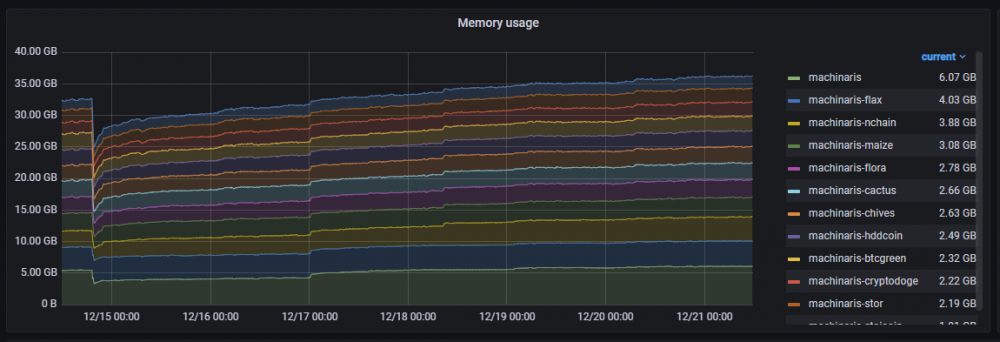
~1 week of running all of the containers available (when already synced). It grows from ~25GB all the way to 36GB - and it is still growing. Here is top of the OG machinaris container, using 6GB of memory. I am only assigning 2 CPU cores so I wonder why there are 8 threads of chia_full_node running PID USER PR NI VIRT RES SHR S %CPU %MEM TIME+ COMMAND 3974 root 20 0 2283572 1.7g 16500 S 10.0 2.8 1274:04 chia_full_node 3931 root 20 0 6387592 78208 15068 S 1.3 0.1 71:33.78 chia_harvester 59 root 20 0 27588 21924 7660 S 0.3 0.0 0:30.79 gunicorn: maste 89 root 20 0 209648 86520 6700 S 0.3 0.1 26:03.03 gunicorn: worke 90 root 20 0 209668 86548 6700 S 0.3 0.1 24:45.01 gunicorn: worke 4007 root 20 0 1237400 922860 6964 S 0.3 1.4 178:45.27 chia_full_node 1 root 20 0 4208 2408 2120 S 0.0 0.0 0:03.68 bash 38 root 20 0 295416 62068 15100 S 0.0 0.1 15:11.01 chia_daemon 57 root 20 0 683320 114912 15652 S 0.0 0.2 19:28.68 gunicorn: maste 63 root 20 0 80332 57928 7828 S 0.0 0.1 0:03.49 gunicorn: worke 447 root 20 0 250360 30992 9412 S 0.0 0.0 6:57.95 python3 3938 root 20 0 246040 79692 15080 S 0.0 0.1 58:18.88 chia_farmer 3999 root 20 0 1171912 935384 16244 S 0.0 1.4 77:29.84 chia_wallet 4010 root 20 0 1304988 922820 6908 S 0.0 1.4 177:55.76 chia_full_node 4015 root 20 0 1308952 931644 7524 S 0.0 1.4 57:20.41 chia_full_node 8647 root 20 0 1749620 1.2g 7580 S 0.0 1.9 39:47.02 chia_full_node 10637 root 20 0 1517596 988.6m 8708 S 0.0 1.5 57:28.38 chia_full_node 28369 root 20 0 2628 720 628 S 0.0 0.0 0:00.25 sh 28378 root 20 0 4472 3840 3196 S 0.0 0.0 0:00.00 bash 28811 root 20 0 7116 3600 3040 R 0.0 0.0 0:00.00 top 28812 root 20 0 2536 768 684 S 0.0 0.0 0:00.00 sleep 32709 root 20 0 79472 57116 7980 S 0.0 0.1 0:01.13 gunicorn: worke
-
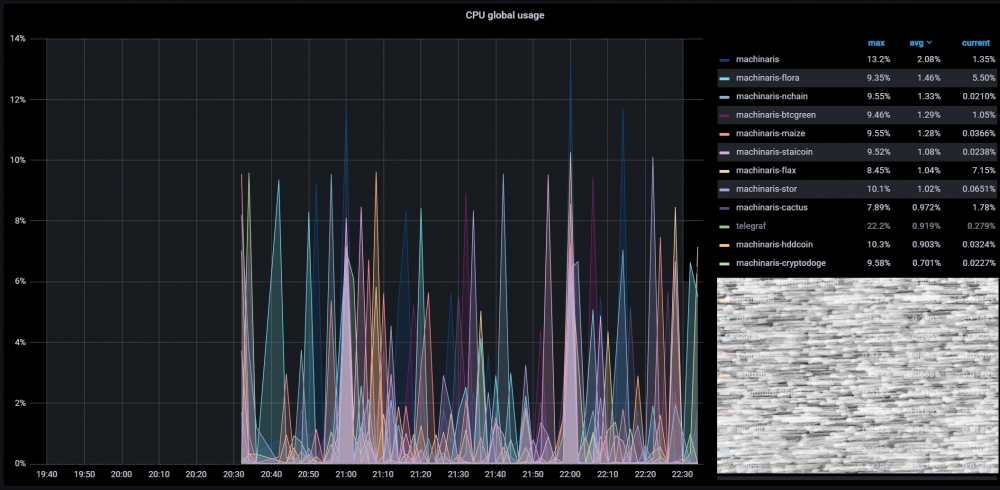
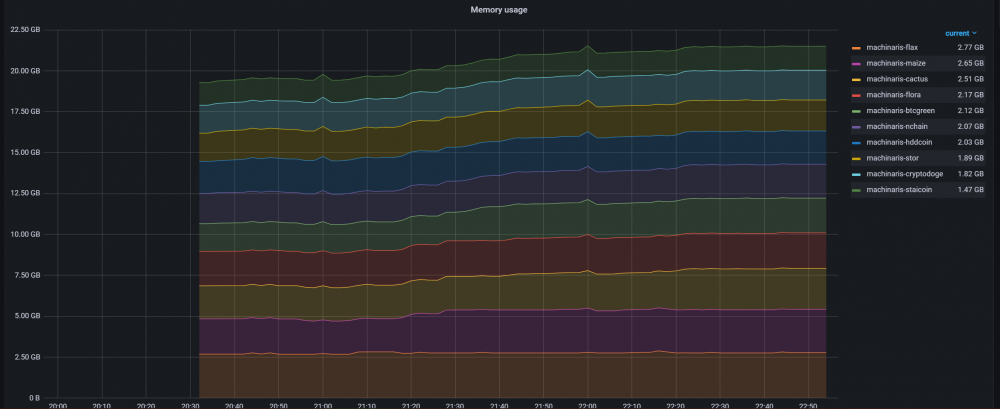
Images are from an Intel i7-8700. CPU usage spikes to around 10% by each fork. The bigger the blockchain, the more CPU it takes to farm. Seems the memory usage is a bit more stable. Last container restart was 3 hours ago. 22GB of memory for all 10 containers. UPDATE: 16 hours after restarting the containers, I'm now up to 27.5GB used for the same 10 Machinaris containers.
-
trying this out now. will let you know if it helps with the RAM usage
-
It seems that the timeline aligns with that patch. I currently don't limit the containers' cores so every container has all 12 cores assigned. Maybe that exacerbates the problem?
-
Look at his latest release. He implemented forktools directly into the container.
-
Yup - if I reboot the container, memory usage will drop significantly and then will gradually creep up. Most of my machinaris containers are using >3GB now after running for ~18 hours. Now that I have a buffer to work with, I'm going to leave them on to see if they will continue to use up whatever is available. Having issues with Telegraf currently so I'm not able to get the nice metrics I usually can get.
-
Definitely does not match mine. My cryptodoge container is taking 3Gb on its own.
-
RAM usage seems to creep up consistently. I just can't believe all of the gradual increase is from the blockchains increasing in size. I'm already at 67% utilization of my 64GB of memory and it just keeps going up. I'm running several other containers outside of Machinaris - but nothing more than ~4GB in total. I don't know if there's a memory leak or what - but something doesn't seem quite right.
-
Feature suggestion: Tracking the growth of each currency over time through some time-based database like influxdb.
-
I ended up buying 4x of 16Gb to deal with the high memory consumption. My Chia container is using 5.3Gb on its own. I'm not really sure what kind of memory reduction forktools is doing. On the bright side, I ended up finding out that 1 of my original sticks was bad anyway - probably only ran into the issue once I started using those last memory bits from running all the forks.
-
Yes, it'll calm down after syncing. But farming does still take some CPU power, especially if you do all the forks.
-
Nice! Thanks for your hard work. Any chance you could document on how forktools would work with the docker? It's unclear to me how to apply that patch to limit memory usage.
-
For the record, this does not fix the issue for me. I used the URL for my Unraid webui or the URL for the Unraid API - the images never load despite the fact that the URL itself works in its own browser. This seems to be a common issue here. Possibly related to the plugin? For what it's worth, I'm running Grafana over an SSL reverse proxy.
-
I only have 32GB installed currently. I will need to get larger modules to increase. I suppose there's a finite number of forks out there, but 2-3GB per fork adds up and this is my primary (and only) server.
-
I haven't done any testing yet, but +1 to figure out ways to reduce the RAM usage. My max is 64GB.
-
Looks like the Silicoin fork requires ipv6? Is this a limitation of the fork or a limitation of the docker? I'm unable to find any peers to sync and I continuously get this error message: 021-11-01T12:54:51.406 full_node chia.full_node.full_node: WARNING querying DNS introducer failed: The DNS response does not contain an answer to the question: dns-introducer.sitnetwork.org. IN AAAA 2021-11-01T12:54:57.975 harvester chia.harvester.harvester: INFO refresh_batch: loaded_plots 0, loaded_size 0.00 TiB, removed_plots 0, processed_plots 0, remaining_plots 0, duration: 2.82 seconds 2021-11-01T12:56:09.408 ful_node chia.full_node.full_node: INFO Received 7 peers from DNS seeder, using rdtype = A. 2021-11-01T12:56:09.415 full_node chia.full_node.full_node: WARNING querying DNS introducer failed: The DNS response does not contain an answer to the question: dns-introducer.sitnetwork.org. IN AAAA 2021-11-01T12:56:58.692 harvester chia.harvester.harvester: INFO refresh_batch: loaded_plots 0, loaded_size 0.00 TiB, removed_plots 0, processed_plots 0, remaining_plots 0, duration: 0.40 seconds 2021-11-01T12:57:27.407 full_node chia.full_node.full_node: INFO Received 7 peers from DNS seeder, using rdtype = A. 2021-11-01T12:57:27.414 full_node chia.full_node.full_node: WARNING querying DNS introducer failed: The DNS response does not contain an answer to the question: dns-introducer.sitnetwork.org. IN AAAA Let me know what other information you need. EDIT: Looks like Silicoin finally decided to sync.
-
Hi, For Fans Auto Control, is there any way to exclude Unassigned Disks? I'm finding that when the plugin runs, it also looks at the temperature of any unassigned disks - despite not having the option to exclude them in the GUI. Edit: another issue I'm seeing is that the fan control doesn't seem to persist after a reboot. I don't see any output in the syslog until I disable/enable the PWM controller again. Note that I only have 1 controller enabled at the moment. Thanks in advance.
-
I only have 1 full node doing all the farming, harvesting, etc. The issue is a formatting one, it seems. When I browse the Machinaris URL to administer the application, only 1 of my computers actually sees the correct formatting on the site. All my other systems I use outputs a poorly formatted website for the same URL. I've tried multiple browsers (phone, desktop, tablet, laptop) and I see the same problem. The only one that formats correctly is the laptop I used to remotely set up the application initially on Unraid. It's really strange. EDIT: I figured it out. It was my pihole DNS filter blocking out one of the URLs your app reaches out to: https://cdn.jsdelivr.net



