





gusgus
Members
-
Joined
-
Last visited
-
That was exactly it! I had totally forgot about Encrypted Drive Manager. I created the device-derived key on the drives and rebooted and HDD pool is now successfully automounted at bootup. Thank you!
-
Ok finally I'm back. Here are the two scenarios that result in the HDD pool in not mounting and one scenario where it does mount. As a reminder, I have two ZFS encrypted pools with the same passphrase. Scenario 1: When I do the following, the HDD pool fails to unlock: Boot up with the keyfile in place. NVME pool succeeds to unlock HDD pool does not unlock and instead says "Unmountable: wrong or no file system" Scenario 2: When I do the following, the HDD pool fails to unlock: Delete the keyfile Stop the array Start the array Enter the correct passphrase NVME pool succeeds to unlock HDD pool does not unlock and instead says "Unmountable: wrong or no file system" Note: The exact order of the steps I'm not sure of because right now it refuses to delete the keyfile (delete button > restart array > keyfile is still there). Scenario 3: This causes the HDD pool to successfully mount Start with the drive set to encrypted zfs filesystem Format (Yes I want to do this) The HDD pool is now unlocked and mounted The next time I reboot UnRAID and forever after it will refuse to mount without being reformatted as a workaround.
-
The odd part is I have two pools, both formatted as encrypted zfs. They both have the same encryption passphrase. The other pool that I'm not having this problem with is unlocking just fine at bootup as expected. Why would one pool unlock perfectly fine using the keyfile and another pool repeatedly but only occasionally fail to unlock using that same keyfile? Is this still possibly a memory corruption issue? Unless I'm missing something, I would think it's time to file a bug report.
-
Three times now I have reformatted a single drive that's in its own pool (as encrypted zfs) because it has randomly come up as Unmountable: wrong or no file system. And it just did it again. It's a new drive, there are no SMART errors. How can I force it to mount correctly? How do I prevent this from happening? This most recent occurrence appears to have happened after a hard shutdown of (loss of power to) the server. I also noticed that after this hard shutdown the root user's authorized SSH keys were wiped, when before I had no issues with it retaining the keys. metaverse-diagnostics-20261002-1002.zip
-
Worked perfectly! Thank you JorgeB for all of the help!
-
A scrub cleared it up, zpool status -v now says errors: No known data errors So it looks like the next step is to remove the extraneous mirror device in the Nvme pool. How would I go about doing that? Thank you JorgeB for all your help! Definitely will be sending beer money when this is over! metaverse-diagnostics-20260924-1751.zip
-
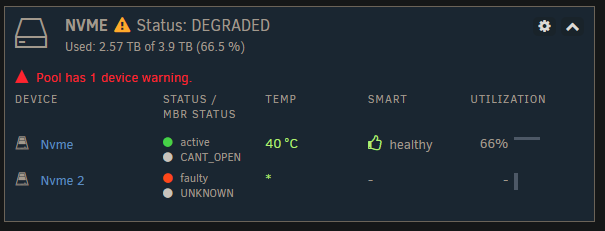
Ok finally the corrupted file has been deleted, but the CANT_OPEN error is still on the existing nvme drive. A look at zpool status -v says: errors: Permanent errors have been detected in the following files: nvme:<0x10f> metaverse-diagnostics-20260923-1850.zip
-
@JorgeB after resolving this will I be able to remove the second mirror drive from the pool?
-
Thank you @JorgeB! I guess unRAID hasn't integrated zfs data integrity issues properly into the UI yet.
-
Diagnostics here metaverse-diagnostics-20260914-0848.zip
-
Thank you for the reply! Screenshot attached, it's the Nvme pool that I need to remove a device from. Right now the red triangle next to the existing drive says "Device has an error status: CANT_OPEN" which I've never seen before. It's also inaccurate since the drive is mounted and operating. Anyone wondering how I have dark mode, I use the Dark Reader extension which works very well and is available on Chrome and Firefox.

-
Hi, I recently did a system upgrade that I'm rolling back. On the newer system I expanded a single drive pool into a mirrored pool. Now I have to revert that mirror into a single drive again. The challenge is that I only have one m.2 slot on this older system so I have to revert it to a single drive without the full mirror being present. Right now it is successfully mounting but is marked as degraded. I'm sure there is some straightforward way to do it but I've looked and looked and haven't found it. If someone could please point me in the right direction that would be very helpful.
-
Mods if you could flag this as a bug report that would be very helpful, I don't see how I am able to do it.
-
I found the hack that makes my backups bootable: 1. Using the unRAID USB Creator (I used it on Linux), create a stock image of the version from your backup, mine was 7.3.2. 2. Remount the newly created unRAID USB media and delete everything except for EFI folder. 3. Unzip your backup file and copy over the contents except for the EFI folder that's in the backup file. Done. You should now be able to boot into your backup. unRAID clearly has a bug with corrupting the EFI folder contents during backup creation! And for the ZFS key issue, I discovered that my backup used a single drive at the time for a pool but I later created a mirror. When I was recreating my existing pools I thought that the mirrored device would suffice but no it wanted the original device (even though they were mirrored and had the same ZFS key). So unRAID clearly has a misleading error message in this situation where the wrong pool member was used - it should say that instead of saying that the key is wrong because the key isn't what failed.
-
After a failed hardware upgrade (which went so far as successfully installing internal boot on the new system), I found too many issues and am reverting back to my original build which has been running without issue for around 4 years. There are two issues: 1. Not being able to use my unRAID backup files 2. unRAID won't accept my ZFS encryption key which I know is correct and I know is being pasted into the text field correctly I'm putting both of these issues in a single post because if we can resolve issue 1 then issue 2 will be resolved as well. Issue 1: It started off with every backup I have made being unbootable on this UEFI-only system that has had no problems booting unRAID on USB media for many years via multiple attempts including: -unRAID USB creation tool on Windows (loading a backup file) -unRAID USB creation tool on Linux (loading a backup file) -Rufus: format as Large FAT32 then create FreeDOS then dumping the backup files on there There are 4 different backup files from v7.3.2 and none of them result in a bootable USB media using the above attempts. What ended up working is the unRAID USB creation tool on Linux loading a stock 7.3.2 image, forcing me to install from scratch. But it seems that if I could just get one of my backups to be bootable then this problem would resolve itself because it was loading the ZFS encryption keyfile just fine before the hardware upgrade. Issue 2: Incredulously, unRAID is claiming that my ZFS encryption key is invalid. Here are the steps that I followed: 1. Created the pools for my drives - each pool has a single drive, both drives are ZFS encrypted with the same key which I did before the upgrade in unRAID 7.3.2 2. Entered the ZFS encryption key from my password manager into the text field under "Passphrase". Click Start to accept the key and start the pools. 3. The pools did not start. I scroll down to find that it says "Wrong key". There there known issues with ZFS encryption passphrase/keyfile in 7.3.2? I have no idea what to do about this other than to finally abandon this scrappy and unreliable software.

