





viper81
Members
-
Joined
-
Last visited
-
@JorgeB viper-diagnostics-20260629-0734.zipThanks again for all the help and guidance. I really appreciate you taking the time to look through my diagnostics and point me in the right direction. I've updated my original post with everything I changed and the resources I used so hopefully it can help someone else with a similar issue. So far the server has now been stable for about 32 hours with zero freezes, reboots, or Machine Check Errors. It has completed parity checks and handled normal workloads without any issues since disabling DOCP/XMP and other settings discussed in the link. I'll continue to let it run and will report back if anything changes, but so far it's looking very promising. Thanks again!
-
@JorgeB Thanks again for all the help and for pointing me in the right direction. Based on the Ryzen/Linux stability information in the FAQ and Arch Linux documentation, I've made the following changes: Disabled DOCP/XMP and am running the memory at the default 2666 MHz. Disabled ASUS Performance Enhancement. Set Power Supply Idle Control to Typical Current Idle. Left Global C-State Control disabled. Left all PBO settings on Auto. (Latest Change) Set Curve Optimizer to All Cores, Positive, Magnitude 4, as recommended in the Linux documentation for Ryzen 5000 stability. I'm going to let the server run overnight with a parity check and normal Docker activity and see if it remains stable. If it crashes again, I'll post the new diagnostics and report back with the results. Thanks again for taking the time to help troubleshoot this.
-
I made the recommended BIOS changes: Power Supply Idle Control = Typical Current Idle Global C-State disabled Memory running at JEDEC 2666 (DOCP disabled) PCIe storage slots forced to Gen3 I ran another parity check and the server rebooted again. The new diagnostics now show: Previous system reset reason: an uncorrected error caused a data fabric sync flood event followed by Machine Check Events. I don't see any obvious SATA timeout or disk I/O errors before the reboot. Does this point more toward the Ryzen platform itself (Infinity Fabric/CPU/motherboard) than the storage controllers? viper-diagnostics-20260626-1414.zip
-
Thanks for the recommendations. I went through my BIOS and made the following changes: Updated the BIOS to the latest version (already had) Set Power Supply Idle Control to Typical Current Idle. Left Global C-State Control disabled. Set all PCIe slots used for storage/controller cards to Gen 3 (left the GPU at Gen 4). Disabled DOCP/XMP and am running the memory at the default JEDEC speed (2666 MT/s). I'm going to leave everything else at stock for now, including PBO and Curve Optimizer, so I only change one variable at a time. I'll run the server under normal use along with parity checks over the next day or so and report back with the results. If it still locks up or logs additional Machine Check Events, I'll post the updated diagnostics and logs.
-
Thanks work on this shortly. I believe C-state is already disabled, but I will report back once I go through everything.
-
UPDATE (Potential Resolution)June 29, 2026 I wanted to post an update in case someone else with a Ryzen 5000 system finds this thread. After working with JorgeB and following the Unraid FAQ below, I was able to resolve what appears to have been the cause of the crashes. Unraid FAQ https://forums.unraid.net/topic/46802-faq-for-unraid-v6/page/2/#findComment-819173 That FAQ led me to the Arch Linux Ryzen documentation regarding Ryzen 5000 processors and Machine Check Exception (MCE) events under Linux. Arch Linux Ryzen Documentation https://wiki.archlinux.org/title/Ryzen#Random_reboots BIOS changes madeUpdated to the latest ASUS BIOS Disabled DOCP/XMP (memory now running at JEDEC defaults) Set Power Supply Idle Control to Typical Current Idle Disabled ASUS Performance Enhancement Left SVM and IOMMU enabled Initially tested a Positive Curve Optimizer (+4) as recommended in the Linux documentation, but after additional testing returned Curve Optimizer to Auto I also removed my secondary GTX 980 during troubleshooting since it was no longer needed and simplified my PCIe configuration. Current StatusSince disabling DOCP/XMP, the server has been completely stable. I've successfully run: Multiple parity checks Unmanic Sonarr imports Normal Docker workloads General heavy disk activity without any freezes, unexpected reboots, or Machine Check Exceptions. The latest diagnostics are also clean. ConclusionBased on my testing, the instability appears to have been related to the memory configuration (DOCP/XMP) rather than the SATA controller cards or motherboard. Many thanks to @JorgeB who took the time to help troubleshoot this. Original PostHi everyone, I'm hoping to get some help troubleshooting intermittent freezes on my Unraid server. I've already run through quite a few hardware and software tests and I'm trying to determine whether this is a controller issue, motherboard issue, or something else. HardwareUnraid (latest stable) ASUS ROG Strix B550-F Gaming AMD Ryzen 9 5950X 64 GB DDR4 (4x16 GB Corsair CMK32GX4M2A2666C16) NVIDIA RTX 5060 Fractal Design Ion+ 660W Platinum PSU Storage10-drive array 3 SSD cache pools 4 HDDs connected directly to motherboard SATA 6 HDDs connected to one PCIe SATA controller 2 HDDs connected to a second PCIe SATA controller (The controller cards are generic PCIe SATA cards.) SymptomsThe issue almost always occurs during a parity check or other heavy disk activity. Examples: Parity check running Unmanic processing a video Sonarr importing files General heavy disk I/O The server will suddenly become unresponsive. Sometimes it appears completely locked: Web UI unavailable SMB unavailable Docker applications stop responding Other times it eventually recovers after several minutes without rebooting. I also had parity checks abort unexpectedly. What I had already testedMemTest86 completed first pass with 0 errors Disabled Global C-States PCIe slots forced to Gen3 (GPU left at Gen4) GPU replaced (no change) Temperatures normal Drives report no SMART errors Array reports 0 disk errors Docker and cache drives appeared healthy Kernel MessagesDuring boot I consistently saw: mce: [Hardware Error]: Machine check events logged Modules loaded: edac_mce_amd edac_core No obvious SATA timeout or reset messages appeared in dmesg after recovery. Other observationsqBittorrent and Sonarr occasionally lost communication during the freeze but eventually reconnected. The issue was strongly correlated with heavy storage activity. The freezes became much easier to reproduce during parity checks. QuestionsDoes this sound more like failing PCIe SATA controller cards? Has anyone seen generic SATA controller cards cause temporary system-wide I/O hangs like this? Would moving all drives to a proper LSI/Broadcom HBA (9300-16i IT mode) be the next logical troubleshooting step? Is there anything specific in the diagnostics that I should be looking for? I've attached my diagnostics zip generated immediately after one of the freezes. Thanks in advance for any suggestions. viper-diagnostics-20260626-0713.zip
-
viper81 changed their profile photo
-
Thanks, I just came across this — I didn’t realize, since I randomly found this post.
-
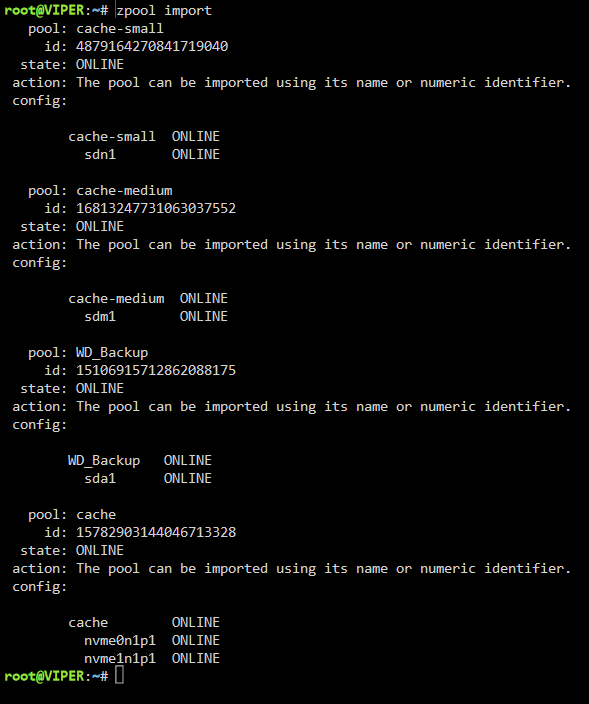
Sorry forgot to add I have no memory issues so far. Once backed up I have been running for the past hour or so. I'm going to leave for 24hrs if possible but so far no errors/fails. What I think happened "cache-medium" only stores my VM's and ISO's. I upgraded to 6-12.1 with the VM running and shutdown and think it corrupted it. NOTE: I changed this cache drive to ZFS the day 6.12 launched. Backed it up and formatted to the new format. This drive on ZFS file system type has been working great until the upgrade to 6.12.1 this AM.
-
Thanks so much this is now solved. I was able to use your command and then start the array. Used Krusader to copy the files. Now I will clear the drive and re-create the pool. Thank you so much again!
-
Hey team, Upgraded to 6.12.1 and this one ZFS drive didn't mount. If I have it mount is locks the system from loading the rest of the array. Right now I have my disk to not auto start until I get word with how to proceed. Drive that's hanging up is cache-medium viper-diagnostics-20230623-1058.zip

-
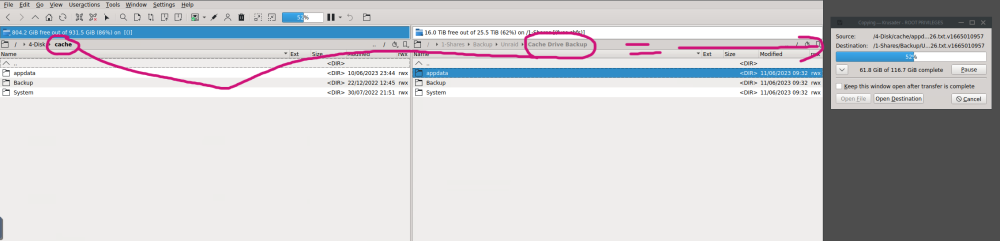
I want to add that I think I recovered everything and backed up my data. I really appreciate it. I also set back up CA backup again "properly". btrfs rescue zero-log Since it worked will it exit to zero-exit status after it recovered after the backtrace was completed? I really do appreciate all your help and I had a feeling you would be the one to reply!
-
Thanks I did what you asked. You might see some dockers now in the logs. These are ones I just manually created to get my server up and running again. What's crazy is after I ran your command you gave me and rebooted the drives are back?? btrfs rescue zero-log /dev/nvme0n1p1 I started to backup and will make sure that my CA Appbackup is running again in the future. I just need to know if I need to set any CLI flags back or your recommendations? viper-diagnostics-20230611-0921.zip
-
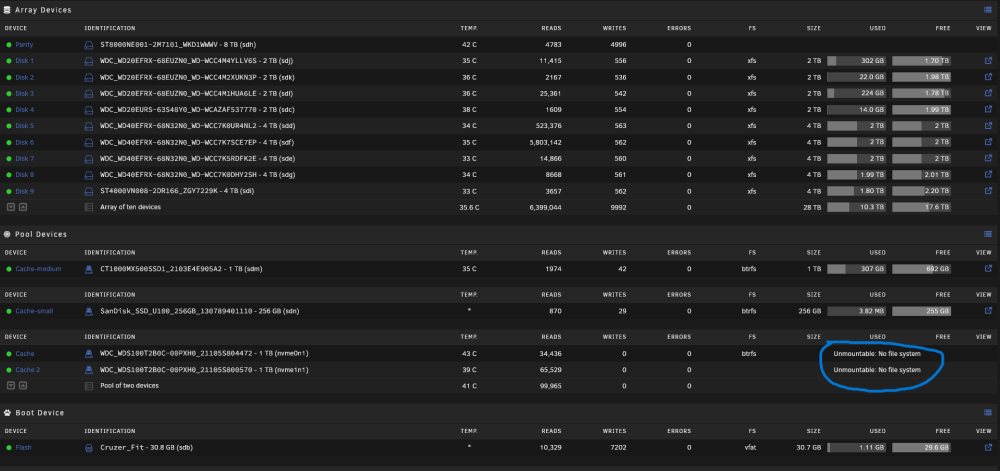
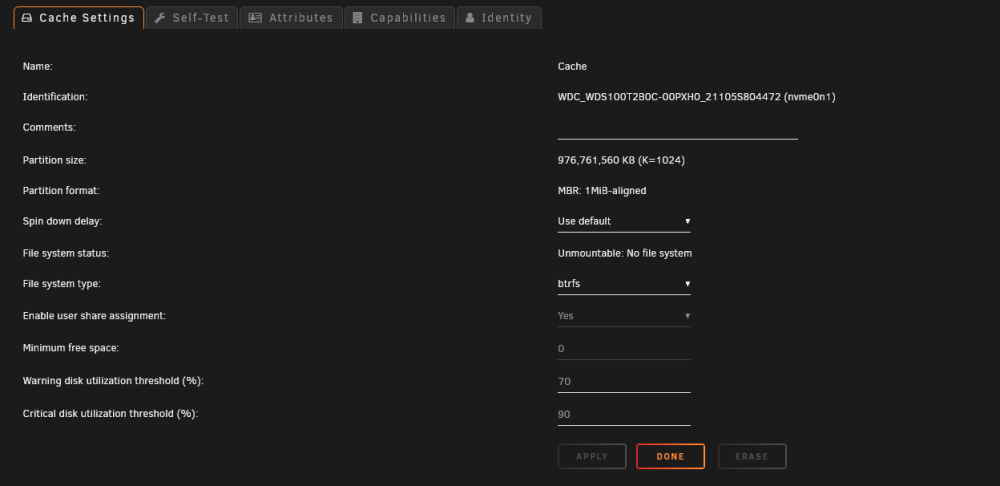
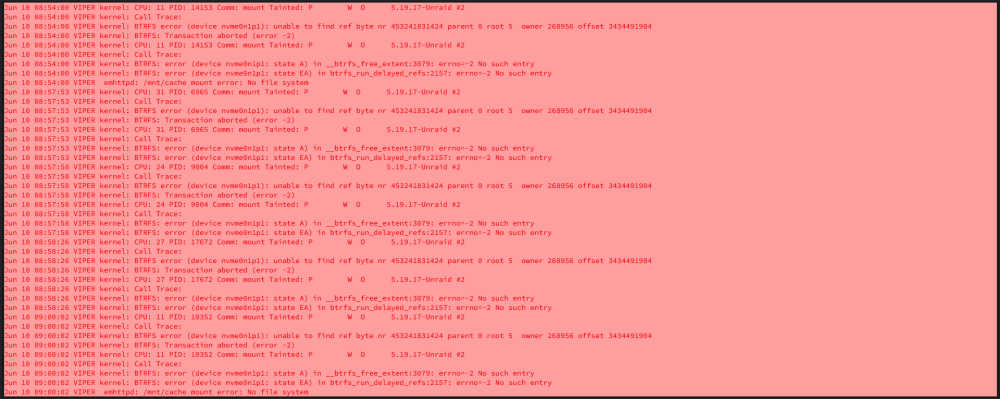
Hello everyone! I rarely post because I usually figure out issues myself as a long-time user of Unraid. However, I'm currently facing a problem. This morning, I woke up and noticed that my dockers had frozen overnight. When I accessed the Unraid WebUI, I saw that my main Cache pool was labeled as "Unmountable" (refer to the picture). This cache pool stores the following: Appdata folder System folder I can't believe I disabled backups for it several months ago, so now it's crucial for me to see if I can recover as much as possible. I attempted to follow the steps for recovery, but I'm a bit confused at this stage. v6.10-rc1 and newer use: Link to Source mount -o rescue=all,ro /dev/sdX1 /temp For a pool: replace X with any of the devices from the pool to mount the whole pool (as long as there are no devices missing), don't forget the 1 in the end I replaced "X" with nvme0n1 My output was mount -o rescue=all,ro /dev/sdnvme0n11 /temp I then get the following output mount: /temp: special device /dev/sdnvme0n11 does not exist. dmesg(1) may have more information after failed mount system call. Any and all help would be greatly appreciated! viper-diagnostics-20230610-0924.zip
-
Thanks your "edit" totally helped I was going nuts!
-
If I use the Intel plugin do I need to remove all the old ways (this article) such as the go file or probe line? Ty again




