TrevP
Members
-
Joined
-
Last visited
-
Quick update here. finally got the chance to update from 7.2.3. Went right to 7.3.2 in one jump. Seems to have worked fine. Quite impressive really. Not an issue so far with the update.
-
Hi everyone, I’m currently running Unraid 7.2.3. The system has been working absolutely fine, but I’ve been busy and have fallen a few revisions behind. As of writing, the current release appears to be 7.3.1, so I’m trying to understand the preferred upgrade approach before touching anything. Is the recommended Unraid upgrade path to jump directly from 7.2.3 to 7.3.1, or is it better to step through each intermediate release one at a time? In other words: Do I go straight from 7.2.3 → 7.3.1? Or should I install each incremental release between them? Or is the preferred approach to jump within the same minor release line, for example 7.2.3 → latest 7.2.x, then step to 7.3.x, and then continue from there? I realize every system is different, but I’m interested in what the Unraid-preferred method is, especially when skipping several point releases. Also, if anyone has jumped this many versions at once, I’d appreciate hearing how it went. Did the upgrade complete cleanly, or did you run into plugin, Docker, VM, driver, or configuration issues afterward? Thanks.
-
Hi all, I’m trying to find an Unraid-friendly equivalent to Synology’s Active Backup for Microsoft 365 / Office 365, which Synology offers at no additional cost with their hardware. I know about CubeBackup, but it's not free. For reference, this is the Synology product I’m talking about: https://www.synology.com/en-us/dsm/feature/active_backup_office365 My use case is for a very small business / non-profit, so a free solution or something with a very low cost would be ideal. What I’m looking for is a way to back up or export Microsoft 365 data to an Unraid-based environment, specifically: Exchange Online Teams OneDrive SharePoint Even better would be something that works well as part of an offboarding process, where a user’s data can be exported or preserved when they leave. I’m open to a few different possibilities: A native Unraid app or Docker container A self-hosted backup platform that runs well on Unraid A PowerShell-based workflow A GitHub project or script repo that can export Microsoft 365 data reliably Has anyone here found a good approach for this?
-
For those of you who are running or thinking about installing Huntarr, you may want to think twice. There have been recent security concerns raised around Huntarr, and a lot of the project appears to have been removed from public view instead of clearly addressed. I’m not telling anyone what to do, but I do think anyone still running it should review the information and decide for themselves whether they want to keep it online. Side note: it looks like Huntarr has already been deprecated in the Unraid Apps menu. This post is mainly a heads-up for people who already installed it. Info / discussion: Reddit: https://www.reddit.com/r/selfhosted/comments/1rckopd/huntarr_your_passwords_and_your_entire_arr_stacks/ YouTube short (and quite good) overview: https://www.youtube.com/shorts/j4Ci1gqHyT4 If you’re still running it and it’s exposed to the internet, you may want to disable external access immediately. If you insist on continuing to run it, at minimum review your setup and rotate any related keys/tokens just to be safe.
-
Quick follow-up here. I've since removed "cache=none" from my mounts as during heavy writes to the NAS I was getting abysmal throughput. The default setting of "cache=strict" is good enough for the bast majority of users.
-
use //192.168.0.30/unraid /mnt/unraid cifs rw,guest,_netdev,noatime,noserverino 0 0 not //192.168.0.30/mnt/user/unraid /mnt/unraid cifs rw,guest,_netdev,noatime,noserverino,cache=none 0 0Note the two changes. You want to mount the "Share", not the path; and I no longer disable caching by default. The standard "cache=strict" is used by default and good enough for the vast majority of uses.
-
As @JorgeB showed. You are missing the leading "//" in the fstab entry.
-
It depends on your individual use case and the environment you are using. I've configured, setup and used both countless times in my career. That being said, for my setup, I moved exclusively to SMB/CIFS shares within my network and between all my systems; linux and windows alike. No issues. See here for more details: https://forums.unraid.net/topic/196474-files-uploaded-via-nfs-mount-have-wrong-user-and-permissions-drwxr-xr-x-for-directories-and-rw-r-r-for-files/#comment-1601671
-
I use SMB exclusively between all my Linux servers and Unraid, all using systemd automount. On Unraid, export the share using SMB. On the Linux client, here is my setup: /etc/fstab //<unraid host>/<sharename> /mnt/<mountpoint> cifs rw,guest,uid=99,gid=100,_netdev,noatime,noserverino,noperm,cache=none,x-systemd.automount,x-systemd.idle-timeout=600,exec 0 0 What this does: rw = read and write access guest = connect without a username/password (guest access) uid=99 = treat files as owned by local user ID 99 gid=100 = treat files as owned by local group ID 100 _netdev = wait for network before mounting noatime = don’t update “last accessed” timestamps noserverino = don’t use server inode numbers (avoid inode-related issues) noperm = don’t enforce local Linux permissions; let the server decide cache=none = disable client-side caching (reduce stale reads) x-systemd.automount = mount on first access, not at boot x-systemd.idle-timeout=600 = unmount after 10 minutes of inactivity exec = allow running programs from the mount final 0 = don’t include in dump backups final 0 = don’t run fsck checks on it Change the above for your requirements. I also create a dedicated “Unraid” identity on the Linux box so UID/GID 99/100 are clearly identifiable when you do ls -l: # make sure group 100 exists (name it whatever you want) groupadd -g 100 unraid # create a system user with no home and no shell, pinned to UID 99 / GID 100 useradd -u 99 -g 100 -M -r -s /usr/sbin/nologin unraidThen run the following: mkdir -p /mnt/<mountpoint> systemctl daemon-reload Sanity checks (make sure the required systemd targets/units are active): systemctl is-enabled remote-fs.target systemctl is-active remote-fs.target (Optional) If you want to confirm systemd actually created the automount unit: systemctl list-units --type=automount | grep -F "<mountpoint>" Important note about automount: x-systemd.automount is mount-on-access. It will NOT mount the share until something actually touches the mountpoint. So if you do this and then run df, you’re not going to see anything yet, that’s expected. df will only show it after the mount is triggered. Now trigger the mount by accessing the directory: cd /mnt/<mountpoint> # or: ls /mnt/<mountpoint> After that, df should show the mounted share.
-
Looking through your syslog, there are a couple of clear things going on: The system thinks it’s shutting down, but never actually does. The logs show Unraid receiving a shutdown/reboot command and starting the process, but there’s no sign of an actual poweroff or reboot sequence afterward. At some point you’re clearly holding the power button, because on the next boot Unraid reports an “unclean shutdown detected.” That’s a strong sign the OS never finished shutting down on its own. There’s definitely something up with Docker. The syslog shows errors with the Docker image (it’s already attached to a loop device and can’t be mounted properly). Whether that is the root cause of the shutdown issue is unclear, but it’s definitely not healthy and worth fixing. So, a few things to try: Test shutdown with Docker and VMs disabled Stop all running Docker containers and VMs. Then go into Settings and disable Docker and disable the VM service completely. After that, try a shutdown/reboot from the GUI. If it now powers off cleanly, the culprit is usually something related to Docker, a container, or a VM. Try Safe Mode (no plugins) Look up how to boot Unraid into Safe Mode (no plugins). Once in Safe Mode, try shutting down again. If it shuts down cleanly in Safe Mode, that points to one of your plugins as the likely cause. Try shutting down from the local console Plug in a keyboard and monitor. Log in as root on the console. Run poweroff (or powerdown depending on your version). Watch the messages on screen as it tries to shut down. Sometimes errors show up on the console that never make it into syslog, and those can give you more hints about what’s hanging. Clean up the Docker image issue (after the above tests) Since the syslog shows Docker image errors, consider recreating the Docker image once you’ve tested the above. Fixing that may or may not solve the shutdown problem by itself, but it’s still something that should be cleaned up. In short: your logs show the system wants to shut down but never completes the process, which leads you to force power it off. Docker is definitely misbehaving, and either it, a VM, or a plugin is the most likely suspect. The steps above should help narrow down which. Good luck.
-
This link for reference: open bug list I was looking through the Stable Releases bug reports and noticed there are currently around 1,500+ open reports (the filter shows 1,569 open items as of today), with some going all the way back to 2018; almost 8 years ago. Speaking as someone who previously worked as a software developer, that number feels very high for a product that’s actively maintained. I completely understand that Unraid is complex, priorities shift, and resources are finite, this isn’t meant as a complaint or a “gotcha,” more as constructive feedback from a user who cares about the platform. A few things that stand out to me: There are open reports on releases that are many years old and no longer generally available. From the outside, it’s hard to tell which of these are: already fixed in newer versions no longer reproducible low-priority but still valid never going to be fixed / effectively “won’t fix” When a bug list accumulates eight years of open reports, it can give the impression (fairly or not) that the tracker isn’t being actively curated. That can be a bit discouraging for people filing new reports, because it starts to feel like their issues might disappear into a pile that’s too big to ever be addressed. Would it be possible to do some kind of backlog cleanup / triage pass? For example: Auto-close or archive reports that only apply to EOL / unsupported versions, with a clear status like “Archived, please re-test on current release.” Ask for re-validation: leave a comment on older reports asking the reporter (or community) to confirm whether the issue still occurs on the latest stable; close if there’s no response after some period. Use more explicit statuses/labels (e.g., “Needs info”, “Duplicate”, “Won’t fix”, “Fixed in X.Y.Z”) so the community can see what’s actually still actionable. Maybe even publish a brief policy on how old bugs are handled, so expectations are clear I want to stress: this is coming from a place of respect for the work you’re doing and appreciation for Unraid. The product is great, which is exactly why seeing such a large, long-lived backlog feels a bit crazy to me. Thanks for reading, and I’d genuinely be interested to hear how the team is thinking about bug triage and whether there are ways the community can help (e.g., re-testing old reports on current releases). Just my two cents from an ex-dev who’s wrestled with bug backlogs before.
-
On the Shares → User Shares page, Unraid incorrectly shows the orange “some or all files unprotected” warning icon for shares whose cache portion is completely empty and only the share directory (mountpoint) exists under /mnt/cache/<sharename>. In the screenshot above, ALL "Cache -> Array" shares are empty. There are no files in the cache. "backups" is my test to prove that when the share folder in cache is removed, only then does the status change to protected. This appears to be because the existence of the directory itself is enough for Unraid to consider the share “present on cache,” even when there are no files there. This becomes a problem when the share is exported via SMB or NFS: you cannot safely remove that mountpoint directory without possibly causing stale file handle errors on clients who have the folder mounted from unraid. As a result, the GUI permanently shows these shares as “unprotected” even though all data actually resides on the protected array. Below proves that each share folder in cache is empty, except for tpvl010 which is a cache only share. You'll also note that the "backup" share folder isn't there; as such the share shows as "protected" in the UI. root@tpur001:/mnt/cache# pwd /mnt/cache root@tpur001:/mnt/cache# ls -laus total 16 16 drwxrwxrwx 1 nobody users 78 Oct 26 07:06 ./ 0 drwxr-xr-x 16 root root 320 Nov 30 11:56 ../ 0 drwxrwxrwx 1 nobody users 0 Oct 26 07:27 qnap/ 0 drwxrwxrwx 1 nobody users 0 Oct 30 13:30 tpvl002/ 0 drwxrwxrwx 1 nobody users 0 Oct 30 13:48 tpvl003/ 0 drwxrwxrwx 1 nobody users 0 Oct 30 12:35 tpvl005/ 0 drwxrwxrwx 1 nobody users 18 Nov 12 08:14 tpvl010/ 0 drwxrwxrwx 1 nobody users 0 Oct 30 15:41 tpvm001/ root@tpur001:/mnt/cache# du 0 ./tpvl010/FileFlows/Drop/tv-to-hevc 0 ./tpvl010/FileFlows/Drop 4 ./tpvl010/FileFlows/Done 4 ./tpvl010/FileFlows 4 ./tpvl010 0 ./tpvl003 0 ./tpvm001 0 ./tpvl002 0 ./qnap 0 ./tpvl005 20 . root@tpur001:/mnt/cache# ls * qnap: tpvl002: tpvl003: tpvl005: tpvl010: FileFlows/ tpvm001: Additionally, shares that are cache-only (tpvl010 above) are always shown as unprotected, even though that is an intentional configuration choice by the user (e.g., scratch/temp shares). This should always be green, or choose a status other then "unprotected" (add new "Cached only" status?) Expected result: For shares where all data currently resides on the protected array and the cache pool only has an empty mountpoint directory, the Shares page should: Treat the share as effectively protected, or At least not warn that “some or all files are unprotected,” since there are no unprotected files on cache. For cache-only shares: The status should reflect that the share is intentionally configured to be unprotected (e.g. neutral icon / info state, or a different label such as “Cache-only (unprotected by design)”). It should not look like a misconfiguration/partial protection when the configuration is deliberate
-
See this thread for full info as I'm not typing it all out over again here. Full details in the following link on the problem, how to reproduce, and how to fix until code gets updated.tpur001-diagnostics-20251127-1027.zip https://forums.unraid.net/topic/195373-license-key-installed-maybe-and-not-updating-in-web-ui-and-cc-issue-with-stripe/#findComment-1592914
-
In digging further (and without rebooting, on purpose), I’m pretty confident the root cause is inconsistent state between server-state.php and the GraphQL registration object. It looks like the GraphQL registration state is never updated after the original trial is created. 1. server-state.php (Connect state)From: /plugins/dynamix.my.servers/data/server-state.php I see: "regTy": "Unleashed", "state": "UNLEASHED", "expireTime": 0, "regTm": 1764185767000, "regExp": 1795721767000 So Connect / server-state.php correctly thinks: I’m on an Unleashed license There’s no trial expiry (expireTime = 0) 2. GraphQL registration state (before any restart)Using this query: query { registration { id type state expiration updateExpiration } } I get: { "data": { "registration": { "id": "…", "type": "TRIAL", "state": "TRIAL", "expiration": "1764017265000", "updateExpiration": null } } } The important part is the expiration value: 1764017265000 is the timestamp for when my original trial expired It does not match my extended trial expiry It also does not reflect the later Unleashed purchase So it looks like: The GraphQL registration object was set up when the original trial started It never updated when the trial was extended It still hadn’t updated even after installing the Unleashed key Meanwhile, server-state.php had already updated and was reporting regTy: "Unleashed", state: "UNLEASHED", expireTime: 0. That would explain why parts of the UI can show “Unleashed” (anything reading server-state.php) and “Trial/Unlicensed” at the same time (anything reading the GraphQL registration state). 3. Forcing a refresh of the API stateTo test this theory, I restarted just the Unraid API service (still no reboot): unraid-api restart Then I re-ran the same GraphQL query: query { registration { id type state expiration updateExpiration } } After the restart, GraphQL now returns: { "data": { "registration": { "id": "…", "type": "UNLEASHED", "state": "UNLEASHED", "expiration": "0", "updateExpiration": "1795721767000" } } } This now matches server-state.php: type / state → UNLEASHED expiration → 0 (no trial) updateExpiration → same future timestamp as regExp in server-state.php And as you can see in the screenshot below, once the API was restarted, the UI also updated and now shows everything correctly as Unleashed. 4. What this suggestsPutting it all together: The registration data exposed by GraphQL is: Created when the original trial is created Not updated when the trial is extended Not updated when an Unleashed key is installed server-state.php does get updated to UNLEASHED immediately after installing the key Restarting unraid-api (or rebooting the server) forces GraphQL to refresh and then it correctly reports UNLEASHED with no trial So the root issue seems to be: The GraphQL registration state is stale and only refreshed when the Unraid API service starts. It doesn’t get updated when a trial is extended or when a paid license is installed, even though server-state.php already has the correct Unleashed state. If the UI is mixing server-state.php and GraphQL as data sources, that would naturally produce exactly the mixed “Unleashed” + “Trial/Unlicensed” messages I was seeing until unraid-api was restarted. After restarting the API, both GraphQL and the UI now fully agree on the Unleashed license. Which brings up.. if simple registration information isn't updated in GraphQL, what other things are also not updated?
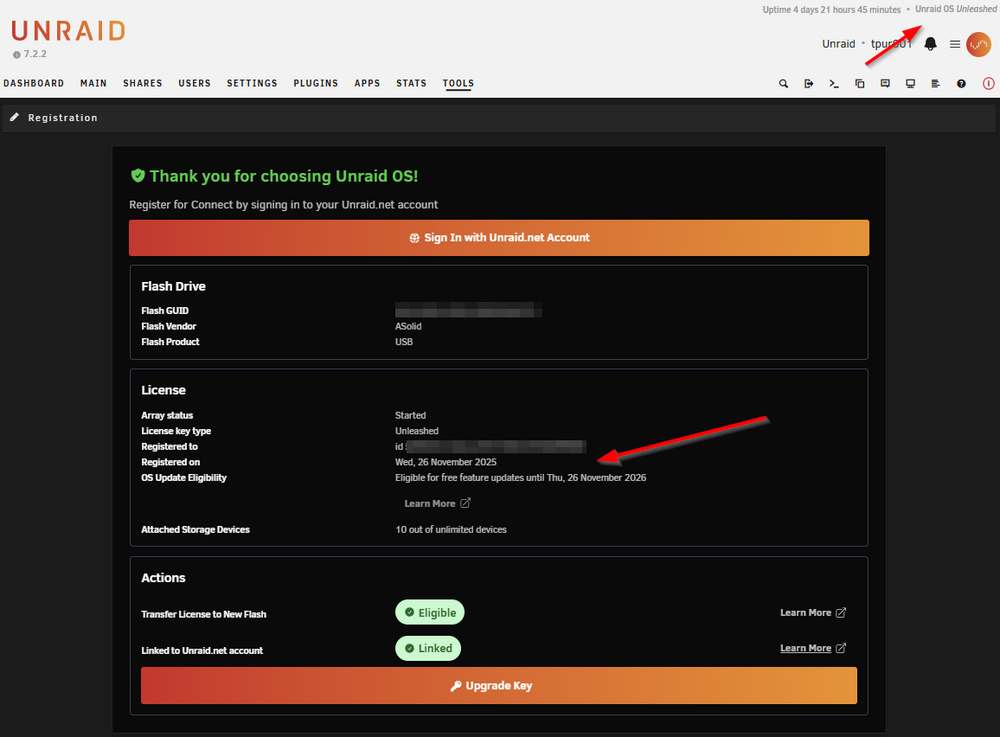
-
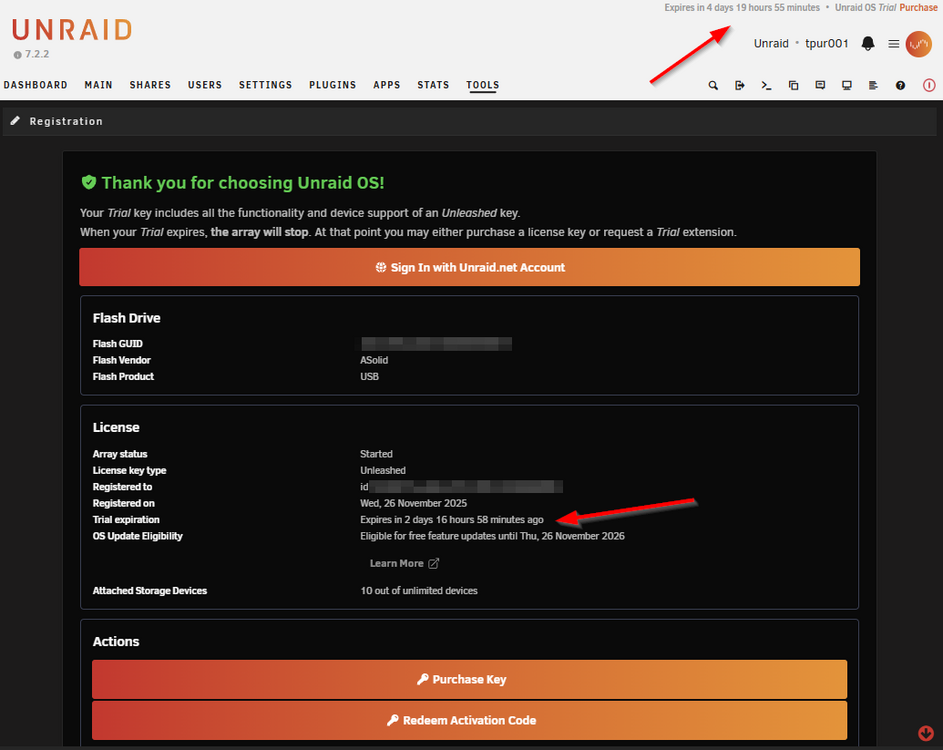
Define "update eventually" as the Top line "Expires in" numbers are increasing, not decreasing. See screenshot below. It went from : "Expires in 4 days 1 hours 55 minutes•Unraid OS Trial" to : "Expires in 4 days 20 hours 2 minutes•Unraid OS Trial" No idea where that counter is getting it's information from, and it's still showing "Trial", with the purchase option link. I also just noticed for the "Trial Expiration" in the "Thank you" screen, it actually displaying: Trial expiration: Expires in 2 days 17 hours 2 minutes ago That's when the original trial expired, aka; in the past. So either change the wording of that line to be Trial expiration: Expired 2 days 17 hours 2 minutes ago Or, a better suggestion, if the license actually is installed, just don't display that line at all. I don't care when the trial expired if I'm now running a valid license, it's too confusing (obviously).