





Martsmac
Members
-
Joined
-
Last visited
Everything posted by Martsmac
-
Hi seems like I'm having some more issues with unraid for some reason, all that has changed to my knowledge is that I recently did the latest upgrade that came out, now when I try to connect to my guacamole docker i get to the domain but the error that pops up is : Error An error has occurred and this action cannot be completed. If the problem persists, please notify your system administrator or check your system logs. It even seems to do this when hitting the webgui link from the docker itself. Any Ideas?? unraid-diagnostics-20240903-0157.zip
-
I think JorgeB with the W again, I could have sworn I had set the power plan in windows on the guest to High Performance, for some reason it didn't seem to take I shall see if it works now thanks again.
-
I've checked the logs and can't figure out why its doing this , I checked the free space and there is plenty, Have included the Diags this is the reforger server VM: unraid-diagnostics-20240901-1554.zip
-
As usual guys thanks for the answers what Jorge suggested worked great for removing those drives and I have yet to try the mover thing but that was gonna be my next question , thanks again
-
As promised here are the diagnostics unraid-diagnostics-20240823-0453.zip
-
I'm not sure if this is an issue with mover or an issue with my cache pool itself but I'm unable to to remove an nvme drive I have in my cache pool, it's the one remaining issue I have with my Unraid server. So here's the rub, I have set ALL my shares to run off of the array, in preparation of removing my entire SSD cache pool and redoing it with JUST sata SSD disks (so I can use the 2 nvmes in my gaming rig). So what I have now is a pool made up of 3 sata ssds and 2 nvme drives. I have read through all the guides that I can see on removing pool drives and they all say 2 things (can't be done in a raid 0 pool), and that all u have to do is remove the drive restart the array (so long as it's set to the correct raid level) and it will rebuild the cache pool WITHOUT the drive you removed. However I DON'T get that result and instead I get the too many Disks missing error. Been racking my brains for days and can't figure it out but it's probably something stupid. My cache pool is a btrfs file system and it has been converted from a raid 0 to a raid 1 via the rebalance area in the cace drive menu. I would just remove all the disks but there is like 500gb stored on my cache pool and if really rather not loose ANY of it. Thanks in advance and I can post screenshots if needed , I will edit this post and add my diagnostics files when I get back to my PC. Thanks in advance you guys and girls.
-
It appears I'm now running in Uefi mode. I had to set the bios os rom setting to Uefi AND legacy, then as Jorge said select the Uefi version of the unraid USB in the boot menu. Running this command (as found online to check what my system booted as) returns the following: dmesg | grep "EFI v" [ 0.000000] efi: EFI v2.31 by American Megatrends [ 30.456329] isci 0000:05:00.0: Unable to obtain EFI var data for OEM parms Which I gather means unraid has booted using EFI, please correct me if I'm wrong. thanks
-
Will check when i get home at work at the moment.
-
same result if I switch the boot modes to Uefi as opposed to legacy.
-
It doesnt get that far after disabling csm and rebooting it gets stuck on post code 97 with a black screen read above. The only way I van get it to boot again is by re-enabling legacy mode via CSM AFTER manually resetting the bios with the physical jumper.
-
Yeah I'm aware of that , but if I disable it the machine doesn't post and gets stuck on post code 97 as mentioned above. Hence why I was asking if anyone with the exact same components (motherboard) knew the CORRECT settings, or had experienced this.
-
Just wondering if anyone has a similar hardware setup to me and has achieved this. I'm running an ASUS Z9PE-D8 WS motherboard and I'm trying to force Unraid to boot into UEFI mode however whenever I turn off CSM mode on my motherboard and thus have it boot to uefi, the motherboard gets stuck on post code 97 which according to the manual is "Console Output Devices connect" and just hangs there. Once I reset the cmos with the jumper as described in the motherboard manual the machine boots again, albeit in legacy mode. Unraids EFI folder does NOT have the ~ attached to it, but still seems to boot in legacy mode, what gives???
-
Cool Will Check it out thanks.
-
Hi All, Sol I write this after what seems and eternity of searching for a good answer, like any goof little I.T. Professional I have multiple PC's in my household, a combination or Windows Laptops, Windows Desktops (and Servers) and some (not a Linux expert by ANY means at all) Linux based machines, (Unraid , Prox Mox). Now what I'm looking for my sound strange but I'm looking for a solutions to BACKUP my LINUX boxes INCLUDING my unraid array and usb etc. to a WINDOWS machine. I presently have a windows machine that I am using as a backup server with 20TB's of space on it. For my other windows machines i typically just make full disc images of the hard drives and transfer them over to the backup server on a semi-regular basis (nothing mission critical on those pc's), however here's where I find a problem , If i search methods to backup my UNRAID ARRAY and CONFIG to A DIFFERENT WINDOWS PC there seems to be almost zero articles on it , with most of them showing how to backup TO an UNRAID ARRAY. This is obviously the opposite of what I'm trying to do , Ideally I would like a windows application (preferably open source) that is capable of backing up both Windows , Linux, UNRAID and potentially MAC devices to said windows backup PC) is this even possible?? Thanks, MM
-
Thanks I timed it and I had to set it to 150 seconds , it does seem like an awful long time though.
-
So It does indeed appear to be linked to the VM's not shutting down cleanly. I tested this by manually shutting down the VM's (which are both Windows 10 VM's; one that runs an Arma Reforger server and the other that runs an Arma 3 server). I have changed the setting for the shutdown-timeout in Settings >> Disk Settings to 120 seconds but STILL every time I shutdown or restart the Unraid server, with the VM's active and running it causes a parity check on reboot, If I manually shutdown the VM's first the parity check NEVER gets triggered.
-
I'm not sure why this is happening and i've read through some of the other threads on this topic but I can't for the life of me figure it out, my system never used to do this but now whenever I restart OR shutdown my Unraid box, an auto parity check starts on the next restart. I have included my logs from the last shutdown, please help. unraid-diagnostics-20240531-0906.zip
-
It was indeed set to Autostart : no. Im not sure why unless this is a side effect of a new config, but it seemed to do the trick.
-
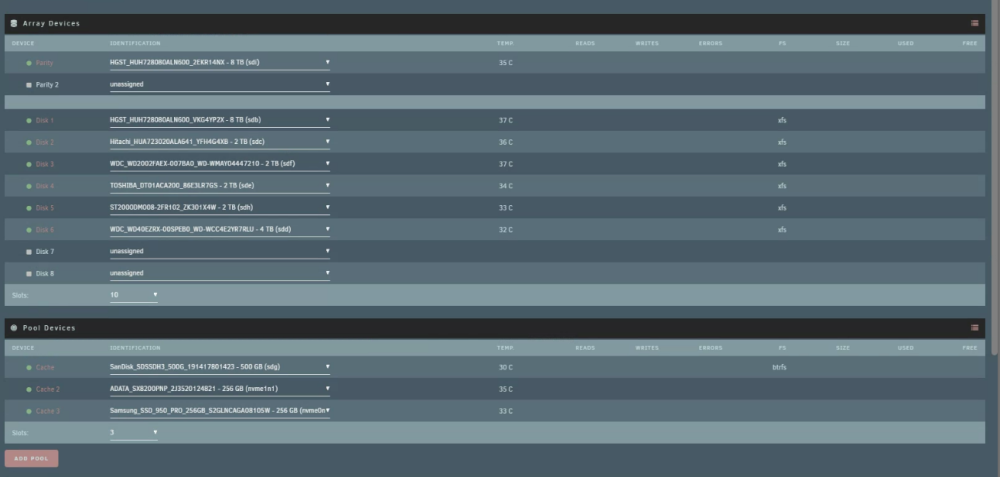
Hi all I'm having a weird issue where whenever I restart of shutdown my server it comes up with the new config screen as shown below when it reboots, has anyone seen this or knows how I can stop it from happening?? All my data appears to be intact and when I click start the array, it appears to start just fine. It just seems the array ALWAYS boots up in a stopped state.
-
Thanks for the suggestion I shall try that when I finish backing up my shares. I do think however that the 900gig is the right number for the data and not the 5tb. I'm just surprised unraid would display it as 5tb.
-
So I have a question with a weird issue. On my unraid server I have a share which according to krusader (and when I lookup the share In the unraid interface) shows as roughly 5+ TB's in size. Yet when I view that share either from windows using the mapped drive, or selecting all the folders in the share and right clicking and properties, again in windows it shows the share data is only 929GB This can't be right surely. One machine saying 929GB the other and source saying 5TB.
-
Hi all , I'm just spitballing here but I have a question. Would there be any benefit to having a zfs RaidZ1 POOL configured to store all my array data but in a pool as opposed to on the array (and thus the shares be on it) then just have a regular old unraid ARRAY running sperately to hold backups of said data that's on the pool. In my tiny brain this would allow my pool to get the faster read and write speeds of the RaidZ1 pool, but also have a backup sitting in the actual array with a parity disk (or 2). Genuinely interested to see if this would work I just saw a video where a guy was getting really good write speeds from a RaidZ1 pool of spinners (way in excess of what I get from mine in my zfs array). I understand that having the backup drives physically in the same machine is not a sound backup strategy , but at least it would be on its own array!?? Thanks .. MM
-
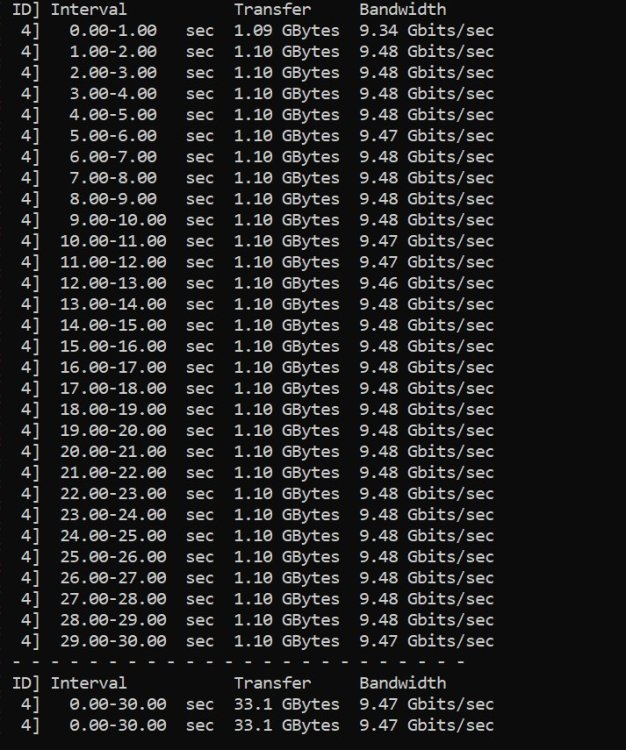
Hi all i am currently running an Unraid server across my 10 Gig backbone (Only have 1.2Gig Down and 40 Meg up ATM but should soon be upgrading to 5Gig symmetrical internet), My issue is this: Despite everything being connected by SFP+ and I have checked the Desktop (Also using an NVME) >>> Unraid server (cache drives which are NVME drives so thus should be able to saturate a 10G connection) speeds using the iperf3 and I got what I expected, see below, which leads me to believe the issue is not my hardware but is some configuration issue. Equipment: Unraid Server: Nvme Drives in a cache pool: 256GB SX8200PNP NVME Samsung 950 Pro 256GB 500GB San Disk SDSSDH3 (yes I'm aware this is a sata drive but I have tested without this in the server and still max speeds of 500MB/s over 10Gig. 128GB DDR3 Z9PE-D8 Mobo E5-2650V2 CPU x 2 Other drives are all Mechanical SATA in the ARRAY but I'm not testing files from the array I'm testing directly from the "Domains" share which is on my cache pool drives Using a mellanox ConnectX3 SFP card connected to Mikrotik CRS309-1G-8S+IN switch vis DC SFP+ DAC cables. Gaming Desktop: 24 core Threadripper 128GB DDR4 3090 Zenith II Extreme Alpha Using a mellanox ConnectX3 SFP card connected to Mikrotik CRS309-1G-8S+IN switch vis DC SFP+ DAC cables. NVME drive being used in the desktop (recieving computer at the moment): WDS500G3XHC-00SJG0 If anyone has any suggestions as to what I can try to get my transfer speeds as close to the expected 1Gig ish as possible that would be awesome. Ran Iperf3 multiple times and the results were pretty much the same as the screenshot included every time i ran it. The File(s) I tested with were separate vdisk files 100GB ish in size, that were located in my various VM folders in "domains". Please see the included diagnostics file, and thankyou in advance. unraid-diagnostics-20230426-0843.zip
-
So I managed to fix the main issue I was having with my unraid server (the proxy issues) so far at least....by doing the following in case anyone has similar issues: If anyone has the same issues as I did above I fixed it by removing the containers (all relating to NginxProxyManager) and deleting the related folders in AppData, then re installed the NPM container and set up each proxy host 1 by one. So far its working flawlessly. Still having the weird issue where the array doesnt want to restart without rebooting if I stop it manually, but I can live with that for now!
-
Bumping this is there really no one who had any idea what's wrong?


