Zvaniel4o
Members
-
Joined
-
Last visited
-
Hi all or to whomever has the patience to assist! I have a Qnap tvs-672xt equipped with an i7 8700. I know the iGPU functionality is present since I can output to the HDMI when I enter the console/GUI upon boot. I am truing to passthrough the UHD630 to a VM and I am using this guide. Not being successful I found another guide which applies for UHD770 and mentions the intel_gpu_top plugin so I decided to install its alternative for UHD630. I am getting the error from Intel GVT-g plugin - GVT-g not supported which instructed me to create this post since I have a compatible CPU. I've also attempted all options in GuC/HuC Firmware loading in the Guide section of the plugin as well as all the steps listed there as a troubleshooting path. Perhaps I need to adjust my Syslinux configuration, or it will never work on my qnap since it has locked bios? Unfortunately I am not too fond of flashing it after reading the horrors with these units, however, I am open-minded if this is a last resort. Please let me know if you may have any suggestions or are aware of any guidelines. I was not too successful at the moment. I appreciate your help! park-diagnostics-20250829-1722.zip
-
I finally found a way to boot isos for UEFI boot. I modified boot.cfg from NETBOOT.XYZ: item option_iso ${space} Option Iso :option_iso set url http://192.168.1.202:80/Option Iso sanboot ${url}/Some_iso.iso Make sure not to use spaces in your image file. Also this method helps for booting Windows isos, but still cannot locate drivers. I think I saw the workaround somewhere in this thread.
-
I would like know this too
-
Zvaniel4o changed their profile photo
-
Unfortunately yes. I attempted creating DSDT/SSDT, tried importing the device path to config.plist, updating kexts, sorting them by specific order, trying patches, playing with drivers, breaking everything, start over multiple times, etc. Everything that I was able to find instructions for - I attempted. The reason why I was insisting on w7000 is because it is a single slot GPU, (I am already utilizing bifurcation card on my x10drh-ct so PCIe slots are scarce) way more powerful than GTX 645 and way less expensive than WX 4100/5100 even though not as powerful.
-
Hey, thank you for reaching out. After disabling the serial and isa bus from the config.plist file - I determined that they are indeed necessary. More important - I cannot turn off the VM from UnRaid's dashboard if I have them disabled. After many trial and error my only solution was to use an RX580 or GTX 645 instead of w7000 so I can utilize the audio from DP.
-
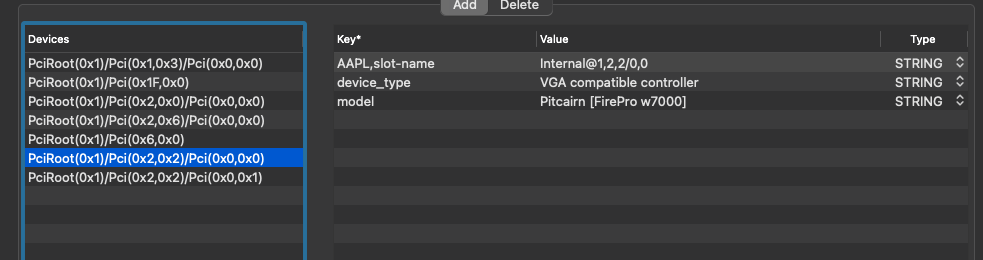
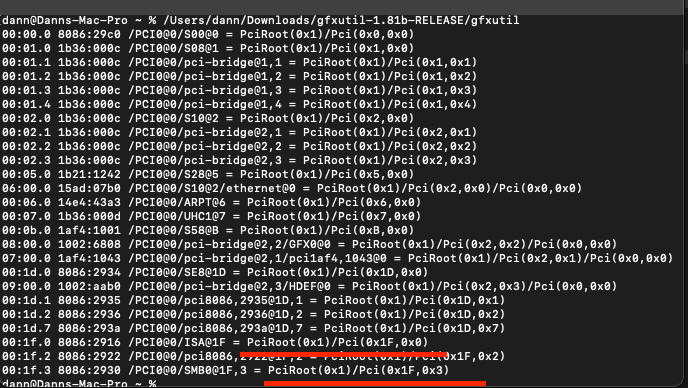
Hello all, I have the following issue: I am trying to boot a Big Sur Macinabox Hackintosh with FirePro W7000 hosted on a SuperMicro X10DRH-CT. Once I map the audio to the same bus as the GPU as shown below - I get a black screen: <hostdev mode='subsystem' type='pci' managed='yes'> <driver name='vfio'/> <source> <address domain='0x0000' bus='0x85' slot='0x00' function='0x0'/> </source> <alias name='hostdev0'/> <address type='pci' domain='0x0000' bus='0x03' slot='0x00' function='0x0' multifunction='on'/> </hostdev> <hostdev mode='subsystem' type='pci' managed='yes'> <driver name='vfio'/> <source> <address domain='0x0000' bus='0x85' slot='0x00' function='0x1'/> </source> <alias name='hostdev1'/> <address type='pci' domain='0x0000' bus='0x03' slot='0x00' function='0x1'/> </hostdev> The monitor is on, however, I receive no image (no mouse pointer, nothing). The only sign on life is switching the CAPS lock. I even cannot remote to the VM. I tried to isolate the device path of the GFX and the HDE - no luck: Somewhere I read that a person from this Reddit Post had related issues, and the fix was to disable Serial port in BIOS. How do I disable Serial port in XML? I can see below that they are detected in Hackintool: and with gfxutil: Every time I remove the Serial entry in XML it is being reinserted after safe. Here is my XML snippet with serial port entries: <controller type='virtio-serial' index='0'> <alias name='virtio-serial0'/> <address type='pci' domain='0x0000' bus='0x02' slot='0x00' function='0x1'/> </controller> <interface type='bridge'> <mac address='52:54:00:b6:02:d5'/> <source bridge='br0'/> <target dev='vnet2'/> <model type='vmxnet3'/> <alias name='net0'/> <address type='pci' domain='0x0000' bus='0x01' slot='0x00' function='0x0'/> </interface> <channel type='unix'> <target type='virtio' name='org.qemu.guest_agent.0' state='disconnected'/> <alias name='channel0'/> <address type='virtio-serial' controller='0' bus='0' port='1'/> </channel> Also - I have a macinabox Mojave hackintosh image which I booted with the same EFI partition and used the same XML VM setup. The HDMI audio worked until I updated Mohave to Big Sur. Thank you in advance!

-
Have you installed and ran the user scripts?
-
Thank you! That worked like a charm!!
-
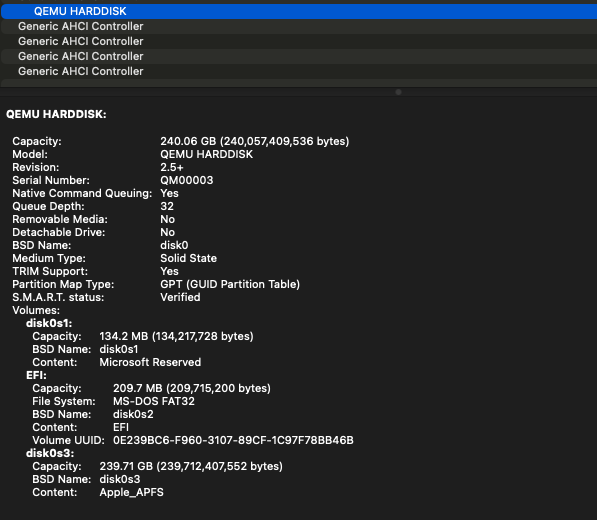
Hello All, I don't know from where to start so I will describe my system, its state and the concerns I have: My system's details: I have successfully installed BigSur on my SuperMicro x9drh-if with x2 e5-2670v2 with total of 52GB ECC RAM with passthrough to GTX 645 and ASM1142 for USB controller. I did not included a BT+WIFI simply because I don't need it and I don't want to waste my PCIE slots. Icloud, iMessage and FaceTime were configured successfully and accessible. My concerns: MY SSD is ADATA SU635 and its passthrough to the OS via Unassigned Devices and is running at "SATA 3.1, 6.0 Gb/s (current: 6.0 Gb/s)" connected to the integrated SATA controller. The OS, however, is detecting the SSD as rotational drive and "sudo trimforce enable" does not make any change which was expected, but attempted. I am afraid that my system will not be trimming my SSD. In the xml the drive is passed as SATA: <disk type='block' device='disk'> <driver name='qemu' type='raw' cache='writeback'/> <source dev='/dev/disk/by-id/ata-ADATA_SU635_2K432L1D97NG' index='1'/> <backingStore/> <target dev='hda' bus='sata'/> <alias name='sata0-0-1'/> <address type='drive' controller='0' bus='0' target='0' unit='1'/> </disk> I have tried passing the drive as SCSI and VirtIO, however, only with SATA I can boot the drive. How can I make my primary drive being detected as SSD and not as rotational drive so I can have it being trimmed by the system?