





dzyuba86
Members
-
Joined
-
Last visited
Everything posted by dzyuba86
-
Now disk 7 reading as unassigned device. plexnas-diagnostics-20221130-1330.zip
-
New diag. I have replaced both power and data cables now with brand new ones. Still same issue. plexnas-diagnostics-20221130-1252.zip
-
The other drive seems worse. Phase 1 - find and verify superblock... - block cache size set to 701112 entries Phase 2 - using internal log - zero log... totally zeroed log zero_log: head block 0 tail block 0 - scan filesystem freespace and inode maps... Metadata CRC error detected at 0x44108d, xfs_bnobt block 0x8/0x1000 btree block 0/1 is suspect, error -74 bad magic # 0 in btbno block 0/1 Metadata CRC error detected at 0x44108d, xfs_cntbt block 0x10/0x1000 btree block 0/2 is suspect, error -74 bad magic # 0 in btcnt block 0/2 Metadata CRC error detected at 0x4728bd, xfs_refcountbt block 0x28/0x1000 btree block 0/5 is suspect, error -74 bad magic # 0 in refcount btree block 0/5 bad refcountbt block count 0, saw 1 agf_freeblks 268435437, counted 0 in ag 0 agf_longest 268435431, counted 0 in ag 0 Metadata CRC error detected at 0x46fd5d, xfs_inobt block 0x18/0x1000 btree block 0/3 is suspect, error -74 bad magic # 0 in inobt block 0/3 Metadata CRC error detected at 0x46fd5d, xfs_finobt block 0x20/0x1000 btree block 0/4 is suspect, error -74 bad magic # 0 in finobt block 0/4 agi_count 64, counted 0 in ag 0 agi_freecount 61, counted 0 in ag 0 agi_freecount 61, counted 0 in ag 0 finobt sb_icount 64, counted 0 sb_ifree 61, counted 0 sb_fdblocks 1952984849, counted 1684549412 root inode chunk not found Phase 3 - for each AG... - scan (but don't clear) agi unlinked lists... - process known inodes and perform inode discovery... - agno = 0 Metadata corruption detected at 0x4379a3, xfs_inode block 0x80/0x4000 Metadata corruption detected at 0x4379a3, xfs_inode block 0xa0/0x4000 bad CRC for inode 128 bad magic number 0x0 on inode 128 bad version number 0x0 on inode 128 bad next_unlinked 0x0 on inode 128... bad CRC for inode 158, would rewrite bad magic number 0x0 on inode 158, would reset magic number bad version number 0x0 on inode 158, would reset version number bad next_unlinked 0x0 on inode 158, would reset next_unlinked inode identifier 0 mismatch on inode 158 would have cleared inode 158 bad CRC for inode 159, would rewrite bad magic number 0x0 on inode 159, would reset magic number bad version number 0x0 on inode 159, would reset version number bad next_unlinked 0x0 on inode 159, would reset next_unlinked inode identifier 0 mismatch on inode 159 would have cleared inode 159 would rebuild corrupt refcount btrees. No modify flag set, skipping phase 5 Inode allocation btrees are too corrupted, skipping phases 6 and 7 Maximum metadata LSN (1:161150) is ahead of log (0:0). Would format log to cycle 4. No modify flag set, skipping filesystem flush and exiting. XFS_REPAIR Summary Wed Nov 30 06:50:22 2022 Phase Start End Duration Phase 1: 11/30 06:50:22 11/30 06:50:22 Phase 2: 11/30 06:50:22 11/30 06:50:22 Phase 3: 11/30 06:50:22 11/30 06:50:22 Phase 4: 11/30 06:50:22 11/30 06:50:22 Phase 5: Skipped Phase 6: Skipped Phase 7: Skipped
-
Mostly looks like this Phase 1 - find and verify superblock... - block cache size set to 686216 entries Phase 2 - using internal log - zero log... zero_log: head block 119596 tail block 119596 - scan filesystem freespace and inode maps... Metadata CRC error detected at 0x43d440, xfs_agf block 0x1/0x200 agf has bad CRC for ag 0 Metadata CRC error detected at 0x468740, xfs_agi block 0x2/0x200 agi has bad CRC for ag 0 bad magic # 0x0 for agf 0 bad version # 0 for agf 0 bad length 0 for agf 0, should be 268435455 bad uuid 7e8511b0-2013-0ac6-166a-e877aae91f03 for agf 0 bad magic # 0x0 for agi 0 bad version # 0 for agi 0 bad length # 0 for agi 0, should be 268435455 bad uuid 7e8511b0-2013-0ac6-166a-e877aae91f03 for agi 0 would reset bad agf for ag 0 would reset bad agi for ag 0 bad uncorrected agheader 0, skipping ag... sb_icount 11840, counted 11008 sb_fdblocks 50924179, counted 49052402 root inode chunk not found Phase 3 - for each AG... - scan (but don't clear) agi unlinked lists... - process known inodes and perform inode discovery... - agno = 0 Metadata corruption detected at 0x4379a3, xfs_inode block 0x80/0x4000 Metadata corruption detected at 0x4379a3, xfs_inode block 0xa0/0x4000 bad CRC for inode 128 bad magic number 0x0 on inode 128 bad version number 0x0 on inode 128 bad next_unlinked 0x0 on inode 128 inode identifier 0 mismatch on inode 128 bad CRC for inode 129........... bad CRC for inode 191 bad magic number 0x0 on inode 191 bad version number 0x0 on inode 191 bad next_unlinked 0x0 on inode 191 inode identifier 0 mismatch on inode 191 bad CRC for inode 128, would rewrite bad magic number 0x0 on inode 128, would reset magic number bad version number 0x0 on inode 128, would reset version number bad next_unlinked 0x0 on inode 128, would reset next_unlinked inode identifier 0 mismatch on inode 128 would clear root inode 128......... would have cleared inode 158 bad CRC for inode 159, would rewrite bad magic number 0x0 on inode 159, would reset magic number bad version number 0x0 on inode 159, would reset version number bad next_unlinked 0x0 on inode 159, would reset next_unlinked inode identifier 0 mismatch on inode 159 would have cleared inode 159 imap claims inode 160 is present, but inode cluster is sparse, correcting imap imap claims inode 161 is present, but inode cluster is sparse, correcting imap imap claims inode 162 is present, but inode cluster is sparse, correcting imap imap claims inode 163 is present, but inode cluster is sparse, correcting imap...... No modify flag set, skipping filesystem flush and exiting. XFS_REPAIR Summary Wed Nov 30 06:49:18 2022 Phase Start End Duration Phase 1: 11/30 06:46:57 11/30 06:47:14 17 seconds Phase 2: 11/30 06:47:14 11/30 06:47:15 1 second Phase 3: 11/30 06:47:15 11/30 06:49:17 2 minutes, 2 seconds Phase 4: 11/30 06:49:17 11/30 06:49:17 Phase 5: Skipped Phase 6: 11/30 06:49:17 11/30 06:49:18 1 second Phase 7: 11/30 06:49:18 11/30 06:49:18 Total run time: 2 minutes, 21 seconds I ran the check as a -nv
-
plexnas-diagnostics-20221130-0951.zip
-
I recently added 2 new 10TB drives then moved 2 drives to a cooler location in my tower since I had the time to take the array offline and fiddle with it. Now I have 2 drives saying they're unmountable: wrong or no file system. One drive says device disable contents emulated and the other one says normal operation. Red X and green dot respectively. I am at a loss as to why this happened. I already shut down and tried new Sata cables and tried a different sata port. I still get the same error message. I have the diagnostic log attached. Not sure how to fix this. plexnas-diagnostics-20221130-0919.zip
-
Never mind I finally figured it out. Had to manually check for updates from the docker tab.
-
Is there a reason I no longer have an option to update Radar?? 2022-02-28 15:41:57.831472 [info] Host is running unRAID 2022-02-28 15:41:57.880266 [info] System information Linux fa2f49767b98 5.10.28-Unraid #1 SMP Wed Apr 7 08:23:18 PDT 2021 x86_64 GNU/Linux 2022-02-28 15:41:57.909351 [info] OS_ARCH defined as 'x86-64' 2022-02-28 15:41:57.960728 [info] PUID defined as '99' 2022-02-28 15:41:58.024916 [info] PGID defined as '100' 2022-02-28 15:41:58.352627 [info] UMASK defined as '000' 2022-02-28 15:41:58.370146 [info] Permissions already set for volume mappings 2022-02-28 15:41:58.485626 [info] Deleting files in /tmp (non recursive)... 2022-02-28 15:41:59.370537 [info] Starting Supervisor... 2022-02-28 15:42:01,645 INFO Included extra file "/etc/supervisor/conf.d/radarr.conf" during parsing 2022-02-28 15:42:01,645 INFO Set uid to user 0 succeeded 2022-02-28 15:42:01,685 INFO supervisord started with pid 7 2022-02-28 15:42:02,688 INFO spawned: 'radarr' with pid 57 2022-02-28 15:42:02,690 INFO spawned: 'shutdown-script' with pid 58 2022-02-28 15:42:02,690 INFO reaped unknown pid 8 (exit status 0) 2022-02-28 15:42:03,692 INFO success: radarr entered RUNNING state, process has stayed up for > than 1 seconds (startsecs) 2022-02-28 15:42:03,692 INFO success: shutdown-script entered RUNNING state, process has stayed up for > than 0 seconds (startsecs) 2022-02-28 15:42:04,157 DEBG 'radarr' stdout output: [Info] Bootstrap: Starting Radarr - /usr/lib/radarr/bin/Radarr - Version 3.2.2.5080 There's my log file. Would love to know what happened. Thanks.
-
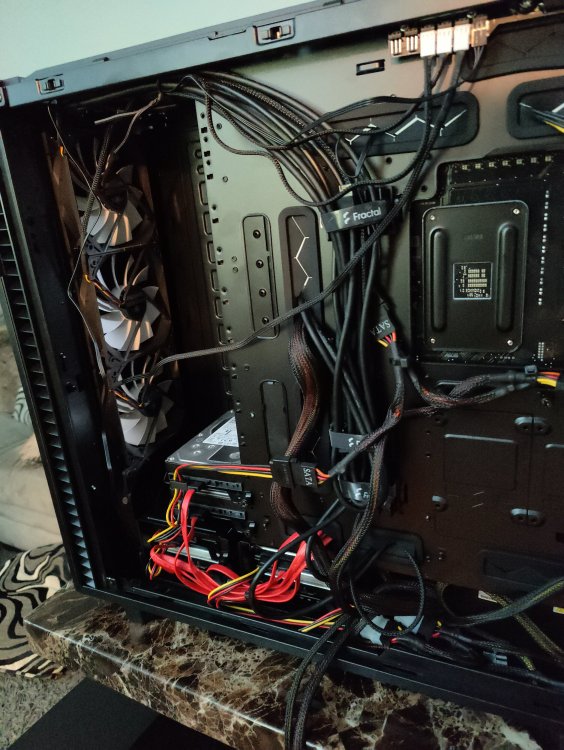
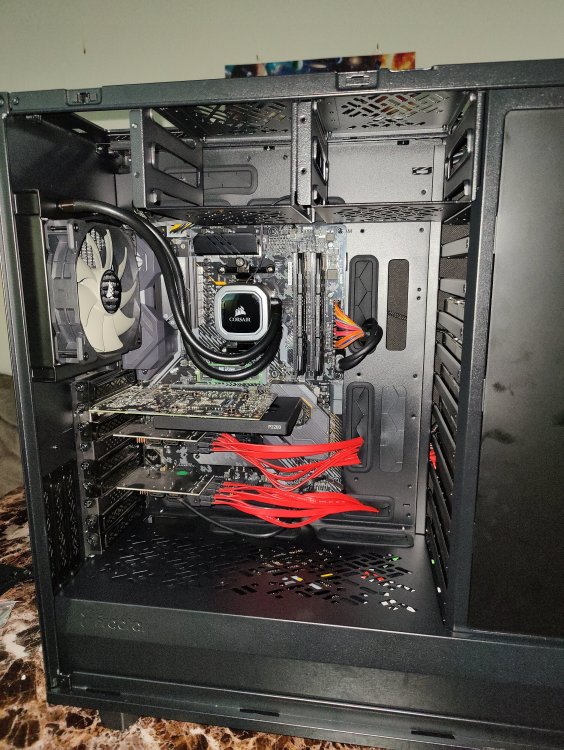
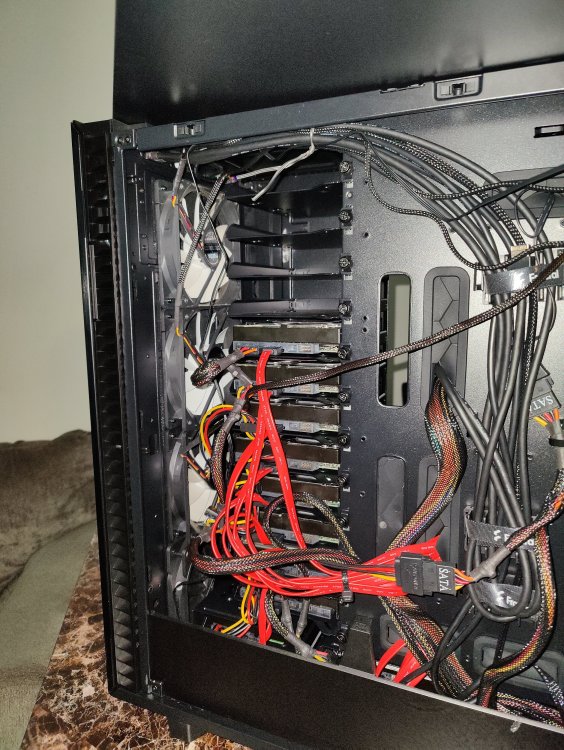
The XL says 18 2.5" drives on the site but you can actually squeeze in 20 with a slight tweak to the case. And still fit in 5 2.5" drives as well
-
Always a work in progress. Fractal Design Define 7 XL Asus X570 Ryzen 5950X Vengeance 2x8 GB ram P2200 quaddro Random 750watt psu Evo 860 500GB cache Ironwolf 10TB double parity Mix and match of shucked drives = 44TB storage. Max capacity 20 3.5" drives.
-
I'm currently running Unraid 6.8.3 on the following. Model: Custom M/B: Gigabyte Technology Co., Ltd. A320M-S2H-CF Version x.x - s/n: Default string BIOS: American Megatrends Inc. Version F50. Dated: 11/28/2019 CPU: AMD Ryzen 3 3200G with Radeon Vega Graphics @ 3600 MHz HVM: Disabled IOMMU: Enabled Cache: 384 KiB, 2048 KiB, 4096 KiB Memory: 16 GiB DDR4 (max. installable capacity 128 GiB) Network: bond0: fault-tolerance (active-backup), mtu 1500 eth0: 1000 Mbps, full duplex, mtu 1500 Kernel: Linux 4.19.107-Unraid x86_64 OpenSSL: 1.1.1d Uptime: 202 days, 3 hours, 33 minutes My array is : 16GB cruiser fit flash, 860 evo 500GB cache, dual 10TB seagate ironwolf parity drive, 1 seagate ironwolf 10tb array, 1 seagate barracuda 8TB array, 2 hitachi 4TB array, 1 WD red 4TB array, 6 WD red 3TB array. I'm looking to swap the CPU to a Ryzen 9 5950X and replace the Motherboard with an Asus TUF X570 and adding a P2200 Quaddro. Currently running Sonarr, Radarr, delugevpn, sabnzb, and jackett. Looking to add Plex docker and possibly handbrake to convert everything to a single streamable format. My specific question is what steps should I take to upgrade the hardware so I don't lose my data? If I attach all drives identically to the new board and list each drive in the same order I had before will my array work as it used to even with a new board and CPU? Or will I need to start over? I have a 1GB fiber connection so my current 32TB media library wouldn't take too long to redownload but it would still be a headache to redownload. I'm also retiring my old Dell T410 with dual E5504 Xeons as my main Plex machine as it's starting to lag when multiple family members are streaming. I have 8 user accounts and approximately 25 devices that access my plex account. Thank you in advance for any and all help or tips.
-
Second to last line. AUTH_FAILED. Check to make sure your username and password are correct.
-
@voicelex when you make a network change, since Deluge had the connection open it knew the route, once it rebooted the router rules played into effect and thus cutting it off. I see this happen a lot with networking. I don't know the intricate details but essentially the route follows the cache and when you restart you wipe the cache therefore it has to relocate the route. Glad you were able to resolve it though.
-
@voicelex seems like one of your DNS servers is causing problems based on what I'm seeing. https://prnt.sc/tpimv7
-
@voicelex has anything changed in the logs after you updated the VPN files? Also which VPN provider are you using? You redacted a lot of information that could be helpful in troubleshooting this.
-
Your log says it can't connect to the network. Make sure no IP addresses have changed is where i would start. Check your VPN configuration as well. Check that your VPN configuration files are in place as well.
-
2020-07-14 23:18:29,754 DEBG 'start-script' stdout output: [warn] PIA endpoint 'nl.privateinternetaccess.com' is not in the list of endpoints that support port forwarding, DL/UL speeds maybe slow [info] Please consider switching to one of the endpoints shown below [info] List of PIA endpoints that support port forwarding:- [info] ca-toronto.privateinternetaccess.com [info] ca-montreal.privateinternetaccess.com [info] ca-vancouver.privateinternetaccess.com [info] de-berlin.privateinternetaccess.com [info] de-frankfurt.privateinternetaccess.com [info] sweden.privateinternetaccess.com [info] swiss.privateinternetaccess.com [info] france.privateinternetaccess.com [info] czech.privateinternetaccess.com [info] spain.privateinternetaccess.com [info] ro.privateinternetaccess.com [info] israel.privateinternetaccess.com [info] Attempting to get dynamically assigned port... There is your answer in case you haven't resolved it yet. Spaceinvaders guide is inaccurate because the NL server no longer has open port.
-
Having an issue with deluge. Sonarr will find torrent files, send them to deluge. Deluge will label and download. Once the download finishes it says file can't be found. I have tried setting up a remote mapping but it's not working. Everything works fine with sabNZB. I just want deluge to work as well. Any advice is most appreciated. Sonarr docker setup https://prnt.sc/tldutc Remote port map https://prnt.sc/tldv29
-
I have an issue of my own though. My max download speed won't exceed 5MiB/s even though my nzb's cap at 120MB/s. I'm routing through privateinternetaccess but I can't imagine them being that slow. I've tried with several torrents including downloading a ubuntu distro which I know should be blazing fast and it wouldn't exceed 8MiB/s. Is there something I'm doing wrong? Thanks.
-
I set it up so that whenever I download a .torrent file and place it into a specific folder. Deluge automatically grabs it. It's the autoadd plugin. Just map a folder and download all your .torrent files into that folder. https://prnt.sc/tfvue8 preferences https://prnt.sc/tfvuno watch folder I put mine in the torrent folder directory I have so it already starts in the data directory. In that folder I have a complete, incomplete, extracted and tors folder. I just put the .torrent files in the tors folder. Deluge does the rest. Hope that helps.


