





dzyuba86
Members
-
Joined
-
Last visited
Everything posted by dzyuba86
-
Hopefully my issue is more fun to resolve I have 2 palworld instances. First one runs just fine. Second one, I have set to port 8213 as I want to run more than one world. I have the port set both in docker settings and the .ini file. However when it launches, the logs say it's still running on port 8211. How can I correct that? Thanks.
-
Close post, Found the issue. Hardware related.
-
Here's a log. Server has self shut down twice since I started logging. syslog-192.168.10.253.log
-
I enabled local syslog server. Will let post log next time it shuts itself down.
-
Hi. Recently my server started randomly shutting itself down after anywhere from 20 minutes to 15 hours. I can't find a cause. Any help will be appreciated. Let me know which logs to attach for review. Thanks
-
I made a new USB and copied my old config folder. Still had same issue. I disconnected ALL USB devices I had plugged into the tower and it booted up no problem. Now just working on getting everything reconnected. I did take a new ident.cfg file from the fresh install config folder though. Thanks for the help.
-
When I was making a copy of the folder it gave me an error saying this file is corrupt and can't be copied. Everything else copies just fine. So I can just delete that file and try booting again basically?
-
my ident.cfg file is corrupt. Apparently we had a power outage that must have caused this. What can I do so I don't lose my entire system and library of everything?
-
So just copy to a new flash drive and try booting again basically?
-
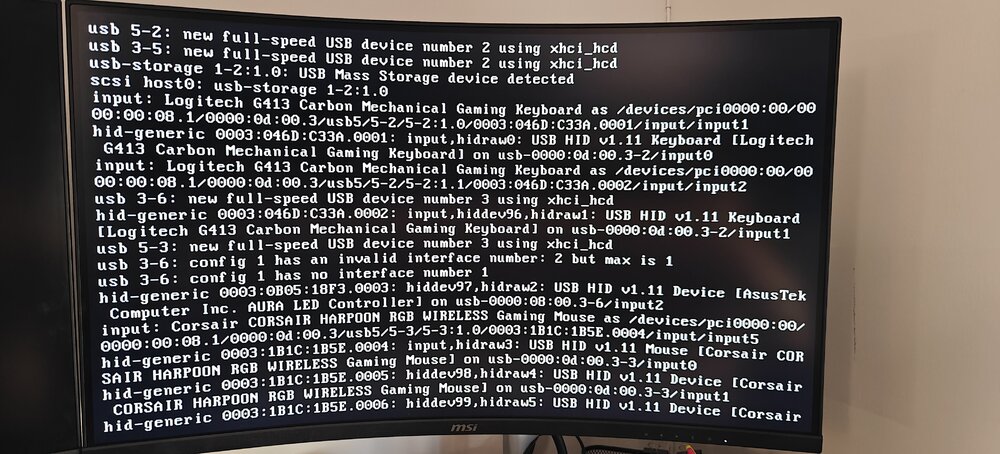
Woke up this morning to this screen. I've tried restarted. Going into safe boot. It always gets stuck here. I did notice one time something about a possible file corruption due to fs not being shut down properly. Hope someone can assist.
-
Finally resolved. Converting the .img into a passthrough disk worked.
-
*UPDATE* Converting the .img to a physical disk. If that doesnt work I'm just making the vm fresh from scratch. All my files are in cloud backup anyways so I'm not losing anything but time
-
I even uninstalled a few things to bring the size down to less than 400GB used in windows, It's still showing as over 900GB.
-
I'm making a new VM. But I don't get an option to do a disk passthrough.
-
So I did that. But even after running a defrag 3 times. The .IMG file is still much too large to boot into the VM without freezing mid boot.
-
Update. Using MC via terminal to copy to a different drive.
-
Another newbie question. What is the most efficient way to do this?
-
I have an 88TB array. I think I'll be good.
-
Or can I move the VM to the array, boot from array, defrag then move back to the ssd?
-
The VM won't boot as the vm drive has 0 free space. Is there anything I can do besides getting a larger drive to fix this? Or do I need to re-create the VM from scratch?
-
The vdisk was set to the same size as the drive. But now it's not booting due to the drive having 0 free space. Maybe I need a better setup solution and just recreate the VM from scratch again?
-
I've gone into scheduler and ran TRIM. I got back no space on the vm drive. Out of ideas here and need this working as soon as possible.
-
I'm trying to find a way to run a command to unmap on my existing vm.img and can't seem to find the proper command. But shouldn't it be doing this automatically already?
-
If it helps. I have auto trim and compression enabled.
-
It's set Primary vDisk Location: Auto /mnt/user/domains/Windows 11/vdisk1.img The img is on it's own ssd for only vm purpose. Not sure if that answers the question.

