





mc_866
Members
-
Joined
-
Last visited
Everything posted by mc_866
-
Thanks for the help!!
-
I want all the data on the nvme and to revert back to a single cache drive. it only shows a single drive in the gui, is there a way to change it back to a single drive?
-
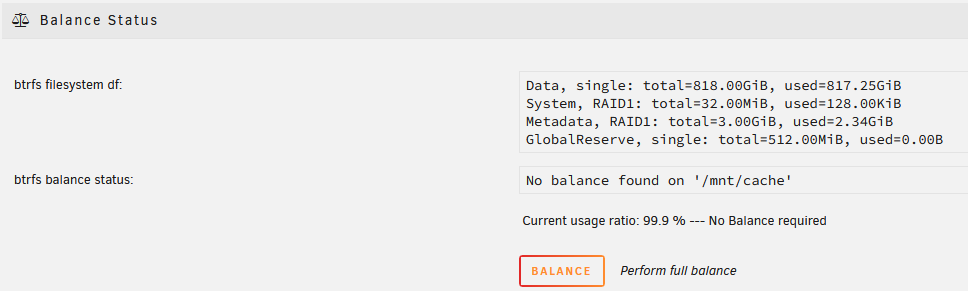
I messed up and rather than starting a new cache pool as I had meant to do with my 2 512 SSD's I incorrectly added them to a pool with my 2TB nvme cache drive. I stopped the array and removed the drives and the slots. So now I'm down to a single cache drive First it was incorrectly showing 1.5TB capacity so I ran the balance and it didn't change things. I did some research and found the post below: So I ran the command below to try and convert back to single vs raid1. Single: requires 1 device only, it's also the only way of using all space from different size devices, btrfs's way of doing a JBOD spanned volume, no performance gains vs single disk or RAID1 btrfs balance start -dconvert=single -mconvert=raid1 /mnt/cache I actually ran that twice but am left with 3TB showing above. Here is a view of the balance status and it appears it's still in Raid1 I was of the impression the convert command was supposed to change this. Also I don't see the drop down next to the balance button shown in the post above. Any other ideas on how to get this corrected back to a single drive with 2TB of capacity?

-
Appreciate that thanks! Can I just copy the info from config/plugins/dockerMan/templates-user over to my new USB drive? Is that safe? Alternatively if I just re-install is there any chance my settings stay? When I look at some of the dockers it appears my settings are there. Or can my backup from appdatabackup, can I pull out the templates from that backup that I created a couple weeks ago?
-
I had a complete fail on my usb while away on vacation, always nice to come home to a catastrophic failure. Good news was I did have a USB backup, bad news was that it was 4 months old and before I had added a few new drives. I've been able to get the array back and running because I knew which drives were parity. I opted for a new config and my data all seems intact which is great. Trouble now is that my dockers seem to be giving errors and aren't running correctly. I have a recent appdata backup I tried to restore but that didn't seem to work. Is there a way to restore my dockers without completely reconfiguring them?
-
I'm having difficulty getting the backup to start from my Android device. I've installed and configured the container on my unraid server. I've created a user and can see the Lomorage instance from the Android app. I've successfully logged in and connected to the Lomarage instance from the Android app. On my phone it says x assests needed to backup. Drag down to start. I pull down and the circle spins but it doesn't look like any data has been sent or any photos backed up.
-
I set both plex containers to not auto start. Rebooted Started binhexplex and started streaming a title that would require transcode. Still nothing hitting the GPU.
-
Ver Version 1.20.0.3181 for binhex plexpass
-
Turned linuxserver.io container off. Double checked my settings in this container and tried turning it on and streaming the same content and no GPU kicks in.

-
Plex ver 1.19.5.3112
-
Nvidia driver version 440.59 Nvidia unraid version 6.8.3 Where do you see your plex version?
-
I used the watch nvidia-smi in console. No activity with this container. Linuxserver.io container shows the GPU doing the work
-
Yes, this is what my setup looks like

-
I followed these instructions and watched the spaceinvader one video but it didn't work with this container. I installed the linuxserver.io separately and the hardware transcode worked right away. I'd like to get that working on this binhex container.
-
Is Nvidia HW transcoding working with this docker? It's been my go to and has been great but I just got a quardo P400 card to help with some transcode and I can't seem to get it to work with this docker. For reference I was able to try out the Linuxio docker and it worked straight away. I'd prefer to stay with this docker if I can.


