





MrLinux
Members
-
Joined
-
Last visited
Everything posted by MrLinux
-
Found this solution
-
Same here. Not sure what is needed to fix this. Do we need to add the username/password as a new field in the docker container settings?
-
How do I change the path from https://1.2.3.4/zm to https://1.2.3.4 ?
-
Were you able to get the GTX 1650 for a reasonable price? If so, mind sharing where? Thanks
-
Following too. Has anyone gotten any Ryzen APU working?
-
Just curious, what is the reason since this works in the official docker?
-
Oh. So those of us with AMD can ignore this error? Sent from my iPhone using Tapatalk
-
What are we supposed to do when we get this error message? I see that the module is included root@unraid:~# lsmod | grep mce edac_mce_amd 32768 0 Does this mean we don't need to manually run anything and just provide our diag file?
-
What did you do to get your binhex-plex docker registered with your Plex account? Whenever I would login to plex by going directly to http://ip:32400/, it would tell me to download/install the Plex Server instead of showing/connecting to the docker's Plex Server. I've tried to Manually expose all the port (run command parameters: -p 32400:32400 -p 1900:1900/udp -p 3005:3005/udp -p 5353:535/udp -p 8324:8324 -p 32410:32410 -p 32412:32412/udp -p 32414:32414/udp -p 3246:3246) Restart the docker several times Checked NAT settings in my pfSense router Blow away the docker and appdata config and reinstall Troubleshooting the script and docker files None of it worked until I just tried to use another container distro of Plex. FWIW, it was also showing me serverUui errors when using bridge mode. Error in command line:the argument for option '--serverUuid' should follow immediately after the equal sign
-
I ended up getting it working by moving over to another Plex Docker release (plexinc Plex Media Server). Assign the claim variable Set the bridge and static ip (br0.255 in my case) Troubleshooting Some extra steps may be needed before it works Logout of plex first Restarted the container a few times Double check the NAT rule (pfSense) After logging in again, it should show you the Plex Server setup screen instead of a client without a source (your Docker's Plex Server)
-
Did you ever get this working? I'd like put Plex in a vlan as well. It's only working when set to host mode.
-
Closing this as solved as I'm no longer having issues, although it would be interesting to know if there are actually any config issues which lead up to the corruption in the first place. Would like to avoid this from happening again. Thanks again for all the help @trurl
-
Thanks, so I'm not crazy...or we're crazy together
-
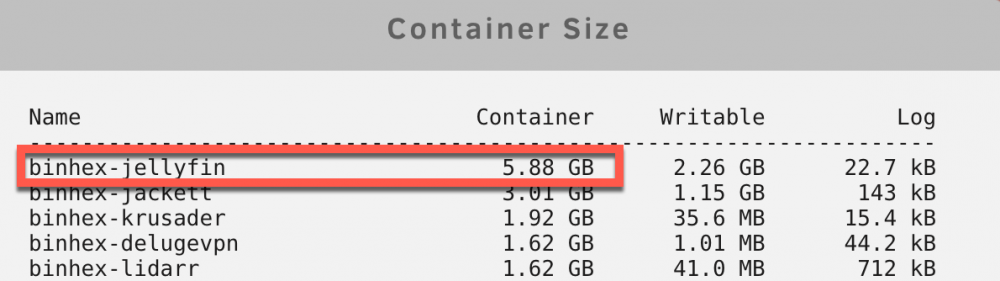
TL:DR I'm finding a hard time finding my config/mapping issues to show that a 20GB of used docker.img is unreasonable with 29 containers. BTW, it seems many of my syslog errors went away after disabling daily plugin checks and disable/re-enable ipmi. I've since re-enabled daily plugin checks and the errors have not come back. I read it could have been related to being unable to connect to github if it had an outage or some other routing issues. Checked what is using up the 5.88GB in the container, but see it's only using up 3.6GB instead. Where is the other ~2.2GB coming from? I see "Writable" is roughly this size of ~2.2GB. Where is this 2.2GB coming from? The only location that's big enough to be considered in the local filesystem is in /home, as there are no other directories large enough to account for the 2.2GB. sh-5.0# find / -maxdepth 1 -mindepth 1 -type d \! -exec mountpoint -q {} \; -exec du -xshc {} + | sort -h 0 /boot 0 /mnt 0 /opt 0 /run 0 /srv 4.0K /.gnupg 12K /root 24K /tmp 8.1M /etc 14M /var 1.5G /usr 2.2G /home # <---------------------- 3.6G total Inside home is just a user called nobody. The files in here do not appear to be user-created files from the application. sh-5.0# cd /home sh-5.0# ls -la total 0 drwxr-xr-x 1 root root 12 Sep 2 01:12 . drwxr-xr-x 1 root root 206 Nov 29 04:06 .. drwxrwxr-x 1 nobody users 130 Nov 29 04:08 nobody sh-5.0# cd nobody/ sh-5.0# ls -la total 8 drwxrwxr-x 1 nobody users 130 Nov 29 04:08 . drwxr-xr-x 1 root root 12 Sep 2 01:12 .. drwxrwxrwx 1 nobody users 38 Nov 29 04:06 .aspnet -rw------- 1 root root 581 Nov 29 04:23 .bash_history drwxrwxr-x 1 nobody users 34 Sep 5 11:32 .cache drwxrwxr-x 1 nobody users 6 Sep 5 11:29 .config drwxrwxr-x 1 nobody users 220 Sep 5 11:35 .dotnet drwxrwxr-x 1 nobody users 10 Sep 5 11:36 .local drwxrwxr-x 1 nobody users 26 Sep 5 11:36 .nuget -rwxrwxr-x 1 nobody users 467 Sep 5 11:28 start.sh drwxrwxr-x 1 nobody users 6 Sep 5 11:32 .yarn sh-5.0# find . -maxdepth 1 -mindepth 1 -type d \! -exec mountpoint -q {} \; -exec du -xshc {} + | sort -h 0 ./.yarn 4.0K ./.aspnet 4.0K ./.config 12K ./.dotnet 254M ./.local 639M ./.cache 1.3G ./.nuget 2.2G total Using mountpoint, I found that /config is actually a mountpoint, even though it doesn't appear as one using df. sh-5.0# mountpoint /config /config is a mountpoint sh-5.0# mountpoint /media /media is a mountpoint sh-5.0# mountpoint /home /home is not a mountpoint sh-5.0# mountpoint /usr /usr is not a mountpoint
-
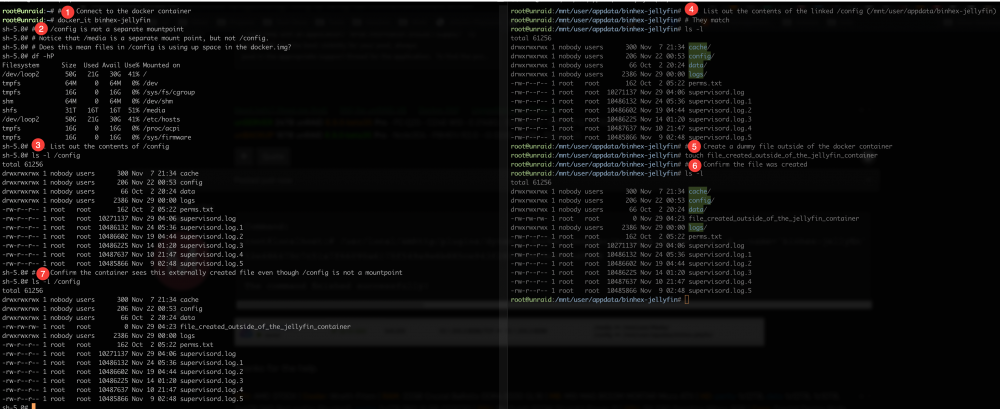
Command: root@localhost:# /usr/local/emhttp/plugins/dynamix.docker.manager/scripts/docker run -d --name='binhex-jellyfin' --net='br0.255' --ip='10.1.255.2' -e TZ="America/Los_Angeles" -e HOST_OS="Unraid" -e 'TCP_PORT_8096'='8096' -e 'UMASK'='000' -e 'PUID'='99' -e 'PGID'='100' -v '/mnt/user/Media/':'/media':'rw' -v '/mnt/user/appdata/binhex-jellyfin/':'/config':'rw' 'binhex/arch-jellyfin' 52e486470c7c51a7f66090a6170f549a9e6b885ce943f28f32fe23cc43cd5358 The command finished successfully! I tested if the container's /config is really mapped to /mnt/user/appdata/binhex-jellyfin. The test below shows that it is mapped, even though /config is not seen as a mountpoint in the container (df -hP). Thanks for the help.

-
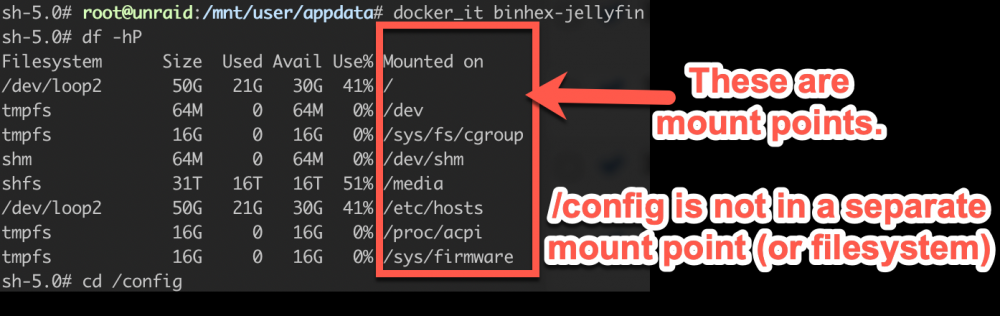
The interesting part is that /media has its own mount point but /config doesn't. I'm trying to understand if I actually have any setup issues where more data is being stored in the docker image than in appdata.
-
I like ssh’ing to the box directly. I use iTerm to have split windows. Regarding /config, I was just pointing out that it doesn’t appear to be on its own file system like /media. Sent from my iPhone using Tapatalk
-
In the Docker, /config doesn't appear to be a separate volume, but is pointing to appdata in /mnt/user/appdata/. Is this expected? sh-5.0# root@unraid:/mnt/user/appdata# docker_it binhex-jellyfin sh-5.0# df -hP Filesystem Size Used Avail Use% Mounted on /dev/loop2 50G 21G 30G 41% / tmpfs 64M 0 64M 0% /dev tmpfs 16G 0 16G 0% /sys/fs/cgroup shm 64M 0 64M 0% /dev/shm shfs 31T 16T 16T 51% /media /dev/loop2 50G 21G 30G 41% /etc/hosts tmpfs 16G 0 16G 0% /proc/acpi tmpfs 16G 0 16G 0% /sys/firmware sh-5.0# cd / sh-5.0# du -shxc ./* 4.0K ./bin 0 ./boot 4.7G ./config 0 ./dev 8.1M ./etc 2.2G ./home 4.0K ./lib 4.0K ./lib64 10T ./media 0 ./mnt 0 ./opt du: cannot read directory './proc/68/map_files': Permission denied du: cannot read directory './proc/70/map_files': Permission denied du: cannot access './proc/4247/task/4247/fd/4': No such file or directory du: cannot access './proc/4247/task/4247/fdinfo/4': No such file or directory du: cannot access './proc/4247/fd/4': No such file or directory du: cannot access './proc/4247/fdinfo/4': No such file or directory 0 ./proc 12K ./root 0 ./run 4.0K ./sbin 0 ./srv 4.0K ./supervisord.pid 0 ./sys 888K ./tmp 1.5G ./usr 14M ./var 10T total sh-5.0# Note: docker_it is just my alias to quickly login the docker Does this seem reasonable?
-
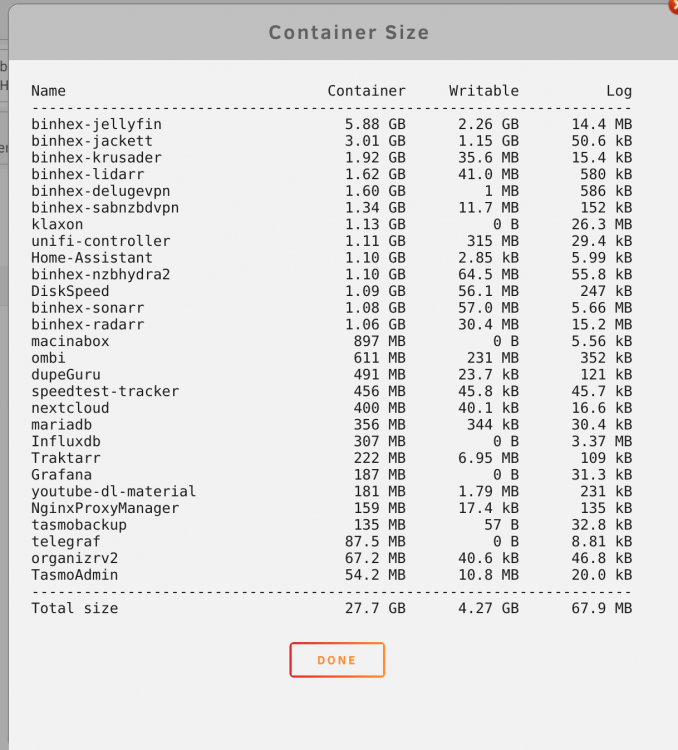
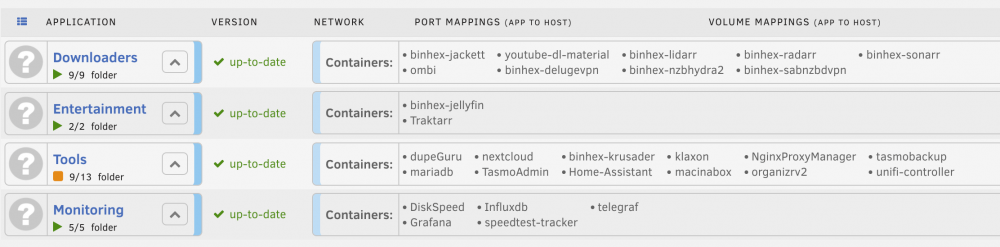
FWIW, I do have a good amount of dockers running. In another thread I see you were using 8GB with a dozen Dockers. I have close to 30. Maybe using 20GB makes sense. 8GB/12 dockers = .67GB/docker .67GB * 30 = 20GB
-
Thanks for the suggestion, but I've tried deleting the docker image file and re-installing (see #2 of things I've tried already). That being said, 20G does seem a bit much. Where can I go find which Docker is eating up all the space? Going into /var/lib/docker didn't seem to help much as it's showing not much space is being taken up at all root@unraid:/var/lib/docker# du -shx * 0 btrfs 16K builder 56K buildkit 1.1M containerd 131M containers 45M image 148K network 0 plugins 0 runtimes 0 swarm 0 tmp 0 trust 964K unraid 4.0K unraid-autostart 8.0K unraid-update-status.json 14M volumes While `df` is showing /var/lib/docker/ is taking up 20GB root@unraid:/var/lib/docker# df -hP Filesystem Size Used Avail Use% Mounted on rootfs 16G 988M 15G 7% / devtmpfs 16G 0 16G 0% /dev tmpfs 16G 0 16G 0% /dev/shm cgroup_root 8.0M 0 8.0M 0% /sys/fs/cgroup tmpfs 384M 2.1M 382M 1% /var/log /dev/sda1 30G 294M 30G 1% /boot /dev/loop0 9.4M 9.4M 0 100% /lib/modules /dev/loop1 8.5M 8.5M 0 100% /lib/firmware tmpfs 1.0M 0 1.0M 0% /mnt/disks /dev/mapper/md1 3.7T 931G 2.8T 25% /mnt/disk1 /dev/mapper/md2 11T 6.5T 4.5T 60% /mnt/disk2 /dev/mapper/md3 9.1T 8.3T 846G 91% /mnt/disk3 /dev/mapper/md4 3.7T 26G 3.7T 1% /mnt/disk4 /dev/mapper/md5 3.7T 26G 3.7T 1% /mnt/disk5 /dev/mapper/nvme0n1p1 932G 422G 509G 46% /mnt/cache shfs 31T 16T 16T 51% /mnt/user0 shfs 31T 16T 16T 51% /mnt/user /dev/loop2 50G 20G 31G 39% /var/lib/docker /dev/loop3 1.0G 4.0M 905M 1% /etc/libvirt
-
Hi, for some reason my /var/log/docker.log.1 keeps getting filled up. root@unraid:/var/log# tail docker.log.1 time="2020-11-24T07:52:02.278261235-08:00" level=error msg="Failed to log msg \"\" for logger json-file: write /var/lib/docker/containers/7cc59575b280c9b47d562787e36b753ffdbfeba1f3c686e75886dd18280ae207/7cc59575b280c9b47d562787e36b753ffdbfeba1f3c686e75886dd18280ae207-json.log: read-only file system" time="2020-11-24T07:52:02.278277104-08:00" level=error msg="Failed to log msg \"\" for logger json-file: write /var/lib/docker/containers/7cc59575b280c9b47d562787e36b753ffdbfeba1f3c686e75886dd18280ae207/7cc59575b280c9b47d562787e36b753ffdbfeba1f3c686e75886dd18280ae207-json.log: read-only file system" time="2020-11-24T07:52:02.278290524-08:00" level=error msg="Failed to log msg \"\" for logger json-file: write /var/lib/docker/containers/7cc59575b280c9b47d562787e36b753ffdbfeba1f3c686e75886dd18280ae207/7cc59575b280c9b47d562787e36b753ffdbfeba1f3c686e75886dd18280ae207-json.log: read-only file system" Things I've tried to do: A few restarts Stop Docker service > Delete docker image file > Start docker service > reinstall dockers Increased /var/log in my go file from 128MB to 384MB I can't really think of anything that would have caused this. At first, I thought it was because my cache pool was getting full but I've already addressed the docker that was causing it to fill up. This last time my cache pool has plenty of space (>500GB). root@unraid:/mnt/cache# df -hP Filesystem Size Used Avail Use% Mounted on rootfs 16G 1022M 15G 7% / devtmpfs 16G 0 16G 0% /dev tmpfs 16G 0 16G 0% /dev/shm cgroup_root 8.0M 0 8.0M 0% /sys/fs/cgroup tmpfs 384M 384M 0 100% /var/log /dev/sda1 30G 294M 30G 1% /boot /dev/loop0 9.4M 9.4M 0 100% /lib/modules /dev/loop1 8.5M 8.5M 0 100% /lib/firmware tmpfs 1.0M 0 1.0M 0% /mnt/disks /dev/mapper/md1 3.7T 931G 2.8T 25% /mnt/disk1 /dev/mapper/md2 11T 6.5T 4.5T 60% /mnt/disk2 /dev/mapper/md3 9.1T 8.3T 846G 91% /mnt/disk3 /dev/mapper/md4 3.7T 26G 3.7T 1% /mnt/disk4 /dev/mapper/md5 3.7T 26G 3.7T 1% /mnt/disk5 /dev/mapper/nvme0n1p1 932G 387G 544G 42% /mnt/cache shfs 31T 16T 16T 51% /mnt/user0 shfs 31T 16T 16T 51% /mnt/user /dev/loop3 1.0G 4.0M 905M 1% /etc/libvirt /dev/loop2 50G 20G 31G 40% /var/lib/docker root@unraid:/var/log# ls -lSshr | tail -5 4.0K -rw-rw-rw- 1 root root 1.3K Nov 23 00:42 vfio-pci 8.0K -rw-rw-r-- 1 root utmp 7.9K Nov 25 10:58 wtmp 64K -rw-rw-rw- 1 root root 64K Nov 23 00:42 dmesg 720K -rw-r--r-- 1 root root 720K Nov 25 10:58 syslog 384M -rw-rw-rw- 1 root root 384M Nov 24 13:14 docker.log.1 Thanks for the help! Solution / TL;DR This could have been a combination of a few issues (in my use case, though many of these shouldn't be related to each other) docker.img corrupted (most probable reason for the log file getting filled up with read-only errors) Stop the docker service delete /mnt/user/system/docker/docker.img Start the docker service re-install docker containers IPMI Plugin issues Stopped this for a while to see the ipmi errors in syslog go away I've since re-enabled this so I can get networks stats back (I'll move to influx/grafana at some point) Github connectivity issues I've read that loading the plugins page can be affected if github is inaccessible. To work around this, disable checking for plugins in Settings > Notification Settings > Plugins update (Disabled) There may have been another location but don't remember. I've also updated from v6.9.0b25 to v6.9.0b35 unraid-diagnostics-20201125-1103.zip
-
Anyone happen to know how to fix this? Thanks Sent from my iPhone using Tapatalk
-
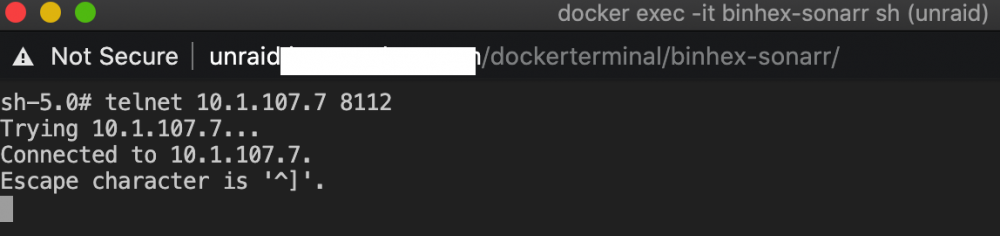
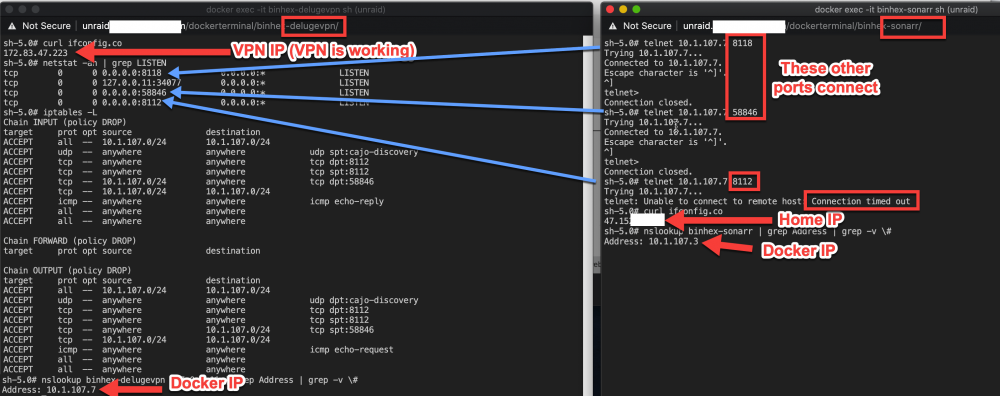
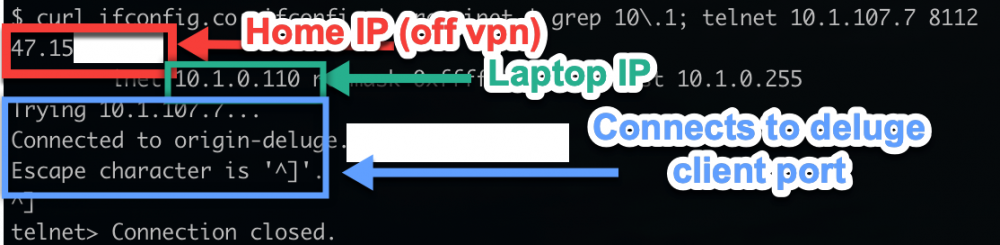
@tehtid, did you ever fix this or anyone else know how to get it working? I'm having the exact same issue. Something stranger is that the VPN port (8118) works but the Deluge port (8112) doesn't work. I'm testing by telnet'ing to the port from the Sonarr docker. Telnet was installed by issuing `pacman -S inetutils` after connecting to the Docker's console. I tested the other port (58846) and that one connects. For some reason 8112 won't connect. Connects fine from other networks (eg: my laptop) If I set vpn to off in delugevpn, the Sonarr docker can now reach 8112/tcp on delvugevpn. My laptop can still connect to delugevpn on 8112/tcp.
-
Yeah, just trying to see if there's a rule of thumb about how much space should be provided around the unit and any maintenance care that would be needed. Take a desktop for example Keep it in an area that can have some airflow, not in an enclosed cabinet which can restrict air Give at least 2 inches around so fans can push air Keep it elevated off the carpet so the bottom vents can pull in air If it will be near the carpet, put it on a flat surface, not just raised, so it doesn't bring in dust Every few months, check the filters and clean out any dust and/or move it to a better location etc Are there any good rules of thumb when caring for a UPS?...other than not pulling it from the outlet
-
Thanks for the info. Anyone know if there are there any best practices when it comes to placing a UPS like ventilation, having so many inches unobstructed, keep it away from _______? Sent from my iPhone using Tapatalk


