





Kishin
Members
-
Joined
-
Last visited
Everything posted by Kishin
-
Hum, what could be a solution to it ? I tried 2 other SATA link, one didnt show the disk and the other one had the same problem. I can format it but still same problem after..
-
@itimpiOh yes, my bad, here is my nas diagnostics @Vr2Io No its inside the case connected by SATA. (its a shuckable drive) nas-diagnostics-20211205-0951.zip
-
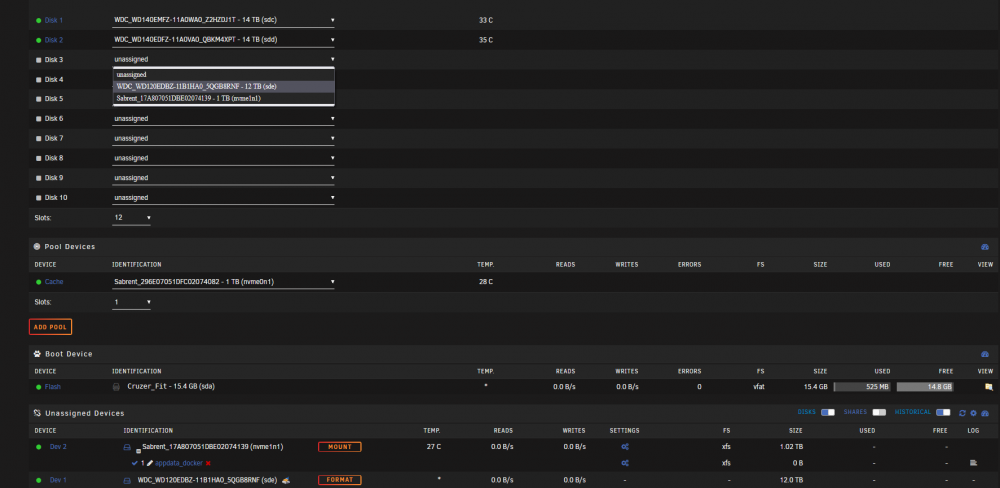
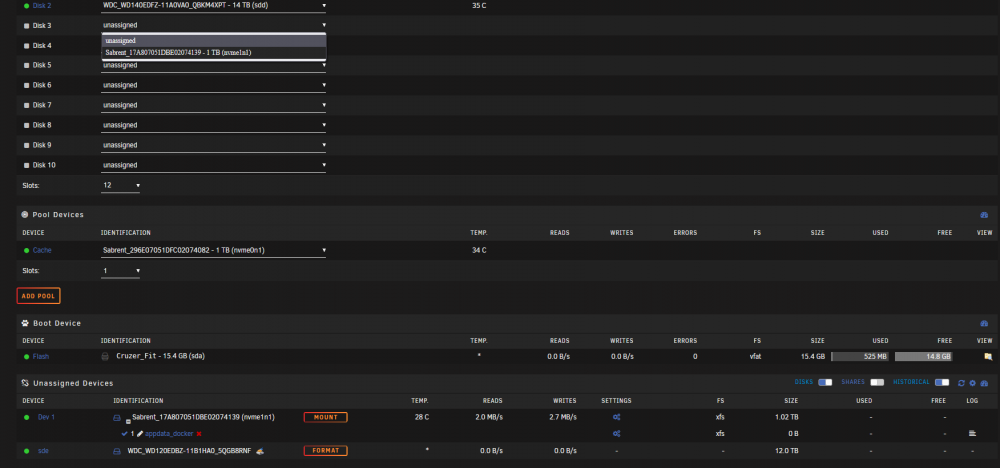
Hello, i'm trying to add a 12Tb disk to an array constitued with 1 parity of 14Tb and 2 HDD of 14Tb. So i stop the array, select the disk but then it dissapears from the list without adding it. I noticed that the device name changed from dev 1 to sde (which is the next name of my array sdb,sdc,sdd) Thanks, Kishin.
-
Thanks it worked !
-
Hello, since the last update, all TVs can't connect to my server. But PCs are fine. In my logs i have : "Critical: libusb_init failed" Any ideas or should i just roll back to previous version? Thanks.
-
Hello, im currently using Deluge and tried Qbittorrent but this one is using 50-60% of my cpu when downloading only (Used docker stats to show it) I'm using MullVad VPN. How can i fix it ? EDIT : words
-
@binhexYou are awesome! Working perfectly now thanks
-
Here you go
-
Hum it didnt work, still cant access webui. rtorrent.rc supervisord.log
-
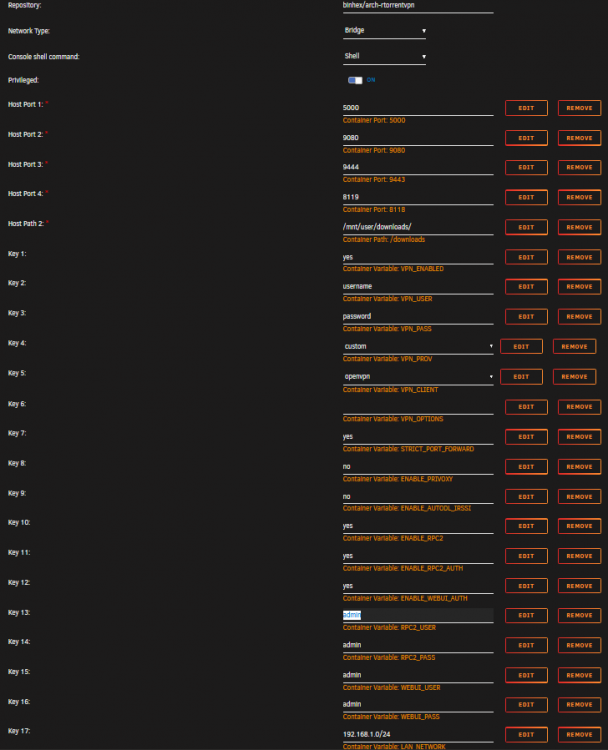
Hello, im trying to setup rtorrentvpn but i cant access webui. I always get connection failed even with openvpn and wireguard (using mullvad) but the docker is starting. root@localhost:# /usr/local/emhttp/plugins/dynamix.docker.manager/scripts/docker run -d --name='binhex-rtorrentvpn' --net='bridge' --privileged=true -e TZ="Europe/Paris" -e HOST_OS="Unraid" -e 'VPN_ENABLED'='yes' -e 'VPN_USER'='myusername' -e 'VPN_PASS'='mypassword' -e 'VPN_PROV'='custom' -e 'VPN_CLIENT'='openvpn' -e 'VPN_OPTIONS'='' -e 'STRICT_PORT_FORWARD'='yes' -e 'ENABLE_PRIVOXY'='no' -e 'ENABLE_AUTODL_IRSSI'='no' -e 'ENABLE_RPC2'='yes' -e 'ENABLE_RPC2_AUTH'='yes' -e 'ENABLE_WEBUI_AUTH'='yes' -e 'RPC2_USER'='admin' -e 'RPC2_PASS'='admin' -e 'WEBUI_USER'='admin' -e 'WEBUI_PASS'='admin' -e 'LAN_NETWORK'='192.168.1.0/24' -e 'NAME_SERVERS'='209.222.18.222,84.200.69.80,37.235.1.174,1.1.1.1,209.222.18.218,37.235.1.177,84.200.70.40,1.0.0.1' -e 'ADDITIONAL_PORTS'='6977,8287,11703,31947,62836' -e 'DEBUG'='true' -e 'PHP_TZ'='UTC' -e 'UMASK'='000' -e 'PUID'='99' -e 'PGID'='100' -p '5000:5000/tcp' -p '9080:9080/tcp' -p '9445:9443/tcp' -p '8121:8118/tcp' -v '/mnt/user/downloads/':'/downloads':'rw' -v '/mnt/disks/appdata_docker/appdata/binhex-rtorrentvpn':'/config':'rw' --sysctl="net.ipv4.conf.all.src_valid_mark=1" 'binhex/arch-rtorrentvpn'
-
Does seeding from array is problematic ?
-
@binhex Yeah i know they are different folders, i wanted to try to seed from array with the 2nd deluge container and see how it goes. I shoudl probably use qbittorent so i have a fresh container. But i guess it's not a good idea so i will stay with seeding from cache only. @wgstarksWell the 2nd install has all the preferences empty while the first one works perfectly.
-
@wgstarks Deluge 1 : root@localhost:# /usr/local/emhttp/plugins/dynamix.docker.manager/scripts/docker run -d --name='binhex-delugevpn' --net='bridge' -e TZ="Europe/Paris" -e HOST_OS="Unraid" -e 'VPN_ENABLED'='yes' -e 'VPN_USER'='VPN user' -e 'VPN_PASS'='VPN password' -e 'VPN_PROV'='custom' -e 'VPN_OPTIONS'='' -e 'STRICT_PORT_FORWARD'='yes' -e 'ENABLE_PRIVOXY'='no' -e 'LAN_NETWORK'='192.168.1.0/24' -e 'NAME_SERVERS'='209.222.18.222,84.200.69.80,37.235.1.174,1.1.1.1,209.222.18.218,37.235.1.177,84.200.70.40,1.0.0.1' -e 'DELUGE_DAEMON_LOG_LEVEL'='info' -e 'DELUGE_WEB_LOG_LEVEL'='info' -e 'ADDITIONAL_PORTS'='' -e 'DEBUG'='false' -e 'UMASK'='000' -e 'PUID'='99' -e 'PGID'='100' -p '8112:8112/tcp' -p '58846:58846/tcp' -p '58946:58946/tcp' -p '58946:58946/udp' -p '8118:8118/tcp' -v '/mnt/user/downloads/':'/downloads':'rw' -v '/mnt/disks/appdata_docker/appdata/binhex-delugevpn':'/config':'rw' --cap-add=NET_ADMIN 'binhex/arch-delugevpn' 1e1ddf4654afe545a64415a7010980662df321355273408c8343553c7f7cc4bc Deluge 2 : root@localhost:# /usr/local/emhttp/plugins/dynamix.docker.manager/scripts/docker run -d --name='binhex-delugevpn2' --net='bridge' -e TZ="Europe/Paris" -e HOST_OS="Unraid" -e 'VPN_ENABLED'='yes' -e 'VPN_USER'='VPN user' -e 'VPN_PASS'='VPN password' -e 'VPN_PROV'='custom' -e 'VPN_OPTIONS'='' -e 'STRICT_PORT_FORWARD'='yes' -e 'ENABLE_PRIVOXY'='no' -e 'LAN_NETWORK'='192.168.1.0/24' -e 'NAME_SERVERS'='209.222.18.222,84.200.69.80,37.235.1.174,1.1.1.1,209.222.18.218,37.235.1.177,84.200.70.40,1.0.0.1' -e 'DELUGE_DAEMON_LOG_LEVEL'='info' -e 'DELUGE_WEB_LOG_LEVEL'='info' -e 'ADDITIONAL_PORTS'='' -e 'DEBUG'='true' -e 'UMASK'='000' -e 'PUID'='99' -e 'PGID'='100' -p '8113:8112/tcp' -p '58847:58846/tcp' -p '58947:58946/tcp' -p '58947:58946/udp' -p '8119:8118/tcp' -v '/mnt/user/data/torrents/':'/torrents':'rw' -v '/mnt/disks/appdata_docker/appdata/binhex-delugevpn2':'/config':'rw' --cap-add=NET_ADMIN 'binhex/arch-delugevpn' fdf3f8fe2529efbe335172de0dcc50afba2f60e07d4acf509d4e9b50a66d2c5e @xxDeadbolt thanks
-
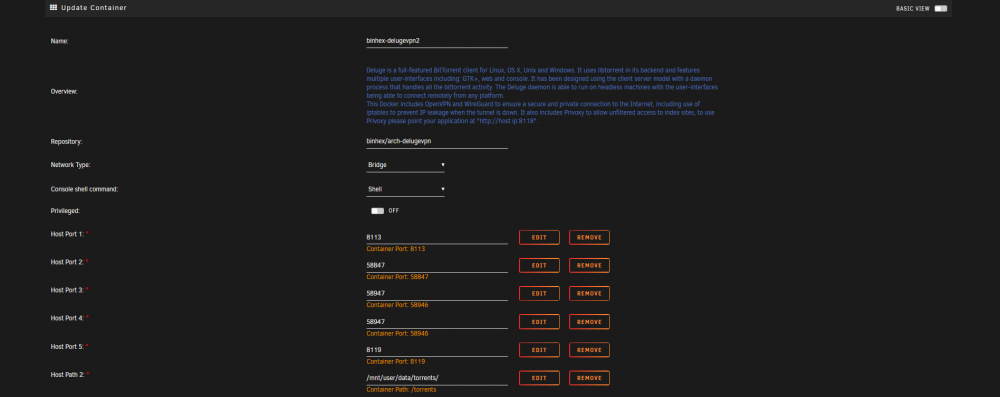
@wgstarks I used unraid to make the container, not using the console. The settings for my first container is just the normals ports and for the 2nd containe it's the picture. I changed the appdata folder name too.
-
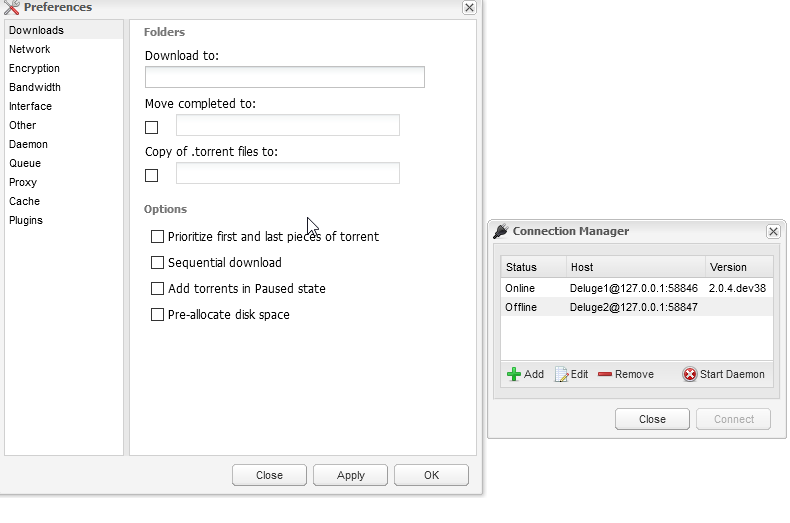
Hello, I tried to make a 2nd deluge container (to try to seed from the array) but all my preference are empty. Any reason ?
-
Hello, i wanted to make a 2nd deluge container but all my preferences are empty, nothin in plugins, ip is n/a... Daemon port is 58946 but im using 58947 as host port and i cant start another daemon with this port.
-
Hello, does anyone has a script to move files between disks ? I would like to download to my cache then move them to the array where i can continue to seed / hardlink for plex. Thanks.
-
Hello, is it possible to download to the cache drive and when completed automaticaly move to another folder on the array ? This way i would be able to continue seeding indefinitely while using all the space.
-
Hello, im downloading to my download share on the cache folder and even after using the mover cache isnt emptying. My torrents are still seeding from cache maybe this is why ? Is it possible to seed from array and if yes, is there no problem while doing it ?




