





binhex
Community Developer
-
Joined
-
Last visited
Everything posted by binhex
-
It means something (still unknown) is blocking access to https://serverlist.piaservers.net/vpninfo/servers/v4 which is a list of port forward enabled endpoints, can you try going to the 'console' of the container and pasting in the following and pressing return:- curl https://serverlist.piaservers.net/vpninfo/servers/v4 It should spit out a long json string, also can you try it from your browser (i think we did this previously, but just to be sure you can access it from a 'normal' host), let me know the outcome from console and from your browser. FYI - so for now you can run like this with STRICT_PORT_FORWARD set to yes, there is no security issues, but your download speed will be impacted as you won't be able to connect to as many peers.
-
ok staring at your screenshot of the last log from the container i can see we have a connection, its now just having issues with the incoming port assignment, for now lets just turn that off and see if you can access the web ui, so set STRICT_PORT_FORWARD to 'no' and see if you can reach the web ui.
-
indeed, but firewals typically block incoming traffic (default configuration), and permit all traffic outbound, so why your firewall is blocking outbound traffic to port 443 i have no idea!, that is extremely odd. permitting outbound traffic for any ip to port 443 is as i mentioned above, is perfectly normal, otherwise you will have to create bypass rules to permit every website on the internet that use https (nearly all of them), but that decision is yours, sounds like a lot of work :-). As it's not normal to block port 443 and thus not documented. In short the vpn container will require 2 things on startup, to be able to resolve names (port 53) and the ability to talk to pia (typically port 443), after it has got everything it requires then the connection will be established to the tunnel and all subsequent traffic will be sent down the tunnel, the only exception being connectivity to the applications web ui - no change in communication that im aware of.
-
ok so you can clearly see it is your router (pfsense) that is blocking, if you look at your 'firewall log entries' screenshot, you can see the action is a red cross, i assume in pfsense that means block, and if you look at the destination you can see its blocking to destination ip addresses on port 443 (https). So you don't want to allow on the source port (35046 and 33210) those ports are randomly assigned and will change every time, instead you want to permit destination port 443.
-
if you are using a blocklist then it will get updated on a regular basis. its potentially possible for a blocklist to incorrectly block vpn provider ip range (vpn's are often used by hackers). lets rule out the latest image being the issue, try left click container, select edit, set 'repository' value to 'binhex/arch-qbittorrentvpn:5.0.5-1-01' then click apply at the bottom and see how it goes.
-
Enabling privoxy and/or microsocks (its not shadowsocks, thats different) will not make any difference to connectivity to the vpn tunnel, feel free to enable it if you wish but it won't help.
-
no. nothing wrong in your log, what is the ip address of the machine running the web browser?
-
it appears that something is blocking on your network, from your log:- 2025-06-07 21:56:38 [UNDEF] Inactivity timeout (--ping-restart), restarting And then eventually after multiple retries it gets connect to the endpoint: [info] Successfully retrieved external IP address 140.228.21.163 But then fails to connect to PIA API to get a port forward: PIA endpoint API 'https://serverlist.piaservers.net/vpninfo/servers/v4' currently down, skipping endpoint port forward check I may of asked this before, excuse me if i have, but is there any pihole/pfsense/opnsense/adguard or similar running on your network that maybe blocking?, if so please do check the logs and configuration, it all points at something blocking to me.
-
im saying lets try it as a debug step, right now i cannot replicate your issue (it simply works for me!) so im flying blind here, so lets try openvpn and see whether you get connected, FYI openvpn is NOT less secure, its just slightly slower (10-15% approx) than wireguard, on the plus side openvpn supports multi remote endpoints, so if one endpoint goes down openvpn will switch to the next (wireguard cannot do this). it is not complete, the publickey has not been generated (as is reoported by your logs) so it won't work until you get a public key, and for whatever reason this is blocked on your home network.
-
correct, i am aware of your issue, in that you cannot connect to the PIA API in order to generate a valid wireguard config, i totally get it. if you want to use openvpn (as wgstarks is reocmmending) then you have to manually download them from the PIA website, Please see Q7 from the following link:- https://github.com/binhex/documentation/blob/master/docker/faq/vpn.md
-
Just a little bit more on this, i have been working with @ChuckPaPlex to improve integration with the my images and have successfully got the script running, so with that work done i have now included ChuckPA's script directly into the image, so to run the script:- 1. Go to UNRAID web ui/Docker tab 2. Left click the container and select 'Console' 3. Type 'DBRepair.sh' and press return to start the script 4. Follow ChuckPA's documentation on usage here
-
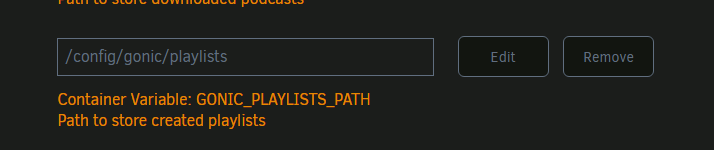
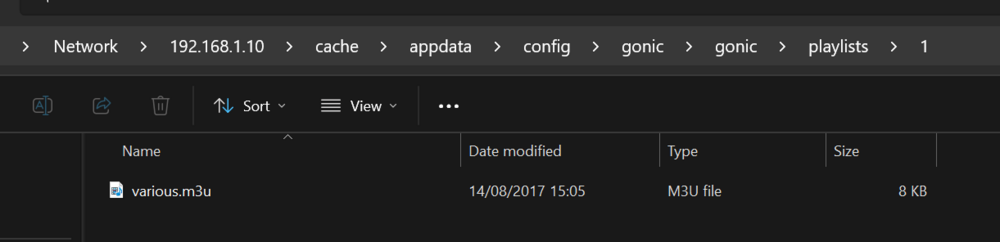
i have created a playlist and it is stored in the path specified for GONIC_PLAYLISTS_PATH in my case that is the default value of /config/gonic/playlists: I then copied an old playlist to the '1' folder (im logged in as admin) and chnged the file exension to m3u and i could then pick up the playlist via the 'import' function on my subsonic client (Symfonium - highly recommended!!) and it imported correctly. so in short, this works for me, check permissions, check your playlist is valid and that the media paths in the playlist are correct (for the container not the host!).
-
well according to your screenshots i see no sign of port 8080 at all, so looks like you have deleted the port, or changed it to something else If you want to change the port to something other than 8080 then follow Q4:- https://github.com/binhex/documentation/blob/master/docker/faq/qbittorrentvpn.md

-
And just like there have been two new releases of flaresolverr!, so perhaps there is light at the end of the tunnel, if you have switched to byparr you may consider switching back to flaresolverr and seeing how it goes (ive done just that).
-
I will need to see a log to help further, please see the following link:- https://github.com/binhex/documentation/blob/master/docker/faq/help.md#unraid-users
-
the listed endpoints in the log are the actual remote names you would use to connect if you wanted to edit your ovpn ocnfig file and replace the 'remote' line with another endpoint, whereas the ovpn config filenames are just the locations of the endpoints, e.g. netherlands.ovpn. yes, netherlands.ovpn config file will be for nl-netherlands-so.privacy.network, if you want to confirm then open the ovpn file with notepad and look at the 'remote' line if you have set STRICT_PORT_FORWARD to 'yes' then you wll not be able to access the web ui unless you are connected to an endpoint that supports port forwarding (incoming port will be assigned).
-
from your log:- 2025-06-04 20:27:23 [UNDEF] Inactivity timeout (--ping-restart), restarting Please see Q17 from the following link:- https://github.com/binhex/documentation/blob/master/docker/faq/vpn.md
-
same, try changing NAME_SERVERS to have a value of 1.1.1.1,1.0.0.1
-
try changing NAME_SERVERS to have a value of 1.1.1.1,1.0.0.1
-
ignore it, that is a stupid error reported by plex, its not critical. this may of been due to plex performing a database upgrade for you, always check the logs before stopping the container, i know Plex Pass users have been seeing this, so i suspect the upgrade is now pushed to Plex.
-
I'm personally sharing the network of privoxyvpn with byparr, but you don't have to do this if you don't want, as long as prowlarr/jackett are on the same network as byparr then you should be good.
-
def does look dns related, ensure you are not blocking dns, check things like pihole, pfsense/opnsense, also Please see Q36 from the following link:- https://github.com/binhex/documentation/blob/master/docker/faq/vpn.md
-
This was not done on purpose, i was totally unaware of ChuckPA's script at the time my script was created, i shall be renaming my script, as i want to make it a more generic tool for any sqlite database related issues, not just plex. woud love some more detail on this, a lot of people have great success with the script i wrote. TBH it's trivial to stop PMS, you simply find the pid for PMS and kill (sigterm) it, that's it, that is all my script does, ChuckPa im sure could do something very similar. no idea why you had to do that, supervisord (init manager) is not set to restart the process on exit, works for me (just tested on fresh plexpass container). EDIT - Turns our ChuckPa renamed his tool from PlexDBRepair to DBRepair, so maybe he should rename his script ;-) https://github.com/ChuckPa/DBRepair/releases/tag/v1.11.00
-
there is an alternative and its mostly working for me, i am seeing tracebacks (uncaught exceptions) so it's def not a polished application yet but it might be worth a go, i have created an template for it and it can be seen on CA, its called 'binhex-official-byparr', this is a template for the official docker image, so any issues should be reported to the developer of the image (see support link).
-
if it's busy performing database migration then i would STRONGLY suggest waiting this out, any interruption in this will probably lead to database corruption.




