





Meowcat285
Members
-
Joined
-
Last visited
Everything posted by Meowcat285
-
So I did run a memory test and found no issues. I'm gonna try disabling CPU C-states, given I've had issues with those before on ASRock boards, if it's still crashing, I'll try doing what you suggested.
-
Would it be worth just running a memory test first off?
-
Crashed again, I don't see anything at all useful in the syslog output. This portion of the log is from about 16-17 minutes or so before it crashed, right up to when it crashed, and I don't see anything useful. The server crashed at 18:17Z 18:15Z (2:17 2:15 PM local time.) As you can see the last output was from a few minutes before. Diagnostics attached, let me know if you need logs from even further back Edit: I got the times slightly wrong "timestamp","source","message" "2025-08-04T18:00:02.000Z","Tower","Tower move: Starting Mover ..." "2025-08-04T18:00:02.000Z","Tower","Tower move: Cron + options: start" "2025-08-04T18:00:02.000Z","Tower","Tower move: ionice -c 2 -n 7 nice -n 0 /usr/local/emhttp/plugins/ca.mover.tuning/age_mover start" "2025-08-04T18:00:52.000Z","Tower","Tower kernel: mdcmd (188): nocheck PAUSE" "2025-08-04T18:00:52.000Z","Tower","Tower kernel:" "2025-08-04T18:00:53.000Z","Tower","Tower kernel: md: recovery thread: exit status: -4" "2025-08-04T18:01:03.000Z","Tower","Tower Parity Check Tuning: Send notification: Paused: Automatic Correcting Parity-Check (45.4% completed) (type=normal link=/Settings/Scheduler)" "2025-08-04T18:03:04.000Z","Tower","Tower flash_backup: adding task: /usr/local/emhttp/plugins/dynamix.my.servers/scripts/UpdateFlashBackup update" "2025-08-04T18:03:36.000Z","Tower","Tower kernel: docker0: port 2(veth8779f38) entered disabled state" "2025-08-04T18:03:36.000Z","Tower","Tower kernel: veth93ddbf9: renamed from eth0" "2025-08-04T18:03:36.000Z","Tower","Tower kernel: docker0: port 2(veth8779f38) entered disabled state" "2025-08-04T18:03:36.000Z","Tower","Tower kernel: veth8779f38 (unregistering): left allmulticast mode" "2025-08-04T18:03:36.000Z","Tower","Tower kernel: veth8779f38 (unregistering): left promiscuous mode" "2025-08-04T18:03:36.000Z","Tower","Tower kernel: docker0: port 2(veth8779f38) entered disabled state" "2025-08-04T18:06:24.000Z","Tower","Tower kernel: mdcmd (189): check resume" "2025-08-04T18:06:24.000Z","Tower","Tower kernel:" "2025-08-04T18:06:24.000Z","Tower","Tower kernel: md: recovery thread: check P ..." "2025-08-04T18:06:29.000Z","Tower","Tower Parity Check Tuning: Send notification: Resumed: Automatic Correcting Parity-Check (45.4% completed) (type=normal link=/Settings/Scheduler)"tower-diagnostics-20250804-1435.zip
-
Diagnostics attached, but not sure how helpful they will be, given that I turned off mirror syslog to flash and I had to restart the NAS to get the web ui to respond after it crashed overnight tower-diagnostics-20250801-1055.zip
-
Welp, it crashed overnight again, so back to square one
-
So far so good, system hasn't paniced yet
-
Yeah, I already had mirror syslog to flash setup because of the panics, but if it happens again I'll setup a remote server for it as well
-
Alright, I've set Power Supply Idle Control to typical current idle as per that FAQ, I'll post here if it panics again or if it remains stable for 7 days straight
-
I'll give that a try, I've had issues with C states before, but that was on a different mobo and a intel CPU.
-
For the past few weeks I've been having issues with random kernel panics on my unraid NAS. I assumed it was related to a failing NVMe drive, but even after replacing said drive I'm still getting kernel panics. What steps can I take to diagnose this? The diagnostics I attached were taken about 3 minutes or so after the panic and the system came back up tower-diagnostics-20250725-1319.zip
-
Forgot to post a update, I swapped the SSD over and everything went ok
-
That seems to have worked, I'll work on replacing the drive later today and report how that goes
-
Alright, I'll give that a try
-
I forgot to attach diagnostics, here you gotower-diagnostics-20250722-1042.zip
-
So I'm planning to replace one of the SSDs in my cache pool as the one in there currently seems to be having some random problems. The thing I'm worried about is that at some point I seem to have semi-broke my BTRFS setup and now the drive assignments are inverted compared to what is displayed in the Unraid web GUI. What I mean is that in the Unraid web UI nvme0n1 is displayed as disk 1, however in the actual BTRFS array, nvme1n1 is actually disk 1 in the BTRFS array. I'm planning to swap nvme1n1 as it's been having some problems. Could this cause any issues when swapping the drive with a new one and is there any way to fix the mismatched config?
-
How exactly does "Synchronize Primary files to Secondary" work? I have it set, but the files don't seem to exist on both the primary and the secondary at the same time. Also if I use "Resynchronize all Primary files to Secondary" no files get synced at all. Am I doing something wrong or am I misunderstanding how the feature works?
-
I've still have the two old drives, would it make sense to just move all the data onto a new pool, then recreate the existing cache pool?
-
When I was replacing a drive in my cache pool during the replacement process bombed out with a error something along the lines of "nvme0n1 device busy" during the process. Due to this, the drive is missing from the BTRFS pool, but Unraid doesn't seem to have noticed that, can I can't find a way to re-trigger the drive replacement process. I was thinking about just moving the data back onto the old drives in a separate new pool, then deleting the current cache pool and then re-creating the cache pool and move the data back onto it, but I thought that I should probably ask for advice first. I'm really not sure about what to do next, any advice would be appreciated. Diagnostics and relevant screenshots attached Status in Unraid UI BTRFS Pool drive status: tower-diagnostics-20250304-1738.zip



-
I tried using free IPMI tool to try and setup a BMC watchdog (which is what I'm trying to do), but no matter what value I use, it gives a "invalid timeout action value" despite it being valid according to the manpage. Thats why I would just like to use ipmitool, because this worked with ipmitool before. Manpage section: -a INT, --timeout-action=INT Set timeout action. The timeout action can be set to one of the following: 0 = No action, 1 = Hard Reset, 2 = Power Down, 3 = Power Cycle.
-
Hi, I've been running into a issue where I can't find a good way to install the "ipmitool" cli tool. Previously I could install it via nerdtools, but now that nerdtools is gone, I'm really not sure how to install it. For some of the other packages that I previously acquired via nerdtools I was able to download the slackware package and add it to "/boot/extra", but the problem I'm running into is that there is no "ipmitool" slackware package, and I'd really like to try and avoid compiling it from source.
-
It seems to be going faster now, not sure why, there's still activity on the disks.
-
In addition, mover seems to be very slow as well.
-
I have also used the DiskSpeed docker to test the drive performance, and even when other IO is being performed, its over 120 MB/sec at least.
-
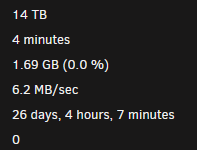
When I run a parity check on 6.12.6, it seems to be significantly slower then 6.12.4. Previously I would get about 100 MB/sec on the check, but now I cant get more then 8 MB/sec even with no other IO activity. I attached the diagnostics to this post, so if anyone can see any issue, help would be very much appreciated. tower-diagnostics-20240123-1105.zip
-
I feel like this is a issue that needs a patch in the next few days, not next few weeks



