





skumse
Members
-
Joined
-
Last visited
Everything posted by skumse
-
After the latest update (2026.07.24.13) this now works perfectly. Thank you @XCrownedClownsX
-
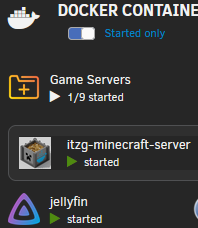
If you edit the folder, and look under Preview -> Quick Actions, you can enable/disable these buttons from the view.
-
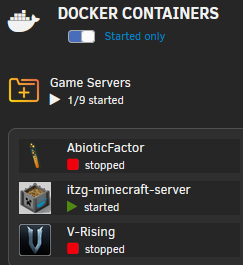
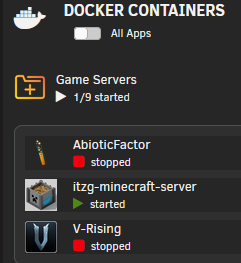
Sure thing. Here are a few snippets: In both cases, it shows the stopped containers, regardless of the selection made ('All Apps' or 'Started only'). If possible, I would like it to only show the running ones (i.e. follow the selection made in the top of the screenshots). It might be possible, but if it is, I can't seem to locate the correct options/selections. 😅
-
In the Dashboard view under Docker Containers, when I expand a folder (with both running and stopped containers in it), it shows all the containers, and not just the running ones - even when 'Started only' is selected. Is there a way for this plugin to hide the stopped dockers in a folder, in this view?
-
I had the same issue initially, and found out that /etc/resolve.conf had the nameserver set to 127.0.0.11 (instead of 127.0.0.1), and I haven't yet been able to figure out why. Changing this worked for me, but I didn't get it to work persistently until after a few reboots, and letting the pihole setup continue, to the point where I could reach the web interface, and import my old settings/lists. After this, the Domains counter ("Error (-2)") went back to normal as well.
-
Yeah, I get the networking side of things. It's the docker way of doing things that I still struggle with. Also, I hate having more than one ip assignment automation (e.g. dhcp server), as it usually leads to confusion later down the line (at lest in my experience). And since the container does not present itself to the network like a normal client, I think I might be better of with another physical pihole (I already have two, but ideally I wanted one of each (physical/virtual)). At least I can have a functional containerized version if need be, and it was really nice to get the bridging issue fixed.
-
Ahh.. I see. When initially setting up my server I left this one out, since I thought it had to do with just ip address assignment (due to the last part/setting): Thank you so much for clearing that up. It has - which is pretty obvious now - given me a few headaches in the past, too. 😅 By the way.. I assume that I can just tick the first 'Subnet' option, leave 'DHCP pool' un-ticked, and still get "proper bridging" (..while having to manually assign the IP addresses, in case my existing dhcp serer on that subnet does not assign one)? EDIT: Yes, the above approach worked, and the container spun up without errors.

-
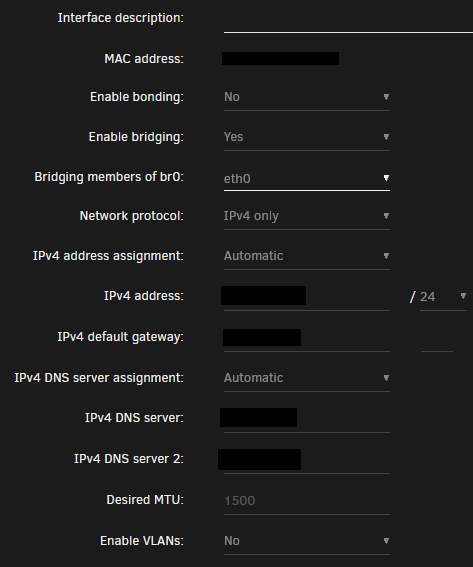
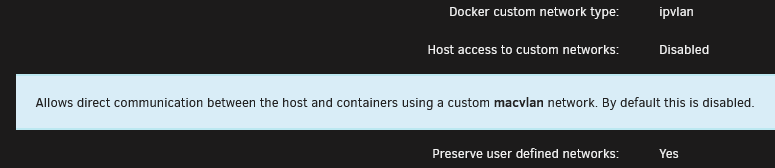
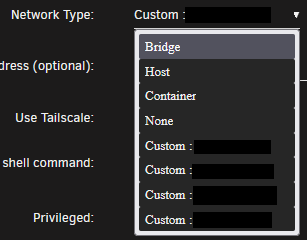
Apologies for the confusion. This is my network setup: And this is my docker setup: (I left the 'Host access to custom networks' disabled , since I am running ipvlan and not macvlan) I did - both a default one, and a specific ipvlan network (using the -d option, as described in the DockerDocs article I linked earlier). But I see no "IPv4 custom network on interface eth0 (optional):" option anywhere. These are my only Network Type options in the container: The four remaining (custom) ones are all manually created (with default settings) with docker network create subnet<CIDR subnet> <name>.
-
Ahh. I assume that you are running macvlan, correct? Thing is, I'm using ipvlan, and not macvlan, so I have no br0 interface. Other that that, the network setup is identical to yours (except for disabled ipv6). As per https://docs.docker.com/engine/network/drivers/ipvlan/ bridging should work, and I've tried creating both a bridge (default) network and a ipvlan network in docker, but they both result in an error when trying to run the docker template. I just want the docker container to have an interface exposed directly to the hosts subnet (and and ip address on there - manually or dhcp assigned), so that no dnsmasq is needed, and I was under the impression that this would be possible with the ipvlan driver.
-
I tried the above approach (after creating a docker network "lan" on the same subnet as the host), but I get the exact same error. Here's the privacy-scrubbed output:
-
I get the following error while trying to spin up this container on a bridged network (dhcp is elsewhere on the hosts vlan): It seems that it wants to listen on the hosts ip address, instead of it own dhcp assigned address (obviously not getting one, since the container doesn't start). Or maybe I'm misreading the situation(?).. Is it possible for me to define the listen address manually?
-
That did the trick. Thanks a lot.
-
Yes. Several times. EDIT: repo is ghcr.io/ich777/steamcmd:conanexiles , in case that was the next question.
-
Not sure if relevant in this case, but I've had a few containers running on a separate network segment/vlan, where I had to manually add a static route in my router/firewall for said subnet(s) (with the unraid server ip as the "next hop"), before everything worked correctly. Might be worth a try.
-
It seems that the Conan Exile docker is out of date ("incompatible version") after todays patch. Thanks again for these dockers ❤️
-
I hope this is the right place to ask... First off, thank you @ich777 for all the dockers you've provided. I've enjoyed using at least a handful of them myself, and they're (mostly 😉) very easy to set up and run. 👍 My only trouble is; now that I have different SteamCMD servers/dockers running, how do I monitor these? Specifically, I'm looking for at way to see if there are any connected users/clients on a specific game server, so that I know if they're safe to restart/update/etc. For some games, I've previously been able to add the server to my favorites in steam, and been able to see this information, but not only are not all games supported, it seems (I am not able to add all my game servers/dockers in my Steam favorite list), but ones that used to work (e.g. Valheim), no longer do (Steam is unable to connect, IIRC). I've also tried SteamPS, but am unable to connect to any of the servers/dockers ("Could not reach server.."), even though they are running, and the game client is able to connect.
-
Oh.. and thank you very much for the speedy support.
-
Ahh. Makes sense. I'm sorry for the confusion, then. I guess that Igot so focused on checking every parameter, that this number-discrepancy threw me for a ride.
-
I'm in the process of running through your suggestions, but one thing that I wondered, was... Whenever I reinstall the docker image, the GAME_ID is 380870, but according to https://developer.valvesoftware.com/wiki/Dedicated_Servers_List it should be 108600 (?), and as such, I have been using this ID every time. Not sure if it's even relevant, though.
-
Version: 6.8.3 Yes. A pool of two SSDs as cache. Server files are in '/mnt/cache/appdata/projectzomboid' (Steamcmd is in '/mnt/user/appdata/steamcmd' though. Not sure if that matters?) I did not. I might have tried it the first time, but I since removed and re-installed the docker as part of my troubleshooting, and have not used steam credentials since. The docker is running, according to Unraid, but I cannot connect to it, and as mentioned, the docker log just ends in this (no errors or warnings, otherwise): Connecting anonymously to Steam Public...Logged in OK Waiting for user info...OK Update state (0x5) verifying install, progress: 0.00 (0 / 0) Success! App '108600' fully installed. ---Prepare Server--- ---Setting up Environment--- ---Looking for server configuration file--- ---Server configuration files found!--- ---Checking for old logs--- ---Server ready--- ---Start Server--- Cannot exec '/serverdata/serverfiles/ProjectZomboid64': No such file or directory
-
When trying to get the Project Zomboid server to run, I keep getting this error in the log: ---Server ready--- ---Start Server--- Cannot exec '/serverdata/serverfiles/ProjectZomboid64': No such file or directory What am I missing?

