



Skip to content
View in the app

A better way to browse. Learn more.

Unraid

A full-screen app on your home screen with push notifications, badges and more.

To install this app on iOS and iPadOS
  1. Tap the Share icon in Safari
  2. Scroll the menu and tap Add to Home Screen.
  3. Tap Add in the top-right corner.
To install this app on Android
  1. Tap the 3-dot menu (⋮) in the top-right corner of the browser.
  2. Tap Add to Home screen or Install app.
  3. Confirm by tapping Install.

waveworm

Members
  • Joined

  • Last visited

  1. Have an issue whwere I think I ran a script that created a ton of snapshots in my pool. It will. ot let me delete any and I can no see them when I LS the dir.
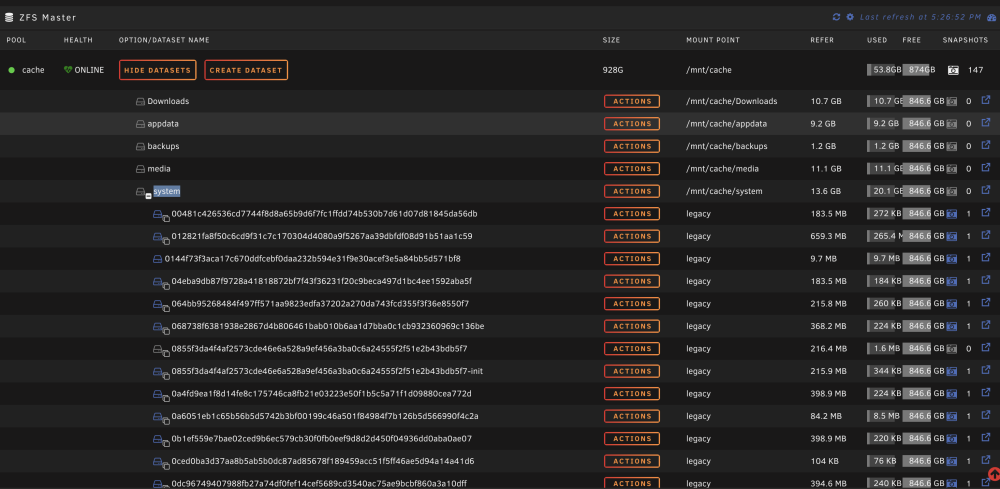
  2. attached is my syslog. I was able to keep it running for a few days. but 2am this morning it died for seemingly no reason. syslog (1)
  3. unit works well for a bout a day, then goes down and I need to hard shut it down. I can not ping or connect by ssh. unraid-diagnostics-20230911-0645.zip
  4. My system crashes every week or so. Not sure where to start. Attached is my Diagnostics file. it runs great for about a week and then I will come down and its locked up, still powered on. Thank you all! unraid-diagnostics-20230111-0750.zip

Account

Navigation

Search

Search

Configure browser push notifications

Chrome (Android)
  1. Tap the lock icon next to the address bar.
  2. Tap Permissions → Notifications.
  3. Adjust your preference.
Chrome (Desktop)
  1. Click the padlock icon in the address bar.
  2. Select Site settings.
  3. Find Notifications and adjust your preference.