philippneistat
Members
-
Joined
-
Last visited
-
Danke für die ganzen Infos! Werde es denke ich erstmal mit dem N100M probieren. Bzgl. der Nvme, habe in der Hardwareluxx Liste ein System gefunden das zwar auf Windows 10 läuft aber mit der gleichen Nvme (500Gb Variante) angeblich C10 erreicht. Werde mal testen und dann berichten

-
Perfekt, danke , werde mir die mal bestellen.
-
Hallo, Habe vor meinen Unraid Server möglichst stromsparend neu zu bauen. Jetzt stehe ich vor der Entscheidung ob es ein Asrock N100M oder Gigabyte B760M DS3H DDR4 + i3-14100 werden soll. Auf meinem Server laufen derzeit 15 Docker Container (Plex, komplette *arr suite, Audiobookshelf, Tautulli, Sabnzbd, Nginxproxy, Vaultwarden, ddns, Immich, unifi-controller, manchmal auch ein Minecraft server) Zukünftig wahrscheinlich noch Technitium Dns. Bei Plex werden max. 2-3 Streams gleichzeitig transkodiert. An VMs würde ich gerne noch Homeassistant OS laufen lassen. Frage dazu: 1. Reicht dafür das Asrock N100M oder sollte ich doch eher zum Gigabyte B760M DS3H DDR4 + i3-14100 greifen? Bzw. würde der N100M noch genügend Headroom für zukünftige Docker haben? Mein vorläufiger Aufbau mit Asrock N100M würde folgendermaßen aussehen: HDD: 7x 8TB WD80EZAZ (übernommen) Cache: WDS100T3X0C 1TB Nvme (SN750) (übernommen) RAM: 1x Mushkin DIMM 32 GB DDR4-3200 HBA: SilverStone SST-ECS06 (ASM1166) NIC: RTL 8126 5Gb rj45 Aufbau beim i3-14100 wäre genauso bis auf RAM. Meine Fragen dazu: 2. Welches Netzteil würdet ihr für diese Konfigurationen empfehlen? 3. Wie sieht es mit Stromverbrauch von dem RTL 8126 5G im Vergleich zu einer rj45 10G Karte mit Intel oder Aqantia chipsatz aus? (10G rj45 switch vorhanden) Habt ihr für rj45 10G Karten Empfehlungen? 4. Komme ich mit diesen Konfigurationen auf die niedrigst möglichen C-States (C8, C10)? Danke schon mal für eure Hilfe. LG Philipp
-
Sorry for the double posting, I just edited this thread, I must've posted it again by accident. I deleted the other one.
-
Hello, here is the tower diagnostics zip attached. Just tried the corrected syntax you mentioned: xfs_repair -v /dev/sdd1 and suddenly the drive mounted again. Really weird because I ran the xfs-repair in gui multiple time to no avail. Currently everything is working, could you guys still look at the diagnostics if there is anything else weird going on with the drive? Thanks tower-diagnostics-20210830-2110.zip
-
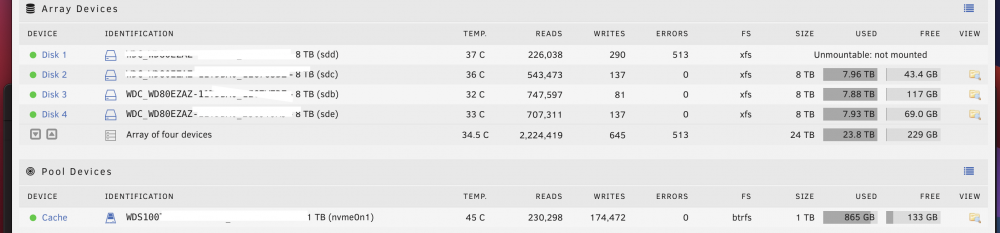
Hello! Im running a Unraid server with the following specs: x570 Aorus Master Ryzen 3900x RTX 3070 4x 8TB WD Red 1x Wd-black sn750 cache Yesterday I tried starting my Unraid array, it did start but the first disk is listed as 'unmountable: not mounted'. After that I ran xfs-repair -v from the gui, which finished without problems but the disk remained unmountable. Running that same command in an command line results in this output: root@Tower:~# xfs_repair -v /dev/sdd Phase 1 - find and verify superblock... bad primary superblock - bad magic number !!! attempting to find secondary superblock... .found candidate secondary superblock... unable to verify superblock, continuing... .found candidate secondary superblock... unable to verify superblock, continuing... .found candidate secondary superblock... unable to verify superblock, continuing... .found candidate secondary superblock... unable to verify superblock, continuing... .found candidate secondary superblock... unable to verify superblock, continuing... .found candidate secondary superblock... unable to verify superblock, continuing... .found candidate secondary superblock... unable to verify superblock, continuing... ............................................................................................................................................................................................................................................................................................................................................................................................................................................................................................................................................................................................................................................................................................................................................................................................................................................ this is then running forever. Then I ran a s.m.a.r.t extended self test which completed without error despite taking the whole night. Am I out of luck? Or are there other possible solutions which I should try? Thank you for your help
-
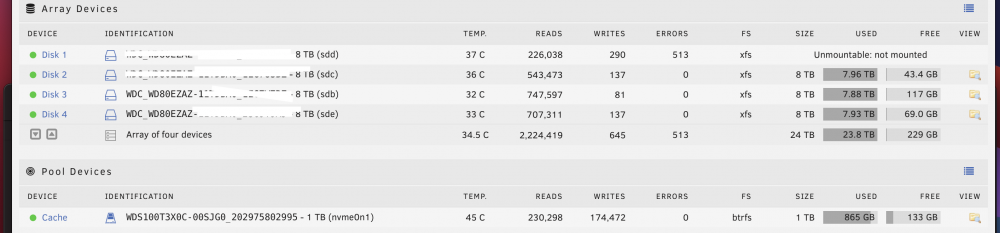
Hello! Im running a Unraid server with the following specs: x570 Aorus Master Ryzen 3900x RTX 3070 4x 8TB WD Red 1x Wd-black sn750 cache Yesterday I tried starting my Unraid array, it did start but the first disk is listed as 'unmountable: not mounted'. After that I ran xfs-repair -v from the gui, which finished without problems but the disk remained unmountable. Running that same command in an command line results in this output: root@Tower:~# xfs_repair -v /dev/sdd Phase 1 - find and verify superblock... bad primary superblock - bad magic number !!! attempting to find secondary superblock... .found candidate secondary superblock... unable to verify superblock, continuing... .found candidate secondary superblock... unable to verify superblock, continuing... .found candidate secondary superblock... unable to verify superblock, continuing... .found candidate secondary superblock... unable to verify superblock, continuing... .found candidate secondary superblock... unable to verify superblock, continuing... .found candidate secondary superblock... unable to verify superblock, continuing... .found candidate secondary superblock... unable to verify superblock, continuing... ............................................................................................................................................................................................................................................................................................................................................................................................................................................................................................................................................................................................................................................................................................................................................................................................................................................ this is then running forever. Then I ran a s.m.a.r.t extended self test which completed without error despite taking the whole night. Am I out of luck? Or are there other possible solutions which I should try? Thank you for your help
-
Thank you, this worked Perfectly
-
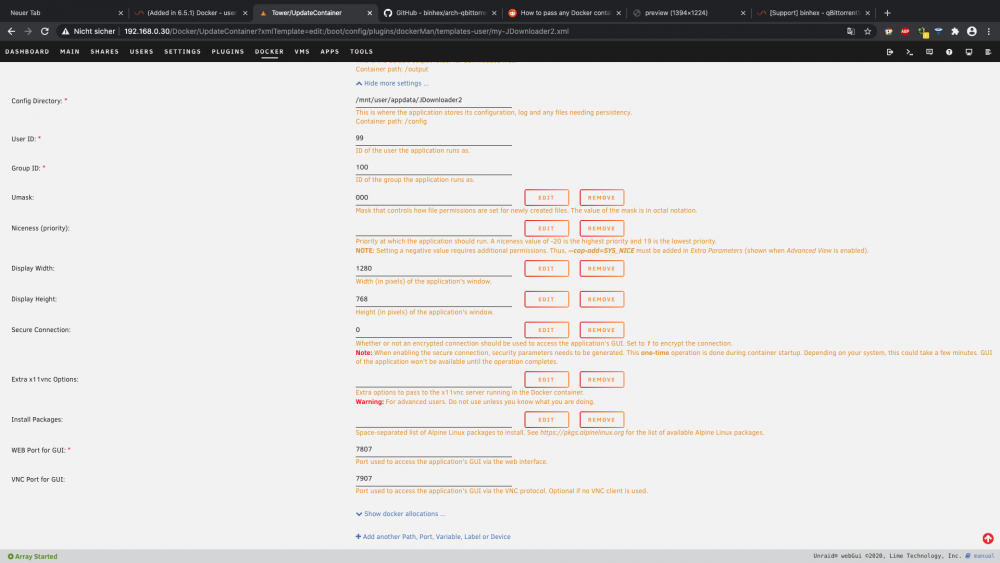
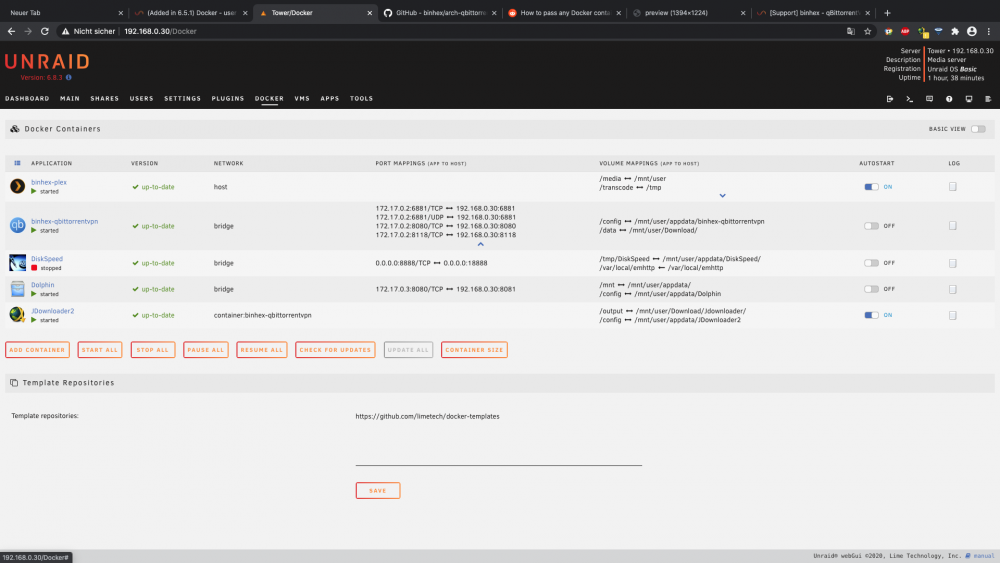
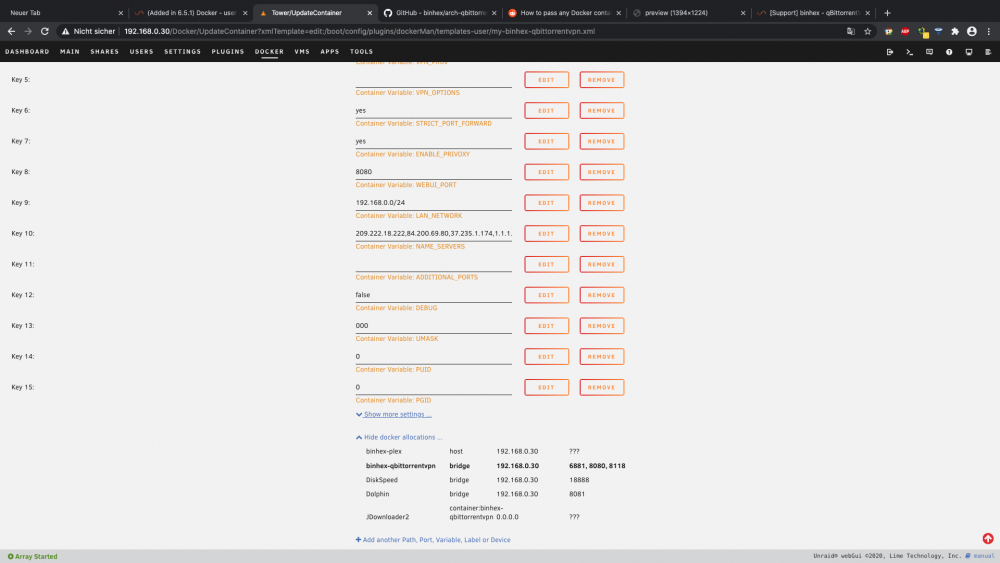
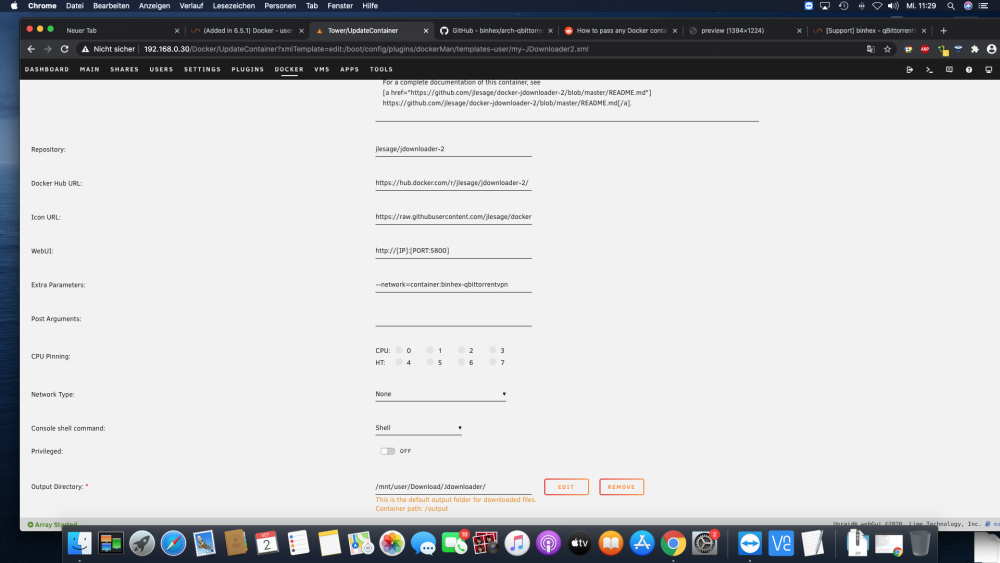
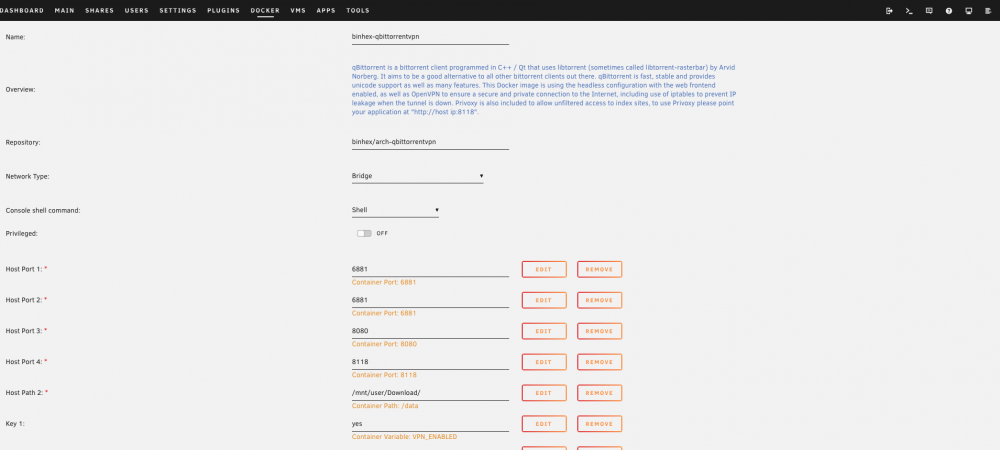
Hello Guys, I thought you could maybe help me with a problem i can't seem to solve myself. I have binhex-qbittorrentvpn installed with a pia vpn, that so far works flawlessly. However, i tried to map another container's network to that of the binhex-qbittorrentvpn, Jdownloader2, with --network=container:binhex-qbittorrentvpn. But with Jdownloader i can't access the web-gui and it doesnt recieve any ports or ip. If someone has a solution for this it would be much appreciated. My Settings are in the Pictures attached. Thank you for your help