





tomas.
Members
-
Joined
-
Last visited
-
Wow weird, I just physically removed and reseated the drive and now it shows up and everything works. The drive is only two months old so it not like it have been sitting there for years.
-
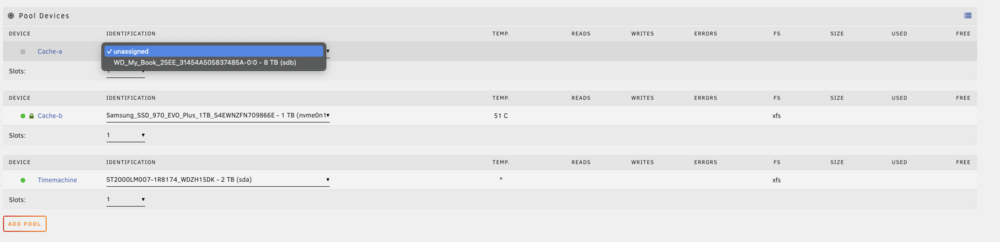
Hello, when I woke up today I saw that my cache drive had some problems and when I hovered over the green dot in the "Main" tab, it said something "Emulated". I then rebooted the system and it was no longer showing up. The SSD is a samsung 990 2tb NVME m.2 drive. I have uploaded my diagnostics below. Here's an image how it looks, it is the Cache-a that is gone. Thanks in advance tower-diagnostics-20240626-0902.zip
-
Hello, my cache drive seems to be corrupted out of nowhere. File system was btrfs. I tried running some commands that I found in another thread but I only got this as a response. Image of the drive: I have attached my diagnostics. Is the issue fixable without any data loss? Tower Diagnostics 20240204 2135.zip


-
Edit: I decided to create a new thread instead, as this one is marked as solved. Hello, I am having the same problem where by cache drive is "unmountable", file system was btrfs. I tried running some of the commands that you recommended in this thread but I only got this as a response. This problem appeared out of nowhere. Tower Diagnostics 20240204 2135.zip


-
I switched to your regular xteve container when trying to route it through binhex's VPN container. But as stated above I did not get it to work with radarr when routing it through delugeVPN, but it works when I dont use any VPN.
-
Thanks for the reply. I have now added the port to the ADDITIONAL_PORTS and it now shows up on the iptables, though the issue still persists... The container that I am trying to route through the delugeVPN container is xTeve, which uses port 34400. I also tried routing radarr through the contains to see if xTeve was the issue but I can't get it to work either...
-
Hi, I've opened the port 8112 on my router and can successfully access the webui when I am not at home, though it seems that I CANNOT access containers that I route through the delugeVPN container. I followed spaceinvaderone's tutorial on how to route traffic from one container to another, so all can sit behind one VPN. Local access is no problem. I think that it has something to do with IPtables though I do not have enough knowledge to be certain. I tried to modify the IP tables through the console of the container and I managed to get the port 34400 (which is the port I am interested in accessing) to have the same settings as port 8112 when typing `iptables -L`. However it does change anything I hope that I have provided enough information, and hopefully my issue is solvable. Thanks in advance.


