





Joedy
Members
-
Joined
-
Last visited
Everything posted by Joedy
-
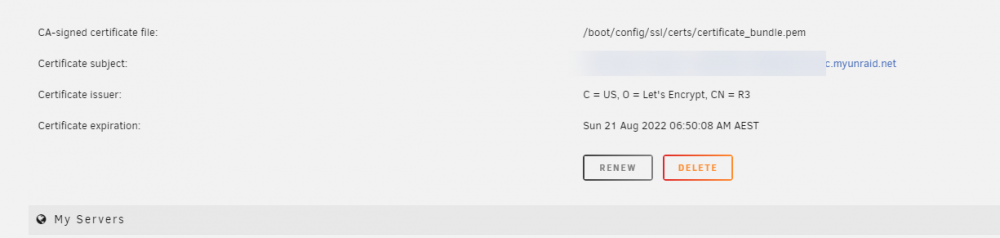
I had my own custom Wildcard ssl certificate, After upgrading to 6.10.1 it now does not give me th eoption and has an unraid wildcard instead. How do i get it to use mine again?
-
cheers thank you.
-
I run through a windows server 2019 as a file server with several connectors and don't have any issues, very quick to access everything but I do have a 10GB fibre card in it and the file server.
-
what affect will this have to peoples existing production setups by uninstalling and reinstalling?
-
either i am using both and neither have the functionality or is that not a feature you will be implementing? @ich777 @SimonF
-
hi are you going to add the functionality to be able to resize existing volumes?
-
Hi I am getting this in my log files Apr 12 10:41:45 HENAS02 kernel: Unable to recover from DataOut timeout while in ERL=0, closing iSCSI connection for I_T Nexus iqn.1991-05.com.microsoft:he?????.???.????,i,0x400001370001,iqn.2003-01.org.linux-iscsi.henas02.x8664:sn.d8096d846764,t,0x01 seems to be only on connector which has multiple volumes i have done some searching on the net and it is a timeout issue when larg amounts of data and used? https://www.google.com/search?q=Unable+to+recover+from+DataOut+timeout+while+in+ERL%3D0%2C+closing+iSCSI+connection+for+I_T+Nexus&rlz=1C1CHBF_enAU909AU911&oq=Unable+to+recover+from+DataOut+timeout+while+in+ERL%3D0%2C+closing+iSCSI+connection+for+I_T+Nexus&aqs=chrome..69i57j0.318j0j1&sourceid=chrome&ie=UTF-8 but unsure how i am able to fix it for myself?
-
Simon We did a fork and pull request in your Git now
-
They were on the git that ich777 gave us access too we still have our changes, we will update the one we are using. FYI it works great and we are getting 1.5Gb/s transfer from server to NAS thats with 10GB fibre and no special config yet.
-
you didn't add the parts Custom name your own IQN extended info in volumes tab showing name, sizes and write back of current volumes info in LUN tab for each one so you can edit or delete current LUN's info in ACL tab for each one so you can edit or delete them a lot easier and see what you already have setup we uploaded these to the depository, not something you are interested in for this version?
-
yep agreed Us users that want to be able to have dynamic storage through thin provisioning will require it. my unraid NAS boxes are in an enterprise environment and that is why i am looking at this plugin as it is required for my setup. We are happy to keep those settings in a different version that we will use when the software moves from beta to stable version.
-
agreed we will port a version to ourselves when we finish with the basic configuration. Proof of concept works as i ran up a windows server and connected initiators for a file server which is exactly what we needed. Thanks
-
found this Have a look at sparse files. dd if=/dev/zero of=file.img bs=1 count=0 seek=1024M creates a 1024Mb sparse file that can be formatted and mounted as a filesystem. There is more information on sparse files and using them here. https://serverfault.com/questions/344518/in-linux-how-can-i-create-thin-provisioned-file-so-it-can-be-mounted-and-a-file
-
No was just going to work them out, do you?
-
so we will be implementing a couple of changes to this version or we fork our own LUN Being able to edit the size of the volume after it is created (Thin Provisioning) Changing target mapping or multiple mappings Target (Volume) Multiple or single session options network binding if multiple networks
-
Simon That is correct and normal setup
-
Thanks for that, worked like a charm
-
yeah we have fixed that part and added a few features to make it a bit more user friendly also added a bit of ajax to the back end to clean some code up, hope your alright with that.
-
if you fill the name and hit enter it creates it
-
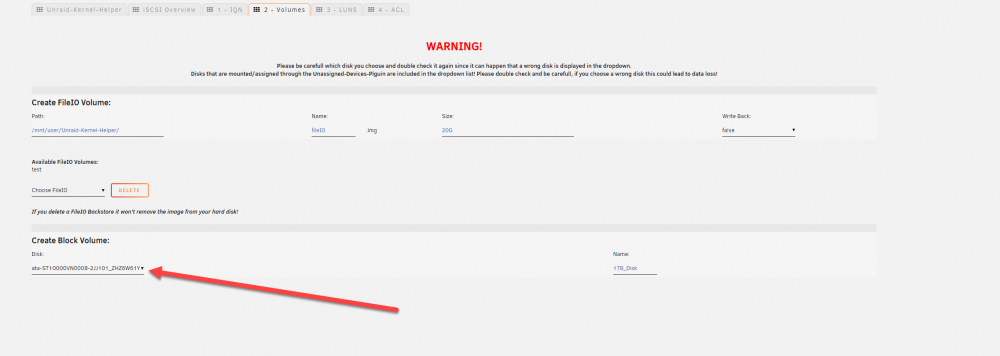
supposed to be a button to do something here?
-
thats ok we are looking at it now and will push any changes and you can decide if you want it or not
-
Thanks, yep got the right one now
-
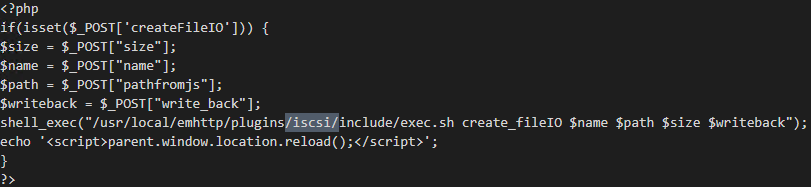
if your plugin is working and ours isnt seems we have issues with the paths that you are using in the files it is not standard like should be unraid-kernel-helper and this is across quite a few lines of code.
-
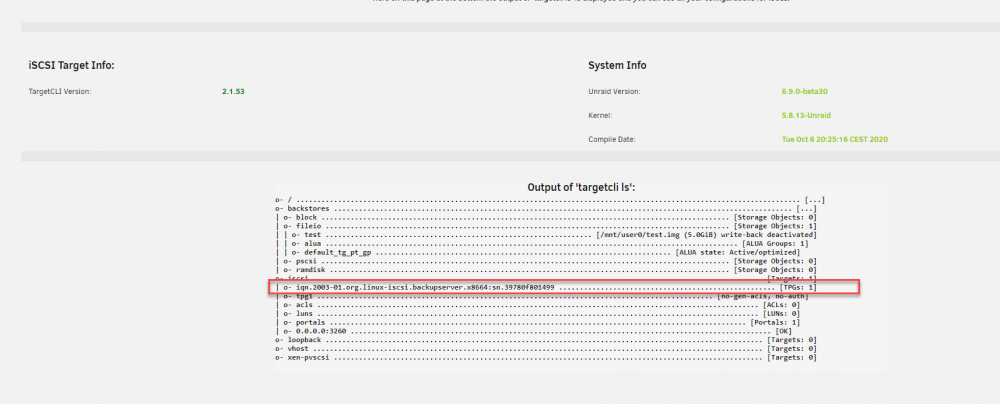
The pathway to run the script when creating an iqn is wrong we are pushing the change to you to fix this also the IQN does not show up under the IQN tab when created only the overview page is this by design?

-
when you click the button to doesn't do anything Nov 5 08:55:57 BackupServer emhttpd: cmd: /usr/local/emhttp/plugins/community.applications/scripts/pluginInstall.sh install https://raw.githubusercontent.com/ich777/unraid-kernel-helper-plugin/master/plugins/Unraid-Kernel-Helper.plg Nov 5 08:56:01 BackupServer root: plugin: running: anonymous Nov 5 08:56:01 BackupServer root: plugin: creating: /boot/config/plugins/Unraid-Kernel-Helper/Unraid-Kernel-Helper-2020.11.04.txz - downloading from URL https://raw.github.com/ich777/unraid-kernel-helper-plugin/master/archive/Unraid-Kernel-Helper-2020.11.04.txz Nov 5 08:56:08 BackupServer root: plugin: checking: /boot/config/plugins/Unraid-Kernel-Helper/Unraid-Kernel-Helper-2020.11.04.txz - MD5 Nov 5 08:56:08 BackupServer root: plugin: running: /boot/config/plugins/Unraid-Kernel-Helper/Unraid-Kernel-Helper-2020.11.04.txz Nov 5 08:56:09 BackupServer root: plugin: creating: /usr/local/emhttp/plugins/Unraid-Kernel-Helper/README.md - from INLINE content Nov 5 08:56:09 BackupServer root: plugin: running: anonymous





