mSedek
Members
-
Joined
-
Last visited
Everything posted by mSedek
-
yes, you migh have missplaced the boot arg it is in NVRAM (SECOND UUID LINE) right click boot-args whatevergreen select from the list agdpmod=pikera close saving changes and reboot side note if you are in a failed boot attempt, reset the whole server becasue AMD reset bug will prevent the VM from booting
-
in order to load you need to change the isa-applesmc line in the qemu tag for the real one, search in google for qemu isa-applesmc 64-byte-OSK-string and you may find it
-
those are the right steps but after shutdown , remove all the boot dirves and images and leave only your os disk and check if everything is booting from the disk, if you did everything right then the macOS resolution would be much higher than with clover and it should shows 16mb video memory allocation or around that.. then you passthrough the card check that your OS tags are pointing to YOUR native default ovmf files and not the modified ones from macinabox
-
if you are using clover, change the gpu back to vnc, in vnc change from clover to opencore following this https://github.com/Leoyzen/KVM-Opencore and then , peronally I use a tool called opencore configurator to edit the config.plist to add the agdpmod=pikera boot arg needed to boot with the 5700XT and update to the latest whatevergreen which the opencore configurtor will allow to
-
change you OS tag for this <os> <type arch='x86_64' machine='pc-q35-3.1'>hvm</type> <loader readonly='yes' type='pflash'>/mnt/user/domains/MacinaboxCatalina/ovmf/OVMF_CODE.fd</loader> <nvram>/mnt/user/domains/MacinaboxCatalina/ovmf/OVMF_VARS.fd</nvram> </os> and add this between the 2 final bottom tag devices and domain <qemu:commandline> <qemu:arg value='-usb'/> <qemu:arg value='-device'/> <qemu:arg value='usb-kbd,bus=usb-bus.0'/> <qemu:arg value='-device'/> <qemu:arg value='isa-applesmc,osk=???????????????????????????????(c)AppleComputerInc'/> <qemu:arg value='-smbios'/> <qemu:arg value='type=2'/> <qemu:arg value='-cpu'/> <qemu:arg value='Penryn,kvm=on,vendor=GenuineIntel,+invtsc,vmware-cpuid-freq=on,+pcid,+ssse3,+sse4.2,+popcnt,+avx,+aes,+xsave,+xsaveopt,check'/> </qemu:commandline> but change the ?????????????????????????????????????????????????? part for the correct word which is forbidden in the forum and finally change the network interface to <interface type='bridge'> <mac address='52:54:00:6e:06:d1'/> <source bridge='br0'/> <model type='e1000-82545em'/> <address type='pci' domain='0x0000' bus='0x01' slot='0x00' function='0x0'/> </interface>
-
Post your xml please
-
Please post your xml
-
Nice, advice you to also passthrough 1 nvme drive for each vm and use a pcie usb controller for each vm too. You just need to create 6 machines with macinabox naming each for your desired name and then following the guides right here in the post to get all working Also advice you to wait a little bit until @SpaceInvaderOne updates the container with the new changes like being able to installl everything with opencore from the start, so everything is easier and rock stable from the beginning. Thats a thing thats about to happen once apple releases big sur
-
Just a question out of curiosity, do you plan to add also 6 graphic cards? because the macOS experience without it is really bad and I see you are putting A LOT of resources to it.
-
<os> <type arch='x86_64' machine='pc-q35-3.1'>hvm</type> <loader readonly='yes' type='pflash'>/mnt/user/domains/MacinaboxCatalina/ovmf/OVMF_CODE.fd</loader> <nvram>/mnt/user/domains/MacinaboxCatalina/ovmf/OVMF_VARS.fd</nvram> </os> this tag is what you need to change
-
You eddited the machine vía visual settings and lost the OS tags, and kvm tags
-
If you need 32 bits programs, you must go rx400/500 series to be able to run mojave. From Catalina and up navi 10 with boot arg adgpmod=pikera works flawless
-
Works flawlessly in My production environment.. Just be sure to grab the 1.x version tho
-
Opencore offers you Better performance when satup with the lyonzen tips Also if you want to pasthrough things like a graphics card it is easier too. I think @SpaceInvaderOne should update macinabox to get installed with opencore otb.
-
Synergy
-
Clover does runs 15.7 without mods, but the best thing you can do is to switch to lyonzen opencore right away.
-
Native, worked out of the box when passedthrough
-
I got an nvidia 710 that I Use for troubleshooting and works flawlessly in mojave, havent tried it in Catalina tho.
-
The bad news is thats seems like 5700XT passthrough at least for kvm is not working.. Can tell that from My experience, working perfect in 10.15.6, not working in 10.15.7, would be interesting of someone could confirm My case EDIT: Ok, reading around found out that if you add the boot arg agdpmod=pikera fixes this issue , I am using opencore so dont know if clover has the same problem or if this works for it too
-
@Leoyzen hello man, first thanks for the kvm opencore, second, my Catalina VM was working great with passthrough Radeon 5700XT up until 10.15.6.. then 3 days ago 10.15.7 came out, unlucky I didnt backup and updated just to find that the 5700XT won't boot anymore, it works perfectly with VNC but no more 5700XT and I cant go back to 10.15.6. Anyways I saw in tonnymac Hackitosh that people there with clover and 5700XTS are working just fine with the upgrade and nothing extra done.. I did a clean install and nothing, got the whatevergreen 1.4.2 tho and the latest lilu, rest are the same kexts you have in the EFI folder, would love some guide on what to do bacause anyways this patch was almost all about apple fixing everything wrong with the 5700XT so it is the version to go for 5700XT owners. Thanks EDIT: Ok, reading around found out that if you add the boot arg agdpmod=pikera fixes this issue
-
this worked perfectly
-
Catalina got an update yesterday to 10.15.7
-
@SpaceInvaderOne man could you please update the Docker for the new catalina product id.
-
Install with everything as the video says, then in the xml you change the auto created disk for the path to your unmounted ssd, thats it.
-
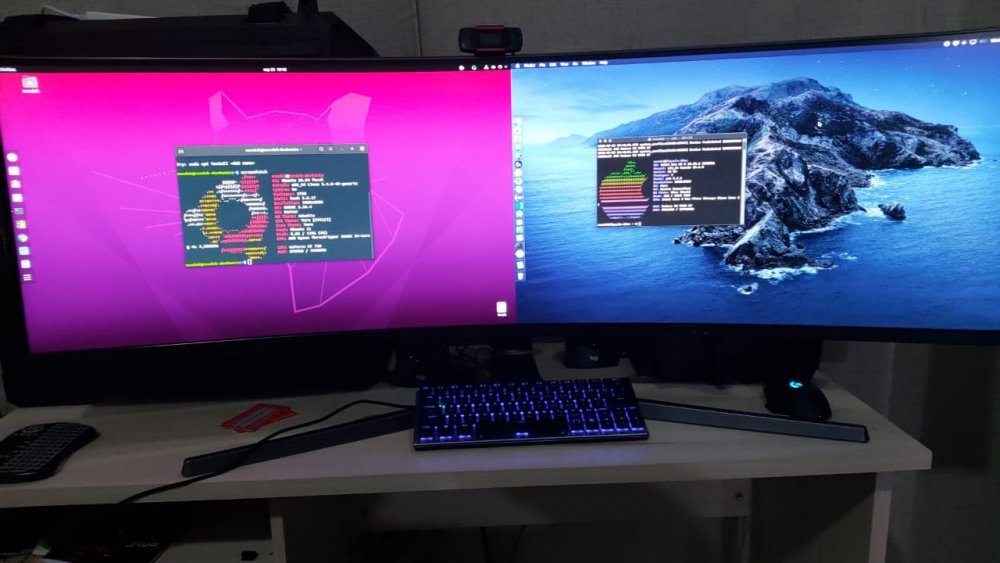
Wanted to share what I have achieved with this great tool Catalina over passthrough 5700XT and Samsun EVO nvme 970 Ubuntu on regular array drive and a placeholder GT710 for my rtx3080 16 cores each 28GB ram each controlling both with synergy 1 keyboard and 1 mouse Loving my system with all my soul thanks again @SpaceInvaderOne