






animeking
Members
-
Joined
-
Last visited
Everything posted by animeking
-
I must have not set something up right i have already got a error http://cloud.tapatalk.com/s/5f8ecb5b40329/log.txt Sent from my SM-N986U using Tapatalk
-
I think i got it working. just need confirmation is this how it suppose to look. i need those api bans to stop!! upload.txt mount.txt
-
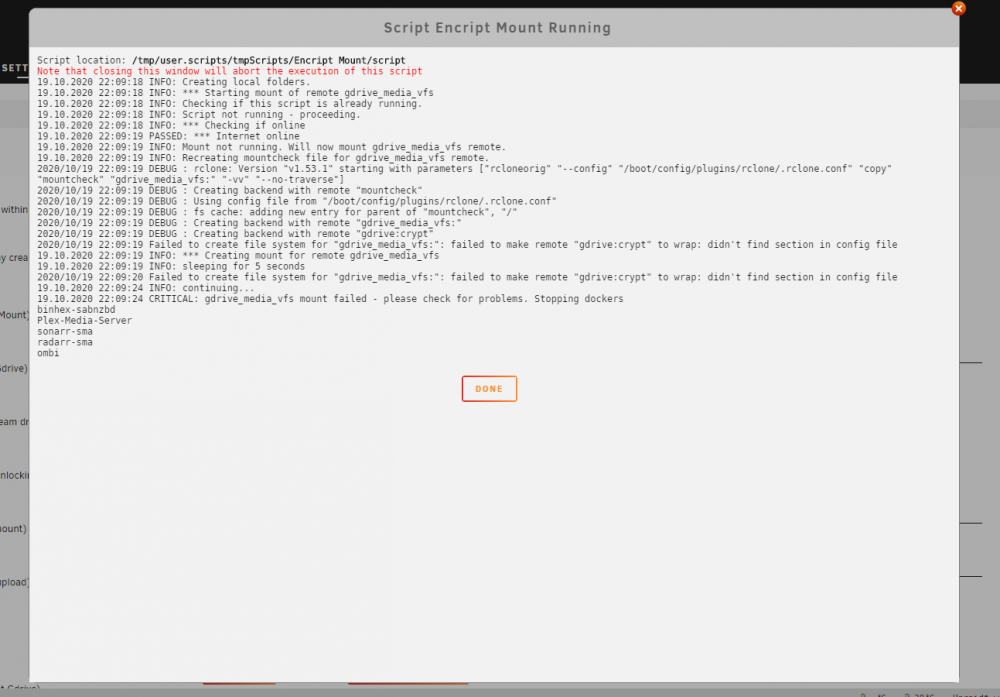
i get this when i run the mount script
-
Does it matter if I mount at mnt/ or mnt/disks Sent from my SM-N986U using Tapatalk
-
I have enabled the api and made creditenals. But the script writing im not really understanding [emoji53] Sent from my SM-N986U using Tapatalk
-
Turn key solution??? i did not see that @Bolagnaise
-
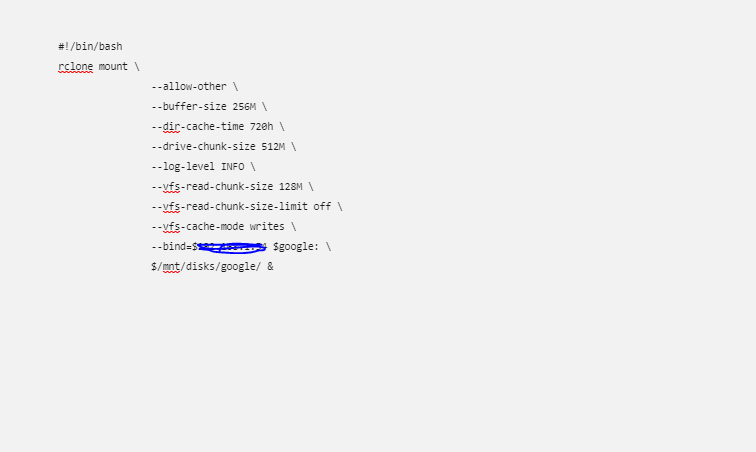
need some assistance, i keep getting the gdrive api ban. im really not a rclone expert with writing scripts or commands to stop the bans. so if someone is willing to guide me i would be happy to listen so i can stop getting the api bans. so far all i have accomplished is mounted gdrive and made a script. i followed the spaceinvader...
-
anybody else having problems with deezmix not loading logs: Deezmix logs.txt
-
question when i do my plex scan of any media in my library my array goes undefined. some other users stated it could be my rclone causing the problem. Previous Post i tried to find the answer but still no luck. here is my rclone cache script: rclone mount "google cache": /mnt/user/Media/GoogleDrive --allow-other --dir-cache-time 1000h --log-level INFO --timeout=1h --umask 002 --user-a gent shedman214 --cache-dir=/mnt/user/Media/GoogleDrive_cache --vfs-cache-mode writes --vfs-cache-max-size 1G --vfs-cache-max-age 20s & syslog.txt


