





sluggathor
Members
-
Joined
-
Last visited
-
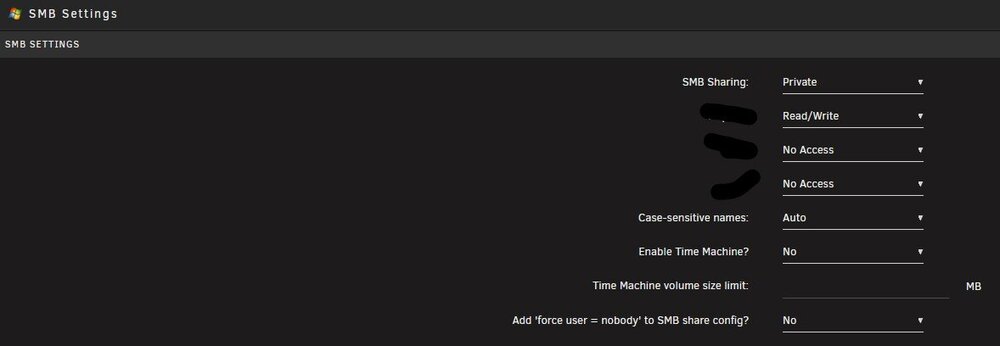
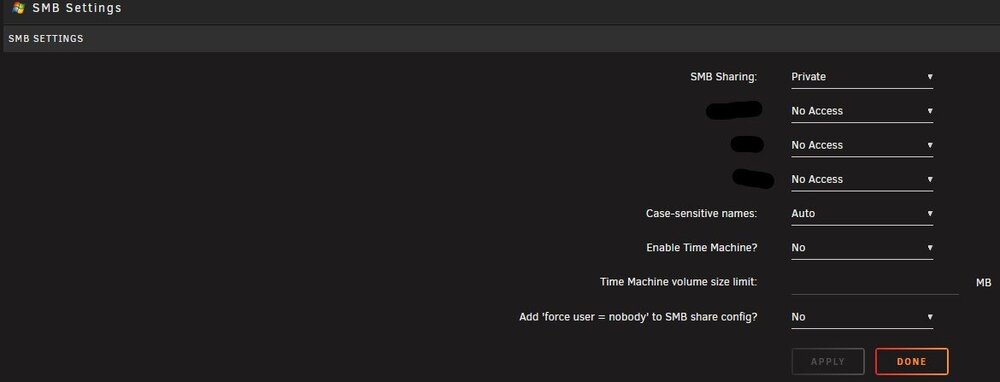
all set up. this is what it has always been set to: and this is what comes up after reboot: i swear it worked a while ago...
-
Hi, i am using unassigned devices to create a root share (created via the option in the webui) of my storage. now the problem: after every reboot the permissions of this share get reset, so my user can not access that share until i go into the ui and set them up again. I tried reinstalling the plugin and recreating the root share. any pointers? thank you in advance EDIT: the only message in the logs about the share Aug 16 20:03:18 hal unassigned.devices: Warning: No valid smb users defined. Share '/mnt/rootshare/root.share' cannot be accessed with smb.
-
Would it be possible to use white-/blacklist to limit which pools get polled for datasets? The intent would be to prevent spin up of drives. In my example i would only need to work on my raidz2 cache and not on the other drives. thanks for the great plugin!
-
How did you get that information? What about a W480 chipset with 8 SATA ports? (Gigabyte W480M Vision W)
-
how did you switch kernels, if you don't mind me asking? did you just test with a different OS?
-
thank you
-
hi, is there a way to call the mount of a remote share setup via unassigned devices if it get's unmounted without restarting the array (for automount) or manually clicking the mount button? I am looking to mount my backup nas (which only gets powered on once a week for backups) within unraid. It is configured via unassigned devices but gets taken offline, when the backup nas poweres off and not remounted, when the backup nas comes online again. thank you!
-
i did... and i am running a seperate syslog server... but nothing in the logs... like nothing. just being informed of the occasional spin down or write method switch. will post after the next crash
-
hi, i seem to be in the same boat as some other users where unraid locks up completely from time to time. i did check my powertop settings and disabled all power saving for the connected drives and the asm sata controller. when unraid freezes i can not login via web/ssh/console. system: xeon w-1290p Gigabyte W480 Vision D 32gb of ECC Kingston RAM 3x 18TB Toshiba 2x 960GB Samsung SSD 2x 3.84TB Samsung SSD 2x 1TB Samsung 980 NVME SSD 1x ASM1166 with updated Silverstone Firmware for ASPM compatibility 10G AQC107 NIC any help possible? it bugs me to hell jarvis-diagnostics-20231006-1134.zip
-
i solved this in the mean time. a replicated job for some zfs datasets with mountpoints set messed up some of unraids mount points.
-
so my server locked up a few days ago (nothing in the logs - i suspect powertop messing up the wrong device). Anyway, since the reboot the installed plugin tab shows no installed plugins (they show up in settings and work, by all accounts). Also on the update os tab, i can only see the restore option and, funny enough, a message that no plugins are installed. is there a way to reset the webui or something without reinstalling everything (i have backups via myserver and other means)
-
i was thinking about using my new 18tb mg09 as array drives in zfs (for easy zfs send/receive and compression). what happens to my array if one of the drives filles up to maybe 50GB free space? i know performance is going to tank hard on the way there but will it render the filesystem (or array) unusable? since this never happened to me before i could use some input. thank you!
-
i can use most of the functionality of the powerstat plugin for telegraf (package power) - but frequency and c-state are not working yet. i suppose that's what intel_rapl_core is for. any news on if it's possible to implement? THANK YOU for the great support!
-
hello, i was using a i7-10700 until a short while ago. i got it down to about 4-5 w idle (on the cpu) with my dockers running etc. . since i switched to a xeon w-1350 the idle power draw has doubled. powertop --auto-tune, powersave cpu governor and bios settings limiting pl1 and pl2 were all tried. any pointers? are xeon w just not able to idle that low? edit: i am using the intel.powerstat plugin within telegraf to monitor cpu draw (THANKS @ich777, btw it's working) - but my external meter confirms the extra 5-6 w idle load
-
is there a way to limit cpu usage or define cores to be used? ram limit? normal lxc commands obviously dont work here. nevermind, found the post in this topic... (search DOES work)



