Ruuddie
Members
-
Joined
-
Last visited
-
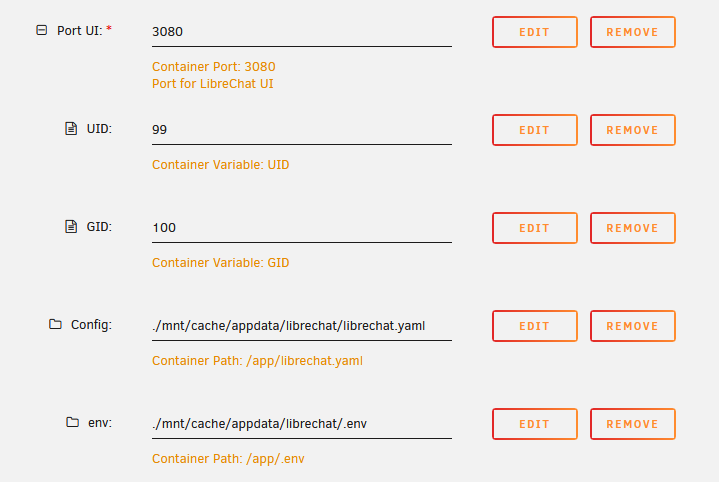
I have added the .env file as well, so I don't have to add a gazillion environment vars to the docker config in Unraid. Seems to work perfectly. I migrated all the docker template's settings to the .env file, so only this is left:
-
Hi all. I currently have a Xeon 2640 v4 with 128GB RAM, Quadro P4000, 6 SATA disks, 2 NVME SSD's and 1 SATA SSD. It runs about 20 docker containers, a Home Assistant and a Kasm VM. It has a lot of spare headroom for me to fire up extra VM's and even ESXi as a VM, but that's for occasional use, they are not always on. Under normal load, I'm on ~30GB RAM usage. I use the P4000 for Plex transcoding because the Xeon doesn't have an iGPU. I have applied all power saving scripts from this thread. With this, the system's idle usage with all disks spun down is around 70W. I feel like this isn't too much for a big Xeon system, but still I'd be interested in saving power. Or well, I guess that's all about saving money down the line So I could invest in newer hardware, but since I prefer to have at least 64GB RAM and preferably have 96/128GB, that would be quite expensive. Also, I don't want something like an N100, I want something that has some performance to run VM's now and then. Doesn't need to be a full 10+ cores setup, but I guess 6+ performance cores (so not the E-cores from the N) would work. Let's say i5 12400-ish? That would also be able to take over transcoding from the P4000, so I wouldn't need a dGPU anymore. If I browse through this thread, I have a feeling that with my requirements will not be giving me a 10W idle system, but it'll go more towards 40W-ish idle. That'd be a savings of 30W, which is about 100 euro per year. So to get a couple hundreds of euros investment back, would take at least a couple of years. That barely feels like it's worth the effort, also because my system now can do everything I want, with plenty headroom performance-wise and it has a built-in remote KVM which is great. What are your thoughts on this?
-
Thanks a lot for your help! Removing all devices from the cache pool, starting it, stopping it, and adding back the A2000 with all the data on it worked well. I decided to not take any risks, and just move all files over from Cache to the Array. This process actually failed 3 times, on some corrupted file. I had to reboot the server (couldn't stop the mover) and do the trick with removing the device from the cache pool, starting, stopping and adding again, because the array wouldn't start with it. I guess my A2000 is half dead, which probably was the cause of all my issues in the first place (random disconnects). Thanks again for your tips. I just finished moving all data from the cache SSD's to my disk array. Now I'll rebuild a brand new cache (great moment to switch to ZFS!) and move the data back.
-
Cool, it does seem to recognise data on the Kingston! It's doing a BTRFS operation now. I see the used data going down slowly (started at 400GB, down to 333GB now), I hope it's not removing my files 😛 But the used and free data combined (used 350GB and free 300GB) is lower than my 1TB storage, so I hope it's just doing some background wizardry and it's all good in a couple of hours. If it worked, I'll first migrate all data to my normal disks, put in my new (empty) cache nvme's and move it all back. Not going to risk the direct-swap again. unraid-diagnostics-20230701-1321.zip
-
First step was a reboot disconnect the Kingston and connect the WD770 instead (as that is my go-to setup). After failing, I rebooted and switched to having the Kingston and WD770 installed (since I figured the Samsung might still have some files on it and decided to keep it offline as a backup). This second reboot is what I sent diags of; I don't have any diags of the first step unfortunately. I'm back on the Kingston and Samsung now and included the diags of this setup, but I don't want to just assign them to the cache and pray. How should I do this? Both the Kingston and the Samsung are unassigned devices now, because of my earlier tries of swapping it around. unraid-diagnostics-20230701-1238.zip
-
Hi, uploaded the diagnostics, thanks for helping out! unraid-diagnostics-20230701-1209.zip
-
Hi, I had a cache pool of two 1TB NVME devices: a Kingston A2000 and a Samsung PM981a. Because the Kingston has some issues with getting disconnected now and then, I decided to replace it with a new 1TB one (WD SN770). I figured it'd be easy since they are all 1TB, and it was a raid 1 cache so the data is on the PM981a as well. So I did the following: - Stop VM and Docker services - Shutdown server - Replace A2000 with SN770 in server - Replace A2000 with SN770 in cache array - Start array After this, it asked me to format. However, it showed it had to format both the new SN770 and the old PM981a. I figured this was some sort of mistake, since it should just copy the contents of the PM981a over to the new SN770 in the array. However, it actually did format both devices. Now I still have the A2000 unwiped, so I'm hoping I can restore all data from that SSD. What would be the best way to do this? I removed the PM981a from the system and put the A2000 back in. Now I have the A2000 as nvme1n1 and the SN770 as nvme0n1. I somehow can't just seem to mount the old A2000 as unassigned device, it says the filesystem is incorrect: Mount of 'nvme1n1p1' failed: 'mount: /mnt/disks/50026B768465C999: wrong fs type, bad option, bad superblock on /dev/nvme1n1p1, missing codepage or helper program, or other error. dmesg(1) may have more information after failed mount system call. Am I screwed or can we still fix this? Running Unraid 6.12.1 by the way.
-
I had the same issue and luckily I was able to restore a month old backup. Everything seems to be working fine again. I noticed most of the Radarr interface still worked, but downloads weren't processed properly and artwork didn't show.
-
Thanks for your help guys! I agree, RAID/parity is never a backup solution. The data I have on here is disposable-ish; I wouldn't like to lose it (hence parity/raid), but my documents, pictures, etc are backed up to the cloud using OneDrive 🙂 I have added two NVME 250GB SSD's to the cache pool. I do reach the full 1Gbit speed fulltime now, so yay there! My first plan was to add a SATA 250GB SSD as cache, one NVME 250GB SSD to 'ssd-pool-1' and another NVME 250GB SSD to 'ssd-pool-2' for VM's. There would be no redundancy, but optimal use of the storage available by my small SSD's. After realizing I'll need caching for proper performance, and knowing the cache is used to store data until the mover is invoked, I feel like I have to have redundant cache as well. And I wouldn't make sense to use one SATA SSD and one NVME SSD in the same cache pool, because of the large speed difference. Is my reasoning a bit ok here? Or do you have other idea's/insights?
-
Thanks a lot for the clear answer! I had disabled cache because it gave issues when I moved all my data from Synology to Unraid (SSD is 250GB and mover only runs every-so-often so the SSD was full and the copy job stopped). I guess I can just reenable it after the move is done, since I won't be moving more than 250GB anyway.
-
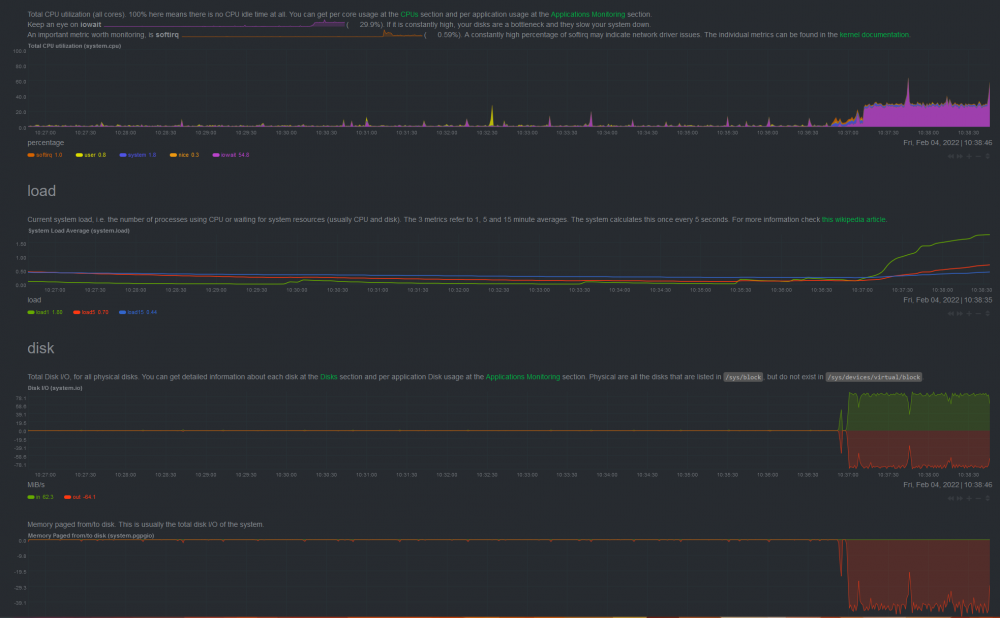
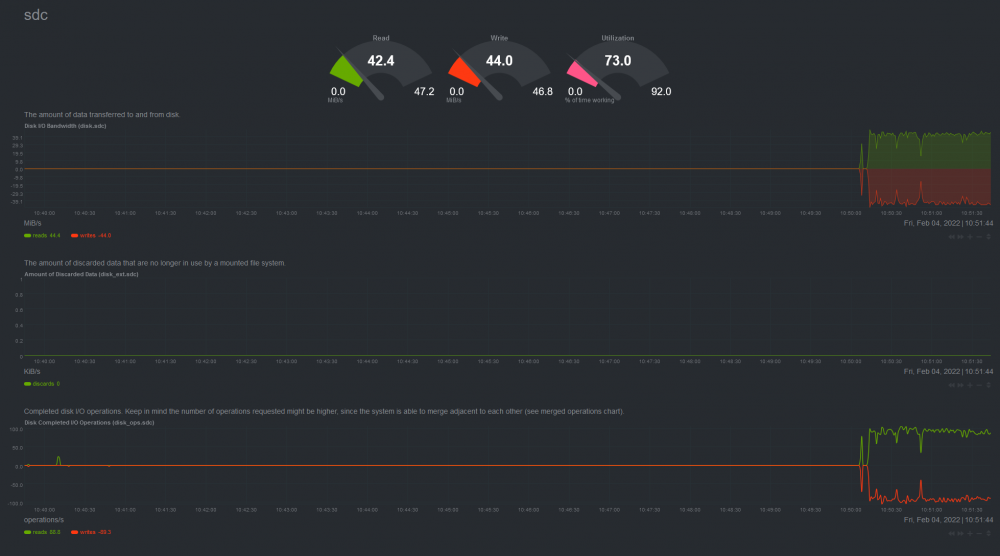
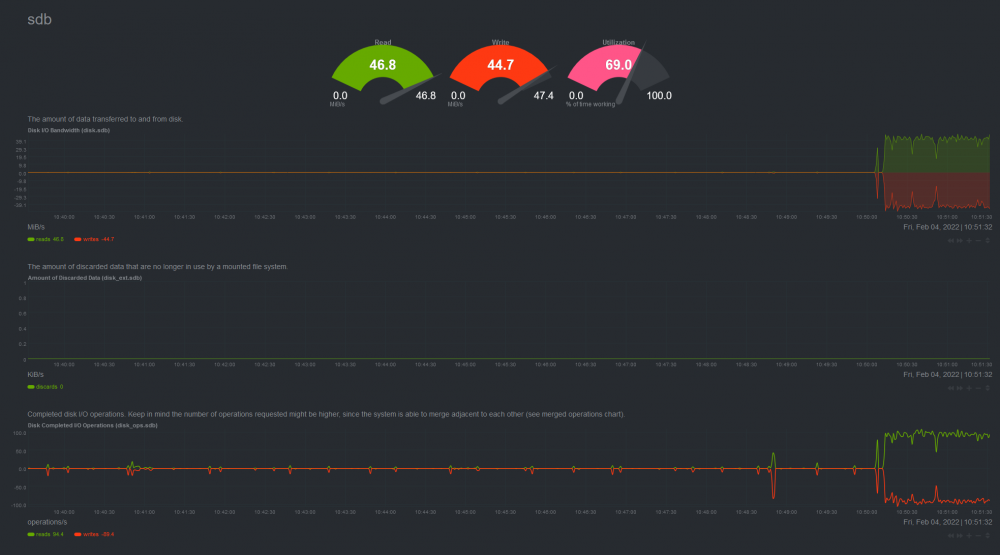
Hi, I have recently installed a new Unraid 6.9.2 server, with one 5TB parity disk and two 3TB storage disks into an array. No SSD caching at the moment. The array is set up using the default xfs, I haven't switched to btrfs because I don't need any of the new features and prefer full stability and proven technology. It's a Pentium G6500 with 16GB RAM. The disks are connected to a Dell PCIe card flashed with LSI SAS2008 IT firmware, acting as HBA. When I copy a large file via SMB (Edit: I mean, I copy a file from my PC to the Unraid server), I notice the transferspeed drops from the full 112 MB/s back to 40-ish after a couple of GB. I have seen some other topics about this issue, but I don't think they were conclusive in their solution. Some suggest the disks are faulty, but before I installed Unraid, they worked flawlessly (tested with both VMware and Windows Server). Adding SSD cache might work, but I figure a normal HDD should easily do 100 MB/s without SSD cache in between. I installed netdata to try and get some insight into what's happening. I attached screenshots of this. The first screenshot shows the system both read and writes at around 80MB/s at the same time. On the second and third screenshot, you see both read and writes 40MB/s to both sdb and sdc. sdb is the 5TB parity disk, sdc is one of the 3TB data disks. So if I interpret this correctly, it seems to: - Write the file to the parity and data disk at the same time (good, redundancy!) - Do this by reading the file after it has been written, instead of doing this in memory Is this an Unraid issue or an xfs issue? I think it should calculate the parity while the file is in memory. Re-reading a file that has just been written seems very inefficient, and is obviously very taxing. Regards, Ruud