





BobNik
Members
-
Joined
-
Last visited
-
Hi, i still have one reiserfs drive (Cache) and want to reformat to the btrfs. My docker and apps are exclusively on the cache drive. The steps are: Step 1. Stop Dockers Settings/Docker/ and change Enable Docker to 'No' Step 2. Stop VMs Settings/VM Manager/ and change Enable VMs to 'No' Step 3 - Move all folders (appdata, domains, isos and system) from the Cache drive On my unRaid they are set as Cache only with no secondary storage set therefore I can use something like Midnight Commander to move the folders from the Cache drive to the array or somewhere else. Step 4. After the move, validate the cache drive and make sure all folders are moved and the cache drive is empty. /**The most important step**/ ls -la /mnt/cache Step 5. Stop the array; click on Cache disk and set the filesystem to btrsfs. Step 6. Start Array; Check format; Click Format and wait to complete. Step 7. Move saved folders back to the Cache drive; validate. Step 8. Start Dockers Settings/Docker/ and change Enable Docker to 'Yes' Step 9. Start VMs Settings/VM Manager/ and change Enable VMs to 'Yes' -- DONE -- The same steps can be used to replace the Cache drive. Obviously after Step 4 a clean shut down is required to change the drives. Once the drive is changed, continue with Step 5. Hope I documented the process right. I would appreciate is someone can validate and comment. Regards Bob ps. I am fully aware that one can use unRaid movers function to move folders out and back to the cache drive but I like to control each step manually. :-)
-
The Brave browser is not rendering the page correcly and hides Search option under the top ribbon. Chrome is fine. The issue is resolved.
-
HI, I have decided to upgrade to ver 7.x from my old 6.8.3 in two steps. Step 1. - Upgrade to 6.12.15 Step 2. - Upgrade to 7.x from 6.12.15. Now, I believe that upgrade to 6.12.15 went fine, no errors reported and everything looks fine. I still have to reformat my Cache drive from Reiserfs to Btrfs but after I am sure that upgrade to 6.12.15 is done correctly. The Apps page is now showing all apps however I dont see a Search option.. Am I missing something? Help is appreciated. Thx Bob
-
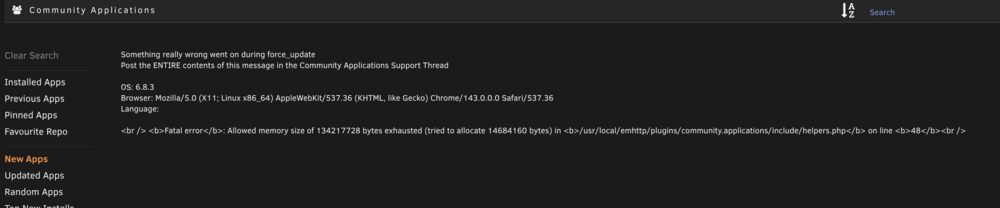
Hi, i got the following error while trying to list the community apps. Anyone seen this before or know how to resolve? Thanks Bob <<< Something really wrong went on during force_update Post the ENTIRE contents of this message in the Community Applications Support Thread OS: 6.8.3 Browser: Mozilla/5.0 (X11; Linux x86_64) AppleWebKit/537.36 (KHTML, like Gecko) Chrome/143.0.0.0 Safari/537.36 Language: <br /> <b>Fatal error</b>: Allowed memory size of 134217728 bytes exhausted (tried to allocate 14684160 bytes) in <b>/usr/local/emhttp/plugins/community.applications/include/helpers.php</b> on line <b>48</b><br /> <<<<
-
Hi, i got the following error while trying to list the community apps. Anyone seen this before or know how to resolve? Thanks Bob <<< Something really wrong went on during force_update Post the ENTIRE contents of this message in the Community Applications Support Thread OS: 6.8.3 Browser: Mozilla/5.0 (X11; Linux x86_64) AppleWebKit/537.36 (KHTML, like Gecko) Chrome/143.0.0.0 Safari/537.36 Language: <br /> <b>Fatal error</b>: Allowed memory size of 134217728 bytes exhausted (tried to allocate 14684160 bytes) in <b>/usr/local/emhttp/plugins/community.applications/include/helpers.php</b> on line <b>48</b><br /> <<<<
-
Hi, i got the following error while trying to list the community apps. Anyone seen this before or know how to resolve? Thanks Bob <<< Something really wrong went on during force_update Post the ENTIRE contents of this message in the Community Applications Support Thread OS: 6.8.3 Browser: Mozilla/5.0 (X11; Linux x86_64) AppleWebKit/537.36 (KHTML, like Gecko) Chrome/143.0.0.0 Safari/537.36 Language: <br /> <b>Fatal error</b>: Allowed memory size of 134217728 bytes exhausted (tried to allocate 14684160 bytes) in <b>/usr/local/emhttp/plugins/community.applications/include/helpers.php</b> on line <b>48</b><br /> <<<<
-
The new parity check had speed of 190MB/s, so I assumed that the issue is now fully resolved with the reboot. My next scheduled parity check is on May 1 and I will post new diagnostic if the same thing happens. Thank you for listening. Regards Bob
-
Well, I have restarted the PC and the log after the boot doesn't show any prior errors. Tonight I will do another parity check (without error corrections) just to see the speed. If back to normal, I would consider this problem gone.
-
Here is diagnostic. tower-diagnostics-20240401-1804.zip
-
The Log is attached. Yes, I have formatted the drive. Since nothing is written on that drive, I can reformat again and restart but after the parity is done. Still one hour to go. tower-syslog-20240401-1949.zip
-
HI, I never had a problem with the speed of r/w during the parity; always around 200 MB/s. Recently I have added a new drive to the array with no issues on the GUI console, all looking good. The new drive was pre-cleared and the speed was around 200MB/s during the process. Yesterday my monthly parity started and to my surprise the speed in in 67MB/s range resulting in 3 times more time to complete (still not done). While investigating I found the error in the log (see below). My new disk9 is still empty, nothing was written. Have anyone seen a similar issue? The parity is still running. Please advise. Regards Bob From the log: Mar 6 11:42:11 Tower root: mount: /mnt/disk9: wrong fs type, bad option, bad superblock on /dev/md9, missing codepage or helper program, or other error. Mar 6 11:42:11 Tower emhttpd: /mnt/disk9 mount error: No file system
-
Thank you. I will upgrade at some point for sure.
-
Is this plugin still available for someone like me running a 6.8.3 version? Where to get it and how to install if CA is old too? Why still on 6.8.3 you ask? Simple - everything I have is working just fine. And that brings me to another question...I see version 6.9.15 is now current...is this one of many RCs for a new major release (7.0?). Is there a roadmap defined? Cheers. Bob
-
would like to wish a Happy New Year to all members and specially the moderators who are tirelessly helping everyone and keeping this product ticking. I have started with version 3 and now close to the latest and will stay for a long time with unRaid. Thank you for all the work and effort. Regards BobNik
-
My thinking exactly. Thank you for the replies.

