martindell
Members
-
Joined
-
Last visited
Everything posted by martindell
-
Two servers updated OK, one got an NGINX 500-error after reboot - ssh'd in to reboot and all OK. However just downgraded both, none of the drives would spin-down - so I must have an older SATA controller. I hope that gets resolved - I REALLY don't want to have to throw these computers away
-
I'm getting the same libssl error running both the old and the new publishing scripts via user scripts
-
Newbie Unraid tinkerer here too with the same question. Is there a way to somehow disable CPU folding within Unraid? Now I have the GPU cooking, it just seems like a waste of power for the CPU to be involved too. I noticed my GPU thermal throttling every now and then (NVIDIA GTX 1080 Ti) and managed to cobble together this user script with ChatGPT's help. No doubt there are more elegant solutions, but this works and stretches my copy/paste skills to their limit 🙂 #!/bin/bash # Set the GPU fan control state to manual nvidia-settings -c :0 -a "[gpu:0]/GPUFanControlState=1" while true; do # Get the current GPU temperature TEMP=$(nvidia-settings -c :0 -q "[gpu:0]/GPUCoreTemp" | grep -Po '(?<=: )\d+') # Set fan speed based on temperature ranges if [ "$TEMP" -gt 85 ]; then nvidia-settings -c :0 -a "[fan:0]/GPUTargetFanSpeed=85" echo "Temperature is $TEMP°C. Fan speed set to 85%." elif [ "$TEMP" -gt 80 ]; then nvidia-settings -c :0 -a "[fan:0]/GPUTargetFanSpeed=80" echo "Temperature is $TEMP°C. Fan speed set to 80%." elif [ "$TEMP" -gt 75 ]; then nvidia-settings -c :0 -a "[fan:0]/GPUTargetFanSpeed=75" echo "Temperature is $TEMP°C. Fan speed set to 75%." elif [ "$TEMP" -gt 70 ]; then nvidia-settings -c :0 -a "[fan:0]/GPUTargetFanSpeed=70" echo "Temperature is $TEMP°C. Fan speed set to 70%." elif [ "$TEMP" -gt 65 ]; then nvidia-settings -c :0 -a "[fan:0]/GPUTargetFanSpeed=65" echo "Temperature is $TEMP°C. Fan speed set to 65%." elif [ "$TEMP" -gt 60 ]; then nvidia-settings -c :0 -a "[fan:0]/GPUTargetFanSpeed=60" echo "Temperature is $TEMP°C. Fan speed set to 60%." elif [ "$TEMP" -gt 50 ]; then nvidia-settings -c :0 -a "[fan:0]/GPUTargetFanSpeed=50" echo "Temperature is $TEMP°C. Fan speed set to 50%." else # Explicitly set fan speed to 20% for 50°C or below nvidia-settings -c :0 -a "[fan:0]/GPUTargetFanSpeed=20" echo "Temperature is $TEMP°C. Fan speed set to 20%." fi # Wait before checking again (adjust interval as needed) sleep 5 done
-
Awesome, thank you. Sorry that I have no clue what I'm doing
-
Thanks, I've modified the docker (I think) and will see what happens to the container size. I'm configuring this via the Unraid docker interface and I get this when it restarts. Does this look right (sorry, am at the limit of my tech abilities here ..) root@localhost:# /usr/local/emhttp/plugins/dynamix.docker.manager/scripts/docker run -d --name='Ripper' --net='host' --privileged=true -e TZ="Europe/London" -e HOST_OS="Unraid" -e 'log-opt max-size'='50m' -v '/dev/sr0':'/dev/sr0':'rw' -v '/mnt/user/Potter/':'/out':'rw' -v '/mnt/cache/.appdata/ripper':'/config/':'rw' --device=/dev/sr0:/dev/sr0 'rix1337/docker-ripper' b06d9a14bfcd3ba5d13ed35403c817b2e05b02a5b803b5ea7dc992335820180d An add-on question if I may. Is there a way to only rip audio CD's to MP3 via the docker config (no flac or wav)?
-
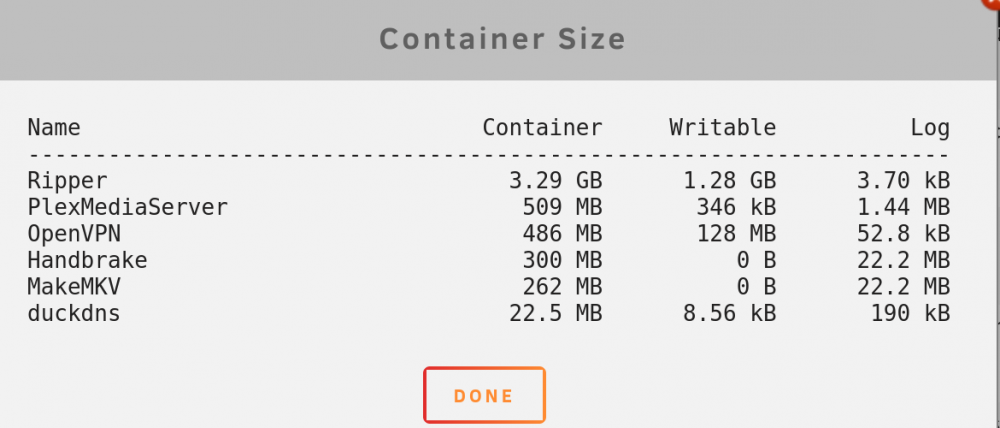
Ripper container increasing in size while not in use. I got an UNRAID about disk utilisation and noticed that the Ripper container had grown to 5Gb. I uninstalled and reinstalled but it's grown from 2.7Gb to 3.2Gb in a couple of days. I'm not actively using Ripper at the moment and the log doesn't show anything untoward. Any idea what I can do to diagnose / resolve this? Thanks in advance for any help.