





DigitalDivide
Members
-
Joined
-
Last visited
Everything posted by DigitalDivide
-
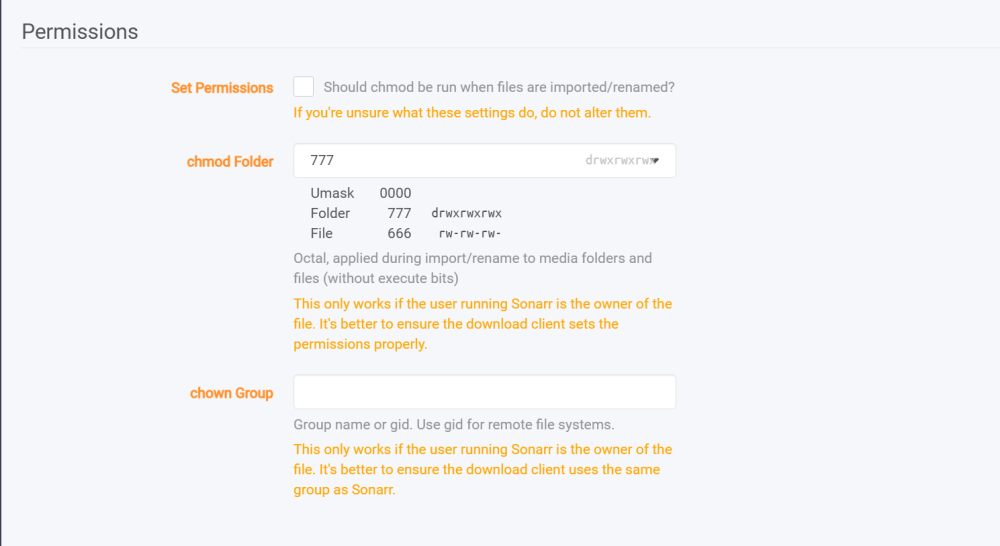
Not sure what's going on but all of a sudden Sonarr is not able to import any shows for the last 2 or 3 days. I haven't made a changes, well except for updating the docker. I'm getting the following then for each episode I get Couldn't import episode /data/completed/xxx.mkv: Access to the path '/tv/xxx' is denied. I checked and as far as I can see my folders look good. Just looking for some assistance on what might have happened


-
Well, I fixed that. For some reason had to remove the unassigned partition, format the drive, then recreate the partition. Seems to have done the trick
-
Well, I think I fixed it. I removed the partition and formated my unassigned disk. Recreated the partition and it's now working. Not sure what happened...
-
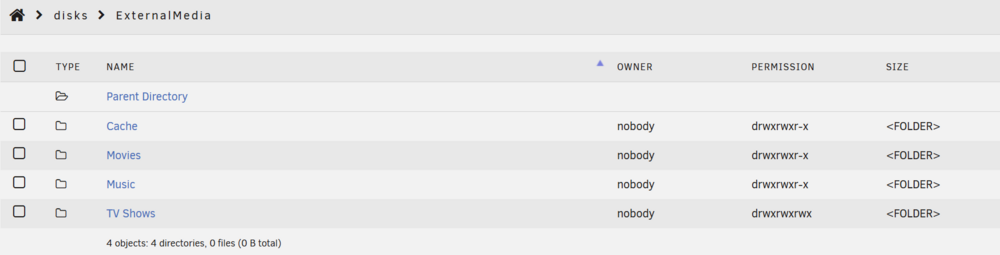
I had to restore my server as I lost my usb device. Got everything pretty much back but running into a problem with Sonarr. It doesn't seem to be able to move files to the destination folder on my unassigned disk. I'm seeing the following error below. I noticed that when I add a show, it's not creating a folder for the show, so then can't copy the files I'm assuming. Series' root folder (/tv) is empty. then System.UnauthorizedAccessException: Access to the path '/tv/Daredevil - Born Again' is denied. ---> System.IO.IOException: Permission denied --- End of inner exception stack trace --- at System.IO.FileSystem.CreateDirectory(String fullPath) at System.IO.Directory.CreateDirectory(String path) at NzbDrone.Common.Disk.DiskProviderBase.CreateFolder(String path) in ./Sonarr.Common/Disk/DiskProviderBase.cs:line 218 at NzbDrone.Core.MediaFiles.EpisodeFileMovingService.CreateFolder(String directoryName) in ./Sonarr.Core/MediaFiles/EpisodeFileMovingService.cs:line 249 at NzbDrone.Core.MediaFiles.EpisodeFileMovingService.EnsureEpisodeFolder(EpisodeFile episodeFile, Series series, Int32 seasonNumber, String filePath) in ./Sonarr.Core/MediaFiles/EpisodeFileMovingService.cs:line 196 at NzbDrone.Core.MediaFiles.EpisodeFileMovingService.CopyEpisodeFile(EpisodeFile episodeFile, LocalEpisode localEpisode) in ./Sonarr.Core/MediaFiles/EpisodeFileMovingService.cs:line 96 at NzbDrone.Core.MediaFiles.UpgradeMediaFileService.UpgradeEpisodeFile(EpisodeFile episodeFile, LocalEpisode localEpisode, Boolean copyOnly) in ./Sonarr.Core/MediaFiles/UpgradeMediaFileService.cs:line 76 at NzbDrone.Core.MediaFiles.EpisodeImport.ImportApprovedEpisodes.Import(List`1 decisions, Boolean newDownload, DownloadClientItem downloadClientItem, ImportMode importMode) in ./Sonarr.Core/MediaFiles/EpisodeImport/ImportApprovedEpisodes.cs:line 159 Close Sonarr docker has the following The unassigned drive has the following I removed the TV Shows Folder and recreated it but still same error. Everything was working fine before I replaced my usb key. I copied over the config folder I had from a few months ago. Just not sure what the cause is.

-
I ended up doing a restore of the dockers from appdata restore. Most everthing works but having one issue. It's in relation to Sonarr. When trying to copy the files to the destination folder I'm getting the following error. Couldn't import episode /data/completed/Daredevil.Born.Again.S02.2160p.DSNP.WEB-DL.DDP5.1.Atmos.DV.HDR.H.265-BLOOM/Daredevil.Born.Again.S02E07.The.Hateful.Darkness.2160p.DSNP.WEB-DL.DDP5.1.Atmos.DV.HDR.H.265-BLOOM.mkv: Access to the path '/tv/Daredevil - Born Again' is denied. Not sure why the access to the path is denied. I have this set in sonarr and the folder does exist

-
My dockers are all there and seem to be working. First off I want to say thanks for all your help. I really do appreciate it! Last question for the night as it's getting quite late for me. ++++++++++++++++++++ You said You can use the config folder from that backup to overwrite the config folder on flash and you will have a configuration as current as that backup. When I say "configuration" I mean all settings from the webUI. None of your storage has your configuration (unless you go to Internal Boot with a boot partition on your storage). Your storage just has your data. Some of that data is your appdata, but the docker templates needed to work with your dockers in the webUI are part of your configuration in the config folder on flash. ++++++++++++++++++++ Not sure I follow. How do I grab the config folder from that backup? Is it just a zipped file that I can copy to my pc and unzip it? Not sure what you mean by ""configuration" I mean all settings from the webUI." Ooops one other question. I can browse my shares of my server from my pc but can't see the individual drives like I use to. I know there was a setting so I can see my individual disks, just can't remember what it was. Was it export on each drive?
-
Oh oh I think I did something stupid. I thought I had Connect previously so I installed it. But all of a sudden I lost access to my unraid server. I get site can't be reached now. edit: nevermind. Seems my server went into sleep mode.
-
I found an unraid backup from just before I shut down my server when I had to move out for my home reno which is about 2 months ago

-
After I do this. Can I still restore from a backup? I really don't want to have to reinstall all my dockers and reconfigure everything. It took a long time to get it working the way I wanted it.
-
I guess I have to unmount my drives, remove the read only and then assign them to the slots
-
Good find! I looked at my posts but didn't even see that. So I could just use that and assign my drives right
-
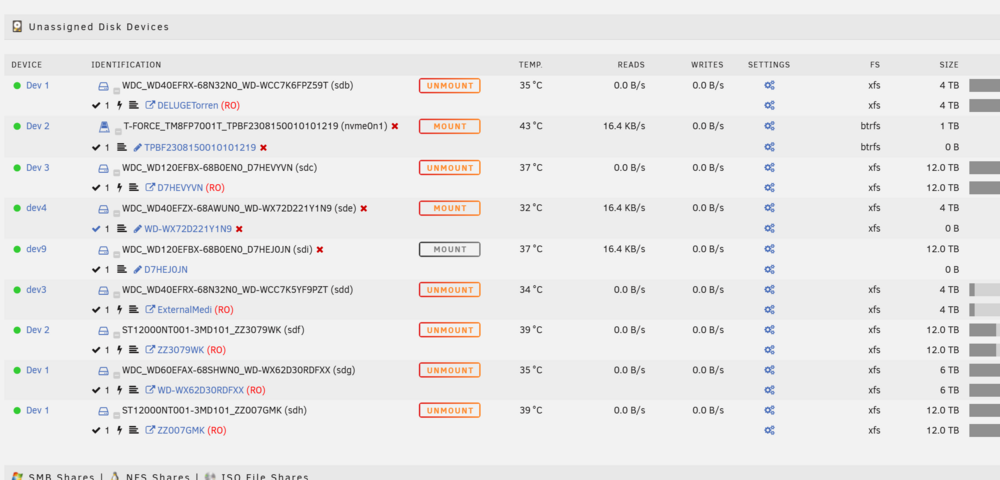
This is what I now see, which would be correct. A total of 9 drives 1 x Parity 1 x cache - The T Force drive. This I know for sure 5 x data drives 2 x unassigned drives - I know which ones this are as well
-
ok I was able to mount all the drives. I didn't try to mount the greyed out one but since I can mount all the other drives, the greyed out one must be the parity drive
-
yup, found it. Mounting them now as read only
-
how do I mount the drives as read only. I don't see an option anywhere
-
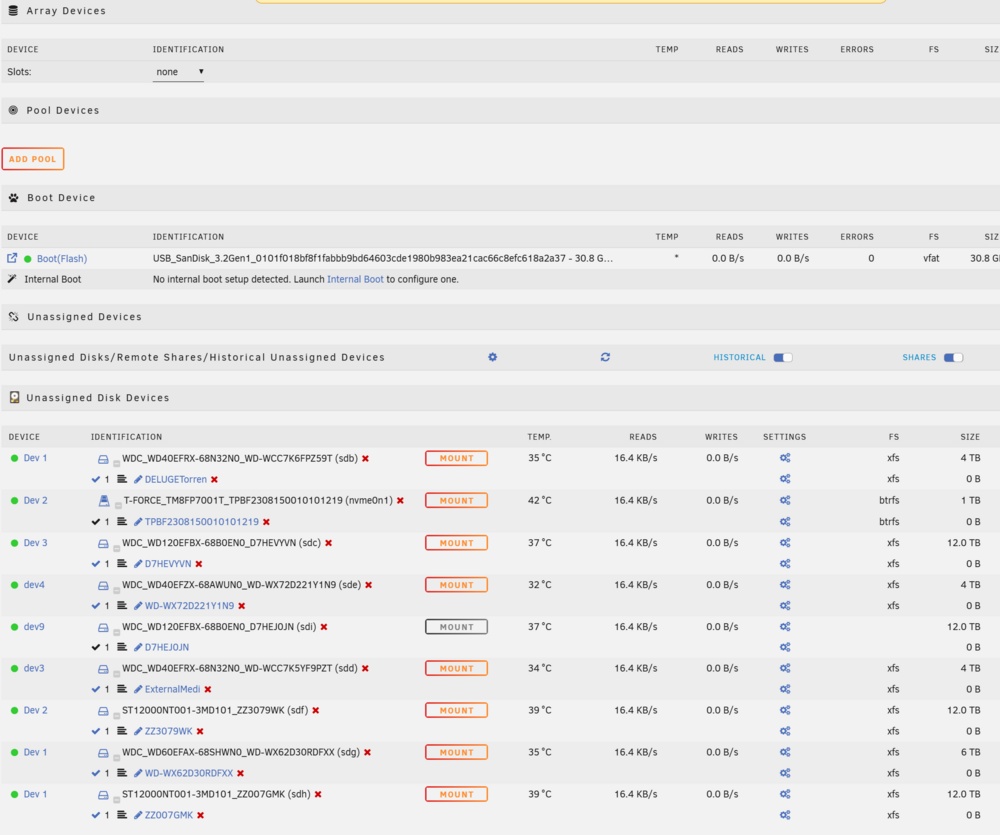
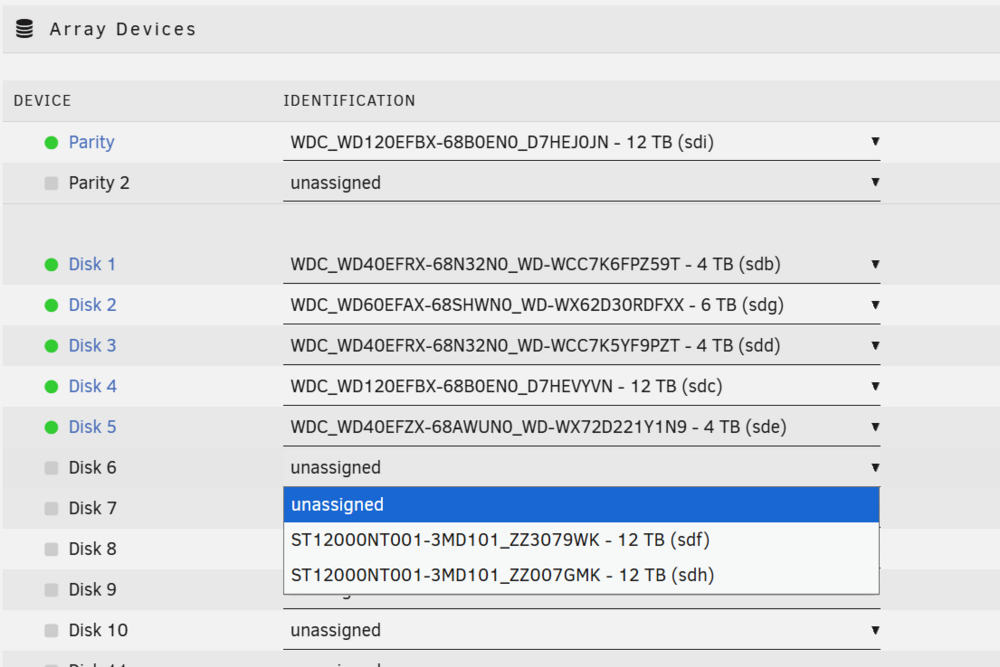
This is a little confusing to me. I do appreciate your assistance. So I did New Config and now see this. The way I had it was 5 data disks, 1 cache, and 2 unassigned drives. I'm a little unsure where to start now. Is the greyed out drive the parity drive?
-
Wow. Actually I'm back up and running...sort of. I copied the config folder from the one on my pc drive and booted up. I got an onscreen message to update my key. It took me to unraid connect and updated my key. Problem is the config I restored seems to have two old disks and not the new 12tb ones and I'm not sure where to assign them to. When I select a slot and replace the old drive with the newer 12tb drive, it says "All existing data on this device will be OVERWRITTEN when array is Started" I have 5 data disks. I"m assuming unraid recognized the right drive as parity and put in as parity. The problem is I'm not sure which of the 3 x 4tb drives and the 1 x 6TB drive I replaced with the two 12TB drives. How do I start up the array with them in a slot without erasing the drives or running a parity check?
-
Hmm I guess the license key is attached to the usb. I am getting an error "The license key file does not correspond to the boot device. Please copy the correct key file to the /config directory on your boot device. You may also attempt to Purchase or Replace your key." Does that mean I need to contact support for a new key?
-
I have a back up of my flash drive. Is there something I can do with it? Is there a file that provides the disk assignments? Can I just copy it over to my new flash drive or somewhere from within Unraid restore the flash?
-
I think I was backing up my config to the unraid server. Is there a way to use that? If I do have a backup, after my initial boot do I assign the drives as best as possible, start the array so I have access to my drive where I backed up the config, then somehow import my config file?
-
Hi, During a renovation of my home, now that I've moved back in, it seems I misplaced my Unraid USB. I looked everywhere but I suspect it must have gotten accidentaly dumped with some garbage which is now gone. I looked high and low for it but at this point I don't think luck is on my side. Just wondering what the overal steps of getting my existing array back? Obvisouly I need to buy a new USB and hopefully get the Unraid Pro license. I have my license key saved in my gmail. It's about 10 years old. Can I still use that and copy it to my usb? Next question is once I boot up, what are the next steps to not lose my data and get my array back? Then the long process of reinstalling all my apps and configuring them begins. Any assistance would greatly be appreciated!
-
Yup, that was it. Didn't even think of browser cache. Thanks
-
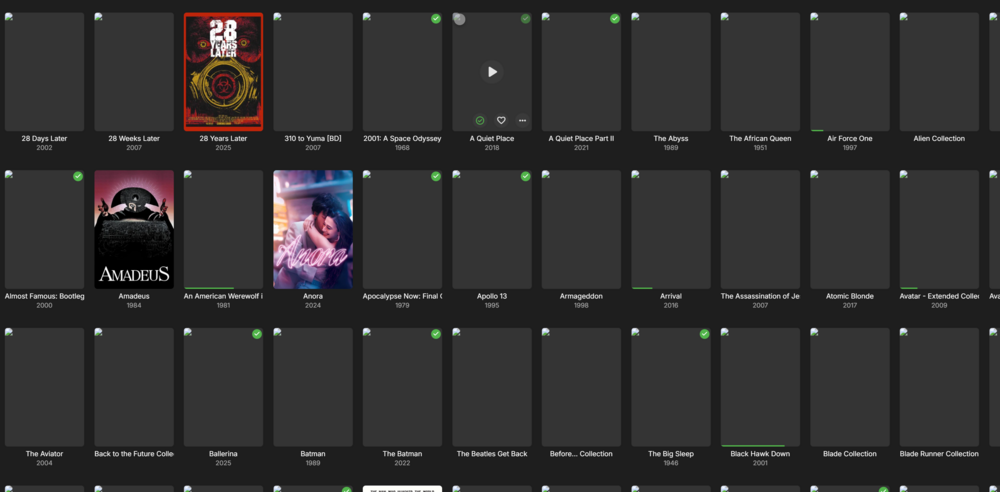
I'm a little lost here.Not sure if this is the right place to for my issue. I'm running EmbyServer which I don't really know if it's the new Emby docker. It says Version 4.9.3.0. I just updated to this but it seems to have caused an issue with my movie images. They no longer show the cover image. The image is in the folder and if I click on a movie, all the images show. I stopped the docker and restarted. I even rescanned the media. Still shows like this. I should add this is via my PC going to the webgui.
-
Odd, not sure why it's showing that as my server doesn't have it enabled as per my screenshot above. Not sure where else to look to see if it's set differently than what is shown.
-
Here's what's is strange. If I let my computer on for like 30min or so, eventually I am able to connect to it again. I just noticed that now. I'll give that a try next time but I'm thinking this may be related to my pc and not the server.



