





ruhrpotter
Members
-
Joined
-
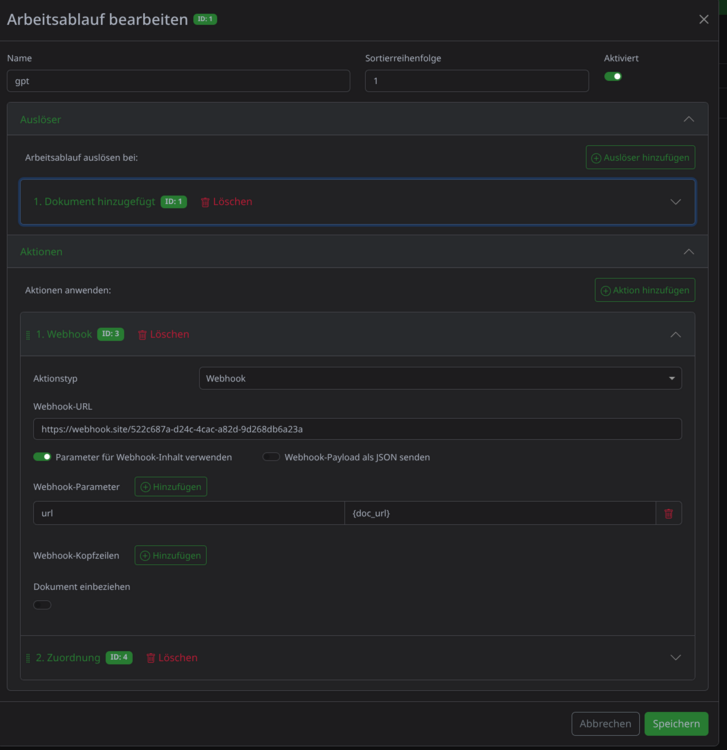
EDIT: SOLVED! the placeholder needs to be {{doc_url}} instead of {doc_url}! Hi, did anyone got it working to send the doc_url as a parameter from a webhook? I've tried multiple things, setting up the image again, setting different PAPERLESS_URL env vars, etc. But it always sends "url=%7Bdoc_url%7D". I'm using the official community applications template. PAPERLESS_URL value is http://192.168.178.XXX:8001 (unraid ip and paperless port) The webhook is executed succesfully, but the content is always empty. My goal is, after a document has been added to send it to n8n, which will then monitor this particular document for specific paperless-gpt tags to see if processing is done. Workflow:
-
Did someone saw this already? https://github.com/ccmorris/unraid-gui-responsive?tab=readme-ov-file Works surprisingly well. Some issues here and there but it's a step in the right direction!
-
Hi, I'm experiencing issues now with /etc/resolv.conf. Seems like unraid always adds %br0 at the end of the ipv6 nameserver. Seems to happen even when it's running, not only after reboot. nginx complains that it's not a valid adress, unless I remove the %br0. Is there any way to either tell nginx to ignore the file or tell unraid to not put the br0? I've looked in all folders for nginx but I cannot even find any reference to /etc/resolv.conf, so I wonder if it's even using this file. It seems to point to /etc/nginx/conf.d, but there is no resolver.conf file... Any ideas?
-
Hi, is there a way to obtain the ipv6 adress of the pihole in order to also set it as default ipv6 dns in the router? Network information is gone from the GUI as of recently. Also, commands like ip -6 addr do not work in the docker terminal. thanks!
