





Everything posted by polishprocessors
-
ok @itimpi just went through New Config, preserved settings, and looks like I'm back up, with parity check running now and will be done in a day or two. Thanks for this-I'm always nervous to do anything this dramatic with my unRAID server, but it needed to happen so I'm glad it's finally working!
-
Ok, then one more question: if I create a new config, how high is the risk of losing data? There's absolutely nothing on the removed 4TB drive, so nothing's being emulated. I guess my steps would be: 1) new config and rebuild parity without that drive 2) stop array, remove parity drive from config, start array 3) stop array, add new pre-cleared 26TB drive as parity 4) let parity rebuild 5) add 14TB drive back into array 6) let parity rebuild Is there any way to compress any of those steps, or, if I want to leave my array running at all times except for the stop/starts, is this the path I need to take? Guess that was actually two questions...
-
I suppose another option could be for me to simply create a new config with that empty drive removed, but I'm a bit nervous about that if I don't need to go that route
-
Since i didn't have enough room in my case, though, I had to remove the smallest (array) drive before installing the newer 26TB drive, so right now I'm sat with the array emulating that drive despite the fact i completely emptied it. Will it be ok for me to just stop the array and replace the parity and start it again, allowing it to rebuild parity even with that emulated/missing array drive?
-
According to that it'll be down for 'many hours' while it copies parity? With a 14TB old and 26TB new parity drive i imagine that'll actually be days. I don't mind going without parity while it rebuilds, but can I skip that long copy procedure?
-
Hey there! I've been running unRAID for some years now and have been getting better at administration, but, as I'm maxed out on power and space in my case I'm at a bit of a conundrum. I have a 7-drive system (6+array) with a 14TB parity and I just picked up a very good (shucked) deal on a 26TB Seagate drive so I'm looking to, ultimately, replace my smallest drive (4TB) with the parity and replace the parity with the 26TB. Unfortunately I don't have physical space/power to install the 26TB drive alongside the 4 and 14TB one, so I need to come up with a plan to remove/bypass it. Also, since I don't seem to have any external USB connections which'll let me preclear the new drive without plugging it into SATA, I'm at a bit of an impasse. I've already moved all the files off of and removed the 4TB drive and put the 26TB drive in its (physical) place and am currently zeroing the drive with preclear. unRAID is 'emulating' the 4TB drive, but there's no data on it, so that's of limited concern except for parity. So...my question is: Once the pre-clear finishes, can I stop the array, throw the 26TB drive in the parity slot and move the parity into the (currently emulated) place of the 4TB drive, start things up, and be fine? Or, as my gut wants to tell me, do I need to do this in stages: going parity-less for a stop/start when I move the parity drive to the array, restart the array, then add the 26TB drive to be parity. I guess this'll be my default unless someone weighs in confirming I can do both at once...
-
Yes, actually: https://github.com/aedocw/epub2tts-edge
-
Nope, though I expect it has to do with it not being on the correct git project, not properly mapping folders, and generally not being optimised for unRAID. There are whispers in the discord it'll be fixed soon, though, probably with the upgrade to v2.1
-
Hmm...scratch that-seems to still crash unRAID, even with these settings...
-
Right, fixed (or at least solved the immediate problem) but doing the following on template creation: Added 3 Path mounts: /home/user/app/tmp > /mnt/user/appdata/ebook2audiobook/app/tmp/ /home/user/app/audiobooks > /mnt/user/appdata/ebook2audiobook/app/audiobooks/ /home/user/app/models > /mnt/user/appdata/ebook2audiobook/app/models/ chown nobody:user -R /mnt/user/appdata/ebook2audiobook/app/ That should move the large processing files out of the docker img file, though the docker itself is still 13.7GB for me, even without those files...
-
Hey all! Has anyone successfully installed and run ebook2audiobook on unRAID? I've gotten it installed and it'll run (CPU-only, as I only have Intel QS for hardware transcoding) but eventually it'll crash my whole system. I've never been watching as unRAID fails, but I'm guessing it's because the application files are all stored within Docker and therefore the Docker .img file in unRAID and that'll eventually fill up and crash. But I can't seem to find a way to map the correct folders within the container outside of the docker.img file. Does anyone have any idea how to do this? I've created folder mapping to map /audiobooks and /tmp in the container to somewhere on my cache drive (as it seems all output goes to /tmp first and /audiobooks eventually, but the container doesn't seem to write to it, only locally on the docker.img file...
-
Did you manage to figure this out? This docker keeps crashing my unRAID instance, I think because it doesn't put its files on appdata, but instead leaves them all within the docker image file, which then fully fills up. I'm going to try running a (short) test to start and see where it puts it's temporary files and then try editing the docker to point those at my normal appdata folder
-
I was able to get past this error by creating a file (owned by nobody:users) of graylog2-committed-read-offset in the appdata folder (note it's greylog in this container but the container itself is called graylog-I updated them to be the same, even though it doesn't matter). But now I'm stuck again-I get loads of errors like this before the container stops itself: Caused by: java.io.IOException (same stack trace as error #16) 34 errors at com.google.inject.internal.Errors.throwCreationExceptionIfErrorsExist(Errors.java:543) at com.google.inject.internal.InternalInjectorCreator.injectDynamically(InternalInjectorCreator.java:186) at com.google.inject.internal.InternalInjectorCreator.build(InternalInjectorCreator.java:109) at com.google.inject.Guice.createInjector(Guice.java:87) at org.graylog2.shared.bindings.GuiceInjectorHolder.createInjector(GuiceInjectorHolder.java:34) at org.graylog2.bootstrap.CmdLineTool.setupInjector(CmdLineTool.java:379) at org.graylog2.bootstrap.CmdLineTool.run(CmdLineTool.java:194) at org.graylog2.bootstrap.Main.main(Main.java:50)
-
Did you or anyone else figure this out? I found links elsewhere suggesting we need to add this to our docker compose: PAPERLESS_OCR_USER_ARGS: '{"invalidate_digital_signatures": true}' But as we don't use docker compose with Unraid apps I added it as a variable, both with and without single quotes, but to no avail. Has anyone succeeded in getting this working?
-
Can confirm, did this, no issues. Thanks again!
-
Right, thanks!
-
Ok, one last question in the long list of issues I've had migrating my array from one enclosure to another, having a drive fail along the way, and accidentally overwriting some of my data... I finally have my array running now with my replacement drive. I didn't want to explicitly choose to replace a drive with the new one because I was too nervous during setup to pick the wrong one after previous failures, so I've now got a full array including a semi-failed drive that just won't accept writes at anything besides a snail's pace. So my question is: that drive's in slot 3 of the array and I have 6 drives in total. To remove the drive fully from the array I just need to create a new config. If I choose to keep all drives in the same positions, though, can I just deselect the drive in slot 3 and have it empty and the array will start fine? Just don't want to create more issues by having a middle slot empty... Sorry if I'm overthinking this, just want to make sure I don't create more issues again... unraid-diagnostics-20240421-1135.zip
-
Right, that would have been useful-thanks! Fortunately I managed to realise my mistake before I'd done anything catastrophic and so only need to sit through a 24h rebuild instead of having to rely on backups for anything...
-
I did and they did, rebuild appears to be going fine.
-
Ok, I found this, which I believe is the correct procedure: https://docs.unraid.net/unraid-os/manual/storage-management/#rebuilding-a-drive-onto-itself It just looks like that 10TB drive is DOA and, because of my mess-up, I'll need to rebuild the 14TB drive then look into replacing the 10TB as well
-
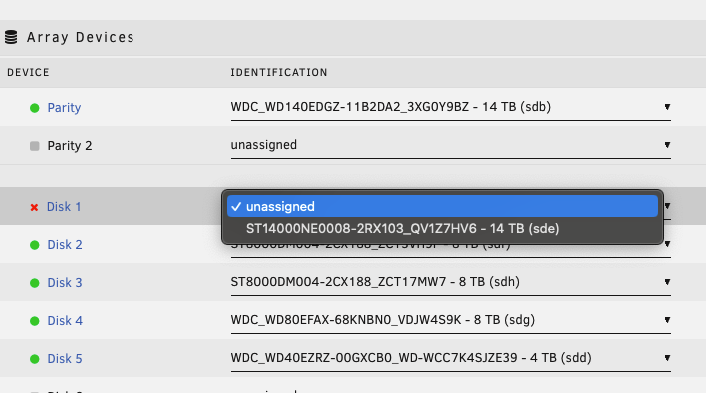
Ok, so I definitely clicked 'clear disk' before I realized that was actually a disconnected disk. So now I'm sat in emulation mode, but I want to be VERY careful to not lose any data... Should I re-attach this disk to the array? If so, will that let the data rebuild? When I booted it started in missing/disk emulated mode, so I know the data's still (virtually, if not physically) there but I want to make sure I don't overwrite it now... Edit: to clarify, it seems that new 10TB drive that arrived is DOA or just not registering for some reason or another, but in the process of installing it I swapped about my cables and this 14TB drive is shucked and therefore requires a specific power cable so it didn't come up fully and then, thinking it was the new 10TB drive, I accidentally cleared it.
-
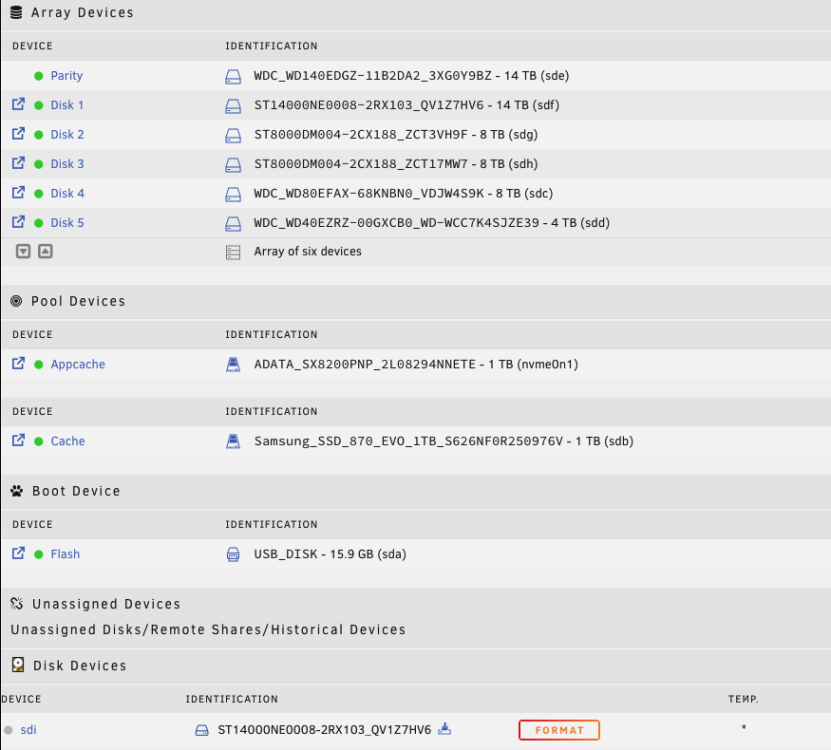
Hey all! I recently upgraded my Unraid with a SAS card and a new enclosure. Unfortunately in the process I lost a drive. No big deal, I just moved all the data off that (virtualized) drive and bought a new one. Now I'm trying to install that new drive but, as it's secondhand, I wanted to do a full preclear. However, despite it being a 10TB HGST Ultrastar He10, the Unassigned Devices plugin is showing me one of my WD 14TB drives (with the same serial) there instead. The sd mount point is different, at least, but I don't dare to start to try and clear the drive until I'm positive Unraid knows what it's looking at. I'm going to try to unplug and plug into a different SAS port and see if that fixes things, but this is weird, right? unraid-diagnostics-20240419-1205.zip
-
Can confirm, there is clearly something hokey with that drive. Even reads (after I copied some files over at .2M/s using unbalanced and then wanted to move them back) were sometimes up to 50M/s, but sometimes more like .2M/s as well. I eventually was able to copy all the files off that drive and then excluded it from shares on the array and have a replacement drive on the way to replace it. In the meantime I added another (smaller) drive and that wrote zeros and formatted and joined the array with no issues, so yes, I'm pretty sure I just got extremely unlucky and had 2 drives fail at once. Though neither was a hard failure, just the beginnings of a slow one, so I'm not out any data, but does make me wonder if dual parity is warranted...
-
Sucks, but yeah, looks like it might be... Had another drive with reallocated sectors I took out of the array, though, so if I'm down 18TB in a week that's gonna suck...
-
Ok, I'll add one more thing for now but try to stop clogging this up until I get more info or someone's got better ideas on what to do. All data was already moved off this drive, but I tried moving a sample of data around between working disks and this disk3. disk1 & 2 are fine, running a copy from disk1 > disk2 copies over at 50MB/s. Disk1 > Disk3, however, copies (in unbalanced) showing .2MB/s, but in the unraid dashboard at 0MB/s then bursts of 200K-1M. Reading seems to work fine, it's just writing disk3 that appears to not work.

