





Everything posted by polishprocessors
-
Hmm... perhaps of some note I turned on alerting for SMART command timeouts and immediately got the following alerts: 188 Command timeout 0x0032 100 099 000 Old age Always Never 4 4 5
-
I did, and it all looks good... Really mysterious, these issues. I'm nervous about adding disk3 back into the shares but might have to at this point...
-
On restarting the array disk1 and disk2 come up immediately, but disk3 takes ages to mount. No errors that I can see, but just takes 3+ minutes to mount where disk1/2/4 took fractions of a second. Attaching another diagnostics file... unraid-diagnostics-20240412-1318.zip
-
Ok, ran zfs check and it came back with this: Phase 1 - find and verify superblock... Phase 2 - using internal log - zero log... - scan filesystem freespace and inode maps... - found root inode chunk Phase 3 - for each AG... - scan and clear agi unlinked lists... - process known inodes and perform inode discovery... - agno = 0 - agno = 1 - agno = 2 - agno = 3 - agno = 4 - agno = 5 - agno = 6 - agno = 7 - process newly discovered inodes... Phase 4 - check for duplicate blocks... - setting up duplicate extent list... - check for inodes claiming duplicate blocks... - agno = 0 - agno = 1 - agno = 2 - agno = 3 - agno = 6 - agno = 4 - agno = 7 - agno = 5 Phase 5 - rebuild AG headers and trees... - reset superblock... Phase 6 - check inode connectivity... - resetting contents of realtime bitmap and summary inodes - traversing filesystem ... - traversal finished ... - moving disconnected inodes to lost+found ... Phase 7 - verify and correct link counts... done
-
See attached. Mover finished no issues with disk3 excluded from shares (just excluded, not explicitly removed from the array). I think I'm going to flip to maintenance mode and check the filesystem on disk3. unraid-diagnostics-20240412-1357.zip
-
Well fine, but what about the Connection Refused error? Again, this is going to other drives (not disk3) without issues, so I don't expect any problems if the issue is just with disk3... I'm going to let the mover complete now and then take the array down to maintenance mode to run an xfs check on disk3...
-
Ok, I realise I'm going at this on my own, but on reboot I tried excluding disk3 from the share and re-ran the mover. Got some early errors: Apr 12 12:05:07 unRaid shfs: copy_file: /mnt/cache/media/movies/Defiance (2008)/Defiance (2008) [1080p].mp4 /mnt/disk1/media/movies/Defiance (2008)/Defiance (2008) [1080p].mp4.partial (17) File exists Apr 12 12:05:07 unRaid move: move_object: /mnt/cache/media/movies/Defiance (2008)/Defiance (2008) [1080p].mp4 Connection refused But it's looking to otherwise go just fine. Is it possible that drive is bad despite showing green and passing all self-tests? Parity built just fine with that drive, but I did notice all writes to that drive were going INCREDIBLY slow when I was manually copying (1-4MB/s) versus other drives being fine (150MB/s). But those issues were only when I was moving files to the drive, not when it was running parity, leading me to perhaps believe there's some sort of logical error with the drive, not physical?
-
I should note: mover worked fine before the drive removal, shares are set to Cache > Array, and nothing on the config side changed besides removal of a drive... I'm also now trying to run a New Permissions because I tried to move at least one set of files from /mnt/cache/media/movies > /mnt/disk1/media/movies and, because I did it from the CLI, they came through as owned by root. This took the better part of 20m, but eventually finished, but Unraid still thinks the mover is running even though nothing's happening so I've no idea what to do besides another reboot...
-
Hey all! So I had a drive (I think) go bad so I pulled it from the array after moving all the data off the emulated version. Went into New Config, got a new config going without that drive and fired up a Parity Build which finished after ~24h for 14TB. So far everything's good. But while running the rebuild I was also downloading things so my cache drive nearly filled up so I had to pause downloads until Parity was finished because the mover apparently won't run when Parity is going. Fast forward 24h and now I have an array where the mover seems to freeze at some point while moving files, perhaps only when writing to disk3 but that also might be a coincidence? Other than perhaps a confluence with disk3 (which tests out fine) I can see no consistency with when things/the mover go wrong, but it keeps stalling and then there seems to be no way to kill it besides restarting unraid. Does anyone have any idea where to look and/or what might be up? FWIW, as well, generating this diagnostics file took 2+ minutes, but, besides files not moving about properly, my array/dockers appear to be functioning fine... unraid-diagnostics-20240412-1108.zip
-
FWIW I'm seeing 50-100MB/s write speeds to my 14TB parity, 8-14TB drive array.
-
I did, I thought, but alas. Oh well, I have backups, so it's just another long disk restore (from no data to no data because that's what it wants to do), followed by restoring my data. I guess there's no way to skip the disk restore because, even if I don't choose to restore it and instead formatted it and added it empty I'd need to rebuild parity with a new drive, no?
-
Unfortunately I wasn't paying a lot of attention after the data restore completed, but, because I wanted to add those 2 new drives to my array I stopped the array and put them in, but the drive which was just rebuilt was also asking to be added back in, so I put it in the slot where it was before. I'm not sure why it didn't just get re-added to the array, but I'm certain that 1) not paying attention and 2) not doing this one at a time created issues. I went back and took the 10TB drive out of the array, restarted it and formatted the two new drives, then added the 10TB drive back to the array and it appeared with 9.9TB free, so I think that data's toast. Probably my problem was adding new drives at the same time as when another drive was being emulated. It's not a huge deal-I have backups of any important data-but lesson learned: one thing at a time!!
-
If it helps... unraid-diagnostics-20240406-1604.zip
-
Additionally, this is showing up below...

-
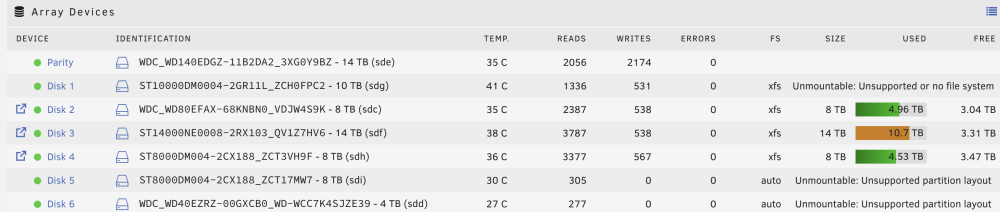
Hey all, so I had a PCI>SATA card go bad so I pulled it which took a single drive offline for a while which was emulated while I was getting a SAS card. With the new card, however, I had a bunch of extra SATA ports so I plugged in the new drives as well. When I brought unraid back up the 10TB drive in the photo was rebuilt from the parity over the course of the last 24h while I precleared the two new drives (8TB and 4TB). Now, however, it seems the 10TB drive is showing 'Unsupported or no filesystem' despite having gone through the rebuild just fine and then adding back to the array just fine. I will say when I shutdown and restarted the array post-rebuild I did add the 10TB, 8TB and 4TB all at the same time. Did I break this for good or is there a way for me to bring this 10TB drive (with all its recovered data) back into the array properly? Looking at /mnt/disk1 it's entirely empty and a bunch of my media files are indeed missing...
-
Marking this as the solution as before I wouldn't stay online for more than 15-20m and now I've been up for over a day. I'll update if I have more issues, but I think that did it
-
Trying that. So far so good, but I'll have to let it run for a while to see...
-
unraid-diagnostics-20230705-0837.zip Happy to report, as well, she seems stable after the downgrade...
-
Aha, I think I'm having this same issue. When I reboot *everything* on unraid (including unraid itself) loses connection to the internet and my DHCP server reports unraid's IP is no longer live. I've rolled back to 6.11.3 in the meantime to see if there's something that can be changed to fix it, but it seems I'm not the only one having this issue, so hopefully it's straightforward...
-
Hey all! I was running 6.11.3 for ages and finally thought to bite the bullet last night and upgrade to 6.12.2. About 15m after I did I seem to have lost connectivity to unraid, though, with the IP fully being offline. I hard rebooted (power button on the machine) and it came back online. Lasted about 30m before going offline agin, so I rebooted again. This time I logged in and moved logging over to the flash drive. I noticed all my dockers were going offline while connected but I didn't lose connection this time seemingly because I was already ssh'd in. The logs are full of alerts like: Jul 4 21:14:56 unRaid kernel: CPU: 1 PID: 3815 Comm: modprobe Tainted: G U 6.1.36-Unraid #1 Jul 4 21:14:56 unRaid kernel: Hardware name: System manufacturer System Product Name/ROG STRIX H370-I GAMING, BIOS 2811 05/27/2020 Jul 4 21:14:56 unRaid kernel: RIP: 0010:assert_rpm_wakelock_held+0x2d/0x58 [i915] Jul 4 21:14:56 unRaid kernel: Code: 40 8a 7f 11 e8 cc ff ff ff 66 85 db 75 1e 80 3d 66 e3 1e 00 00 75 15 48 c7 c7 80 f2 91 a0 c6 05 56 e3 1e 00 01 e8 ab 1a 8a e0 <0f> 0b c1 eb 10 75 1e 80 3d 42 e3 1e 00 00 75 15 48 c7 c7 9a f2 91 Jul 4 21:14:56 unRaid kernel: RSP: 0018:ffffc9000392fcd8 EFLAGS: 00010282 Jul 4 21:14:56 unRaid kernel: RAX: 0000000000000000 RBX: 0000000000000000 RCX: 0000000000000027 Jul 4 21:14:56 unRaid kernel: RDX: 0000000000000002 RSI: ffffffff820909fc RDI: 00000000ffffffff Jul 4 21:14:56 unRaid kernel: RBP: 00000000001415d8 R08: 0000000000000000 R09: ffffffff82245ed0 Jul 4 21:14:56 unRaid kernel: R10: 00007fffffffffff R11: 0000000000000000 R12: ffffc9000392fd80 Jul 4 21:14:56 unRaid kernel: R13: 0000000000000000 R14: ffff888103bc0000 R15: ffff888103bc1c40 Jul 4 21:14:56 unRaid kernel: FS: 0000148124470740(0000) GS:ffff88884dc40000(0000) knlGS:0000000000000000 Jul 4 21:14:56 unRaid kernel: CS: 0010 DS: 0000 ES: 0000 CR0: 0000000080050033 Jul 4 21:14:56 unRaid kernel: CR2: 000014812414e000 CR3: 00000001011ce002 CR4: 00000000003706e0 Jul 4 21:14:56 unRaid kernel: DR0: 0000000000000000 DR1: 0000000000000000 DR2: 0000000000000000 Jul 4 21:14:56 unRaid kernel: DR3: 0000000000000000 DR6: 00000000fffe0ff0 DR7: 0000000000000400 Jul 4 21:14:56 unRaid kernel: Call Trace: And then later: Jul 4 21:14:56 unRaid kernel: i915 0000:00:02.0: [drm] Cannot find any crtc or sizes Jul 4 21:14:56 unRaid kernel: i915 0000:00:02.0: Direct firmware load for i915/gvt/vid_0x8086_did_0x3e98_rid_0x02.golden_hw_state failed with error -2 Jul 4 21:14:56 unRaid kernel: i915 0000:00:02.0: MDEV: Registered I tried to identify a couple dockers that were having issues and shut them down, but to no avail, I woke up this morning to find the server offline (but still powered up) again. I hard rebooted and then reverted back to 6.11.3. I'll now be leaving it to see if it was an issue with 6.12.2, but given that was the only thing that changed I'm thinking it was... Does anyone have any insight as to what might be happening? I pulled a diagnostics file when downgrading so if support needs it I'm happy to provide...
-
Did you ever solve this? I'm looking for the same thing...
-
Worth noting explicitly: I (and I guess many others) was on a very old version of NextCloud (v20.x) and you have to run the upgrade for every major version (i.e.-20>21, 21>22, etc), so it actually took a bunch of runs of the upgrade to get it to work. I started by downgrading the docker to version 24.0.6 by adding :24.0.6 to the end of the 'repository' line in the docker image, then just upgraded through the console via the following command: sudo -u abc php /config/www/nextcloud/updater/updater.phar After each time it asked if I wanted to run the OCC upgrade (I picked yes) and then each time asked if I wanted to disable Maintenance Mode (I picked yes). Once on v25.0.4 I removed the :24.0.6 piece on the docker image and I'm up and running again. Somewhat excited to see what new features I missed in the intervening 5 major versions!
-
Correction, for both me and anyone else with the similar issue. I had to choose MacOS Installer *twice* (the first reboot + ~30m of install, the second reboot + ~5m of install) before I saw my disk relabeled BigSur. Then I had to go through the usual (from previous Macinabox install attempts) multiple reboots to get it to install. I'll see how it goes from here, but so far so good, just didn't expect this from previous attempts...
-
I tried wiping out the OpenCore image by setting the setting to 'yes' in the docker image and then 'no' as it directed me, but, despite the log claiming it put it in my vm share: OpenCore bootloader image named BigSur-opencore.img was put in your Unraid vm share in the folder named BigSur it did not appear there.
-
Hmm...and now while trying to delete the VM I'm getting: Requested operation is not valid: cannot undefine domain with nvram Edit: managed to clear that out by running virsh undefine --nvram "Macinabox BigSur"


