andreas79
Members
-
Joined
-
Last visited
-
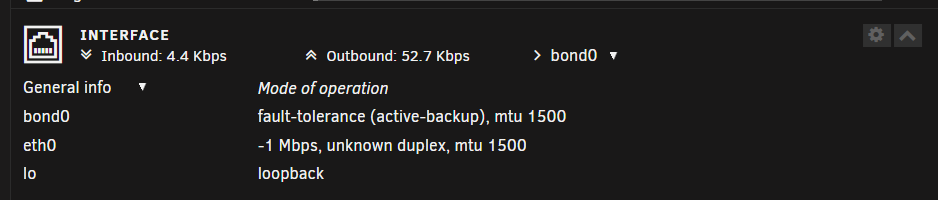
Hi again! When I use VirtIO nic it looks like the pic below. see this screenshot Would appreciatesome help.
-
Hi again! I think I solved the problem. In proxmox I used paravirtualized nic in the unraid vm and I changed it to intel1000E instead and now copying files to smb shares are working.
-
Hello! I have recently moved my unraid from bare metal to virtualize unraid in proxmox. Everything works well but I can´t copy files in windows to my smb shares in unraid. I´m able to copy from my smb shares in unraid to my computer but not to the shares in unraid. I attach my diagnostic file too. I would appreciate if there is a kind soul who could help my in this matter. Many thanks! blacknas-diagnostics-20240904-1034.zip
-
Hello! Many thanks for you answers. From my understanding of "automatically split any directory as required" that I thought it was written a little bit of data to every disk. I understand that will spin the disks as it is used and that consumes more energy but that´s a trade of that I´m willing to take. As Archonw mentioned in that case a cache drive is needed. I will look into that. Thanks again for all the help.
-
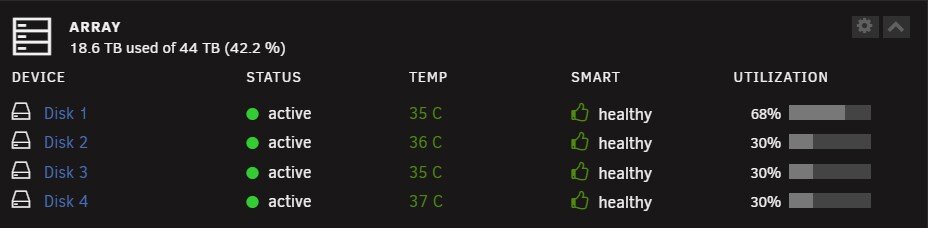
Hello! I have similar question as the original thread maker. I have complete rebuilt my server and my disk setup is following Disk 1 14TB Disk 2 10TB Disk 3 10TB Disk 4 10TB And I choose under High water, automatically split any directory as required. But I have same problem when I copied my files to the server it start with the largest disk and then it was 30% full it went to the next disk and filled 30% and so on. I know a long time ago I could fill the disks simultanously I mean it writes to all the disks at the same time and filled them equally. Becuase I need fast access to my files as I have my family using plex to watch movies. Thanks in advance for any help in this matter.
-
Hello! It worked! I change my LAN IP Adress to 192.168.1.245 Thanks again for your help. Very appreciated.
-
Hello! I have an isp adress but this is after on the LAN side that I gave my LAN this adress. The idea i got from watching lawrencestystems video of how to setup a pfsense router. I have disconnected pfsense router to see if that helped but no. Yes I agree with you that it says amazon but does this matter in any way? I had 192.168.1.245 before. But as many of gurus in network says you should give your LAN side a different LAN IP adress. So this is what I chose. What is your thought om this? I will try the ordinary adress now to see if it resolves my problem. I will get back in a minute. Thanks for your help! This was something I didn´t think of. I let you know in a minute.
-
Here is the diagnostic from my unraid. I am not sure what you need so I took the donwloaded file andreasnas-diagnostics-20220805-1452.zip
-
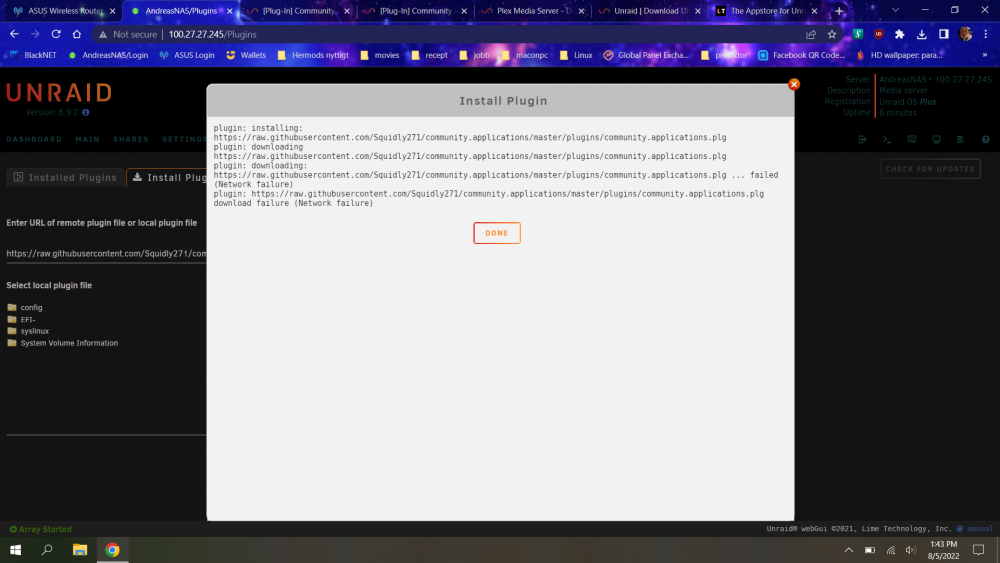
Problem with installing Community Application on Unraid 6.9.2 and 6.10.3 Hello all nice people out here! I have an unusual problem. I had to setup a new install of unraid and when I click on plugin tab (unraid 6.9.2) and paste the CA link I get a network failure problem. I get the same error message if I install in unraid 6.10.3. I have checked my router and also used another router to see if the problem still is in the router. I have search on internet if anyone had the same problem. I also tried internal nic on the MB and my external. Please see the attached picture. I had installed unraid 6.10.3 from the beginning but I decided to revert to 6.9.2 but the problem is the same. My specs: MB: Asus Prime Z390-a CPU: Intel Core i5 9400F 2.9 GHz 9MB RAM: Corsair Vengeance RGB PRO 32GB (2x16GB) x2 GPU ASUS Geforce 1060 3GB NIC: ASUS XG-C100C - Nätverkskort 10GBase-T x 1 / (PCIe) PSU: EVGA Supernova G2 1300W SDD NVME 1: Kingston A2000 1TB M.2 NVMe SSD NVME 2: WD Blue SN550 NVMe SSD 1TB M.2 (WDS100T2B0C) Parity HDD: Seagate ST14000NM001G Exos X16 14 TB HDD 1: WD Gold 10TB 7200rpm 256MB HDD 2-3: TOSHIBA N300 NASHDWG11A I need help as I am stuck and run our of solutions. I hope I provided sufficient info.