





Fedeöä
Members
-
Joined
-
Last visited
Everything posted by Fedeöä
-
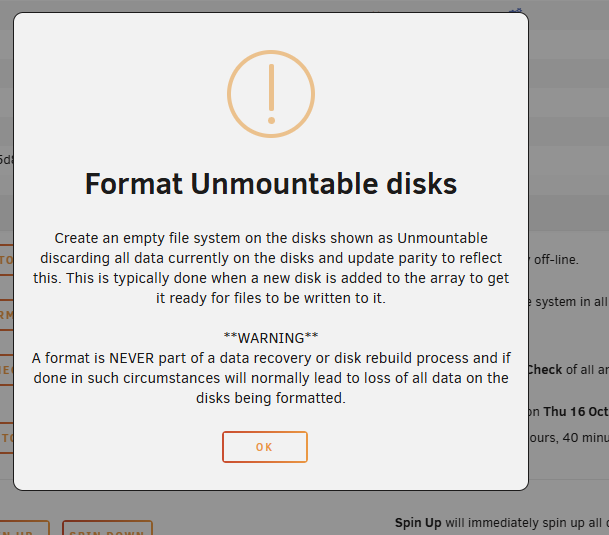
After copying the data, do I format the drive? Even though it says not to? I am copying the data to the array while the disk is attached to my PC, so the data ends up on the other drives. I don't have space on my PC, so it's my only option. But this basically means that I can remove the drive and format it through Unraid to avoid having to rebuild parity, right?

-
Thanks. Was able to save the data. Still have to see if it's complete, but the important stuff seems to be there.
-
Just to close the topic: I replaced one of the miniSAS->4x SATA cables. I also replaced 2 of the SSD's. They were samsung T5 portable drives that were hooked up to SATA by removing them from the case and using an adapter. They seemd to work fine for months but suddendly wouldn't stop throwing errors no matter what. It now seems to work just fine. I am not replacing the HBA. Even if it's not how it's "supposed" to be, it works fine and I don't want to buy another one.
-
I have the demo version of UFS explorer open again. I have now done a full scan. What is the next step? It shows two File Systems: SGI XFS ~13TB out of 16TB disk, nearly full and Raw recovery result ~315GB Should I copy just the Raw recovery result? Should I copy both? An XFS filesystem seems to be present, right? but xfs_repair used to throw errors like crazy. Is the best course of action to copy all data to another drive and reformat the drive with a new filesystem and then add it back to the array and recalculating parity?
-
Did that already. Doesn't work. Same error. Is UFS Explorer the best tool? Could you provide a good guide I could follow?
-
A drive is unmountable. Xfs_repair doesn't work. There are way too many errors, like thousands of lines of inode errors. In the end it says: xfs_repair: phase6.c:1674: longform_dir2_entry_check_data: Assertion parent != 0' failed. Even during the check, it says: No modify flag set, skipping phase 5 Inode allocation btrees are too corrupted, skipping phases 6 and 7 I have now removed the disk from the NAS and hooked it up to my PC. I am pretty sure the drive itself is fine and that the source was corruption caused by either bad power or bad SATA cable, which I have both since replaced. How do I proceed? From my research DDrescue could be helpful, though I have never used it. If it doesn't work I could pay for Rstudio or UFS. Last resort would be photorec, as it doesn't preserve file structure and names. With the free version of ddrescue I could see some files and folders, though not many, as it's very limited.
-
Oh, wow. I bought it a few years ago and the seller told me it was in IT mode. It even had the tape on the pins, so I never bothered to check. It's almost weird that I never had any problems and that all drives showed up and worked flawlessly in Unraid.
-
I hope not. I'm not sure it is, as one of them is not connected to it, but directly to the mainboard. It has a heatsink, no fan, like before. Maybe a little less airflow because of more cables, but the case and HDD locations are the same. Also, problems pop up now, while the case has no sidepanels on, and when the system has only been on for minutes. I am using a Broadcom / LSI MegaRAID SAS 2008 [Falcon] (rev 03) card in IT mode. It has been working for a few years without problems until now. I can see both SMART and Temps no problem. It's also working for the other 6 connected drives. I ordered new cables and will see when they get here. EDIT: I confirmed that one end of the 4x splitter cable is at least the source of one of the problems. When changing it from one drive to the next, the CRC errors follow it.
-
Yes I know and yes they increase. I have now unplugged and reconnected ALL Sata and ALL power from ALL drives, mixing the cables around to organize them and try to find the broken ones. Three things happened: Drives that are connected to the mainboard cannot be connected to the HBA, as that changes their names and unraid can't handle that. It thinks that the, are new drives. The other way around as well. The parity doesn't even get detected by the HBA, no matter what I try, so it has to remain connected to the mainboard. Now the ones throwing CRC errors are different, which seems to imply the cables are broken. I'm trying to find out which ones exactly it is.
-
That was my thought as well, but now the errors are on both miniSAS cables AND even on normal sata cables, one drive each.
-
I have 9 Data Drives, 1 parity, 2x2 ssd cache pools I recently upgraded my mainboard and CPU to an intel i5 9600kf and a Gigabyte B350m DS3H. I also added a gtx 1060 6gb for transcoding, though i haven't set that up yet. The HBA is now in the Pcie x4 slot, which should be ok, as far as I know. I don't run fancy stuff, so I don't care about reduced maximum bandwidth. Since the change I get these CRC errors across multiple different disks. In the beginning I thought it might be a power issue, as I only have a 500W PSU and the GPU might use too much 12V juice, but even that seemed unlikely, as the GPU was barely used (only a monitor for BIOS). So I took another PSU (300W, old) shorted it with a paperclip and added 6-7 drives to it. It was stable for a few days, even managed to do a parity rebuild (don't ask). Then, during another parity check, which I did to make sure everything was ok, it got through 80% when a drive dropped out, as it could no longer be read. It was still detected, but Unraid disabled it due to CRC errors which caused problems. So my next step was that maybe something's wrong with the Molex to Sata adapters that I am using, as I heard they often are of bad quality. At this point I had to jump a second, old, 300W PSU to run all the drives (lol). Still no luck. I guess the next step would be to change the HBA 1xminiSAS to 4xSATA connectors, but I read that they are surprisingly durable, despite their look and feel. Or maybe the problem is the HBA? I don't think it's the drives, as other SMART errors are stable and not increasing (some have pending/reallocated sectors, but they haven't increased in a long time, so it should be ok, right?). drive 9 is the one that was disabled The drives that are throwing errors right now are: drive 2 - has the sata cable that used to be on drive 9 when it failed. I wanted to see if it was the cable. Maybe it was, or maybe it's the HBA. It's a 4 way splitter and the other 3 are ok cache - is connected directly to the onboard sata cache 2 - is connected to the HBA, but from the other 4 way splitter. Again, the other 3 are fine. As I still have a disabled drive and the array is unprotected right now, I wanted to first ask here. Parity rebuild seems impossible, as long as the drives keep spitting out CRC errors, if only out of fear that another drive ends up disabled. How should I proceed? I appended two syslogs and diagnostics. One of the logs is from before I did some troubleshooting. frattininas-syslog-20251003-2300.zip frattininas-syslog-20251003-1512.zip frattininas-diagnostics-20251004-0104.zip
-
OOOOOH, I set the variables into the name instead of the key field!!! How can I test if it works? The reminders that are already there didn't trigger an email.
-
I can't get it to work at all, it says SMTP is not configured. Is there a standard way you are supposed to set it up? I just tried adding the lines to the config file, but it doesn't work.
-
How does the email reminder work? I have been trying for hours to get it running.
-
Yep, thanks.
-
frattininas-diagnostics-20220131-1142.zip
-
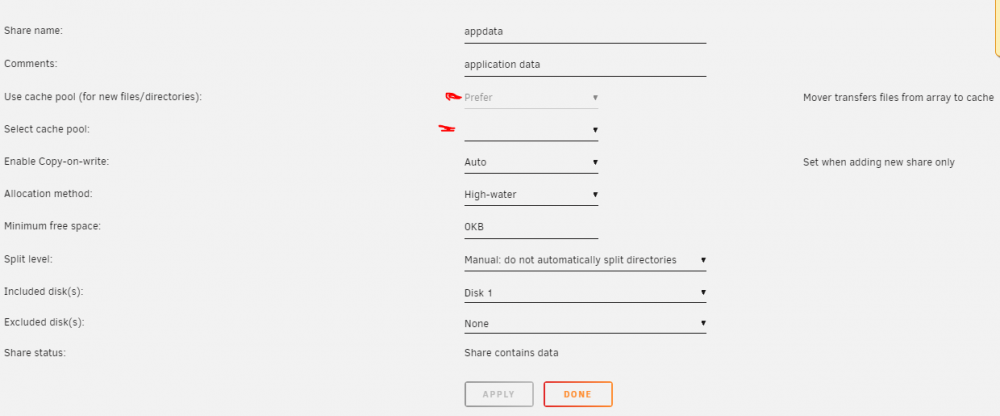
Thats what I thought, but I can't actually change anything. The Use cache pool is greyed out and select cache pool is just an empty list, as I don't actually have a cache pool, and don't intend to have one atm.
-
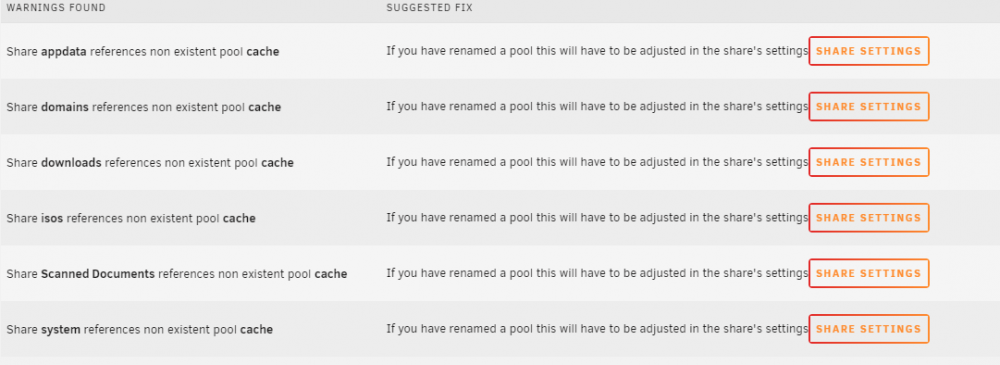
I got these strange warnings from FCP, how do I fix it? I have no cache pool and have never had one, don't know what caused the issue. The settings for the shares are prefer: cache for some and yes: cache for others, but they worked for few years without problems (already set up for if I ever wanted to add cache).
-
Hello, I am trying to let my system shutdown in the evening usind the Dynamix S3 Sleep plugin. My problem is, that if I have "wait for array inactivity" turned on, it wont work. I suspect it has to do with me not having a cache drive and small everyday operations keeping some of the drives from spinning down. That in itself wouldn't be a problem for me as those operations don't really care if the system shuts down, but in the case of for example a parity check I think it wouldn't be very good for the system to shut down. Is there a good fix for this? (Diagnostics zip attached) nas-diagnostics-20201206-1949.zip
-
What is the advantage compared to just add it normaly by mapping a network drive through windows?
-
You just saved my evening



