





Frayedknot
Members
-
Joined
-
Last visited
-
This seems to be a story that doesn't end. So on a whim I tried doing a check-disk in windows on the USB key (Kingston DataTraveller 100 G3 16GB) and in the USB 3 port it gave me a "unable to repair", so I plugged it into a USB 2 port (i think) and it went through without issue. So I tried a new USB Kingston Datatraveller Elite and now no issues as far as I can tell. OMG usb key issues..
-
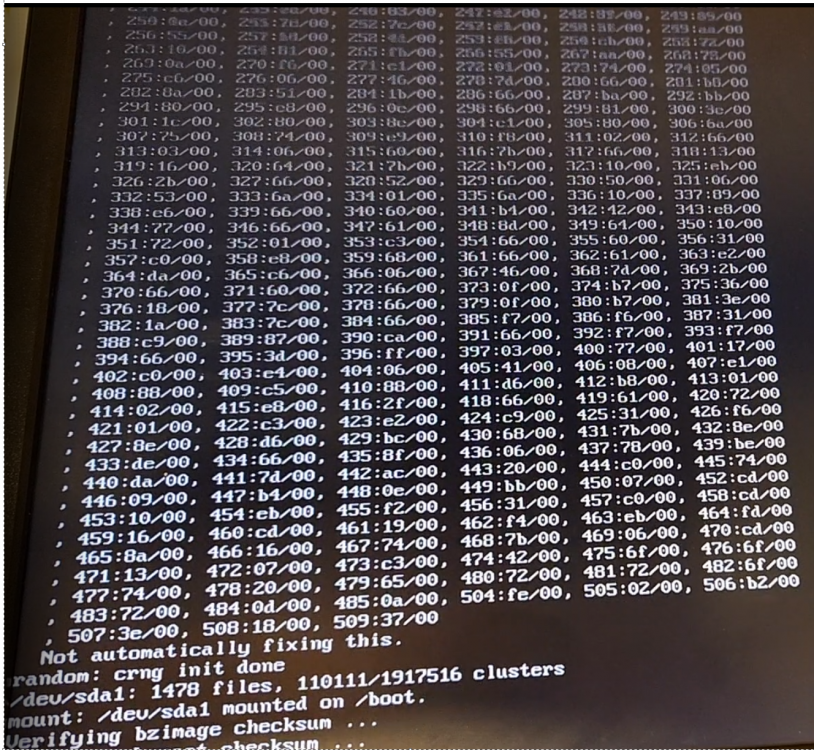
Been playing around with this more and it seems to be getting harder to restart!? I also tried clearing CMOS to see if that helps. Tried scanning / repair USB key in case there were issues and none found. Lastly I decided to create backup of USB with Unraid and rebuild a new USB key and try that. I know it won't start the array but I couldn't even get close to that far when it was failing. So now It seems to have no issues loading back into the web UI consistently. But I have a bunch of new weird errors on the console as it is booting and I can't find them in the syslog. I have a photo of them and the diagnostics attached. For reference the MACHINE ERRORS were always happening before as well, that isn't new. So far original USB seems incompatible with UNRAID and the new one is giving me some concerns that might be nothing. Any insight would be appreciated. tower-diagnostics-20220418-1415.zip
-
A new piece of information.... I changed out my cache drive (SSD to NVME) and was able to reboot the PC without moving the USB key!? So extended off periods seem to make a difference. Is there a way to transfer to another USB key for testing to see if it is the USB key is causing the issue without blacklisting that one?
-
Yes, I have tried the USB 2.0 ports. I might check to see if there is an option for USB2 mode on the usb3 to see what it does. This issue smells of FASTBOOT to me, but I know I turned it off.
-
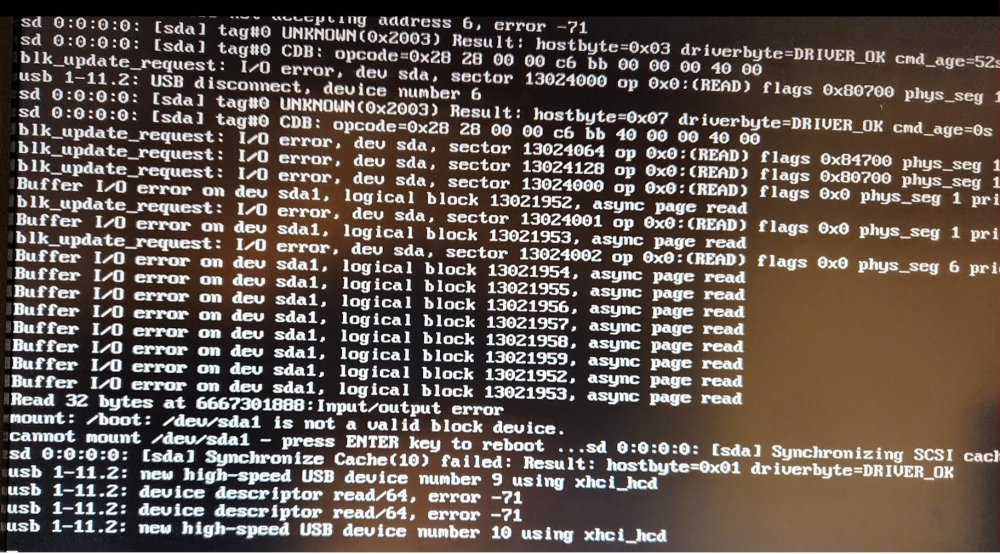
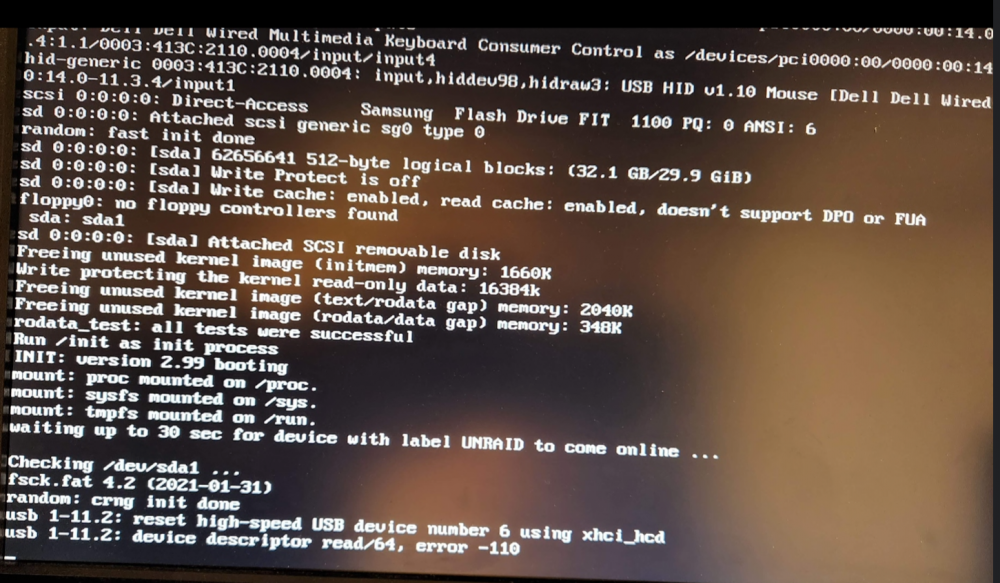
So, I have this strange problem with my Unraid box where the reboot always fails and gives some concerning errors. I was sure that changing the USB port would fix the errors; but this time when I tried to get a screen shot of the errors it wouldn't work. Only after putting the key in my other computer to scan for errors (found none) and putting it back would it boot again. So maybe it's related to powering down the computer for a length of time!? My question is this; could this be a USB issue or a motherboard type issue? I have turned off FASTBOOT which sounded reasonable from a previous post from someone else but obviously that isn't working for me. My motherboard is a gigabyte Z590 AORUS ELITE with latest BIOS (F6a) and the USB Key is a 32 GB Samsung Flash Drive FIT. Sorry for the screen shots, but I didn't know how to capture the log since it never completes a boot.
-
I'm running Unraid 6.10.0-rc2 and a day ago I put in a 980 Samsung NVME drive and I got message last night that it was 85 Celsius. This is pretty alarming since the system is honestly pretty idle. On the MAIN page for unraid it indeed says 85C, but in the smart values for the drive it showed a Temperature of 35. Also the TEMP Sensor 1 was about 35C ish and the Temp Sensor 2 was about 39C ish. The funny thing is that the THERMAL TEMP. 2 Transition Count was the 85. (I tried to look what that was and I guess that is the number of times it went into thermal throttle (according to Kingston drives). So is it reporting that value!? I also took temp readings with a thermal thermometer which showed 35C on it. BTW it does have the heatspreader from the motherboard on the drive (Gigabyte z590 Aorus Elite). The overheat message came at 10:01 that the drive was 85C and I got another one at 10:32 that it returned to normal. Here's the system log during that time: One last thing I noticed is that the drive now shows a value of 132 for Thermal Temp 2 transition count. I know SMART is a interesting beast and different manufacturers have different values; so maybe that isn't actually what this is. A test I did this morning was run a benchmark on that SSD with DISKSPEED docker and the Temp Sensor 2 never went above 50C. My next plan is to update the firmware (apparently there is a new version for this drive). Quick Edit: I was going to include the SMART report and I swear it now just said "Temperature of 85C" in the smart, but the MAIN page was fine. Unfortunately I clicked away and went back and it has returned to 34C. .. and the Thermal Temp 2 Transition count is now 133. I don't believe Temperature sensor 1 or 2 was off just the generic "temperature" one. Here's my current values for SMART:
-
I love unraid and to be honest I have a container of every badge for computer products that I've received in the past. I like to keep my computers clean of stickers. Although if I got a badge I would feel inclined to use it. The irony is that unraid is so stable and has been so great that I keep it in the furnace room and nobody even gets to see it. Great product and happy birthday!
-
Update showed up on unraid docker page and has been applied. She worky now Thanks.
-
Me three... it no longer starts (Exit 127) The Deluge docker from BinHex was also doing the same thing after an update, but after a few more updates (forced and one update that became available) it now works. So I suspect it's being fixed... hopefully.


