





TheUnraider
Members
-
Joined
-
Last visited
Everything posted by TheUnraider
-
I hear that is a common fix but I am hoping to keep hardlinks on if possible. I wanted to bring this thread back to life and see what solution you found, if any?
-
I've been running this UnRaid server with very few problems for 4 or so years now. Absolutely love UnRaid. Due to the lack of problems, I am not a very strong troubleshooter... A couple days ago we had some power outages occur. My UnRaid server should have shut down gracefully as it is on a UPS and configured to shut down at 50% battery but it seems it failed to do so. When I turned it back on I was unable to access Radarr WebUI. Tautulli and Overseer seemed to have lost their database too because they are acting as if I just installed them freshly. Radarr logs say I should restore from backup but I don't know how to do that without a WebUI. I can't find instructions to do so. Radarr WebUI tells me "refused to connect" when I try to access it. I have tried in a few browsers and all give me the same result. I noticed my network interfaces status state the following: (not sure what the status was before the power outage - could this be a factor?) bond0 = fault-tolerance (active-backup), mtu 1500 eth0 = interface down eth1 = 1000 Mbps, full duplex, mtu 1500 I also noticed there was stuff stuck on my cache drive. It looks like the docker image and the docker appdata folders are both on my cache drive. I stopped all dockers and ran the move operation. It cleaned up the cache drive quite a bit but did not solve my problems. /mnt/cache/system/docker/docker.img /mnt/cache/system/libvirt/libvirt.img /mnt/cache/appdata I don't see anything very helpful in the UnRaid system logs. I did download the UnRaid diagnostics before and after the move operation, in case that gives any clues. Any recommendations on next steps would be sincerely appreciated. nas-diagnostics-20241111-2253.zip nas-diagnostics-20241112-1942.zip
-
Fixed it for me as well. Currently running Unraid version 6.11.5. Console said that process was not running when I ran command. Thank you!
-
JorgeB - Thank you for all of your help! I was able to rebuild on top and it seems I have all my data. All is well. Seriously appreciate you taking the time to look over my issue. Thank you!
-
Ok, I swapped out the old Thermaltake TR2 600W ATX 12 V2.3 PSU for a EVGA 850W PSU. The Array started up. Disk 3 seemed to mount without issue. Disk 2 is still disabled and contents emulated. Diagnostics attached. nas-diagnostics-20230320-2121.zip
-
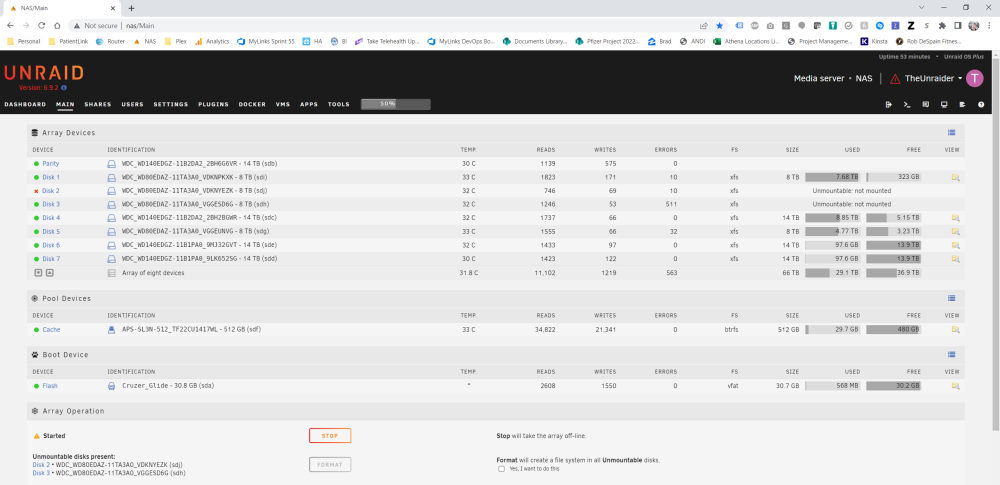
Reading through the forum, it looks like next step is to check Disk 2 using the "Check File System Status". I stopped the array, put it in maintenance mode and started it again. I used the GUI and ran a check with option "-n". It reported back: Phase 1 - find and verify superblock... superblock read failed, offset 2199023247360, size 131072, ag 2, rval -1 fatal error -- Input/output error I was hoping it would give me more info than that. Don't know what to do from here. NOTE: I also noticed disk 3 which wasn't having problems before, is now reporting "unmountable disk". Only happens randomly as a I start and stop the array. Sometimes it mounts, sometimes it doesn't. Odd. nas-diagnostics-20230319-1549.zip
-
I replaced the SAS cables, added disk 2 back to the array and started the array. Unraid is now reporting Disk 2 as "Unmountable disk present" and is still marked as "disabled". Any thoughts on what I can try next? nas-diagnostics-20230319-1500.zipnas-smart-20230319-1501.zip
-
Ok, that makes sense. I will replace the cables tonight and try again. thank you!
-
nas-diagnostics-20230316-0906.zip
-
I followed the steps in the Rebuilding_a_drive_onto_itself instructions exactly the first time. It's possible my parity check tuning plugin was causing problems. After stopping the array, to try the procedure again, I unassigned the disk, now I can't even see disk 2, can't re-assign it. Just states "not installed" / "device is missing". As far as I can tell, my data seems to all be there.
-
Thank you for the guidance. I followed your directions and checked cables. All seems well. I rebuilt the data on top of that drive following these directions: https://wiki.unraid.net/Manual/Storage_Management#Rebuilding_a_drive_onto_itself I received a notification that the read check finished with 0 errors. The disk 2 still states it "Device is disabled, contents emulated". What would you recommend I try next? Do I need to replace this drive? nas-smart-20230316-0755.zip
-
Some background.. I've had Unraid for years and loved it. During that time, I've never had a disk issue. So I tried to read up on this issue bit, but my smart data looks a bit off. I am guessing the drive is a goner, can someone confirm? I think this issue was caused by a large backup being saved to my Unraid NAS from my Windows 10 machine. It was 7TB and typically takes all day to write to NAS. So far, all I've done is download the SMART report from the failing disk and the Unraid diagnostics. Please see attached. Hoping someone can tell me the best next steps to take? Do I need to replace this disk with a new disk? Thanks in advance for any guidance you can provide. nas-smart-20230314-1013.zip nas-diagnostics-20230314-1026.zip
-
I haven't played with VMs much, but I know I can RDP into my ubuntu box with "use all monitors" option selected and the ubuntu box will display on all 3 of my monitors. Not sure if this helps, but may give you something to try. Good luck!


