





SimplifyAndAddCoffee
Members
-
Joined
-
Last visited
-
It seems like the syuncplay feature is missing or broken or something because I'm not seeing any option to activate or use it, create/join groups etc. All the searching I've done says the button should be right there on the video playback page but I've never seen it on any browser or version so far... is there something I need to do to enable it?
-
ok so slight update on this... I did finally get around to fixing and verifying the cache drives so now everything is cache only and does not touch the array at all. This alone did not improve anything, however... I also disabled and removed the plugins for playback reporting, reports, and tmdb box sets and purged a bunch of log files and old metadata, ran cleanups on everything I could. This seemed to make a very slight improvement from "completely unusable" to "mostly unusable". I was able to at least play some videos again, but the interface was still hit or miss unresponsive. However... I then took a bit of a deep dive into the database contents and configuration... disclaimer: I am not a data structure expert and you should assume I don't know what I'm doing and not take advice from me, BUT.... anecdotally, I was able to improve performance from "mostly unusable" to "pretty slow" with some ad-hoc database maintenance... specifically: I created missing database indexes for idx_mediasegments_itemid , idx_userdata_userid_itemid , idx_baseitemproviders_itemid , idx_baseitemimages_itemid_imagetype to stop it scanning the entire database on every item query. analyze and vacuum database It seems like the database could use better optimization and might require some periodic maintenance in its current condition to keep it running effectively... I'd be interested in knowing if there's anything more I can do to further improve performance here, like runtime optimizations to cache size, multithreading, keeping it loaded in memory etc. My server has the RAM resources for it, and they may be under-utilized for this given the size of my database (appx 500 MB) I'm not sure how long these improvements will last for me, so will have to see and likely come up with some better long term solutions... Is there perhaps a guide or something we can follow in addressing known issues with db performance on exceptionally large libraries? my JF performance as it is is still somewhat annoyingly slow and I would like to improve things further if I can but I'm so far at the limit of what I know how to do.
-
Hi, I have been having some issues with performance on JF for quite a while now and several versions, and it's been getting to the point where it takes several minutes for pages within the webUI to load (although playback and transcoding performance seems to be fine still) and I'm wondering if I can get some help troubleshooting my setup. I don't see any obvious errors in the logs, just incredibly slow response times. System info: Unraid 7.1.4 running as a guest VM on ESXi 6.7 Update 3 Dell PowerEdge R520, unlocked HBA firmware with direct passthrough to UNRAID VM resources: 8 cores Xeon E5-2440 @ 2.4GHz 96GiB DRAM (ECC) 10GB NIC nVidia RTX A2000 12GB Storage: Array: 60 TB dual parity 8x 10TB SMR HDDs Boot: Samsung BAR Plus 64GB MUF-64BE3/AM Cache: 2TB hardware RAID 1 of 2x Samsung 870 EVO 2TB Thrash: Samsung 870 EVO 1TB Shares: appdata: cache << array (I believe I tried to set this to cache only, but some files were failing to move over from the array ever since the pool got full once and overflowed onto the array) media: cache >> array thrash: thrash << array Jellyfin version 10.11.2 config: /data/tvshows : /mnt/user/media/Video/TV/ /data/moves : /mnt/user/media/Video/Movies/ JELLYFIN_PublishedServerURL : 192.168.0.5 (auto config? I don't think I set this) Music : /mnt/user/media/Audio/Music/ Music Videos : /mnt/user/media/Video/Music Videos/ eBooks : /mnt/user/media/eBooks/ NVIDIA_DRIVER_CAPABILITIES : all Transcodes : /mnt/user/thrash/jellyfin/transcodes config.json : /mnt/user/appdata/docker/jellyfin/config-override/config.json other : /mnt/user/media/Video/other appdata : /mnt/user/appdata/docker/jellyfin Plugins: AniDB, AniList, AudioDB, Fanart, Merge Versions, MusicBrainz, OMDb, Open Subtitles, Playback Reporting, Reports, Studio Images, TMDb, TMDb Box Sets, TVmaze API links: Jellyseer Library contents: 1,406 movies, 410 series, 18,769 episodes, 2,225 albums, 19,858 songs, 2,188 books... it's very large. About half is h.265 and half is h.264 with transcoding being required on about half of the playback clients that access the former. I have about 50 user accounts configured and managed via jfa-go, though never more than 2-3 active users, and the performance issues are present even with only one user logged in. Problem behavior: Web UI very slow to load. When loading for example the home page, the banner and background loads immediately, then, slowly, one row at a time over the course of a few minutes while the little blue loading animation plays in the middle, My Media, Recently Added in moves, Continue Watching, Recently Added in shows, recently added in music, recently added in other videos, and Next Up. The first couple appear in a few seconds while the last one or two can take several minutes. The loading animation circle may never go away without reloading the page a couple times. JF log doesn't show any specific activity while it loads, only the websocket request. HTOP on the unraid console shows near constant high (60%-90%) CPU utilization, mostly from jellyfin, /usr/libexec/unraid/shfs, python (deluge/bazarr), and Readarr. Memory use is only about 10%-20% but ALL of the top 30 processes using it are jellyfin. If anyone can offer any help with this I would appreciate it, thanks.
-
Will the license transfer over or do I need to do something to recover that?
-
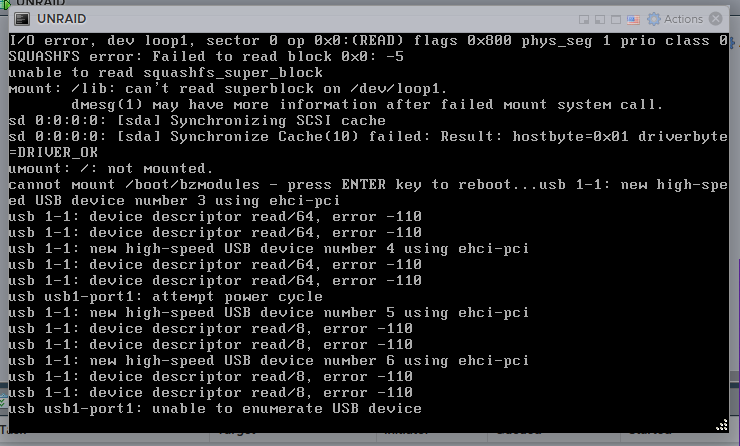
I tried to update from 7.0.1 to 7.1.4 and after rebooting, the server did not come back up... here is the message I get: Is there any way to recover from this?
-
Mover seems to be moving things now. Is ca mover tuning no longer supported?
-
How does that even happen? and what do I need to do to fix it at this point?
-
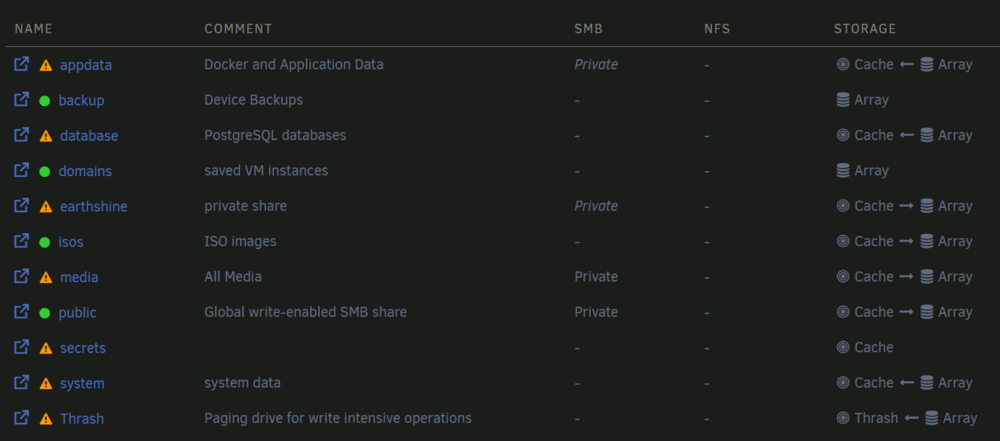
I've enabled mover logging, but is there a way to stop and re-run the mover? It seems it can't run because it's already running. media should be moved from primary to secondary laforge-diagnostics-20250329-0353.zip
-
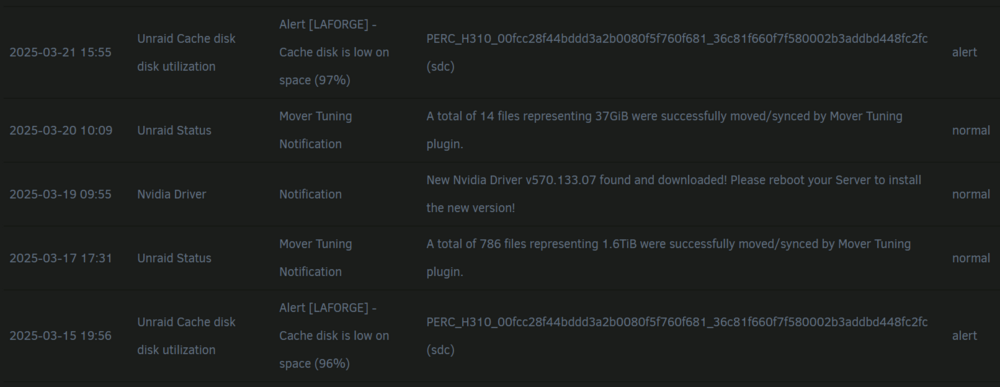
my cache disk has been full up for a while now and its impacting performance. I checked with qdirstat and it's all files that *should* be moving to the array. Moreover, my notifications seem to imply the files *were* moved, but the disk is still full... e.g., disk 96% full, then moves 1.7TB (from 2TB cache drive), then 97% full... any idea what's going on?
-
I am using a passthrough container to keep it segregated with the rest of the arr suite via --net=container:binhex-delugevpn log: [migrations] started [migrations] no migrations found ─────────────────────────────────────── ██╗ ███████╗██╗ ██████╗ ██║ ██╔════╝██║██╔═══██╗ ██║ ███████╗██║██║ ██║ ██║ ╚════██║██║██║ ██║ ███████╗███████║██║╚██████╔╝ ╚══════╝╚══════╝╚═╝ ╚═════╝ Brought to you by linuxserver.io ─────────────────────────────────────── To support the app dev(s) visit: Bazarr: https://www.paypal.com/cgi-bin/webscr?cmd=_s-xclick&hosted_button_id=XHHRWXT9YB7WE&source=url To support LSIO projects visit: https://www.linuxserver.io/donate/ ─────────────────────────────────────── GID/UID ─────────────────────────────────────── User UID: 99 User GID: 100 ─────────────────────────────────────── Linuxserver.io version: v1.5.1-ls295 Build-date: 2025-03-11T21:24:46+00:00 ─────────────────────────────────────── [custom-init] No custom files found, skipping... 2025-03-15 11:59:46,239 - waitress (14912167eb28) : INFO (wasyncore:485) - BAZARR is started and waiting for requests on: http://127.0.0.1:6767 2025-03-15 11:59:46,247 - root (1490f58dcb30) : INFO (signalr_client:122) - BAZARR trying to connect to Sonarr SignalR feed... 2025-03-15 11:59:46,254 - root (1490f56bfb30) : INFO (signalr_client:189) - BAZARR trying to connect to Radarr SignalR feed... 2025-03-15 11:59:46,270 - root (1490f54a2b30) : INFO (signalr_client:150) - BAZARR SignalR client for Sonarr is connected and waiting for events. 2025-03-15 11:59:46,284 - root (1490f58dcb30) : INFO (signalr_client:217) - BAZARR SignalR client for Radarr is connected and waiting for events. Connection to localhost (127.0.0.1) 6767 port [tcp/*] succeeded! [ls.io-init] done. all the other containers using the passthrough work and I can access their webuis just fine, it's only bazarr where I can no longer hit the webui at [IP]:6767 did something change with a recent update?
-
since updating to v1.5.1-1s295 last night, I can no longer access the webui.
-
I have an 8 disk array of 10TB drives with 2 parity drives. I think in the past it's usually only ever taken about 2-3 days of 5 hours a night to complete the parity check, but now it's been running nearly 2 months. Is there a way to see what it is doing that is taking so long?

-
R-REM-SLL-A55 Silicon Power A55 3D-NAND SSD 1TB bought two of them, both bricked just a day shy of 2 years after purchase, following a hard shutdown. COMRESET failed errono=-16 on initialization both well within 5 yr warranty, still waiting to hear back.
-
Hi, I had to reboot my unraid server the other day due to the webui bug, and now jellyfin will not start. It is stuck in a loop. ... [11:42:07] [INF] [1] Jellyfin.Networking.Manager.NetworkManager: Remote IP filter is Allowlist [11:42:07] [INF] [1] Jellyfin.Networking.Manager.NetworkManager: Filtered subnets: [] [11:42:21] [FTL] [1] Main: Error while starting server Microsoft.Data.Sqlite.SqliteException (0x80004005): SQLite Error 11: 'database disk image is malformed'. at Microsoft.Data.Sqlite.SqliteException.ThrowExceptionForRC(Int32 rc, sqlite3 db) at Microsoft.Data.Sqlite.SqliteDataReader.NextResult() at Microsoft.Data.Sqlite.SqliteCommand.ExecuteReader(CommandBehavior behavior) at Microsoft.Data.Sqlite.SqliteCommand.ExecuteReader() at Microsoft.Data.Sqlite.SqliteCommand.ExecuteNonQuery() at Emby.Server.Implementations.Data.SqliteExtensions.Execute(SqliteConnection sqliteConnection, String commandText) at Emby.Server.Implementations.Data.ManagedConnection.Execute(String commandText) at Emby.Server.Implementations.Data.BaseSqliteRepository.Initialize() at Emby.Server.Implementations.Data.SqliteItemRepository.Initialize() at Emby.Server.Implementations.ApplicationHost.InitializeServices() at Jellyfin.Server.Program.StartServer(IServerApplicationPaths appPaths, StartupOptions options, IConfiguration startupConfig) [11:42:21] [INF] [1] Main: Running query planner optimizations in the database... This might take a while [11:42:21] [INF] [1] Emby.Server.Implementations.ApplicationHost: Disposing CoreAppHost [11:42:21] [INF] [1] Emby.Server.Implementations.ApplicationHost: Disposing PluginManager {restarts} is there a way to repair/recover the database? EDIT: I believe I got it working again, mostly, although I lost my watch history.... Here is the process I followed: shut down jellyfin open unraid console and navigate to jf data directory and run.... root@LaForge:~# cd /mnt/user/appdata/docker/jellyfin/data/data root@LaForge:/mnt/user/appdata/docker/jellyfin/data/data# sqlite3 library.db .dump > recovered_data.sql root@LaForge:/mnt/user/appdata/docker/jellyfin/data/data# mv library.db library.db.corrupt root@LaForge:/mnt/user/appdata/docker/jellyfin/data/data# sqlite3 recovered.db < recovered_data.sql root@LaForge:/mnt/user/appdata/docker/jellyfin/data/data# sqlite3 recovered.db "PRAGMA integrity_check;" ok root@LaForge:/mnt/user/appdata/docker/jellyfin/data/data# mv recovered.db library.db root@LaForge:/mnt/user/appdata/docker/jellyfin/data/data# chown 99:100 library.db root@LaForge:/mnt/user/appdata/docker/jellyfin/data/data# chmod 644 library.db 3. re-launch jellyfin and wait forever for it to load and then revalidate the library Hope this helps someone else encountering the same issue... I don't suppose there's any way to get my watch history back?
-
Last I heard this was caused by some bug where logs would fill up and nginx would run out of memory due to a web UI tab being left open... the problem is that I can't seem to find a way to fix it. The suggested fixes on the forums involve restarting nginx, but how do I do that if I can't get the webUI to respond, and can't open a terminal or SSH? Is there any option open to me other than a hard shutdown every time I leave a tab open? EDIT: some parts of the webui are working, but not the plugins tab so I can't troubleshoot the SSH problem... tools/system log opens and is full up of this: .... Jun 16 07:28:55 LaForge nginx: 2024/06/16 07:28:55 [crit] 32453#32453: ngx_slab_alloc() failed: no memory Jun 16 07:28:55 LaForge nginx: 2024/06/16 07:28:55 [error] 32453#32453: shpool alloc failed Jun 16 07:28:55 LaForge nginx: 2024/06/16 07:28:55 [error] 32453#32453: nchan: Out of shared memory while allocating channel /disks. Increase nchan_max_reserved_memory. Jun 16 07:28:55 LaForge nginx: 2024/06/16 07:28:55 [error] 32453#32453: *15543604 nchan: error publishing message (HTTP status code 507), client: unix:, server: , request: "POST /pub/disks?buffer_length=1 HTTP/1.1", host: "localhost" .... it seems to start end end on 06/16


