





Miss_Sissy
Members
-
Joined
-
Last visited
Everything posted by Miss_Sissy
-
"Unraid is a powerful, easy-to-use operating system for self-hosted servers and network-attached storage." That's the first sentence under the first heading ("What will you build?") on the actual unraid.net front page at https://unraid.net. (forumassist.unraid.net is not the "Unraid.net front page" any more than artsandculture.google.com is the Google front page). That is exactly the acronym NAS stands for.
-
If you want examples of failed consumer flash drives, the Unraid forums have plenty of them. Personal anecdotes about individual drives and warm feelings about case materials are no way to choose flash drives for applications where high reliability is important. I will stick with SLC NAND industrial drives like the ATP NANODURA, but you do you.
-
I didn't dispute that in my reply.
-
There is more to Unraid flash reliability than cell P/E cycles. As one goes from SLC to TLC to MLC to QLC, the error rate goes up, the data retention time goes down, and the operating temperature window shrinks -- in addition to P/E cycles going from ~100,000 in SLC to just ~100 – 1,000 in QLC. See: https://storedbits.com/slc-mlc-tlc-qlc-and-plc/#Detailed_Comparison_of_SLC_MLC_TLC_QLC_and_PLC_NAND_Flash_Cells
-
@landS Samsung literature calls the BAR Plus drives "Temperature-proof" and then, apparently without recognizing the irony, specifies "Operating temperatures of 0℃ to 60℃ (32°F to 140°F)." * My ATP NANODURA 4GB B800pi flash drive is rated for an operating temperature range of -40°C to 85°C (-40°F to 185°F). * Samsung previously rated the BAR Plus line for an operating temperature range of -25°C to 85°C but later revised that down to the more limited 0℃ to 60℃ range we see now. That suggests that Samsung might have downgraded the drive's NAND flash or other internal components. Or they might have discovered that the drives were not reliable at the previously specified -25°C to 85°C temperature range.
-
Using a USB 2.0 port, whether internal or external, reportedly helps reliability. But your industrial USB stick helps a lot more. Cheers!
-
While I'm happy for your good fortune, we can't extrapolate much from it. If your model of drive had a 25% failure rate over three years, 56% of the people who bought a pair of them three years ago would have experienced no failures by now.
-
Your rapid deployment of updates fixed that System tab problem for me. Thank you very much. Sorry for the delay in gettin back to you (I was installing a new ham radio antenna cable today).
-
root@Unraid-NAS:~# ls -la /boot/config/plugins/disklocation/backup/ total 24 drwx------ 5 root root 4096 Feb 14 12:29 ./ drwx------ 4 root root 4096 Feb 14 13:25 ../ -rw------- 1 root root 4096 Oct 10 19:03 ._20240328-204958 drwx------ 2 root root 4096 Jan 23 13:50 20250123-135020/ drwx------ 2 root root 4096 Jan 23 14:28 20250123-142806/ drwx------ 2 root root 4096 Feb 14 12:29 20250214-122912/ root@Unraid-NAS:~# I did not muck about at the command line to move anything before or after installation or update of Disk Location. The NAS is connected to an Eaton 3000VA UPS and I don't yank the power cord or flip the power switch. It's generally rock-solid and runs for weeks or even months at a time. Thanks for your help.
-
What I immediately found in the PHP log may give you what you need: text error warn system array login [14-Feb-2025 13:45:37 America/New_York] PHP Warning: scandir(/boot/config/plugins/disklocation/backup/._20240328-204958): Failed to open directory: Not a directory in /usr/local/emhttp/plugins/disklocation/pages/page_system.php on line 211 [14-Feb-2025 13:45:37 America/New_York] PHP Warning: scandir(): (errno 20): Not a directory in /usr/local/emhttp/plugins/disklocation/pages/page_system.php on line 211 [14-Feb-2025 13:45:37 America/New_York] PHP Fatal error: Uncaught TypeError: array_diff(): Argument #1 ($array) must be of type array, false given in /usr/local/emhttp/plugins/disklocation/pages/page_system.php:211 Stack trace: #0 /usr/local/emhttp/plugins/disklocation/pages/page_system.php(211): array_diff(false, Array) #1 /usr/local/emhttp/plugins/disklocation/pages/page_system.php(385): disklocation_system('backup', 'list') #2 {main} thrown in /usr/local/emhttp/plugins/disklocation/pages/page_system.php on line 211 [14-Feb-2025 13:46:55 America/New_York] PHP Fatal error: Uncaught TypeError: array_diff(): Argument #1 ($array) must be of type array, false given in /usr/local/emhttp/plugins/disklocation/pages/page_system.php:211 Stack trace: #0 /usr/local/emhttp/plugins/disklocation/pages/page_system.php(211): array_diff(false, Array) #1 /usr/local/emhttp/plugins/disklocation/pages/page_system.php(423): disklocation_system('backup', 'list') #2 /usr/local/emhttp/plugins/dynamix/include/DefaultPageLayout.php(778) : eval()'d code(5): require_once('/usr/local/emht...') #3 /usr/local/emhttp/plugins/dynamix/include/DefaultPageLayout.php(778): eval() #4 /usr/local/emhttp/plugins/dynamix/template.php(94): require_once('/usr/local/emht...') #5 {main} thrown in /usr/local/emhttp/plugins/disklocation/pages/page_system.php on line 211 [14-Feb-2025 13:53:34 America/New_York] PHP Fatal error: Uncaught TypeError: array_diff(): Argument #1 ($array) must be of type array, false given in /usr/local/emhttp/plugins/disklocation/pages/page_system.php:211 Stack trace: #0 /usr/local/emhttp/plugins/disklocation/pages/page_system.php(211): array_diff(false, Array) #1 /usr/local/emhttp/plugins/disklocation/pages/page_system.php(423): disklocation_system('backup', 'list') #2 /usr/local/emhttp/plugins/dynamix/include/DefaultPageLayout.php(778) : eval()'d code(5): require_once('/usr/local/emht...') #3 /usr/local/emhttp/plugins/dynamix/include/DefaultPageLayout.php(778): eval() #4 /usr/local/emhttp/plugins/dynamix/template.php(94): require_once('/usr/local/emht...') #5 {main} thrown in /usr/local/emhttp/plugins/disklocation/pages/page_system.php on line 211 [14-Feb-2025 13:59:11 America/New_York] PHP Fatal error: Uncaught TypeError: array_diff(): Argument #1 ($array) must be of type array, false given in /usr/local/emhttp/plugins/disklocation/pages/page_system.php:211 Stack trace: #0 /usr/local/emhttp/plugins/disklocation/pages/page_system.php(211): array_diff(false, Array) #1 /usr/local/emhttp/plugins/disklocation/pages/page_system.php(423): disklocation_system('backup', 'list') #2 /usr/local/emhttp/plugins/dynamix/include/DefaultPageLayout.php(778) : eval()'d code(5): require_once('/usr/local/emht...') #3 /usr/local/emhttp/plugins/dynamix/include/DefaultPageLayout.php(778): eval() #4 /usr/local/emhttp/plugins/dynamix/template.php(94): require_once('/usr/local/emht...') #5 {main} thrown in /usr/local/emhttp/plugins/disklocation/pages/page_system.php on line 211 [14-Feb-2025 13:59:19 America/New_York] PHP Fatal error: Uncaught TypeError: array_diff(): Argument #1 ($array) must be of type array, false given in /usr/local/emhttp/plugins/disklocation/pages/page_system.php:211 Stack trace: #0 /usr/local/emhttp/plugins/disklocation/pages/page_system.php(211): array_diff(false, Array) #1 /usr/local/emhttp/plugins/disklocation/pages/page_system.php(423): disklocation_system('backup', 'list') #2 /usr/local/emhttp/plugins/dynamix/include/DefaultPageLayout.php(778) : eval()'d code(5): require_once('/usr/local/emht...') #3 /usr/local/emhttp/plugins/dynamix/include/DefaultPageLayout.php(778): eval() #4 /usr/local/emhttp/plugins/dynamix/template.php(94): require_once('/usr/local/emht...') #5 {main} thrown in /usr/local/emhttp/plugins/disklocation/pages/page_system.php on line 211 [14-Feb-2025 18:51:43 America/New_York] PHP Fatal error: Uncaught TypeError: array_diff(): Argument #1 ($array) must be of type array, false given in /usr/local/emhttp/plugins/disklocation/pages/page_system.php:211 Stack trace: #0 /usr/local/emhttp/plugins/disklocation/pages/page_system.php(211): array_diff(false, Array) #1 /usr/local/emhttp/plugins/disklocation/pages/page_system.php(423): disklocation_system('backup', 'list') #2 /usr/local/emhttp/plugins/dynamix/include/DefaultPageLayout.php(778) : eval()'d code(5): require_once('/usr/local/emht...') #3 /usr/local/emhttp/plugins/dynamix/include/DefaultPageLayout.php(778): eval() #4 /usr/local/emhttp/plugins/dynamix/template.php(94): require_once('/usr/local/emht...') #5 {main} thrown in /usr/local/emhttp/plugins/disklocation/pages/page_system.php on line 211 Does that explain what's happening? Let me know what else you need.
-
@FlamongOle I updated Disk Location on two Unraid installs. One seems normal, but the other has an empty System tab. I've stopped and started the array. I've rebooted the NAS twice. I've tried with two different browsers. The result is always the same -- an empty System tab in Disk Location.
-
I've got a massive box full of cables, most of which are CAT6A or better. Things are a tad more complex than the diagram. The switch that services the NAS has a 10GBase-SR Fiber Transceiver SFP+ module that goes to a matching module in another switch in my computer room. In that switch is a a 10GB Ethernet SFP+ module, to which the workstation shown in the diagram is connected. I may end up just making my own cables to length to go between the NAS and the switch.
-
Thanks! That's what I thought, but I didn't want to purchase an LACP-capable switch without some reassurance.
-
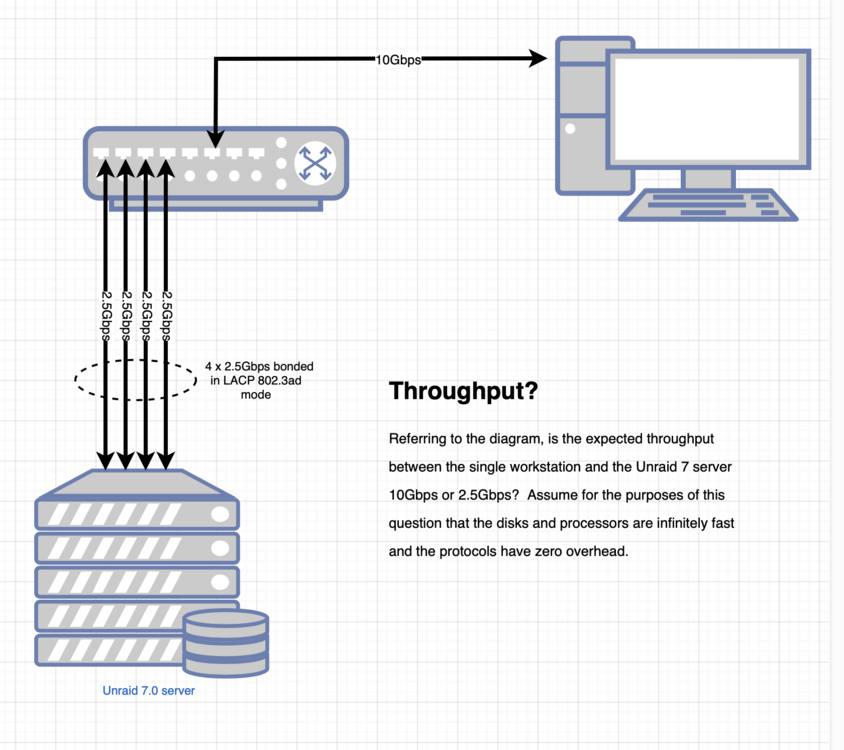
I've not been able to find a clear answer on this. If I have an Ethernet switch with four 2.5Gbps connections to my Unraid server, configured in LACP 802.3ad bonded mode, and a 10Gbps 'uplink'connection to a single workstation, what is the theoretical maximum bandwidth? Again, theoretical. (see footnote 1) Thanks in advance. Footnotes: (1) Please know in your heart that readers would swoon in admiration if you explained that the switch has to support LACP link aggregation, that networking protocols have overhead, that disks are not infinitely fast, that defective cables can slow things down, etc. And then don't explain any of those things. Thank you.
-
Thanks. I probably won't even look at the display more than once every few weeks, and then just in passing because I happen to be in the laundry room where my primary 3D printer lives. The ICP A125 does work with the ICP A106 driver and that's the one I used when I set up LCD Manager. My issue wasn't the panel driver, which worked fine. It was displays that didn't fit on the tiny 16x2 format. Most of the preconfigured displays seem to be formatted for LCD panels at least 20 characters wide, so I was ending up with things like time displays with missing seconds and screen titles and host names that continually scrolled. This is not a criticism of @SimonF's LCD Manager plugin. It's not his fault that QNAP put a 16x2, 1200 baud display in my NAS; I would not expect him to tailor his displays for something that pitiful. With a list of available system status variables, I could printf my own displays. Let me pass in two strings of 16 characters formatted however I want. But, really, I'm fine with what I have put together now.
-
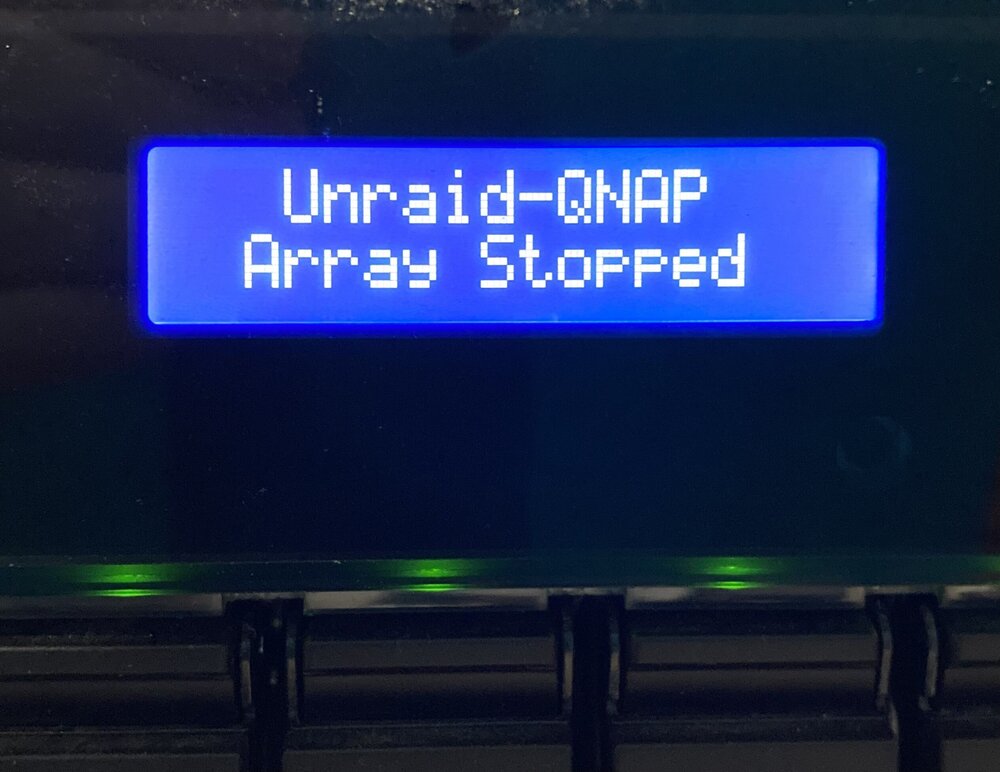
Hi @wabamad, Thanks for the generous offer. That's a good looking LCD display you have. Unfortunately, my LCD panel is an ICP A125 with just two lines of 16 5x7 pixel characters, which is stock on the QNAP TS-853A. On top of that, it communicates at a liesurely 1200baud, leading to ugly things like time displays with colons that blink out of sync with second changes. In the end, I took a simpler route that lets me know if the system is booting, the array has been started, or the array has been stopped. I just manually write to the display using a couple of scripts called from the User Scripts plugin: LCD_Array_Start: #!/bin/bash # Define command to clear LCD LCD_Clear="\x4D\x0D" # Define commands to send 16 character lines. LCD_Line0="\x4D\x0C\x00\x10" LCD_Line1="\x4D\x0C\x01\x10" # Define 16 character strings Stringx="1234567890123456" StringA=" Unraid-QNAP " StringB=" Ready " # Set the baud rate to 1200 stty -F /dev/ttyS1 1200 printf $LCD_Clear > /dev/ttyS1 printf "$LCD_Line0%s", "$StringA" > /dev/ttyS1 printf "$LCD_Line1%s", "$StringB" > /dev/ttyS1 LCD_Array_Stop: #!/bin/bash # Define command to clear LCD LCD_Clear="\x4D\x0D" # Define commands to send 16 character lines. LCD_Line0="\x4D\x0C\x00\x10" LCD_Line1="\x4D\x0C\x01\x10" # Define 16 character strings Stringx="1234567890123456" StringA=" Unraid-QNAP " StringB=" Array Stopped " # Set the baud rate to 1200 stty -F /dev/ttyS1 1200 printf $LCD_Clear > /dev/ttyS1 printf "$LCD_Line0%s", "$StringA" > /dev/ttyS1 printf "$LCD_Line1%s", "$StringB" > /dev/ttyS1 That's really all of the info I need when I happen to walk by the NAS in the laundry room. Thanks again for the offer of help and for sharing the nice display you've got going. -- Miss_Sissy

-
My celebration was premature. All of the edits I did failed to survive a reboot. Even the backup files I created disappeared. I vaguely recall that Unraid runs from a RAM disk and that, of course, won't survive a reboot. Maybe there's some way to resolve this, but I've wasted far too much time making the date and time appear in an attractive manner on the display. It's just not that important for a NAS that will live on a shelf of an unoccupied laundry room datacenter. I hope that @SimonF will take another look at this to move it from beta to stable. Should he do that, I recommend the changes described below to the lcdprof.conf file, disabling all display screens by default (leave that to the user to select the 'run lcdproc options'). We also need a way to edit to the associated .conf files that will survive reboots. He's a sharp guy, so I'm sure that he would come up with something appropriate. The unwanted displays are caused by the /etc/lcdproc.conf file having "Active=true" lines for each display you see cycling through. I edited my copy of the /etc/lcdproc.conf, changing every "Active=true" to "Active=false". Now, the only screens that show up in the rotation are those that I explicitly specify in the "Run lcdproc options" line, which is how I expected it to behave. Your post got me started in the right direction, so thanks!
-
Thank you! With the potential downtime and data recovery time should I do something wrong, I wanted to be absolutely certain about the process before starting.
-
Thanks for your help JorgeB! That is a shame. If customers can create and add drives to L2ARC subpools from the Unraid GUI, one would expect that the GUI would also supply the complementary features to remove cache drives and/or the entire L2ARC cache. I guess I'll turn to the zpool help: For further help on a command or topic, run: zpool help [<topic>] root@Unraid-NAS:~# zpool help couldn't run man program: No such file or directoryroot@Unraid-NAS:~# Just super... I did not remove the man command, so where is it? I just did a straight upgrade from the latest six-dot version of Unraid. I didn't erase 'man' or muck about with the path. I want to make sure that I have this exactly right before I start typing and clicking. This is my ZFS pool named simply 'zfspool'. root@Unraid-NAS:~# zpool status pool: zfspool state: ONLINE scan: scrub repaired 0B in 08:36:39 with 0 errors on Sun Jan 5 11:36:40 2025 config: NAME STATE READ WRITE CKSUM zfspool ONLINE 0 0 0 raidz2-0 ONLINE 0 0 0 sdb1 ONLINE 0 0 0 sdc1 ONLINE 0 0 0 sdd1 ONLINE 0 0 0 sde1 ONLINE 0 0 0 sdf1 ONLINE 0 0 0 cache nvme0n1p1 ONLINE 0 0 0 nvme1n1p1 ONLINE 0 0 0 errors: No known data errors Would this be the proper command to remove the cache drives? With the array running (according to what the Unraid GUI says): # zpool remove zfspool nvme0n1p1 nvme1n1p1 Then, from the GUI, I would stop the array, click on the pool name (zfspool) and remove (not erase!) it. From there, I would re-import the five-drive RAIDZ2 pool by creating the pool with the same of "zfspool", assigning five slots to it, putting the same drives into the same slots, and then importing? If this or some variant is the go-to method, I hope that Lime Technology creates some sort of step-by-step video or knowledgebase article. Thanks again.
-
That explains the MBR part; they are 240GB SSDs. It was oh-dark-thirty when I rushed into my L2ARC experimentation, but I assumed that I could later remove one or both L2ARC cache drives based on my 'research'. Is that not possible using the GUI; is it something that I have to do with zpool console commands? I think that I know how to do that, but I'd sure like something official before I start mucking around like that. Thanks!
-
My Unraid 7.0 upgrade went very smoothly! My thanks to the Unaid team and beta testers. After upgrading my 5 x 18TB RAIDZ2 to the Unraid 7 standard, I added a two-slot L2ARC subpool with a matching pair of SSDs. I got the warning that the drives would be formatted, which is what I wanted. Everything seemed to work fine. But now I see that the drives are showing up with partition formats of "MBR: 1MiB-aligned" rather than GPT. I decided to remove the L2ARC subpool through the GUI and try again. But I can't find a way to remove it. Nor can I reduce the slot count below 2. If I remove one or both drives, then I can't start my array because of the missing drives. Where do I go from here? Any insight would be greatly appreciated.
-
I recommend the ATP NANODURA 4GB, SLC-based, USB 2.0 industrial flash drive, an industrial drive with a rated endurance of 48TB/96TB (random and sequential write respectively) and 60,000 program/erase cycles. It has an MTBF in excess of five million hours at 25 degrees C and an operating temperature range 0f -40C to 85C. I paid $67 to DigiKey for mine, including taxes and shipping. Competing industrial SLC NAND flash drives from Delkin, SwissBit, Apacer and others are worth considering if you prefer a different brand (the prices are all very similar). All are sold through professional electronics distributors like DigiKey, Mouser, and Newark Electronics. If you prefer more general advice, look for SLC NAND flash drives. Avoid drives using MLC, TLC, and QLC NAND, as well as any drive where the NAND technology is not advertised. MLC, TLC, and QLC NAND each has only a fraction of the endurance of SLC NAND as illustrated in this chart from Kingston Technology: Note: While the ATP NANODURA is rated for "only" 60K P/E cycles, industrial electronic devices usually have specs that are much more conservative than the best-case sort of thing shown in that chart.
-
@FlamongOle: I've reinstalled it and it's working great! Thanks for the quick response at squashing these bugs.
-
Thank you. I plan to wait, but I worry about others experiencing the unexplained (to them) loss of their Unraid dashboard after an update/autoupdate or new install of the Disk Location plugin. It's easy for a troubleshooting session to turn ugly and time consuming if the person is perplexed as to the cause of the problem in a complex system. I don't want any of that to overshadow how grateful I am to FlamongOle for providing this valuable plugin. I look forward to this minor hiccup being resolved.
-
The only way that I know of is if you have a copy of the old .plg file. I do not have that. That is why I recommended that FlamongOle roll back the version in the Unraid repository.





