gguglielmi
Members
-
Joined
-
Last visited
-
I came here to say the exact same thing. I can provide logs if needed.
-
Just to update everyone, I think I found the issue. Comparing my system, with a new installation on the same hardware made with the trial key, I noticed that the system routing table metrics were all over the place. Also, I was missing the default route for "shim-br0". I upgraded back to 7.1.4 and then deleted the network.cfg in "/boot/config/". I then rebuilt the network configuration after rebooting. Now the routing table is the same as the test system, and after 12 hours it still seems to be working as expected. I'll update this post if something new comes up.
-
Well, I'm the OP of this post. I'm not resurrecting a dead thread, I'm simply updating my thread. As I suggested more or less a month ago, I was going to test the 7.2.0 Beta to see if the issue persisted, and it does. But as you suggested, i also opened a bug report yesterday.
-
Hello everyone, As you can read from this thread, I'm having issues with version 7.1.4 and also 7.2.0 beta. Network issue after 7.1.4 update from 7.1.3 - Page 2 - General Support - Unraid There's something about Docker and the community app store that kills my network. It seems a lot like a huge broadcast storm. I'm attaching here the diagnostics of my latest test on version 7.2.0 Beta 2, the issue happened around 01:32 AM. I'm rolling back to 7.1.3, but I'm available to make tests if it helps to fix the issue. Thanks unraid-ws-diagnostics-20250908-0136.zip
-
Tested 7.2.0 Beta 2 and the issue persists. I attached the diagnostics file, i faced the issue around 01:33 AM. Also during this time, i went from only bonded to a bonded + bridge network setup, but nothing changed. unraid-ws-diagnostics-20250908-0136.zip
-
After another week, 7.1.3 was rock stable. I updated my ASUS XG-C100F (Marvell AQC113) to a Intel XXV710-DA2 thinking that the card could be the issue, but after upgrading to 7.1.4 again, the issue came back. So i went back to 7.1.3 again. Let's hope that 7.2 fixes the issue. Maybe I'll try the beta.
-
I went back to 7.1.3 and it has ben rock stable. So my issue is definitely something different.
-
Maybe the AI fcked up. But i definitely don't have any IGB nic. I'm on 7.1.3 since 3 days, and as of right now everything is working. But even on 7.1.4 i didn't have this port flapping issue. What motherboard and switch are you using? Maybe it's an incompatibility on this side? I was thinking more about a hardware issue.
-
Well, as of right now, my 2 NICs are already using 2 different drivers. I have a 10Gbps PCIe ASUS XG-C100F (Marvell AQC113) and a 2.5Gbps Realtek (r8125) on the motherboard. Apparently it doesn't matter which one of those I'm using, I get the issue either way.
-
I agree with you, AI is more often than not wrong. But they definitely changed something about networking. From the 7.1.4 release notes: Networking Fix: Reverted: Improved automatic metric assignments Fix: Prevent the interface monitoring script from deleting the default route Fix: Ensure disabled default routes are not used
-
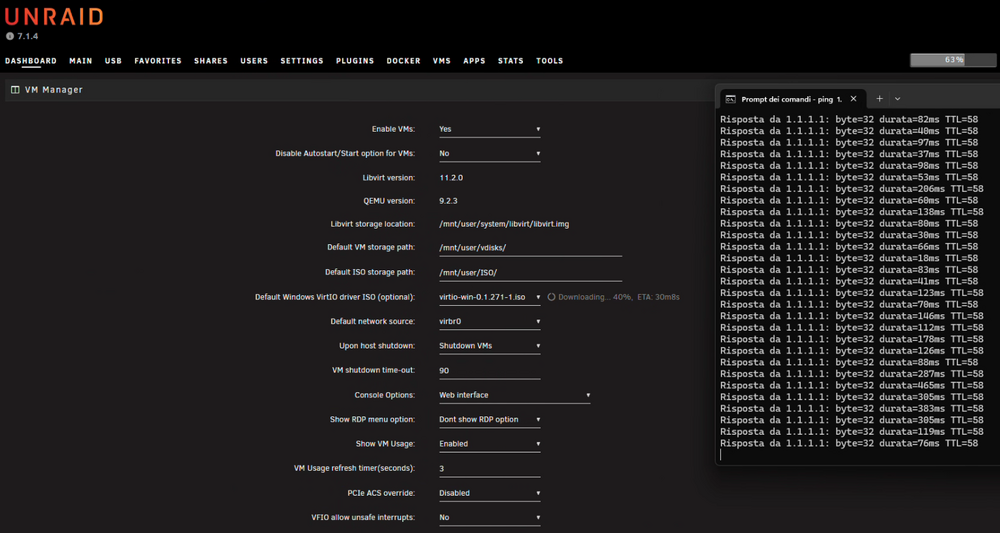
I don't have watchtower, but I saw that around that time, the community application looks for updates. But apparently the issue happens when the unRAID OS itself tries to download something from the web, as I was able to reproduce the issue by simply starting the VirtIO ISO download: Well, I spoke too soon. The issue came back after a short time. I tried to break the bond, as suggested by Gemini, but the issue persists. As of right now, I'm definitely rolling back to 7.1.3 ASAP. Something is really broken in 7.1.4, but apparently not for everyone. The thing that really worries me, is that no one from the unRAID team has responded to the threads yet. @CSeK @shinfo44 @kentb does anyone have tried to open a support ticket with unRAID? If not, I can maybe try to open it for all of us later today.
-
I opened a dedicated support thread, thanks.
-
Well, my happiness didn't last that long... After ca. 30 minutes, the system totally locked up. I had to force a system reset and right now is running a parity check. I enable the "Mirror syslog to flash" setting, so if it happens again, I can check the logs. On the bright side, the network issue still didn't come back, so at least this issue seems to be resolved.
-
I have an update, I submitted the logs to Gemini out of curiosity, and it suggested two things: disabling the bond setting up a user script to increase "inotify watch limit" using the command "sysctl -w fs.inotify.max_user_watches=1048576" Fist, I created the user script, but nothing changed, the issue was still there. After disabling the bond, I tried to download a docker image, and the issue seemed to be resolved. After this, just out of curiosity, I enabled back the bond and the issue wasn't there anymore! This is really a weird behaviour. I keep the issue under monitoring, and I will report back if it happens again.
-
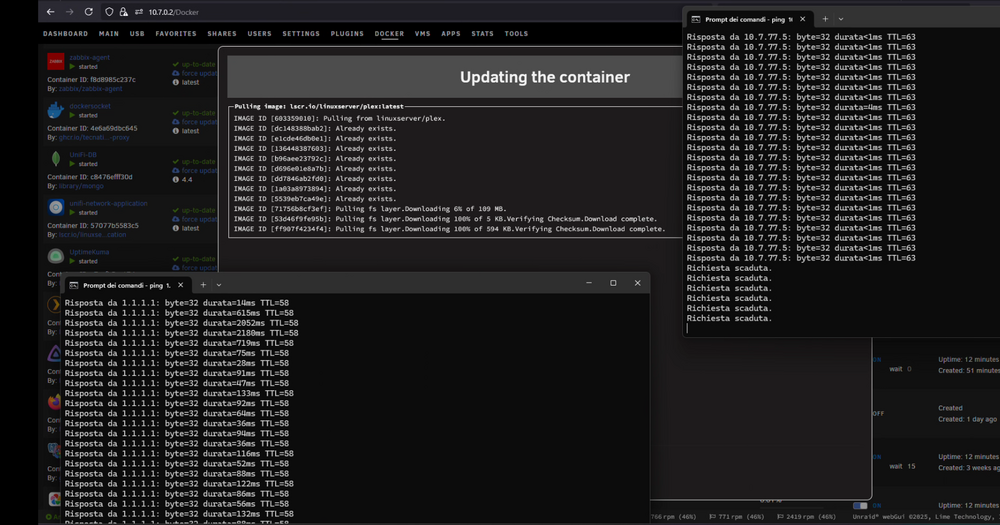
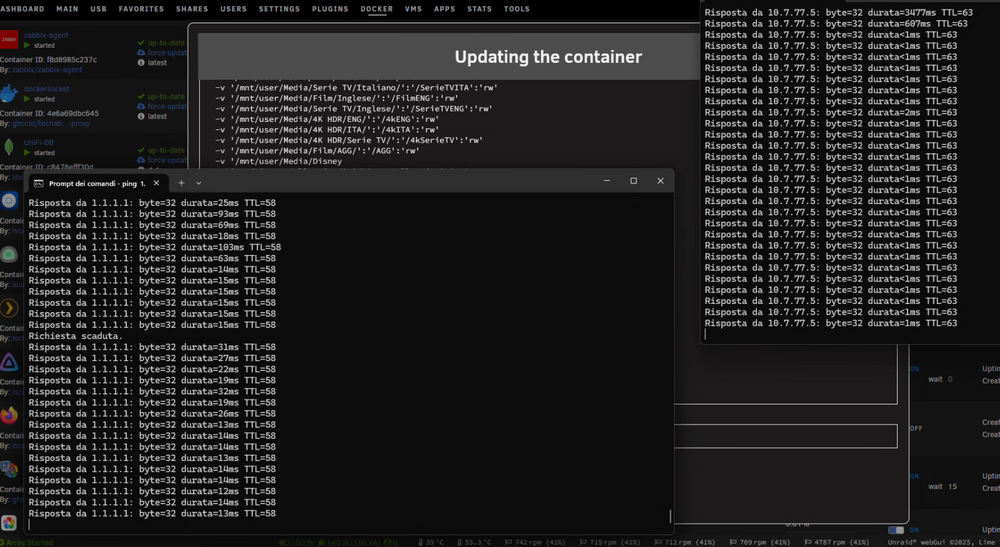
Hello everyone, after upgrading to 7.1.4 from 7.1.3, my unraid server started to totally kill my network around 3 AM, and it would recover only after 15-30 minutes. After a week of trial and error, I was able to narrow it down to my unraid server, turning off other devices and basically leaving only firewall, switch and unraid. It seems to be that when it downloads the docker images, it kills the ability of every single device on the network to reach the internet and each other, almost like if it creates a broadcast storm. I was able to replicate the issue by manually updating a docker container: In these screenshot I'm trying to ping from my Windows pc (10.7.0.5) to another docker container 10.7.77.5 (not the one being updated, that has IP 10.7.77.10) and to the Cloudflare DNS, and as you can see, as soon as I start the container update, the internet ping becomes much slower and the other container stops to respond all together. As soon as it ends, everything gets back to normal. Also the docker image download is incredibly slow, it took multiple minutes to download only a handful of MBs. This started happening only after the 7.1.4 update. I've never seen anything similar before the update I uploaded the diagnostics file, but if there's no real fix as of right now, I'm thinking of rolling back to 7.1.3. Just to add some context, I have a pfSense box with 2 VLANs, and I'm using 2 Ubiquiti switches connected via SFP+ to my unraid server that is using an Asus xg-c100f bonded in active-passive mode with the motherboard r8125 chip. I did not try yet to break the bond, because of time issues. I tried to change the network configuration, changing from a dynamic IP to a static one, but the issue persists. I also tried to enable jumbo frames, but nothing changed. Thanks to anyone who can help. unraid-ws-diagnostics-20250715-1802.zip