





DrBobke
Members
-
Joined
-
Last visited
Everything posted by DrBobke
-
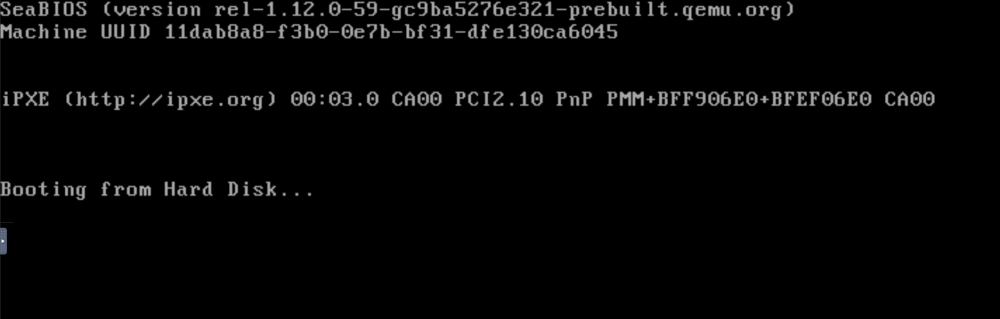
Anyone? I have watched another movie : https://www.youtube.com/watch?v=RrWOEYldTdk on passing through an nvme drive, but it is stated that the option is obsolete for some reason (I read evertyhing, but I am not sure where I would have to put certain things). Seems That others are having the same issues, though the thread is not answerred anymore.. I have also followed https://www.youtube.com/watch?v=xsuRFeyqbt4 and made a new VM, it seems it does work to pass through and I am a happy camper, being able to boot from the NVMe drive. However, I did notice that I couldn't see my HDD's anymore, which house my Photo files. So I shut it down, and added the HDD's into the mix (still using the /dev/sdc, and /dev/sdg, as nobody seems to be able to explain why the /by-id/ doesn't work for me... I have also tried "manual Vdisk Location" as /mnt/disks/HDD_Photos_Work/ (I changed the name of the HDD, so it's easier to see which is which)., but then the VMS edit tab keeps on "updating...", So I need to go out and change the settings again.. When I do this, I can see in VNC Remote that it is trying to boot from the HDD, not the Nvme anymore : When I try to edit the VM, I see that Primary vdisk location is no longer set to "none", but it set to one of the HDD's. As the NVMe is passed through, I can't see it anywhere. What I did forget to mention before - is that I had to make the VM using SeaBios, as I was getting errors when using OVMF. I also tried doing this on the new VM I was making, but that didn't work and I was taken to a command shell. PLEASE can someone check this, as I have been looking around, reading everything that seemed relevant for days now, and no closer to solving my issue...
-
Hi itimpi, I have an nvme drive that I want to use to run my VM and use as a cache drive for editing in Lightroom and Photoshop. As I already have a VM set up, someone suggested (on FB), to transfer the vdisk1.img to the nvme drive, which I have done now. However, if it is easier to set up a new VM, I am okay with that, as reinstalling the VM from scratch, will probably be a lot faster than keep trying different options for it to work properly. So maybe a "bare metal" setup would be better suited for my needs? What would you suggest and how to set this up? I don't think I found a Spaceinvader One video on that? My setup is this : 1*14TB Parity drive 2*12 TB HDD for the array 1*2TB 2'5 SSD Flash (USB) drive with unRAID In my unassigned devices, I have : nmve0n1 - 2TB Samsung 970 Evo Plus sdc - 12 TB HDD which I want to use for HDD Work photo files sdg - 12 TB HDD which I want to use for HDD Private photo files What I want to setup, is a VM that is as fast as it can be, and not using network shares on the unRAID server, as 1. Lightroom is not a fan of that and 2. I prefer to keep using my Backblaze cloud service, to ensure backup - or can this be done by using symlinks? Or is that not 'powerful enough' to fool Backblaze? IF there is a way to have the unRAID make copies of this too, that is a bonus and nice to have. The nvme would be used as cache drive in the VM for Lightroom, Photoshop and possibly Premiere Pro and would be nice to be able to run WIN10 on that too, as it will likely be faster and more responsive than running it off the array?
-
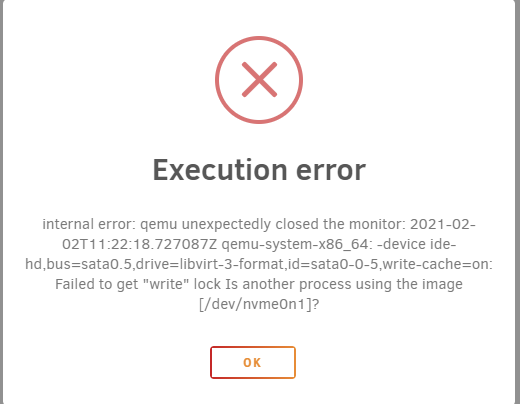
Okay, so I have finally been able to access the nvme drive via the network and copied over the vdisk image, but now I am stuck with pointing the Primary vdisk location to the nvme drive - I have now input: /dev/nvme0n1/vdisk1.img, which is freezing up. When just inputting /dev/nvme0n1, it gives me an error... Any thoughts on what I can do?
-
Okay, I will unmount the NVMe, but that should be possible for the HDD's (mounting them), right? What about reaching them as network share and assigning the drives with the /dev/disk/by-id/ ?
-
Hi all, I am watching Spaceinvader One on how to setup unassigned HDDs in a VM. https://www.youtube.com/watch?v=QaB9HhpbDAI I am building a VM for edting photos and for the purpose of putting that into a cloud backup (and Lightroom work), I want to have HDD's and an SSD. So Option 1 is to assign by sdX name, but when rebooting the unRAID, it might change, so I want to go for the option of /dev/disk.by-id/xxxxx This is not working for me. I have formatted the drives and mounted them too, option 1 I can do, but option 2 the VMS menu is just stuck on 'updating'. I searched the forum, but didn't find it there either. Second question - is there a different way to add an SSD NVMe drive as a cache drive, only for that VM? When I mounted the Drives (2 HDD's of 12 Tb each and 1 NVMe 2Tb), I should be able to connect to them from each computer via a network share, right? I cannot get that to work either. I see others on youtube videos having a "share" option in the main menu, which I do not have. I have the unassigned devices and the plus running and Enabled the Destructive Mode. Any ideas most welcome! Also found this one : but seems to not be an update that works?
-
Wow, that is very impressive and tidy work! Well done! I was actually considering buying the Fractal Meshify 2 XL tower case. I have one managed switch (https://www.tp-link.com/en/business-networking/managed-switch/t2600g-18ts/#specifications), which should be able to handle that, but the other one, which it needs to go through, doesn't have that option, so either buy another one, or move the unraid case to another location in the house..
-
Thanks a lot for your reply! You write about the large picture DB, is that in Lightroom, or are you using different software. May I ask how big the database is to have an idea? I have two Master LR Catalogs, both containing around 100k RAW files (.cr2, some .dng and some .psd). Why did you want a 65w CPU in stead of the 105W CPU? Only for powerconsumption? Is there such a big difference in that? What about performance between the two? Do you have Adobe based programs like LR and PS running on the VM, does it work smoothly on this board? What about the AUDIO, is it patched through to the client computer (say editing movie files in Premiere Pro)? I don't have 10G network yet, but if there is 10G in the Unraid and in my PC, I should be able to do 2.5-5G speeds over cat5e I read. My gigaswitches in between the Unraid and my desktop, are 1G, but are high quality, so I'm hoping they will be able to sustain the higher speeds too. If not, I'll have to relocate the Unraid closer to my pc and test it that way.
-
That is a really nice setup! Looks like the one I am wanting to build. I would just go for the X570D4U-2L2T board I think, as I read that the 'normal' X570 would have some issues, the newer version would not have these issues? Are you using this with a VM for Lightroom, PS,..? What about audio passthrough and what about the overall speed? Can you edit off of that easily? What are you using the cache 1 for? I had the ASUS expansion card a year ago for my desktop too, but couldn't get it to work on my old mobo, so I had to send it back. Any ideas would be most welcomed!

