DrBobke
Members
-
Joined
-
Last visited
Everything posted by DrBobke
-
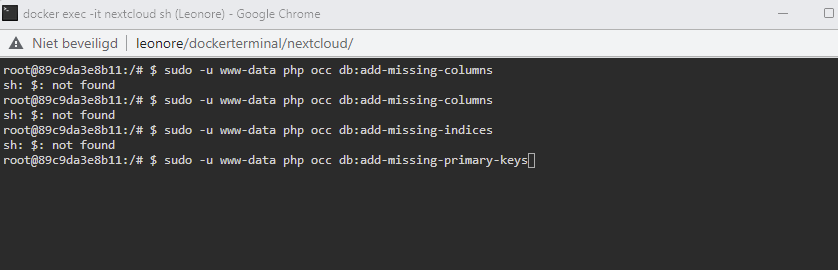
The ones stated as examples, don't work for me:
-
Thanks a lot for that, that really helps! But which commands do I have to input there? The ones in the article you mentioned are examples to fix other things?
-
Thanks a lot for that, but the link you provided only has a few examples of things one might do, but it doesn't have anything to do with the errors I see...? Also looked up this article: https://docs.nextcloud.com/server/latest/admin_manual/configuration_server/occ_command.html But I don't even have a clue where to start. From your article, I input the "$ sudo -u www-data php occ db:add-missing-columns" to test in Unraid webterminal, but I get "command not found". I am handy with computers and stuff, but this kind of thing is not my cup of tea, it would be handy if it was written where I actually have to go and input which commands? Do I have to change something in the Nextcloud docker settings? Or is it in Nextcloud webui itself in the settings? Or is it in unraid? Or is it in a folder of nextcloud on unraid? Any help is greatly appreciated, as this is a little out of my comfort zone. Thanks, DrBobke
-
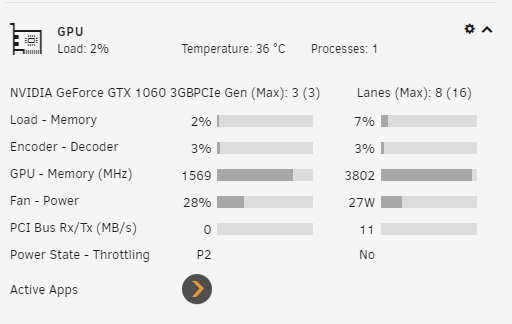
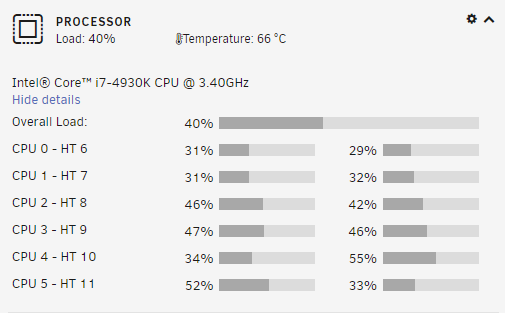
Hi all, Not sure if this is the right place to ask the question, so mods feel free to move it to the correct page. I have a stable working Unraid build (Gigabyte Technology Co., Ltd. X79-UP4, Intel® Core™ i7-4930K CPU @ 3.40GHz, 32 GB Ram DDR3, NVIDIA GeForce GTX 1060 3GB PCIe Gen (Max): 1 (3) Lanes (Max): 8 (16)). And am mainly using my unraid for Nextcloud and as a Plex Media Server. All dockers and apps are updated to the latest version. I am using Plex inc's own Docker and using the GPU to trancode movies if neccessary, but as I am on the same (internal) network, I don't really need to transcode - or so I thought. I have had issues with movieplayback for some time (buffering being the major issue). So I moved from an old NAS to Unraid, as I thought that was the issue, but it wasn't, I changed from the Popcorn Hour C200 (and 300) to PS3 and Raspberri Pi and am now using a PS4 that I have on loan for testing. In the meantime, I thought it might be down to the network or the cables, so I changed all cat5e to new cat5e cables and went from ASUS network (AC5300, 2 AC68u and AC86u) to a Unifi UDM Pro SE with all unifi devices. I moved my unraid server and UDM to the same room where I am playing the movies and connected them directly, and usually this works pretty well and we can watch a movie without buffering, but I am still sometimes getting buffering issues. Like yesterday, I wanted to watch a 4k movie (77.9 Mb/s), which was buffering, so since I have the trancode function set up, using the GPU, I wanted to test for transcode at 1080p, 20 Mb/s, still buffering issues. (On the PS4, wired with Ethernet cable) I also tried transcoding at 10 Mb/s, but that didn't work either. Because I was affraid of these issues, I already ripped the movie to 1080p at 3.6 Mb/s using a program on my computer and put that in the Plex library too, surely that should play fine? It didn't, it was buffering every +- 20 seconds or so. Very annoying! I remembered that Unraid was performing a parity check, so I stopped the parity check, but that didn't seem to make any difference (but in stopping the parity, I did see that the GPU was working and Plex showed as an app, so that was good). Pausing the movie and waiting for some time, did seem to work a little and the buffering issues only came back after a few minutes of playback. As a test, I stopped the movie on the PS4 and went on the Raspberry Pi 4, which is also wired. First tried the 4k movie but that didn't even want to get going, so I tried the other version at 3.6 Mb/s), but that was even worse as the PS4. Maybe irrelevant, but my movie share is set to Use cache pool : Yes. But not sure the limiting factor is the HDD speed. My cache is an SSD (non M.2, as my Mobo isn't supporting that). So, I clearly have tried about everything I can think of to make the movies play smoothly and was even looking at buying the PS5, which luckily is sold out everywhere, as I am not convinced now that playback will be smooth... When I play movies from my Plex when we are visiting friends through their network on for example the Raspberry Pi 4, it usually runs smoothly, even on the Google TV/Chromecast TV 4k on Wifi. I assume this is because I set the upload speed of external devices to 8 Mb/s? My questions are - 1. Anything I am missing or what I haven't thought of yet? 2. Any settings I should change to make it run smoothly? 3. Which movieplayers are you using for smooth playback of movies? 4. Since my unraid build is in the same room, I wonder if making a VM or something on the unraid and connecting that directly to my amp/projector would be possible? So essentially using the moviescreen as my screen of WIN and playing through the GPU of the unraid? Or is that not possible? When playing the 4k movie on my desktop (it seems to not buffer), the load on the GPU is : CPU load : Sorry for the loads of text, but wanted to paint a picture which has everything I tried and my setup... I also attached my diagnostics. If it helps, the movie was playing from about 20.30 last night until around 23h. And now (from 10.30 on the 4k version on my desktop, that is without issues). Any help is immensely appreciated! leonore-diagnostics-20221130-1047.zip
-
Hi All, I have been looking around, but can't find a topic about this... I have been using my nextcloud for about 2 years now, without any issues, until someone wanted to download some files >2GB and got a timeout. I always updated the docker of Nextcloud (and the others), but never realized I could update nextcloud itself from the settings, so I just updated a bunch of times from version 21.0.1 I think and am currently on 25.0.1 (talk about an upgrade) ;-). So all went well and as far as I can tell, the files and everything is still there. I had an error about mailbox not being connected, but that is sorted now. However, I have a list of warnings and can't seem to find a post about these issues or how to solve them : Missing index "fs_size" in table "oc_filecache". Missing index "fs_id_storage_size" in table "oc_filecache". Missing index "fs_storage_path_prefix" in table "oc_filecache". Missing index "properties_pathonly_index" in table "oc_properties". Missing index "job_lastcheck_reserved" in table "oc_jobs". Missing index "direct_edit_timestamp" in table "oc_direct_edit". Missing index "preferences_app_key" in table "oc_preferences". I was hoping that in doing this update, the download error (Gateway error), might be fixed too? As almost everyone, I followed the installation of SpaceInvaderOne for initial setup and have mariadb, Swag and duckdns dockers running and all are up-to-date (I usually keep my dockers up-to-date when a new version comes out). Any help will be greatly appreciated! Thanks a lot, DrBobke
-
YOU ARE A KING!!! Thank you sooooo much. I totally missed the second post. I had a few issues, but it seems to be working now, so hopefully, we can keep that up. I am sorry that you had to spend your time because I wasn't paying enough attention to the post. It is very rare that someone actually posts an answer on this forum that actually helps me, so THANK YOU!!! Maybe slightly off topic here, but I seem to have issues with opening the Plex docker (it is started) via my browser . In the Plex app itself, in the settings, I go to Network and then "Secure connections" - I can do everything when it is on preferred, but can't seem to access it via my web browser when I put it on 'required'. I didn't check on other devices right now, but I have to copy over the entire PMS folder from another Plex server (which I am not using) and change all the libraries and some other settings. Any ideas on that? I can't seem to find a good topic with the same issues. Or you wouldn't recommend me putting that on required? (I want to share my libraries with some select friends).
-
Hi All, I have been using Unraid for a long time with Plex now, but want to share my movies with others too, so want to transcode movies for them and also 4k movies for myself. So wanted to try and give this transcode another go. I have been watching and follow SpaceInvader One's vid : I had some issues yesterday in trying to set it up (I didn't see the Nvidia Visible Devices in my current Plex docker - Plex Inc's own). So I tried going through the Linux Plex app, which wouldn't show the Nvidia visible devices line either. So then I was looking for answers and came accross this topic. Since I saw multiple answers involving the Binhex Plex app, I decided to give that a go. It worked and I input the GPU info and everything in the "edit docker", continued setting up (make a new library,..) and verifiying it worked with HW encoding, ALL DANDY, it worked, I saw the "(hw)" and saw in the unraid dashboard that the GPU was being used! Then I knew my 'watched info' would be gone and it would be nice to retain that, so using Krusader, I moved over the Plex Media Server file from the old Docker (Plex Inc's own) to the new one- YES, it worked and I could see the movies I had been watching with history, etc. However, Transcoding didn't work anymore with hardware, also in the dashboard (unraid), I couldn't see the GPU turning on when invoking the transcode process. I verified in Plex itself and hardware transcoding ticks are on. Also in the docker, I can see my (correct) GPU info and everything, but I can't get it to work. I have tried all day to get it to work, fresh installing another Binhex Plex docker, but nothing seems to work with the HW transcoding.. I have the same GPU as in the example here - NVIDIA GeForce GTX 1060 3GB. My Mobo is Gigabyte X79-UP4 with Intel Core i7-4930K @3.40GHz and 32GB of RAM GPU is also shown in the dashboard with the Fan power, load etc. I have the Plex Premium lifetime subscription or whatever it is called and also an Unraid Pro account. I can't really figure out why I can't get it to work anymore. Does anyone happen to have an idea what I am missing or doing wrong? As stated, setting up a brandnew, fresh Plex docker app doesn't get it working either (and I have an issue from Plex Dashboard that Plex is not working remotely, can't seem to get around that part either). However, on the Binhex Plex that I made yesterday (and was working with HW, copied over the old PMS info through Krusader), I do have the Plex server working remotely. I have stopped "Plex Docker 1" to work on "2" and vice versa, so there weren't multiple Plex dockers running at the same time. Thanks in advance, best regards, DrBobke leonore-diagnostics-20221121-1337.zip
-
Hey Squid, thanks a lot for your reply. My drives are actually set to spin down indeed. I will disable the feature for now and see if that helps... I did have the same issue with my old NAS (hence the reason to change over to Unraid, but in the meantime, I even changed my entire setup for Internet (from ASUS AC5300 to UDM Pro SE with all unifi AP's, changed from Popcorn Hour C200/300's to Raspberry Pi and PS, switched location of the UDM Pro, went from YAMJ to Plex,...) So I really have no clue why I am still having the buffering issues after all those changes. We live pretty 'remote', so there is no interference from other networks as far as I'm aware... All drives have to be spun up, or only the ones with movies on them? What about the Parity drives?
-
UnRaid Version 6.9.2 2021-04-07 Docker : Plex-Media-Server Server Version#: 1.25.9.5721 Player Version#: 4.76.1 Hey all, Since a long time, I am having issues with Plex media server in an Unraid docker and buffering issues. This happens on my Raspberry Pi 4, which is wired with UTP (and wireless) and on a PS3, which is also wired. The connection from the Unraid machine is straight into my Unifi UDM PRO SE with Cat 5e wiring and is then straight onto the PS3 and Raspberry Pi (total length per cable is around 1 meter at most), so I am sure that is not the issue. (1 cable from my UnRaid server to the UDM Pro SE). So far, I have tried trouble shooting using this article : Why is my video stream buffering? | Plex Support and turned on verbose logging, as suggested, but in none of the 6 logs, there is a mentioning of the speed of transcoding. I do see a lot of other things going on, which seems weird, as those movies/… have been on the unraid for a long time (and in Plex too). I have also checked if my CPU were to blame (What kind of CPU do I need for my Server? | Plex Support), but since I have an i7-4930K CPU @ 3.40GHz, that should be more than fast enough for what I am using it for (only one stream for 99,9% of the occasions). My Mobo is Gigabyte Ltd. X79-UP4 and have 32 GB of Ram installed, as well as a dedicated GPU - GeForce GTX 1060 3GB. Movies I am having trouble with is ‘all’ of them, but every 5-10 minutes it is noticeable, then usually it stutters a few times for a few seconds and then plays for another 5-10 minutes. For example Pacific Rim, 191kbps wth 23.98 frames/sec, 1080p, 3.64 GB (so not even that big). It also stutters with Better Nate than ever (1080p, 4,71 GB), Transformers the last knight (1080p, 7.09 GB). None of the streams are 4K, so I have no idea why anything would stutter, buffer or whatever. I think I didn’t mess with any of the standard PLEX settings and I have 7 libraries in use, should that be of any concern. I hope someone can help me. Let me know if you need specific logs, so I can upload them. Thank you in advance, Robert
-
I just shut down unraid and saw that when I took out the Parity drive, apparently, I accidently ejected the cache drive Sata cable. Still not sure how I managed to do that, as it is in a pretty secure location that I cannot reach easily. But Dockers and VM's are back up and running! 🤩
-
Is there a way to get the VM's and Dockers running again? Disk 1: Phase 1 - find and verify superblock... Phase 2 - using internal log - zero log... - scan filesystem freespace and inode maps... - found root inode chunk Phase 3 - for each AG... - scan (but don't clear) agi unlinked lists... - process known inodes and perform inode discovery... - agno = 0 - agno = 1 - agno = 2 - agno = 3 - agno = 4 - agno = 5 - agno = 6 - agno = 7 - agno = 8 - agno = 9 - agno = 10 - process newly discovered inodes... Phase 4 - check for duplicate blocks... - setting up duplicate extent list... - check for inodes claiming duplicate blocks... - agno = 0 - agno = 2 - agno = 9 - agno = 3 - agno = 4 - agno = 5 - agno = 7 - agno = 1 - agno = 8 - agno = 10 - agno = 6 No modify flag set, skipping phase 5 Phase 6 - check inode connectivity... - traversing filesystem ... - traversal finished ... - moving disconnected inodes to lost+found ... Phase 7 - verify link counts... No modify flag set, skipping filesystem flush and exiting. Result Disk 3: Phase 1 - find and verify superblock... Phase 2 - using internal log - zero log... - scan filesystem freespace and inode maps... - found root inode chunk Phase 3 - for each AG... - scan (but don't clear) agi unlinked lists... - process known inodes and perform inode discovery... - agno = 0 - agno = 1 - agno = 2 - agno = 3 - agno = 4 - agno = 5 - agno = 6 - agno = 7 - agno = 8 - agno = 9 - agno = 10 - process newly discovered inodes... Phase 4 - check for duplicate blocks... - setting up duplicate extent list... - check for inodes claiming duplicate blocks... - agno = 0 - agno = 2 - agno = 6 - agno = 5 - agno = 4 - agno = 7 - agno = 8 - agno = 1 - agno = 9 - agno = 10 - agno = 3 No modify flag set, skipping phase 5 Phase 6 - check inode connectivity... - traversing filesystem ... - traversal finished ... - moving disconnected inodes to lost+found ... Phase 7 - verify link counts... No modify flag set, skipping filesystem flush and exiting. I just realize, that I am actually missing my cache drive. I was looking for answers on the forum and read somewhere that files could be on the cache drive, but mine is not listed anymore (at all).
-
Hey all, I unassigned Parity II, as said (stop array, go to Parity section, select dropdown and unassign, checked that it was unassigned and shut down unraid, removed Parity II and booted up again, but was stuck with 'Stale configuration', the only way to being able to start the array again, is insert Parity II again. What is going on? I obviously want to start the array without Parity II being present... Edit - SHIT! I just see I have lost all my dockers??? Nextcloud, duckdns, mariadb, Plex, Wireguard, OpenVPN, all of them gone! Also my 2 VM's are gone! HEEEELLLPPPP leonore-diagnostics-20220115-1450.zip I have just checked, my entire AppData folder is EMPTY! 😮 Luckily, I still have a backup of it from 9/01/2022 at 1.06AM. Can I restore without having to use the backup? I hope to God I didn't loose any data, but how on earth is this possible? I did the right things, no?
-
Okay, thanks a lot! I will check if I can see anything 'not right' with disk 3. Thanks a lot for all your help, I really appreciate it! What is the best course of action in removing the Parity II? Shut down UnRaid, pull the drive out and power back up, or do I need to do that in another way?
-
I think I bought them from two separate companies, so I could first return the Parity drive and get a new one and then disk 3, no? Since there is 'only a few TB' on Disk 3, I could copy that over to an external HDD too if needed, or doesn't it work that way?
-
Awesome, thanks a lot, so should I send back the Parity drive II and okay disk 3 then, or just keep Parity drive II as well? I don't know how serious the errors are.. Thanks again!
-
Thanks a lot for your information. Disk 3 just finished its extended run (I'm sure it has taken more than 28 hours), when I went to bed last night, it was around 80%. Hereby attaching the zip file. Thanks again for all your help. Should I okay the errors, or send the drive(s) back? leonore-smart-20220113-0922.zip
-
The disk is not being used during the test. Yesterday evening, my weekly Parity-Check started, which will end in a few hours. But that was after the Parity II test ended. Is there something I can/should change there? And anything you can tell me why the SMART status in Dashboard remains on Error or what I can do to fix that? As said, disk is less than 1 year old, the other one is also still in warranty at just over 1 year old.
-
I'm pretty sure it has taken longer than 28 hours. Also, the SMART status on the disk still shows as error in orange with a thumbs down. Disk 3 (12TB) is still clearing and also stuck at 10% (I don't see CPU or other parameters shoot up unexpectedly). I don't know where I can find the SMART polling timer setting, do you mean SMART capabilities:0x0003Saves SMART data before entering power-saving mode. Supports SMART auto save timer. ? I am sure I wouldn't have touched any such setting, so it should be at default, if there is any...
-
I don't know how or why, but all of the sudden, this went from 10% (I checked this morning) to 'completed without error' when I checked just now. I am posting the outcome of Parity drive II here. I will post the same results when disk 3 clears (if that happens). leonore-smart-20220111-1901.zip
-
Hereby attaching the diagnostics file. As I read in other posts, it would be helpful to note which drives are affected. Parity 2 (sdf) Z030A010FP7G (14TB) and Disk 3 (sdg) 6050A07RFPBG (12TB). Any help is greatly appreciated! leonore-diagnostics-20220111-0906.zip
-
After making sure the disks now keep running and killing the extended smart test, it is still stuck at 10% (this has been over 5 hours). The Parity drive is 14TB, but still, I should be seeing some progress by now, no?
-
Thanks a lot, disks were spun down indeed, very strange, I would assume the disks had operations, so they would not spin down. I have killed the self-test and restarted it. Hopefully it will move along this time around..
-
Hi all, Since yesterday, I am having an issue with my share in Plex-Media-Server. I have always added movies to my folder and Plex updates itself, to show the new movies. Since having added movies, it does not want to update the library. Not even after giving the command to scan the entire library. I have 914 movies in the library, but it doesn't want to update - also tried refreshing all the metadata. All my movies are named "moviename (year) resolution.ext" with an .nfo file with a link to themoviedb for the movie and a jpeg with the movieposter, each movie is in it's own folder, except for collection sets (Harry Potter, Lord of the Rings, The Hobbit, Fast and Furious, etc). To do a test, I have made a new library in my Plex, which is pointing to the same directory as the one described above and the new movies do pop up there. Strange thing is, it tells me there are 853 movies in there (vs 914 in the original). Because I thought this was very strange, I made another exact library, and in that one, I get 635 movies... Should all be the same number of movies, no? They should all be set up with the same movie scanner and agent as far as I'm aware. Ideally I would want to keep "library 1 / the original", as that knows which movies I have seen and which not yet and get it to update with the new movies. I am using a docker "Plex-Media-Server" since a few months now, ever since I was having issues with the Binhex-Plex docker (which is disabled/not running at the moment). (the docker container is up-to-date too obviously). Hope someone can help, as I didn't find the answer on the forum. Thanks in advance, Best regards, DrBobke
-
Hi All, since some months, I am having smart errors on two drives (one Parity and one array drive). I have done the smart Short self-test on both and it couldn't find any issues. I then thought to run the extended self-test, at first I tried both simultaneously, but it keeps stuck at 10% (when it starts, it starts at 10% and never progresses), after a few days of running, I decided to 'kill' the extended test on the normal HDD and only let it run the test on the Parity drive. After a few days, still at 10%, I decided to kill that test too. I rebooted my pc and the Unraid and ran another extended test, but it has now been running for 13 days and 21 hours and it is still stuck at 10%. Anyone knows why it doesn't want to progress further? It's driving me crazy. I even noticed a few weeks ago, that after having rebooted my PC, the self-test read 'aborted by user', which seems strange, as the self-test should be run inside unraid itself and there is no reason for it aborting just from rebooting my PC, no? I have read different articles on the forum (this one was most helpful), but seems I cannot even get it to run through the entire thing. The Parity drive is only a few months old, the HDD is just over 1 year old, but as said, it has been like that since the beginning, or at least for several months. Both (all in the array), have been pre-cleared before and were ready to go, bought them from good suppliers that I trust and are new (no other deployment in another machine). The Parity is even my 2nd parity drive, should that help. Hope someone can help. Thanks in advance! Best regards,
-
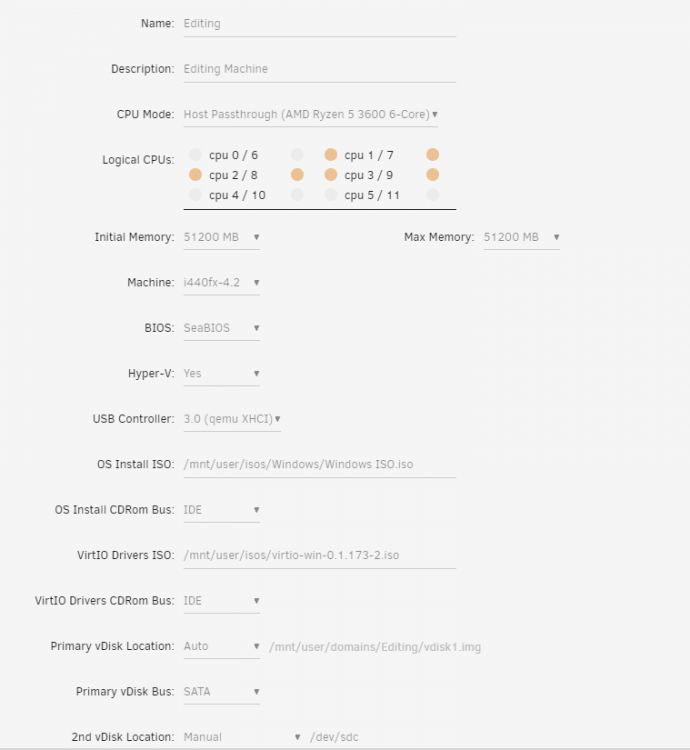
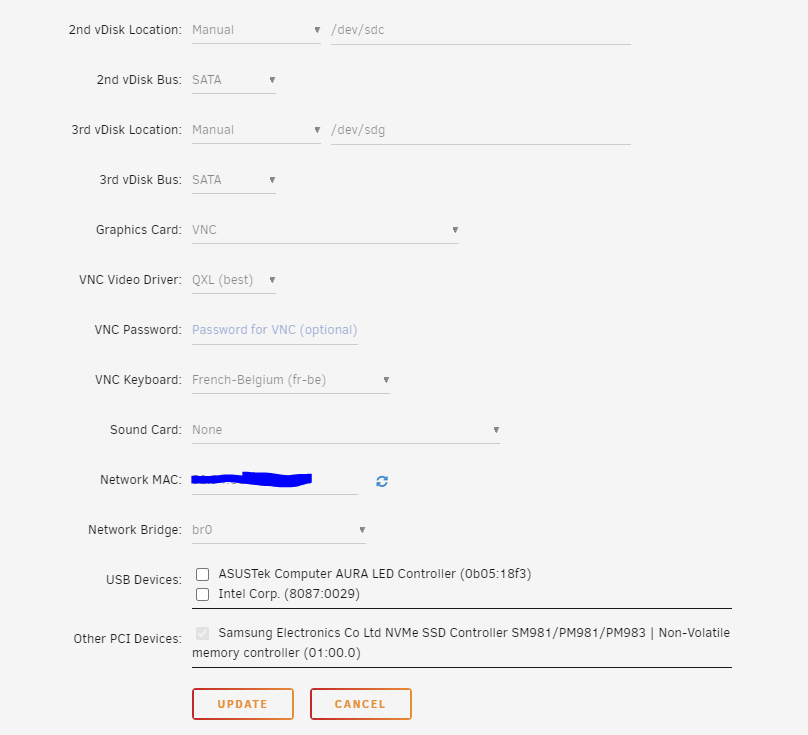
For full transparency - These are my VM settings... Ideally, I want to pass through the nvme drive and use that as the drive that holds WIN, all programs and cache. But when changing primary vDisk Location to 'none' it is taking the HDD's as bootdrive - which doesn't work. In the other VM, passing through the nvme drive, it works great, but then I can't see the HDD's anymore. I would also like to change 2nd and 3rd vdisk locations to have them /by-id/, so I don't loose them.. I wanted unraid for this feature and combine it with the NAS capabilities, but it seems I can't get it to work.. 😞 And yes, I am using the Unassigned devices plugin (funny that I have copied over about 3 TB of files on the HDD_Photos_Work and it says 473MB used and it is empty when checking in my VM, HDD_Photos_Private says 3.08TB here too, in the VM, I can see the same, but I cannot see the files - just "Backup") I copied the files over from my desktop HDD's to the unRAID UD HDD's via a network share I setup :