






IFireflyl
Members
-
Joined
-
Last visited
Everything posted by IFireflyl
-
That worked. Thanks for the assist!
-
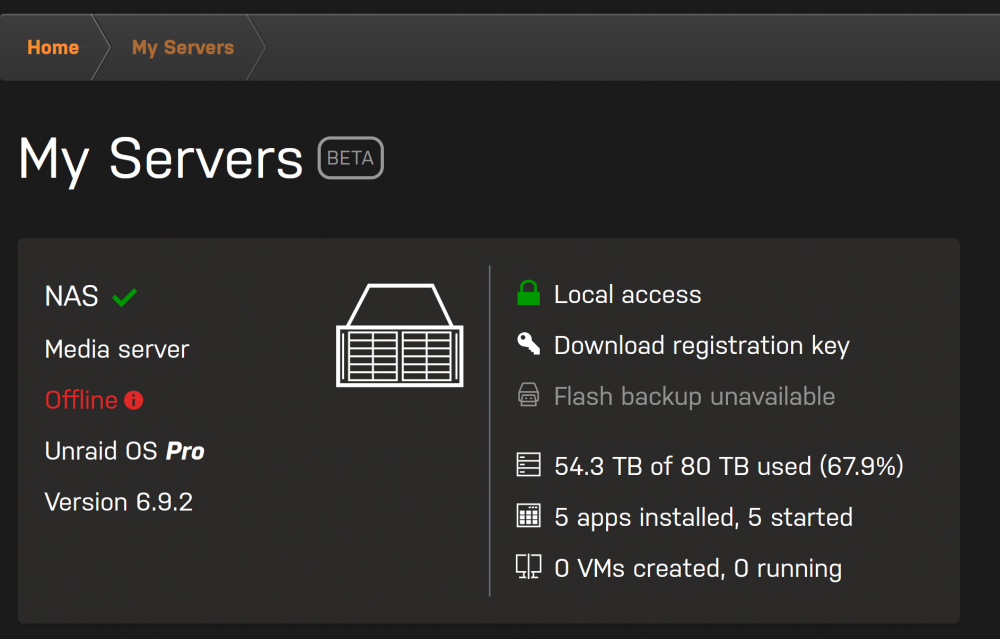
I like to pop in here from time-to-time to see what's been happening. I decided to check My Servers on this site, and I'm seeing this: It's showing Offline, but I can access it remotely just fine. Is this a bug, or should I do something to fix this on my end? My Servers is working for me, so not the biggest deal, but I was surprised to see that the thing that is working is telling me that it isn't working. Also, is there any ETA on encrypted Flash backups? I don't use the online backup solely because I don't want unencrypted data floating out in the ether. This isn't something I'm hugely upset about or anything, but merely curious on where the Unraid team is at with this. As a side note: Thanks for everything! I love being able to access my server wherever I am. It's super convenient, and I appreciate all of the effort put into this.
-
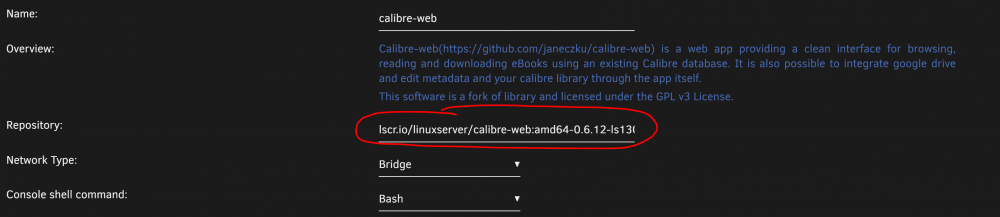
Edit your Calibre-Web docker, and find and change the Repository section to this: lscr.io/linuxserver/calibre-web:amd64-0.6.12-ls130 It should look like this: That will downgrade your Calibre-Web docker to the older version (released approximately three months ago) where the workaround I mentioned actually works. We'll have to be satisfied with this until they release a fix for this in the future.
-
Yep, that's what I ended up doing. I have no idea what caused it, or how to find out. But it appears to be working fine after a re-install. Thanks!
-
Well, I tried to reboot my server to see if that would fix it. Now the Calibre-Web docker is completely missing and I have to re-install it. *le sigh*
-
These are the steps I took to resolve this issue: In your appdata/calibre-web folder create a new folder called "custom-cont-init.d" (without the quotation marks). In the new folder, create a file called "patch-session-protection.sh" (without the quotation marks). In the new file, copy the following text and save it: #!/bin/bash echo "**** patching calibre-web - removing session protection ****" sed -i "/lm.session_protection = 'strong'/d" /app/calibre-web/cps/__init__.py Restart your container. You're right that Cloudflare is causing the issue, but only because of a security measure put in place in the last few months by Calibre-Web that is extremely unnecessary for what Calibre-Web is (just a book library). https://flask-login.readthedocs.io/en/latest/#session-protection The session protection that was added by Calibre-Web set lm.session_protection to strong, and that simply doesn't work with Cloudflare. The steps I listed bypass this newly added security feature.
-
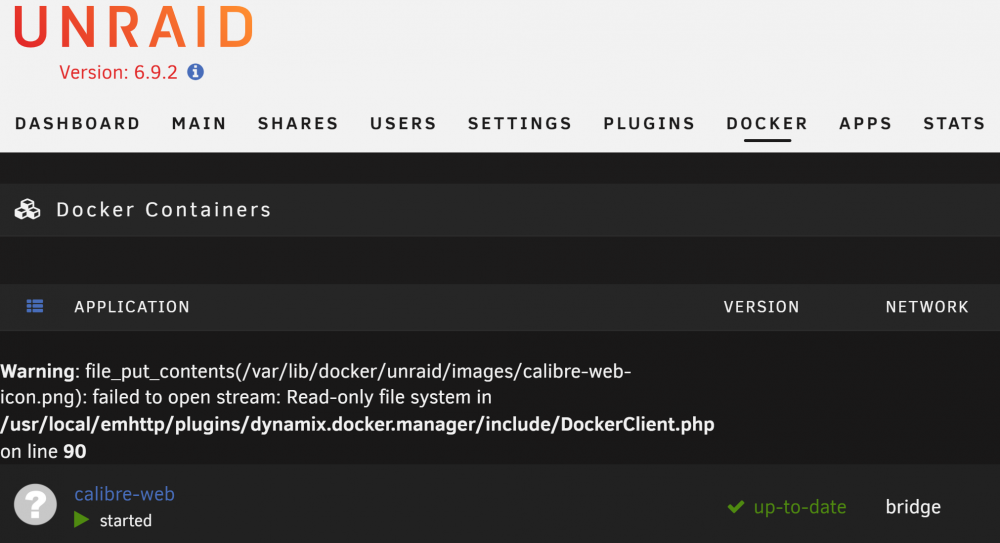
I had a Calibre-Web update available today, so I updated it. After updating my Docker page now gives me this warning: Any ideas on what I'm supposed to be doing to resolve this? It *appears* that Calibre-Web did successfully update since it says "up-to-date" whenever I check for updates. But Calibre-Web no longer works. I get an page cannot be displayed error when trying to access the WebUI. Below is a screenshot of the Docker page. EDIT: I tried restarting the server, and that causes it to say: Execution Error Error code 403
-
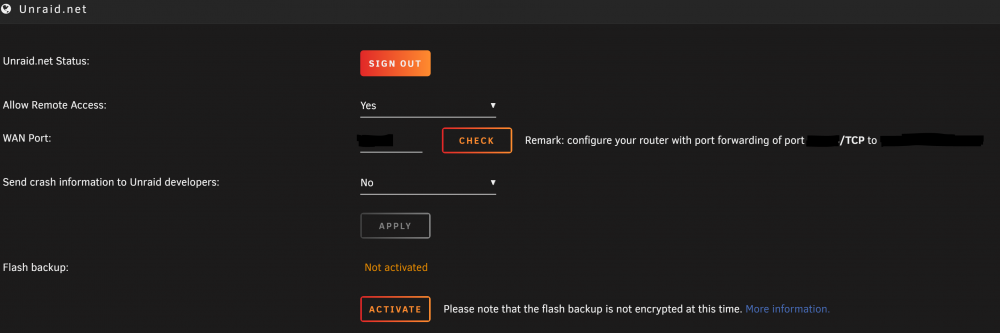
You do not have to enable remote mode. This is what the My Servers settings page looks like: The link to the flash backup information is here: https://wiki.unraid.net/My_Servers#Flash_Backups_are_Not_Encrypted That Wiki page will probably answer any other questions you might have.
-
It was more the out-of-network aspect that I suggested this for as in-network is super easy with the suggestion you made. I figured this could very well be a no, but it doesn't hurt to say something. There is something else I am curious about, though. In regards to the flash backup settings, it states this message: Please note that the flash backup is not encrypted at this time. Is flash backup encryption something that is being worked on, or is this a permanent warning?
-
Not really. Your suggestion involves forking over more money to purchase (lease) your own domain. Unraid already has a purchased domain, and they already have support for subdomains which they are already offering. The subdomain they setup is a hash that people have almost no chance of remembering. My suggestion is to let people change this to a subdomain they can remember without having to go the more expensive route of utilizing your suggestion.
-
I have a feature suggestion which may (for valid reasons I'm not able to think of) get shot down. Right now everyone has their own https://hash.unraid.net address with this plugin. It would be fantastic if you could implement a setting to change the hash to a custom value. The plugin could then check to see if that custom value is already in use, but if not then it would assign that as the new subdomain prefix. It would look like this: Default URL: https://hash.unraid.net Change custom URL field in Unraid plugin settings to (for example) metallica. Plugin checks to see if https://metallica.unraid.net is already assigned. If it is, it rejects the change with an error that the requested value is unavailable. If it is not, the change is made. Right now we have to go to the Unraid forum first, and then get redirected to the URL, and then bookmark that page for easier access. Implementing this change would make it easier to be able to access your server because you would (hopefully) always know what the URL is. There might be a completely valid reason that this cannot be done (or even that it can be done but won't be implemented), but in case this is possible and just wasn't something anyone thought of I figured I would mention it. Thanks for this plugin! I love it.
-
When I go to update a Docker (any Docker), I have this white bar that shows up and I am not sure why. I am using the Dark theme (love it, but I wish the top of the GUI was dark as well), and I think this might be an issue with the Dark theme itself but I couldn't tell you for sure. I attached a screenshot of what I'm seeing. If someone has a suggestion I am all ears. Thanks!





