





SolaAesir
Members
-
Joined
-
Last visited
-
I had the same issue, for me it seemed to be caused by the Dynamix File Integrity plugin.
-
I believe you're looking for /boot/config/plugins/dockerMan/templates-user/
-
This thread has help for the port issue with the Minio template.
-
This is what mine looks like in Advanced View (required). Note the modified Post Arguments, changed keys/passwords, and added port mapping. It seems to work and comes up without error, though I haven't used it extensively yet.
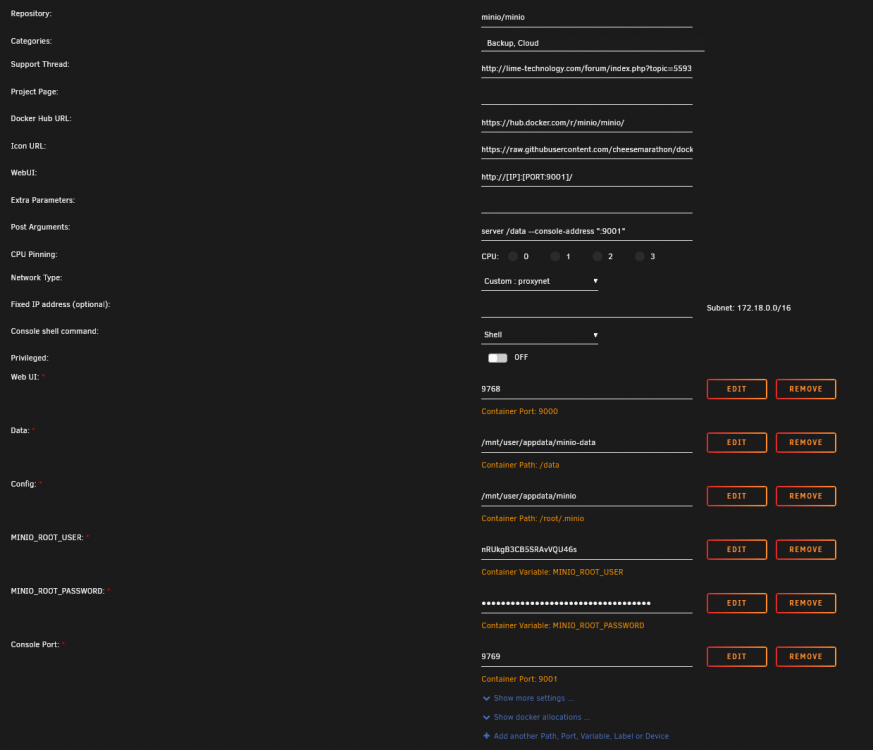
-
This fails out with the error instead put it in "Post Arguments" (also in advanced view). Post arguments should end up looking like this that console address is the internal port number though, so you'll also have to add an additional port mapping for it.
-
I haven't been able to get it running. It's erroring out waiting for containerd startup. Combined with the poor community apps template and lack of support thread, I'm guessing someone just messed up the configuration of the docker with some sort of auto-generation and just never tested it.
-
So I must have installed it previously at some point and need to delete the old appdata folder. Thank you.
-
What is the default username and password for this container?
-
For anyone trying to debug this, it can really help setting the verbose flag in your config file. That makes every attempt to update get output to the logs you can pull up by clicking on it in the Docker tab and going to logs. For example, this is the top of my ddclient.conf And now this is output to my logs This let me debug some issues and lets me verify that my IP is still being updated on occasion.

