





mauriceatkinson@btconnect.
Members
-
Joined
-
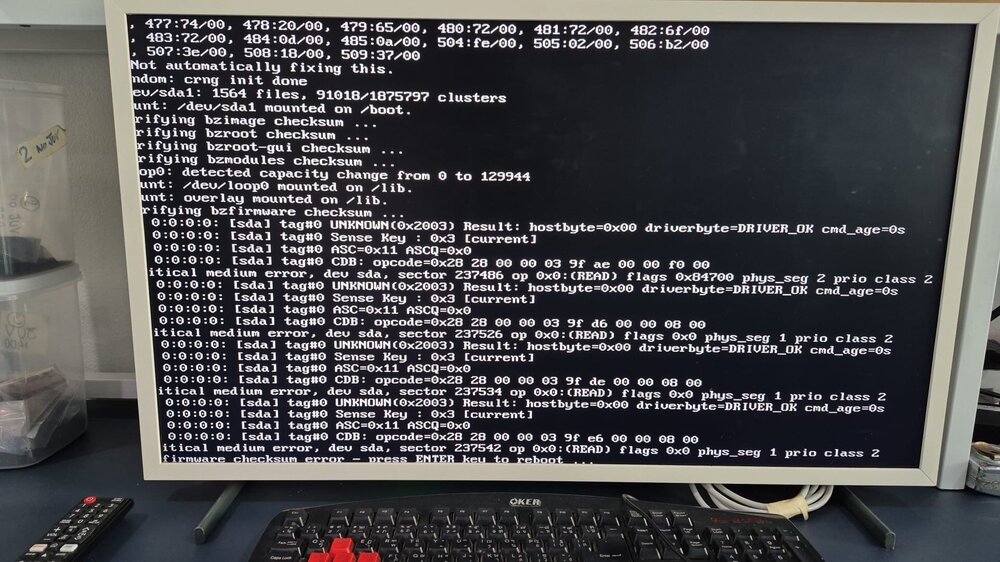
I have an issue with my unraid server after a power failure and I get the firmware checksum error on boot up. I have checked the usb is OK using windows chkdsk and I have changed out the usb stick for a new one but the same problem occurs. What can I do? Cheers Maurice
-
I eventually rebooted the server and the problem resolved itself.
-
HELP!!! I have Unraid 6.12.11 and I have enabled vlans - I can access to the unraid gui on both default (192.168.0.101) and vlan 6 )192.168.24.101) networks. However when I try to start a VM after changing the network source to br0.6 I get the error "internal error: process exited while connecting to monitor" I reverted all the changes so I am now back on thre default network and although I can get access to thr unraid webgui I cannot start the vm. Again i get the message "internal error: process exited while connecting to monitor" Here is the vm logs..... 2025-11-03 21:28:23.199+0000: starting up libvirt version: 8.7.0, qemu version: 7.2.0, kernel: 6.1.99-Unraid, hostname: AARC LC_ALL=C \ PATH=/bin:/sbin:/usr/bin:/usr/sbin \ HOME='/var/lib/libvirt/qemu/domain-5-Autofeeder Control' \ XDG_DATA_HOME='/var/lib/libvirt/qemu/domain-5-Autofeeder Control/.local/share' \ XDG_CACHE_HOME='/var/lib/libvirt/qemu/domain-5-Autofeeder Control/.cache' \ XDG_CONFIG_HOME='/var/lib/libvirt/qemu/domain-5-Autofeeder Control/.config' \ /usr/local/sbin/qemu \ -name 'guest=Autofeeder Control,debug-threads=on' \ -S \ -object '{"qom-type":"secret","id":"masterKey0","format":"raw","file":"/var/lib/libvirt/qemu/domain-5-Autofeeder Control/master-key.aes"}' \ -blockdev '{"driver":"file","filename":"/usr/share/qemu/ovmf-x64/OVMF_CODE-pure-efi.fd","node-name":"libvirt-pflash0-storage","auto-read-only":true,"discard":"unmap"}' \ -blockdev '{"node-name":"libvirt-pflash0-format","read-only":true,"driver":"raw","file":"libvirt-pflash0-storage"}' \ -blockdev '{"driver":"file","filename":"/etc/libvirt/qemu/nvram/1a32648b-0695-f84d-698d-fd4b4bc9d4d0_VARS-pure-efi.fd","node-name":"libvirt-pflash1-storage","auto-read-only":true,"discard":"unmap"}' \ -blockdev '{"node-name":"libvirt-pflash1-format","read-only":false,"driver":"raw","file":"libvirt-pflash1-storage"}' \ -machine pc-q35-7.2,usb=off,dump-guest-core=off,mem-merge=off,memory-backend=pc.ram,pflash0=libvirt-pflash0-format,pflash1=libvirt-pflash1-format \ -accel kvm \ -cpu host,migratable=on,host-cache-info=on,l3-cache=off \ -m 4096 \ -object '{"qom-type":"memory-backend-ram","id":"pc.ram","size":4294967296}' \ -overcommit mem-lock=off \ -smp 4,sockets=1,dies=1,cores=2,threads=2 \ -uuid 1a32648b-0695-f84d-698d-fd4b4bc9d4d0 \ -no-user-config \ -nodefaults \ -chardev socket,id=charmonitor,fd=36,server=on,wait=off \ -mon chardev=charmonitor,id=monitor,mode=control \ -rtc base=utc,driftfix=slew \ -global kvm-pit.lost_tick_policy=delay \ -no-hpet \ -no-shutdown \ -boot strict=on \ -device '{"driver":"pcie-root-port","port":8,"chassis":1,"id":"pci.1","bus":"pcie.0","multifunction":true,"addr":"0x1"}' \ -device '{"driver":"pcie-root-port","port":9,"chassis":2,"id":"pci.2","bus":"pcie.0","addr":"0x1.0x1"}' \ -device '{"driver":"pcie-root-port","port":10,"chassis":3,"id":"pci.3","bus":"pcie.0","addr":"0x1.0x2"}' \ -device '{"driver":"pcie-root-port","port":11,"chassis":4,"id":"pci.4","bus":"pcie.0","addr":"0x1.0x3"}' \ -device '{"driver":"pcie-root-port","port":12,"chassis":5,"id":"pci.5","bus":"pcie.0","addr":"0x1.0x4"}' \ -device '{"driver":"ich9-usb-ehci1","id":"usb","bus":"pcie.0","addr":"0x7.0x7"}' \ -device '{"driver":"ich9-usb-uhci1","masterbus":"usb.0","firstport":0,"bus":"pcie.0","multifunction":true,"addr":"0x7"}' \ -device '{"driver":"ich9-usb-uhci2","masterbus":"usb.0","firstport":2,"bus":"pcie.0","addr":"0x7.0x1"}' \ -device '{"driver":"ich9-usb-uhci3","masterbus":"usb.0","firstport":4,"bus":"pcie.0","addr":"0x7.0x2"}' \ -device '{"driver":"virtio-serial-pci","id":"virtio-serial0","bus":"pci.2","addr":"0x0"}' \ -blockdev '{"driver":"file","filename":"/mnt/user/domains/Autofeer Control/haos_ova-14.1.qcow2","node-name":"libvirt-1-storage","cache":{"direct":false,"no-flush":false},"auto-read-only":true,"discard":"unmap"}' \ -blockdev '{"node-name":"libvirt-1-format","read-only":false,"cache":{"direct":false,"no-flush":false},"driver":"qcow2","file":"libvirt-1-storage","backing":null}' \ -device '{"driver":"virtio-blk-pci","bus":"pci.3","addr":"0x0","drive":"libvirt-1-format","id":"virtio-disk2","bootindex":1,"write-cache":"on","serial":"vdisk1"}' \ -netdev tap,fd=37,id=hostnet0 \ -device '{"driver":"virtio-net","netdev":"hostnet0","id":"net0","mac":"52:54:00:8e:79:9a","bus":"pci.1","addr":"0x0"}' \ -chardev pty,id=charserial0 \ -device '{"driver":"isa-serial","chardev":"charserial0","id":"serial0","index":0}' \ -chardev socket,id=charchannel0,fd=35,server=on,wait=off \ -device '{"driver":"virtserialport","bus":"virtio-serial0.0","nr":1,"chardev":"charchannel0","id":"channel0","name":"org.qemu.guest_agent.0"}' \ -device '{"driver":"usb-tablet","id":"input0","bus":"usb.0","port":"1"}' \ -audiodev '{"id":"audio1","driver":"none"}' \ -vnc 0.0.0.0:0,websocket=5700,audiodev=audio1 \ -k en-us \ -device '{"driver":"qxl-vga","id":"video0","max_outputs":1,"ram_size":67108864,"vram_size":67108864,"vram64_size_mb":0,"vgamem_mb":16,"bus":"pcie.0","addr":"0x1e"}' \ -device '{"driver":"virtio-balloon-pci","id":"balloon0","bus":"pci.4","addr":"0x0"}' \ -sandbox on,obsolete=deny,elevateprivileges=deny,spawn=deny,resourcecontrol=deny \ -msg timestamp=on 2025-11-03 21:28:23.274+0000: shutting down, reason=failed aarc-diagnostics-20251103-2124.zip
-
Thats a pain to have to do this especially as all my vms were setup and have been for ages. Is there an automatic process for backing up libvert?
-
OK I copied the libvert.img file to a different location and configured vm manager to point to that file. I no longer the the error libvert not started and according to the logs it does start. However I still dont see any vms in the vm tab. freedom-diagnostics-20250824-0914.zip
-
I had rebooted before I rasied the issue but I have rebooted again and diagnostics attached. No vm's visible on vm tab. freedom-diagnostics-20250823-1253.zip
-
I updated the size of my docker vdisk as I was getting install failures when trying to install new docker images. I rebooted the system and whilst dockers were fine I have no vm's anymore. I get a message saying libvert not starting in the vm tab. I tried to start libvert and get this message i thought this was a strange message as I cannot understand why docker vdisk is causing this issue. Help much appreciated. freedom-diagnostics-20250823-0937.zip
-
I too am having the same issue with squashfs errors and my vms will not start. - the rest of the system looks OK. Memorytest showed no errors, I am sure I changed out the usb stick recently but this is the next thing to do again.
-
Hi did you ever resolve this as I am getting the same problem now?
-
The fix common problems plugin has reported "Out Of Memory errors detected on your server" and said to post this and the diagnostic file to the forum. The server is still running but I would welcome any pointers to resolve this issue. aarc-diagnostics-20250308-2337.zip
-
Although the disk boot order was correct (vdisk = boot 1 and ISO install = boot 2) I removed the OS install path and this corrected the problem
-
I have a wierd problem. I have been running Chirpstack in an Ubuntu VM for months with no issues. However after reducing the VM memeory size in Unraid every time I start the VM it go to the Ubunutu installer rather than run the Chirpstack vdisk. I put the memory size back to the previous setting but still this problem exists. I run two chirpstack VM's both on same version of ubuntu and one accepted the memory change no problem but just this one that appears to want to reinstall the OS. Any ideas what I can do next, should I let the OS reinstall, I dont want to lose my Chirpstack config/settings??
-
ok changed the power and sata port but still parity drive is disabled. freedom-diagnostics-20240921-0950.zip
-
thanks I used ddrescue and recovered the data. However I swopped out the bad drive but now I have the parity drive is disabled. I know the system went through its parity check and last night it was at 80% with no errors. This morning the drive is disabled. Any ideas as to the issue here? freedom-diagnostics-20240921-0833.zip
-
the exended smart test shows "completed read failure" this is the smart log for the drive if that helps? I am assuming that the parity drive should not be showing invalid? what options do I have to get my data back? freedom-smart-20240914-1833.zip
