





Tom90
Members
-
Joined
-
Last visited
-
I'm having an idential issue but have nordvpn. Did you find a fix? I move the dns server list to have 1.1.1.1 as the first option

-
Access to webui is back, but I've not changed anything. Is it working for others too?
-
I also have the same issue. I can't access webui but can access files on the network and docker is fine because containers are accessible. I recently went to 6.11.5 from 6.10 and the only change I made was removing nerdpack as it said it was no longer compatible.
-
Turns out this was a plugin causing the crash. I ran in safe mode for a while and it was fine. I removed all non essential plugins and now no problems. Unfortunately I don't know which one it would be though. I have had 2 monts up time now. Should have done this at the start
-
This was the last entry in the syslog Sep 12 13:16:40 Tower kernel: ------------[ cut here ]------------ Sep 12 13:16:40 Tower kernel: NETDEV WATCHDOG: eth0 (r8169): transmit queue 0 timed out Sep 12 13:16:40 Tower kernel: WARNING: CPU: 6 PID: 30625 at net/sched/sch_generic.c:467 dev_watchdog+0x10f/0x169 Sep 12 13:16:40 Tower kernel: Modules linked in: nct6683 tun xt_nat xt_tcpudp veth xt_conntrack nf_conntrack_netlink nfnetlink xt_addrtype br_netfilter xfs md_mod i915 iosf_mbi video i2c_algo_bit drm_kms_helper drm backlight intel_gtt agpgart syscopyarea sysfillrect sysimgblt fb_sys_fops hwmon_vid corefreqk(O) iptable_nat xt_MASQUERADE nf_nat nf_conntrack nf_defrag_ipv6 nf_defrag_ipv4 wireguard curve25519_x86_64 libcurve25519_generic libchacha20poly1305 chacha_x86_64 poly1305_x86_64 ip6_udp_tunnel udp_tunnel libblake2s blake2s_x86_64 libblake2s_generic libchacha ip6table_filter ip6_tables iptable_filter ip_tables x_tables bonding edac_mce_amd wmi_bmof kvm crct10dif_pclmul crc32_pclmul crc32c_intel ghash_clmulni_intel aesni_intel r8125(O) crypto_simd cryptd rapl r8169 ahci input_leds i2c_piix4 k10temp i2c_core led_class ccp nvme libahci wmi realtek nvme_core acpi_cpufreq button [last unloaded: i2c_dev] Sep 12 13:16:40 Tower kernel: CPU: 6 PID: 30625 Comm: sh Tainted: G O 5.13.8-Unraid #1 Sep 12 13:16:40 Tower kernel: Hardware name: Micro-Star International Co., Ltd. MS-7C91/MAG B550 TOMAHAWK (MS-7C91), BIOS A.70 06/29/2021 Sep 12 13:16:40 Tower kernel: RIP: 0010:dev_watchdog+0x10f/0x169 Sep 12 13:16:40 Tower kernel: Code: ae b0 00 00 75 36 48 89 ef c6 05 40 ae b0 00 01 e8 d8 16 fc ff 44 89 e1 48 89 ee 48 c7 c7 49 b6 f1 81 48 89 c2 e8 a6 25 11 00 <0f> 0b eb 0e 41 ff c4 48 05 40 01 00 00 e9 62 ff ff ff 48 8b 83 90 Sep 12 13:16:40 Tower kernel: RSP: 0018:ffffc90000340ec8 EFLAGS: 00010282 Sep 12 13:16:40 Tower kernel: RAX: 0000000000000000 RBX: ffff888104fe4438 RCX: 0000000000000027 Sep 12 13:16:40 Tower kernel: RDX: 0000000000000003 RSI: 0000000000000001 RDI: ffff88841e998570 Sep 12 13:16:40 Tower kernel: RBP: ffff888104fe4000 R08: 0000000000000003 R09: fffffffffffd2710 Sep 12 13:16:40 Tower kernel: R10: ffffffff826182c8 R11: ffff88842f341701 R12: 0000000000000000 Sep 12 13:16:40 Tower kernel: R13: 00000001220cb800 R14: ffffc90000340f10 R15: ffffffff8168314e Sep 12 13:16:40 Tower kernel: FS: 000015216ed7c740(0000) GS:ffff88841e980000(0000) knlGS:0000000000000000 Sep 12 13:16:40 Tower kernel: CS: 0010 DS: 0000 ES: 0000 CR0: 0000000080050033 Sep 12 13:16:40 Tower kernel: CR2: 0000000000492520 CR3: 000000002a136000 CR4: 0000000000750ee0 Sep 12 13:16:40 Tower kernel: PKRU: 55555554 Sep 12 13:16:40 Tower kernel: Call Trace: Sep 12 13:16:40 Tower kernel: <IRQ> Sep 12 13:16:40 Tower kernel: ? netif_tx_lock+0x7a/0x7a Sep 12 13:16:40 Tower kernel: call_timer_fn+0x5c/0xe4 Sep 12 13:16:40 Tower kernel: __run_timers+0x146/0x184 Sep 12 13:16:40 Tower kernel: ? enqueue_hrtimer+0x65/0x6c Sep 12 13:16:40 Tower kernel: run_timer_softirq+0x19/0x2d Sep 12 13:16:40 Tower kernel: __do_softirq+0xef/0x21b Sep 12 13:16:40 Tower kernel: __irq_exit_rcu+0x52/0x8d Sep 12 13:16:40 Tower kernel: sysvec_apic_timer_interrupt+0x66/0x7d Sep 12 13:16:40 Tower kernel: </IRQ> Sep 12 13:16:40 Tower kernel: asm_sysvec_apic_timer_interrupt+0x12/0x20 Sep 12 13:16:40 Tower kernel: RIP: 0010:native_queued_spin_lock_slowpath+0x132/0x191 Sep 12 13:16:40 Tower kernel: Code: 00 f0 44 0f b1 07 74 79 eb d3 c1 ee 12 83 e0 03 ff ce 48 c1 e0 05 48 63 f6 48 05 c0 b4 02 00 48 03 04 f5 00 b9 f2 81 48 89 10 <8b> 42 08 85 c0 75 04 f3 90 eb f5 48 8b 32 48 85 f6 74 03 0f 0d 0e Sep 12 13:16:40 Tower kernel: RSP: 0018:ffffc900011d7e58 EFLAGS: 00000246 Sep 12 13:16:40 Tower kernel: RAX: 0000000000000000 RBX: ffffc900011d7eb8 RCX: 00000000001c0000 Sep 12 13:16:40 Tower kernel: RDX: ffff88841e9ab4c0 RSI: 000000000000000a RDI: ffff888100072540 Sep 12 13:16:40 Tower kernel: RBP: ffffc900011d7ea8 R08: 000000000050ccd0 R09: 0000000000000000 Sep 12 13:16:40 Tower kernel: R10: 0000000000000000 R11: 0000000000000000 R12: 0000000000000000 Sep 12 13:16:40 Tower kernel: R13: 0000000000000000 R14: 0000000000000000 R15: 0000000000000000 Sep 12 13:16:40 Tower kernel: queued_spin_lock_slowpath+0x7/0xa Sep 12 13:16:40 Tower kernel: nr_blockdev_pages+0x1d/0x6d Sep 12 13:16:40 Tower kernel: si_meminfo+0x3f/0x5c Sep 12 13:16:40 Tower kernel: do_sysinfo.isra.0+0x9a/0x131 Sep 12 13:16:40 Tower kernel: __do_sys_sysinfo+0x20/0x59 Sep 12 13:16:40 Tower kernel: do_syscall_64+0x63/0x76 Sep 12 13:16:40 Tower kernel: entry_SYSCALL_64_after_hwframe+0x44/0xae Sep 12 13:16:40 Tower kernel: RIP: 0033:0x15216ee8ba47 Sep 12 13:16:40 Tower kernel: Code: f0 ff ff 73 01 c3 48 8b 0d 1e 74 0c 00 f7 d8 64 89 01 48 83 c8 ff c3 66 2e 0f 1f 84 00 00 00 00 00 66 90 b8 63 00 00 00 0f 05 <48> 3d 01 f0 ff ff 73 01 c3 48 8b 0d f1 73 0c 00 f7 d8 64 89 01 48 Sep 12 13:16:40 Tower kernel: RSP: 002b:00007fff1efe5478 EFLAGS: 00000202 ORIG_RAX: 0000000000000063 Sep 12 13:16:40 Tower kernel: RAX: ffffffffffffffda RBX: 0000000000490f40 RCX: 000015216ee8ba47 Sep 12 13:16:40 Tower kernel: RDX: 000015216ef15a34 RSI: 000000000000004c RDI: 00007fff1efe5480 Sep 12 13:16:40 Tower kernel: RBP: 00007fff1efe55a0 R08: 0000000000000000 R09: fffffffffffff800 Sep 12 13:16:40 Tower kernel: R10: fffffffffffff58e R11: 0000000000000202 R12: 00000000000004f0 Sep 12 13:16:40 Tower kernel: R13: 00000000004e350c R14: 0000000000000000 R15: 0000000000000030 Sep 12 13:16:40 Tower kernel: ---[ end trace e6a4592869c08869 ]---
-
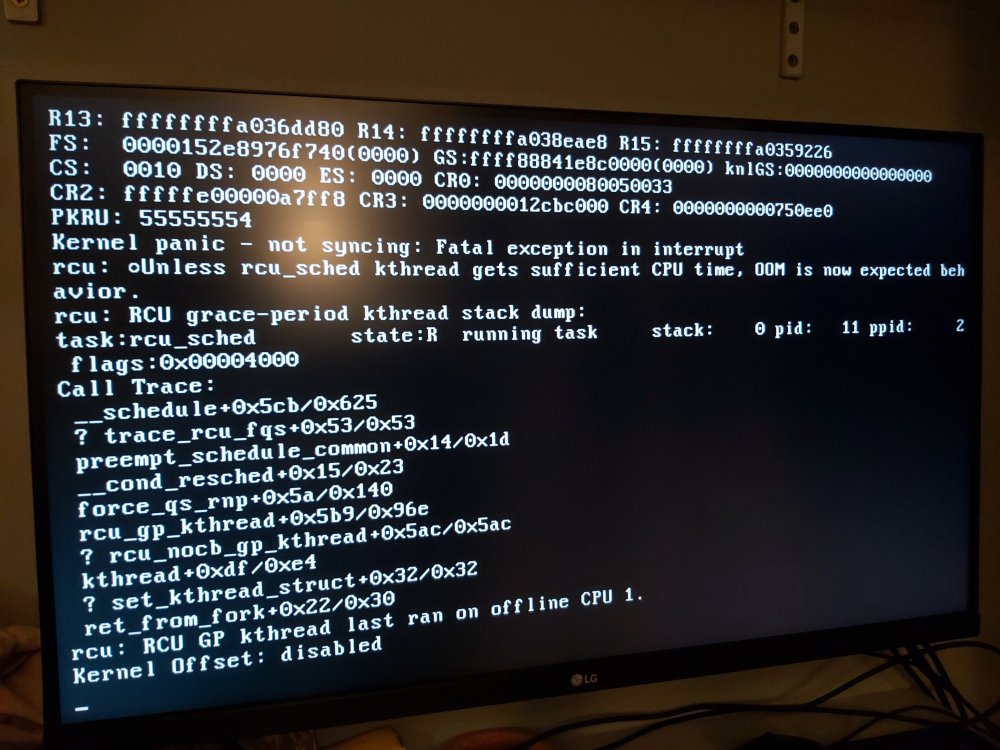
Had my unraid server running on my gaming machine. It lasted for around 6-7 days uptime before it froze again. The machine was unresponsive but the attached image shows what was on the frozen screen. The specs of the machine are 5600x, MSI b550 tomakawk, 16gb ram and rtx 2060 if that's important. Does anyone know what is causing this? I think I have two separate problems here. One is the bad RAM on my old hardware and the other, which is causing the freezing as shown in the picture below. I do have the syslog being mirrored to the flash drive which I can add later to this post. Any help greatly appreciated, I'm running out of ideas to troubleshoot this. Thanks
-
After leaving it on in gui mode the screen started to flash after a few hours. The flashing increased in frequency until it eventually froze. I figured that this was a RAM issue because the igpu uses the system memory. I moved the ram from one slot to another and either got a bad image in the bios or a speaker beaping code for bad RAM. I have swapped the mobo, CPU and RAM to my main Ryzen system which I know is solid, to see if I can replicate the issue.
-
I disabled docker and VM services to see if that helped but I still got a crash after a day or so. I've connected up the machine to a monitor now and got the gui mode working by changing some BIOS settings. I'm going to leave it on the main screen and see what happens.
-
Unfortunately it hasn't helped because it has gone offline again. The last entry in the syslog this time is just one of the drives in the array starting a SMART check. Is there a way to enable more detailed logging? I would also like to check if there's a way to get to boot into gui mode whilst connected to a monitor to see of that helps at all but I don't think it works with UEFI? My motherboard only seems to work with UEFI. Thanks
-
I've set the trim schedule to go at 6am daily and I seem to remember that it has stopped before at a different time. I've disabled the schedule for now to confirm this though.
-
The other system that I swapped into was completely different cpu/mobo/ram
-
Ok here is the syslog from the flash drive. Thanks syslog
-
Ok it was not the power supply either as this has happened again a week later after it was working fine. I've now replaced all hardware apart from the drives and flash drive. I've attached the system diagnostics but I'm not sure if this will be of any use as I can't catch the problem once I can't access the machine. I do have a log file that was written to the flash drive that I've pulled off and can attach if needed but I don't know which personal info I should remove apart from drive serial numbers? Any help would be greatly appreciated please!!! tower-diagnostics-20210821-1011.zip
-
Turns out it was a problem with the power supply if anyone else has this problem.
-
I've been swapping out parts and I think I've diagnosed this as a dying motherboard.

