Blackbird2k
Members
-
Joined
-
Last visited
-
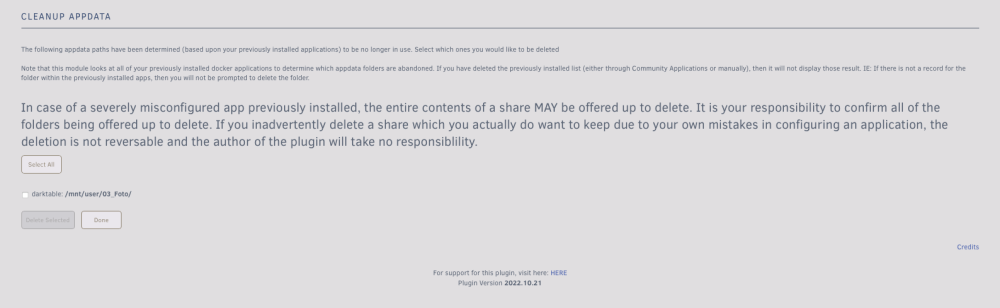
Bezüglich der Annahme, dass auf den Share zugegriffen wird, gibt es eine merkwürdige Auffälligkeit. Wenn ich in das Tool "CleanUp AppData" schaue, steht dort immer folgendes (siehe Bild) Dabei habe ich dieses Addon schon lange nicht mehr installiert. Wenn ich versuche, es über das Tool zu löschen, stürzt auch immer alles ab.
-
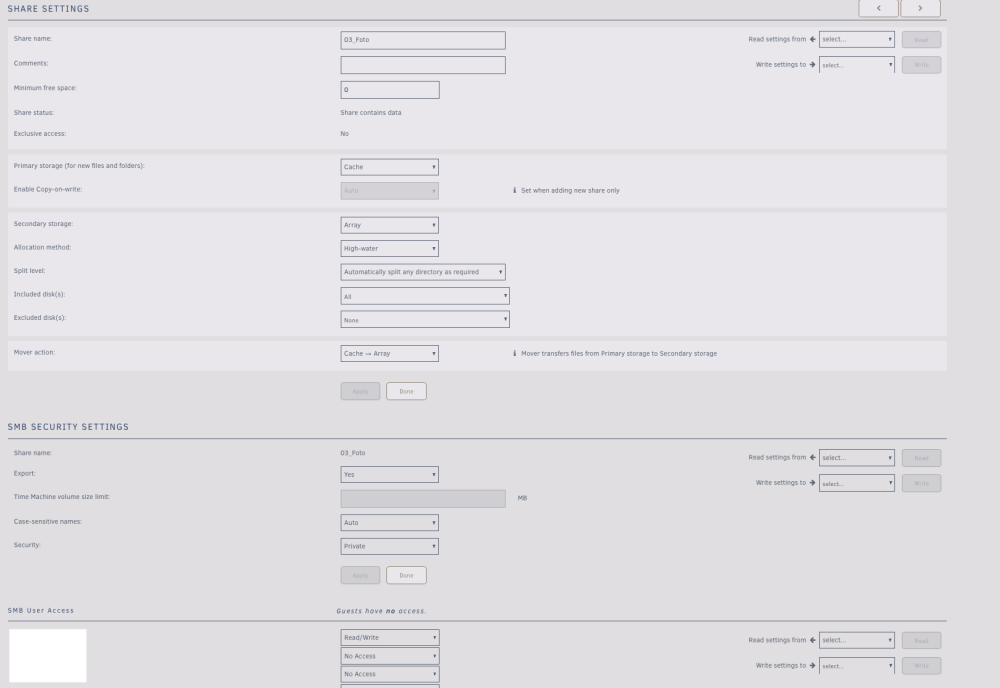
Hier ist meine Share Einstellung:
-
Das mit dem Löschen weiß ich nicht wie es passiert ist, ist in diesem Fall auch nicht so wichtig. Hatte dazu auch mal ein Thema erstellt (HIER) und wir beide hatten vor kurzen zu dem Thema auch per E-Mail kontakt. Die Info war nur als Kontext gedacht, weil ich denke, dass es etwas mit dem Problem von damals zu tun hat. Ich logge mich eigentlich immer über SMB ein und wähle dann die Freigabe aus, die ich brauche. Das ist in diesem Fall der Fotoordner. Wenn ich jetzt versuche ein Bild zu löschen, verliert mein PC die Verbindung. Wenn ich dann in die Unraid GUI gehe und unter Shares schaue sind alle weg -> Unraid neu starten -> Alle Shares sind wieder da. Wenn ich nun versuche eine andere Datei in dem Foto Share zu löschen passiert genau das gleiche. Lösche ich eine Datei in einem anderen Share wird diese gelöscht und alles läuft ohne Probleme weiter. Kursaider habe ich nur als Alternative ausprobiert, da ich dachte das dieses Problem mit der SMB Verbindung zu tun hat, was ich aber mittlerweile nicht mehr glaube.
-
Hallo wie im Titel geschrieben, verschwindet immer der komplette Benutzerordner unter \mnt\user, wenn ich Daten in einem bestimmten Share lösche. Ich habe einen Share für meine Fotos angelegt und dieser wurde vor einigen Wochen aus irgendeinem Grund komplett gelöscht. Nach dem Ausbau der Festplatten konnte ich die Daten wiederherstellen. Nach dem Wiedereinbau habe ich den Share mit dem gleichen Namen wie vorher wieder angelegt. Ich habe die geretteten Daten darauf geladen und neu sortiert. Dabei sind jetzt ein paar Bilder mit hergestellt worden, die ich nicht mehr brauche und auch die Ordnerstruktur wollte ich nochmal ändern. Wenn ich jetzt versuche die Bilder oder Ordner innerhalb des Shares zu löschen, stürzt etwas innerhalb von Unraid ab und der \mnt\user Pfad ist weg und ich muss Unraid neu starten um ihn wieder "herzustellen". Es spielt keine Rolle, ob ich die Daten über SMB oder Krusaider lösche, das Ergebnis ist dasselbe. Hat jemand eine Idee, wie ich das wieder in Ordnung bringen kann?
-
Hello, I don't know exactly how it happened but I noticed today that a share of mine is missing. I have numbered my shares and the share with the number 03 is missing, all the others before and after it are there. I can only explain that I accidentally deleted it today when I was logged in as root and deleted a share from an old application. Is there a way to restore this?
-
Nein habe ich noch nicht, dann werde ich das machen.
-
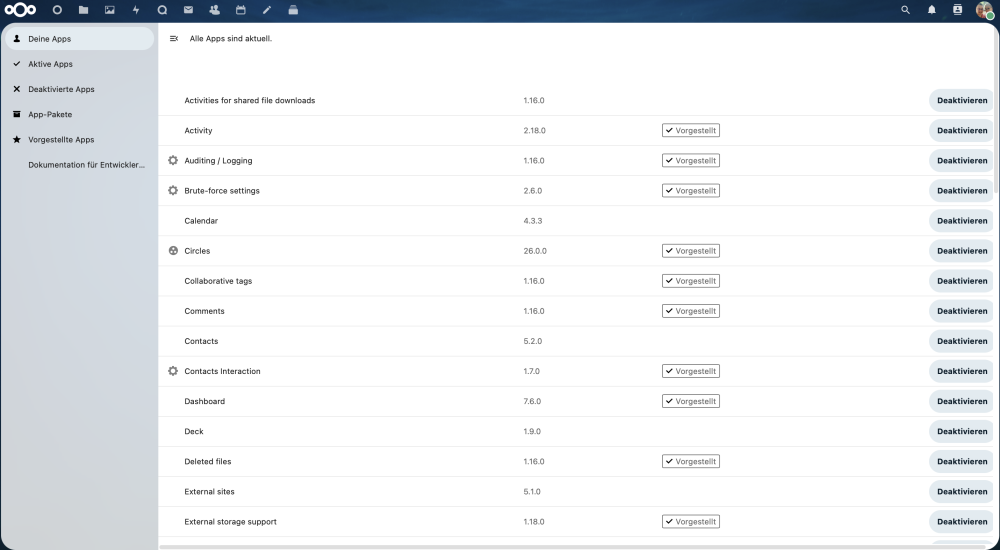
Hallo, Ich benutze Nextcloud schon seit einiger Zeit, aber nach dem Update auf Version 26.0.1 ist mein Appstore verschwunden. Ich habe zwar noch die Option im Drop-Down-Menü auf Apps zu klicken, aber hier sehe ich nur alle Standard-Apps, aber keine von "Extern" oder Drittanbietern. Meine Übersicht sieht wie auf dem Bild aus. Muss ich hier seit der Version 26.0.1 etwas ändern? Ich habe dazu nichts gefunden, falls ich etwas übersehen habe, wäre ich für einen Link dankbar. Ich benutze die Nextcloud Variante von Linuxserver.
-
Thank you very much, I have found it now. I didn't realise that the folders were hidden.
-
Hello, A question regarding Satisfactory. Is there a possibility to download the savegame from the server? I have now looked at a few websites, many of which refer to this directory: ~/.config/Epic/FactoryGame/Saved/SaveGames/server But I can't find it on the server. I have also tried to find the directory via the console but without success. Would be grateful if someone could explain this to me in more detail.
-
Ich habe mir heute schonmal eine neue bestellt. Eventuell baue ich die als neue Parity Disk ein und lass Unraid alles neu aufbauen und formatiere dann die aktuelle Parity Disk und schaue wie die sich im Array verhält.
-
Ja also SATA Kabel habe ich ersetz durch 2 Ersatz die beim Mainboard dazu waren und hatte jetzt sogar nochmal neue bestellt und die "alten" durch diese ausgetauscht. Habe ebenfalls mehrfach geprüft das sie korrekt sitzen. Gerne mache ich das nochmal aber ich kann mir nicht vorstellen, dass ich dort was übersehe. Dann werde ich das mit dem BIOS mal probieren.
-
Ja, wie schon oben geschrieben, Kabel getauscht, SATA Port auf dem Mainboard getauscht bzw. einen anderen verwendet. Eventuell hat die Festplatte einen Fehler, da kann sein aber warum ist dann dieses mal Disk 1 deaktiviert worden und nicht die Parity Disk? Die Hardware ist ja noch sehr neu (8 Monate), da hätte ich nicht erwartet das gleich zwei Festplatten kaputt gehen. Die andere Frage ist, wie wahrscheinlich ist es, das der SATA Controller vom Motherboard defekt ist?
-
Hallo, der Fehler ist erneut aufgetreten, jetzt, warum auch immer mit Disk 1. Ich verstehe das alles irgendwie nicht, warum das überhaupt passiert? Der Fehler wurde mir gestern 15.09 um 17:56 gemeldet (per Mail). Im Anhang habe ich das komplette Diagnosefile, ich hoffe das ist dass richtige? Langsam muss ich sagen, bin ich genervt von Unraid, wenn man seine Daten nicht nutzen kann und das obwohl man am System selbst nichts macht oder ändert und es einfach so nicht mehr funktioniert. Aber gut ich hoffe hier kann mir jemand weiterhelfen. E-Mail Meldung: Event: Fix Common Problems - ME-System Subject: Errors have been found with your server (ME-System). Description: Investigate at Settings / User Utilities / Fix Common Problems Importance: alert * **disk1 (ST4000VN008-2DR166_ZGY8C63N) is disabled** * **parity (ST4000VN008-2DR166_ZGY8BHAG) has read errors** * Docker Application Grafana has an update available for it * Docker Application UniFi-Controller has an update available for it * No destination (browser / email / agents set for Warning level notifications * Docker application openvpn-as has moderator comments listed * vfio.pci.plg Not Compatible with unRaid version 6.9.2 * Syslog mirrored to flash me-system-diagnostics-20210916-1805.zip
-
Ja der Server wurde zwischendurch neugestartet. Ich habe jetzt den lokalen Syslog Server angeschaltet, ist das ausreichend? Muss Syslog Mirror to Flash ebenfalls aktiviert werden?
-
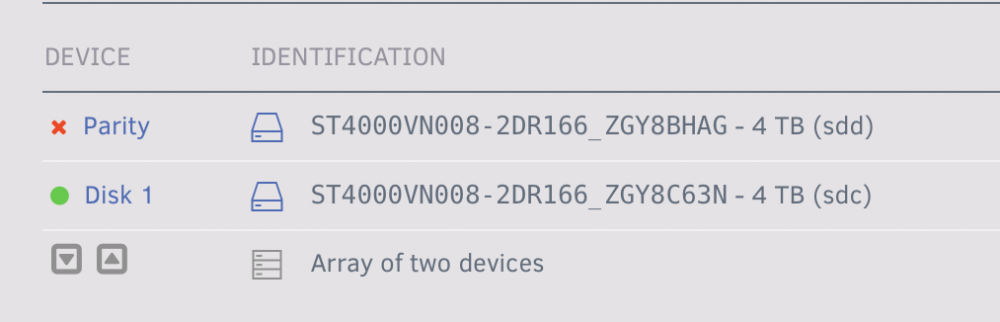
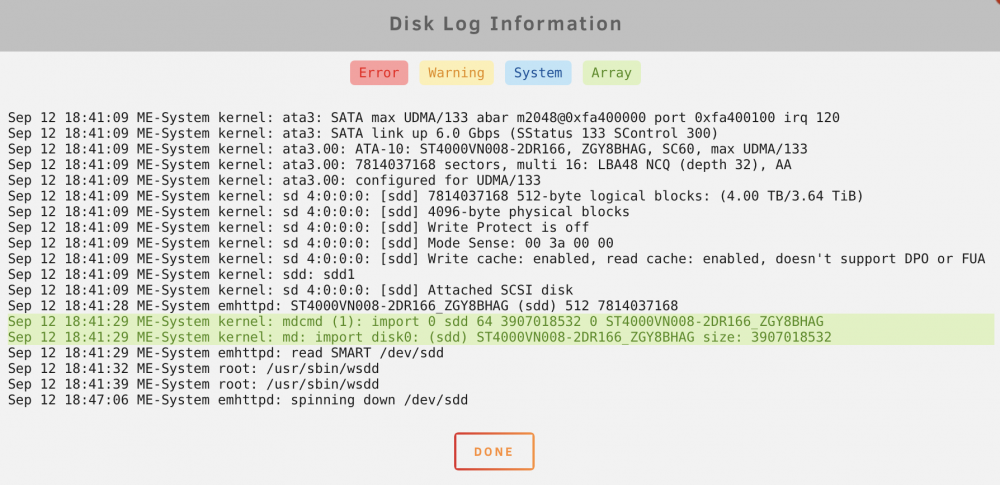
Hallo, ich habe seit ein paar Wochen das Problem, dass die Parity Disk immer "disabled" wird. Ich habe jetzt schon einen SMART Tests gemacht, da war aber alles ok. Ich habe jetzt ebenfalls versucht, das Array zu stoppen, disk entfernen, Array starten, erneut stoppen und Disk wieder hinzufügen. Dann funktioniert alles für 2-3 Tage, bevor es erneut deaktiviert wird. Habe ebenfalls schon das SATA Kabel getauscht, den SATA Port getauscht (auf dem Mainboard) aber nichts davon hat geholfen. Kann mir jemand sagen, was ich noch machen könnte? Ist die Festplatte eventuell doch defekt? Auch im "Disk Log Info" Fenster sind keine Fehler zu sehen (siehe Bilder im Anhang) Anbei noch das Log vom SMART Test: smartctl 7.1 2019-12-30 r5022 [x86_64-linux-5.10.28-Unraid] (local build) Copyright (C) 2002-19, Bruce Allen, Christian Franke, www.smartmontools.org === START OF INFORMATION SECTION === Model Family: Seagate IronWolf Device Model: ST4000VN008-2DR166 Serial Number: ZGY8BHAG LU WWN Device Id: 5 000c50 0c7d57f38 Firmware Version: SC60 User Capacity: 4,000,787,030,016 bytes [4.00 TB] Sector Sizes: 512 bytes logical, 4096 bytes physical Rotation Rate: 5980 rpm Form Factor: 3.5 inches Device is: In smartctl database [for details use: -P show] ATA Version is: ACS-3 T13/2161-D revision 5 SATA Version is: SATA 3.1, 6.0 Gb/s (current: 6.0 Gb/s) Local Time is: Sun Sep 12 18:43:59 2021 CEST SMART support is: Available - device has SMART capability. SMART support is: Enabled AAM feature is: Unavailable APM level is: 128 (minimum power consumption without standby) Rd look-ahead is: Enabled Write cache is: Enabled DSN feature is: Unavailable ATA Security is: Disabled, frozen [SEC2] Wt Cache Reorder: Enabled === START OF READ SMART DATA SECTION === SMART overall-health self-assessment test result: PASSED General SMART Values: Offline data collection status: (0x00) Offline data collection activity was never started. Auto Offline Data Collection: Disabled. Self-test execution status: ( 0) The previous self-test routine completed without error or no self-test has ever been run. Total time to complete Offline data collection: ( 581) seconds. Offline data collection capabilities: (0x73) SMART execute Offline immediate. Auto Offline data collection on/off support. Suspend Offline collection upon new command. No Offline surface scan supported. Self-test supported. Conveyance Self-test supported. Selective Self-test supported. SMART capabilities: (0x0003) Saves SMART data before entering power-saving mode. Supports SMART auto save timer. Error logging capability: (0x01) Error logging supported. General Purpose Logging supported. Short self-test routine recommended polling time: ( 1) minutes. Extended self-test routine recommended polling time: ( 616) minutes. Conveyance self-test routine recommended polling time: ( 2) minutes. SCT capabilities: (0x50bd) SCT Status supported. SCT Error Recovery Control supported. SCT Feature Control supported. SCT Data Table supported. SMART Attributes Data Structure revision number: 10 Vendor Specific SMART Attributes with Thresholds: ID# ATTRIBUTE_NAME FLAGS VALUE WORST THRESH FAIL RAW_VALUE 1 Raw_Read_Error_Rate POSR-- 071 064 044 - 13729073 3 Spin_Up_Time PO---- 095 093 000 - 0 4 Start_Stop_Count -O--CK 099 099 020 - 1510 5 Reallocated_Sector_Ct PO--CK 100 100 010 - 0 7 Seek_Error_Rate POSR-- 086 060 045 - 440117417 9 Power_On_Hours -O--CK 093 093 000 - 6618 (80 62 0) 10 Spin_Retry_Count PO--C- 100 100 097 - 0 12 Power_Cycle_Count -O--CK 100 100 020 - 44 184 End-to-End_Error -O--CK 100 100 099 - 0 187 Reported_Uncorrect -O--CK 100 100 000 - 0 188 Command_Timeout -O--CK 100 100 000 - 0 189 High_Fly_Writes -O-RCK 100 100 000 - 0 190 Airflow_Temperature_Cel -O---K 068 056 040 - 32 (Min/Max 27/39) 191 G-Sense_Error_Rate -O--CK 100 100 000 - 0 192 Power-Off_Retract_Count -O--CK 100 100 000 - 1075 193 Load_Cycle_Count -O--CK 097 097 000 - 7986 194 Temperature_Celsius -O---K 032 044 000 - 32 (0 11 0 0 0) 197 Current_Pending_Sector -O--C- 100 100 000 - 0 198 Offline_Uncorrectable ----C- 100 100 000 - 0 199 UDMA_CRC_Error_Count -OSRCK 200 200 000 - 0 240 Head_Flying_Hours ------ 100 253 000 - 1747 (119 156 0) 241 Total_LBAs_Written ------ 100 253 000 - 12614868320 242 Total_LBAs_Read ------ 100 253 000 - 117411652290 ||||||_ K auto-keep |||||__ C event count ||||___ R error rate |||____ S speed/performance ||_____ O updated online |______ P prefailure warning General Purpose Log Directory Version 1 SMART Log Directory Version 1 [multi-sector log support] Address Access R/W Size Description 0x00 GPL,SL R/O 1 Log Directory 0x01 SL R/O 1 Summary SMART error log 0x02 SL R/O 5 Comprehensive SMART error log 0x03 GPL R/O 5 Ext. Comprehensive SMART error log 0x04 GPL,SL R/O 8 Device Statistics log 0x06 SL R/O 1 SMART self-test log 0x07 GPL R/O 1 Extended self-test log 0x09 SL R/W 1 Selective self-test log 0x10 GPL R/O 1 NCQ Command Error log 0x11 GPL R/O 1 SATA Phy Event Counters log 0x13 GPL R/O 1 SATA NCQ Send and Receive log 0x15 GPL R/W 1 Rebuild Assist log 0x21 GPL R/O 1 Write stream error log 0x22 GPL R/O 1 Read stream error log 0x24 GPL R/O 512 Current Device Internal Status Data log 0x30 GPL,SL R/O 9 IDENTIFY DEVICE data log 0x80-0x9f GPL,SL R/W 16 Host vendor specific log 0xa1 GPL,SL VS 24 Device vendor specific log 0xa2 GPL VS 8160 Device vendor specific log 0xa6 GPL VS 192 Device vendor specific log 0xa8-0xa9 GPL,SL VS 136 Device vendor specific log 0xab GPL VS 1 Device vendor specific log 0xb0 GPL VS 9048 Device vendor specific log 0xbe-0xbf GPL VS 65535 Device vendor specific log 0xc1 GPL,SL VS 16 Device vendor specific log 0xd1 GPL VS 136 Device vendor specific log 0xd2 GPL VS 10000 Device vendor specific log 0xd3 GPL VS 1920 Device vendor specific log 0xe0 GPL,SL R/W 1 SCT Command/Status 0xe1 GPL,SL R/W 1 SCT Data Transfer SMART Extended Comprehensive Error Log Version: 1 (5 sectors) No Errors Logged SMART Extended Self-test Log Version: 1 (1 sectors) Num Test_Description Status Remaining LifeTime(hours) LBA_of_first_error # 1 Short offline Completed without error 00% 6618 - SMART Selective self-test log data structure revision number 1 SPAN MIN_LBA MAX_LBA CURRENT_TEST_STATUS 1 0 0 Not_testing 2 0 0 Not_testing 3 0 0 Not_testing 4 0 0 Not_testing 5 0 0 Not_testing Selective self-test flags (0x0): After scanning selected spans, do NOT read-scan remainder of disk. If Selective self-test is pending on power-up, resume after 0 minute delay. SCT Status Version: 3 SCT Version (vendor specific): 522 (0x020a) Device State: Active (0) Current Temperature: 31 Celsius Power Cycle Min/Max Temperature: 27/39 Celsius Lifetime Min/Max Temperature: 14/44 Celsius Under/Over Temperature Limit Count: 0/93 SCT Temperature History Version: 2 Temperature Sampling Period: 3 minutes Temperature Logging Interval: 59 minutes Min/Max recommended Temperature: 0/ 0 Celsius Min/Max Temperature Limit: 0/ 0 Celsius Temperature History Size (Index): 128 (38) Index Estimated Time Temperature Celsius 39 2021-09-07 13:02 35 **************** ... ..( 16 skipped). .. **************** 56 2021-09-08 05:45 35 **************** 57 2021-09-08 06:44 ? - 58 2021-09-08 07:43 24 ***** 59 2021-09-08 08:42 ? - 60 2021-09-08 09:41 26 ******* 61 2021-09-08 10:40 ? - 62 2021-09-08 11:39 27 ******** 63 2021-09-08 12:38 ? - 64 2021-09-08 13:37 29 ********** 65 2021-09-08 14:36 ? - 66 2021-09-08 15:35 31 ************ 67 2021-09-08 16:34 ? - 68 2021-09-08 17:33 31 ************ 69 2021-09-08 18:32 ? - 70 2021-09-08 19:31 32 ************* 71 2021-09-08 20:30 ? - 72 2021-09-08 21:29 31 ************ 73 2021-09-08 22:28 ? - 74 2021-09-08 23:27 29 ********** 75 2021-09-09 00:26 37 ****************** 76 2021-09-09 01:25 30 *********** 77 2021-09-09 02:24 28 ********* 78 2021-09-09 03:23 27 ******** ... ..( 3 skipped). .. ******** 82 2021-09-09 07:19 27 ******** 83 2021-09-09 08:18 28 ********* 84 2021-09-09 09:17 27 ******** 85 2021-09-09 10:16 31 ************ 86 2021-09-09 11:15 29 ********** ... ..( 7 skipped). .. ********** 94 2021-09-09 19:07 29 ********** 95 2021-09-09 20:06 33 ************** 96 2021-09-09 21:05 35 **************** 97 2021-09-09 22:04 36 ***************** 98 2021-09-09 23:03 35 **************** 99 2021-09-10 00:02 35 **************** 100 2021-09-10 01:01 31 ************ 101 2021-09-10 02:00 30 *********** ... ..( 13 skipped). .. *********** 115 2021-09-10 15:46 30 *********** 116 2021-09-10 16:45 31 ************ ... ..( 3 skipped). .. ************ 120 2021-09-10 20:41 31 ************ 121 2021-09-10 21:40 30 *********** ... ..( 13 skipped). .. *********** 7 2021-09-11 11:26 30 *********** 8 2021-09-11 12:25 31 ************ 9 2021-09-11 13:24 31 ************ 10 2021-09-11 14:23 30 *********** 11 2021-09-11 15:22 30 *********** 12 2021-09-11 16:21 30 *********** 13 2021-09-11 17:20 31 ************ ... ..( 2 skipped). .. ************ 16 2021-09-11 20:17 31 ************ 17 2021-09-11 21:16 30 *********** 18 2021-09-11 22:15 31 ************ 19 2021-09-11 23:14 31 ************ 20 2021-09-12 00:13 30 *********** ... ..( 11 skipped). .. *********** 32 2021-09-12 12:01 30 *********** 33 2021-09-12 13:00 31 ************ 34 2021-09-12 13:59 30 *********** 35 2021-09-12 14:58 30 *********** 36 2021-09-12 15:57 31 ************ 37 2021-09-12 16:56 31 ************ 38 2021-09-12 17:55 31 ************ SCT Error Recovery Control: Read: 70 (7.0 seconds) Write: 70 (7.0 seconds) Device Statistics (GP Log 0x04) Page Offset Size Value Flags Description 0x01 ===== = = === == General Statistics (rev 1) == 0x01 0x008 4 44 --- Lifetime Power-On Resets 0x01 0x010 4 6618 --- Power-on Hours 0x01 0x018 6 12614868320 --- Logical Sectors Written 0x01 0x020 6 25617773 --- Number of Write Commands 0x01 0x028 6 117411652272 --- Logical Sectors Read 0x01 0x030 6 143931267 --- Number of Read Commands 0x01 0x038 6 1631184253047 --- Date and Time TimeStamp 0x03 ===== = = === == Rotating Media Statistics (rev 1) == 0x03 0x008 4 4271649876 N-- Spindle Motor Power-on Hours 0x03 0x010 4 4271647955 N-- Head Flying Hours 0x03 0x018 4 7986 --- Head Load Events 0x03 0x020 4 0 --- Number of Reallocated Logical Sectors 0x03 0x028 4 0 --- Read Recovery Attempts 0x03 0x030 4 0 --- Number of Mechanical Start Failures 0x03 0x038 4 0 --- Number of Realloc. Candidate Logical Sectors 0x03 0x040 4 1076 --- Number of High Priority Unload Events 0x04 ===== = = === == General Errors Statistics (rev 1) == 0x04 0x008 4 0 --- Number of Reported Uncorrectable Errors 0x04 0x010 4 0 --- Resets Between Cmd Acceptance and Completion 0x05 ===== = = === == Temperature Statistics (rev 1) == 0x05 0x008 1 31 --- Current Temperature 0x05 0x010 1 30 --- Average Short Term Temperature 0x05 0x018 1 29 --- Average Long Term Temperature 0x05 0x020 1 44 --- Highest Temperature 0x05 0x028 1 0 --- Lowest Temperature 0x05 0x030 1 38 --- Highest Average Short Term Temperature 0x05 0x038 1 17 --- Lowest Average Short Term Temperature 0x05 0x040 1 34 --- Highest Average Long Term Temperature 0x05 0x048 1 21 --- Lowest Average Long Term Temperature 0x05 0x050 4 0 --- Time in Over-Temperature 0x05 0x058 1 70 --- Specified Maximum Operating Temperature 0x05 0x060 4 0 --- Time in Under-Temperature 0x05 0x068 1 0 --- Specified Minimum Operating Temperature 0x06 ===== = = === == Transport Statistics (rev 1) == 0x06 0x008 4 129 --- Number of Hardware Resets 0x06 0x010 4 71 --- Number of ASR Events 0x06 0x018 4 0 --- Number of Interface CRC Errors |||_ C monitored condition met ||__ D supports DSN |___ N normalized value Pending Defects log (GP Log 0x0c) not supported SATA Phy Event Counters (GP Log 0x11) ID Size Value Description 0x000a 2 20 Device-to-host register FISes sent due to a COMRESET 0x0001 2 0 Command failed due to ICRC error 0x0003 2 0 R_ERR response for device-to-host data FIS 0x0004 2 0 R_ERR response for host-to-device data FIS 0x0006 2 0 R_ERR response for device-to-host non-data FIS 0x0007 2 0 R_ERR response for host-to-device non-data FIS