





princ3ssa
Members
-
Joined
-
Last visited
-
CRAZY: I had a miraculous break through as well. I kept trying to use UEFI, but when I made the unRAID 6.9-rc2 image with the Unraid Flash Drive Tool and as BIOS and CHANGED my R710 to BIOS instead of UEFI it booted this time! I know I've read somewhere where using BIOS instead of UEFI for R/710 is a bad idea (whether for drives space, which apparently is false for an HBA controller; or for some other reason, I do not recall).
-
Hoping for some more details from @n1L following my example format above, but no word yet... The key here is that we lock into a reproducible process. I'm hearing that one other R710 user has been able to use the existing Unraid tool to make BIOS boot USB flash drives successfully that boot...
-
Alright, so this is making some more sense, but can you give some explicit stepwise instructions as to what you did? I tried with both "Allow UEFI Boot" and not with it. So here for example are my steps that I tried (that have not worked): 1) insert flash drive into Windows computer 2) run Unraid USB Flash Creator with these settings (this is for the MBR/BIOS attempt that also failed): 3) took USB flash drive out of Windows computer 4) inserted USB flash drive into Linux computer (Pop!_OS in this case) 5) wrote your MBR image with this command: sudo dd if=MBR_HardDisk4.dat of=/dev/disk/by-label/UNRAID bs=446 count=1 6) took out USB flash drive 7) inserted USB flash drive into R710 with BIOS boot turned on 8 ) started R710 server and waited for it to try to boot - failure to detect a boot device.
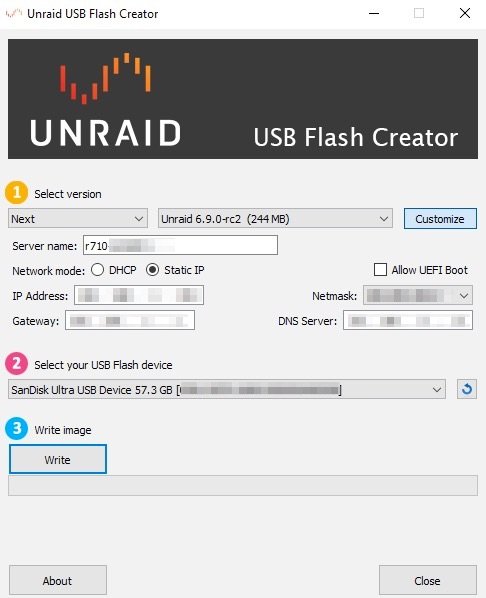
-
So @n1L you're using an MBR/BIOS boot and not GPT/UEFI boot on the Dell server? If so, do you not have the 2TB drive size limit that Dell warns about? I think the Dell support people who said this were wrong in saying the limits affect Windows and Linux and maybe it's only Windows....
-
Another option that seems to be working from someone might be using Rufus. I don't have the details yet, but since recent Rufus has syslinux 6.04 it might work?
-
Can you confirm if you used syslinux 6.04 successfully or does it have to be a newer version compiled from the git source?
-
@n1L and anyone else working on this, there is serious interest in addressing this and fixing this bug/inadequacy of unRAID (see bug report and post: ) Could you please either 1) document the process of creating the USB in Linux with details or 2) share a currently bootable version of the image that we can test and dissect? It appears the most recent version of syslinux is 6.04 from https://mirrors.edge.kernel.org/pub/linux/utils/boot/syslinux/Testing/ but I don't see any beta here. (Changelog) There might be some new development here: https://wiki.syslinux.org/wiki/index.php?title=Development but I don't know how to compile that to be used in our case. I believe the developers will implement the fix if we can get sufficient details and steps here.

