





GK-ken
Members
-
Joined
-
Last visited
Everything posted by GK-ken
-
That didnt help. I figured out whats causing the disks to never spin down. They werent also not showing any smart values. The hba lsi 9300 16i card was not updated to the newest bios and firmware. It was also very slow starting. Nearly 3 minutes took a reboot because of this hba. I I updated everything on this card like mentioned in this post HOW TO UPGRADE AN LSI HBA FIRMWARE USING UNRAID and now its working very fine. Thank you all for the help anyway! It really helped me understanding whats going on!
-
Yes it did before. What do you mean with "new Unraid install" ?
-
They dont. They try to spin down once and immediately spin up again. Every try after that will result in nothing till I reboot the system.
-
Could please somebody help me here. The disks arent spinning down and the summer is coming. They were above 50c last summer during parity check and i dont want them to be that hot all the time and to save some energy on them
-
Tried it, didnt work. I cant figure out whats preventing the spin down. Here are my diagnistics again. I hope somebody could help me out here...it worked just fine before 2 of my disks had corrupted filesystems. homepod-diagnostics-20230506-1258.zip
-
I cant find anything that prevents the disks from spinning down. They stayed on all the night wihthout docker or vm even activated in settings
-
Did that, pressed the "spin down" button for all disks and the hdds didnt spin down. All cache drives are spun down. Active streams doesnt show any activity and open files just has one process named "find" that is up and shows some paths in the cache.
-
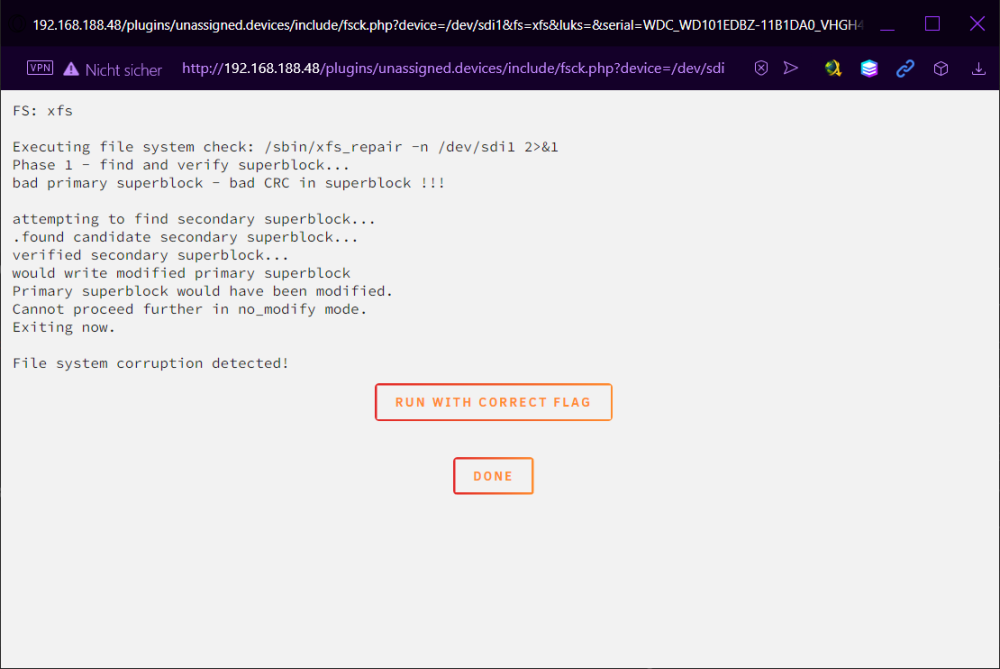
Did the check, found some errors and did the repair as mentioned in these instructions. Now the array seems fine filesystem wise. But the disks wont spin down when not in use. How do i figure that out? homepod-diagnostics-20230503-2150.zip
-
Also my last parity check finished like that: Last check completed on Mon 01 May 2023 06:41:51 PM CEST (yesterday) Duration: 18 hours, 47 minutes, 18 seconds. Average speed: 147.9 MB/s Finding 45224462 errors
-
Thank you for all your support. I got the array working again but now i have a new problem or many. Fox Common Problems says "Unable to write to disk2". My mover does nothing I can see. All my disks arent spinning down anytime and my disk setting is set to a 15 minute spin down delay. I would really like to find the problem myself, so i dont need to relate to others to solve my problem, but i dont really know how. homepod-diagnostics-20230502-1904.zip
-
I think I understood that, but unfortunately disk2 is already empty and so is disk3. Only Data remaining is on parity1 but its disabled and I dont know how to bring it back. Is there a way to repair the parity or check it now in this config?
-
Since Disk 2 is empty because UnRaid already wanted me to format the disk every time it rebootet in order to be mountable, does that mean I could try to do a new config in order to get the data that is on the parity disk to work again?
-
The PSU was swapped out to a new one with more power now. I have a new controller but no cables atm, need to order them. Is it posible to get rid of the disabled mark on these two disks?
-
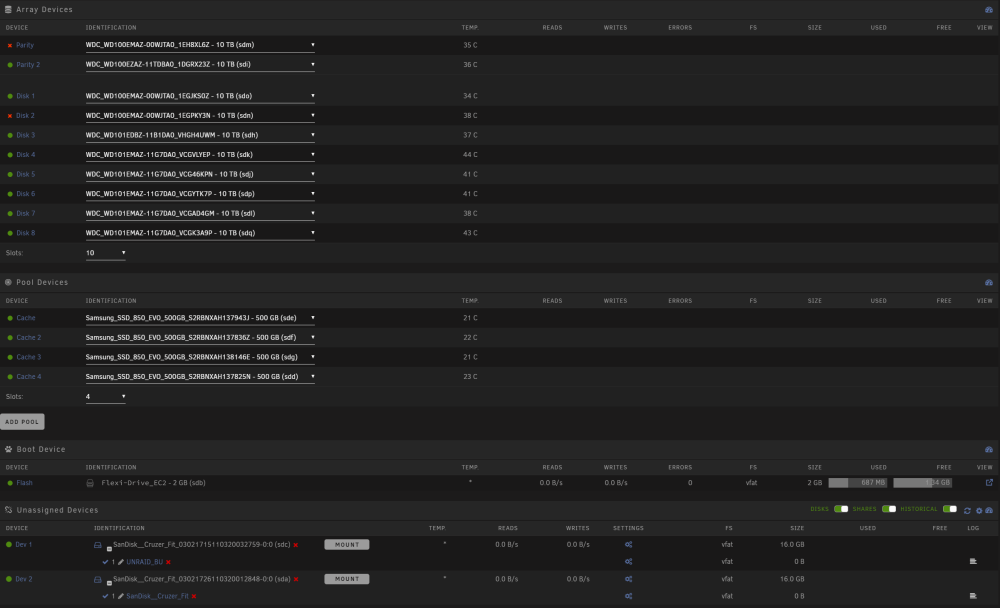
Its been a time, but I now had time to try it with new replaced cables. Now there is something else that seem wrong. The array just starts fine, but the perity with earlier read errors is now disabled and one of the formatted disks too. The other of the two formatted array disks shows up with no data but the array says its fine. homepod-diagnostics-20230413-1646.zip
-
The rebuild stopped at 0,0% now. Im afraid... diagnostics-20230408-1343.zip
-
This is what it says
-
I checked, but they were formatted before the second rebuilding try.. there is nothing
-
Thank you for the fast response. Here is the new diagnostics diagnostics-20230408-1132.zip
-
Hi there, I did a big mistake by accidentally unplugging 2 disks in standby when the Server was online. I didnt see that there was something wrong untill 3 days after it happend. Now after a reboot 2 disks were shown as "new", so I let them rebuild into the array but at the process of rebuilding the parity 1 had many read errors. The first try of rebuild stopped at 10% and didnt want to go further. The second try stopped at 60%. Is there a way to not lose the entire array of data to this? diagnostics-20230408-1014.zip
-
First: Thanks for the fast response! Second: So do I need to delete the files on the cache now? I was a bit confused by the "cache-only", "prefer" and "yes" option Edit: I tried setting the shares you mentioned as prefer without deleting anything and it just works now. Easy fix for my very frustrating problem.Thank you very much! Now I can configure everything else
-
Hi, I was searching for months now for my problem. My disks never spin down as soon as I start the docker service or the vm manager. Sometimes it may or may not spin up the disks immediately, but they will never spin down. I tried "open files" and "file activity" to search for indicators that wouldnt let my disks spin down. But I dont know what causes the problem. I dont know linux and dockers very well, so I could do some deep research or even understand how to use most of the commands for the console. My unraid worked for years now. I just wanted to replace the cache ssd from a 256gb to a 500gb one. Unfortunately I didnt do much research for how to do that right and broke some of my docker settings. Now I have an arrey of ssds as a cache, but my disks wont spin down and I dont know what to do without reinstalling unraid, which I dont know how to do without losing my data. I attached my diagnostics, so somebody could help me. I would really appreciate it : homepod-diagnostics-20230107-1403.zip
-
HI ich777; I really appreciate your great work and already use some of your gameserver Dockers. Is it somehow possible to get a DayZ Server for the DayZ Standalone (DayZ SA) from Steam? Every way I could find to setup a DayZ server requieres windows OS and is only avaiable through steamCMD. I just would like to see a normal vanilla DayZ Server as a docker so I could easily host one for my own. If you need anything to do that feel free to PN me.
-
Nachdem ich im BIOS C-States deaktiviert hatte ist innerhalb 4h wieder ein Neustart vorgekommen und hier sind die logs. Weiterhin habe ich die Meldung "Hardware error". Kann das wirklich sein? Es ist ein neuer Ryzen 5 3600. Bitte helft mir, irgendwie kommt mir da was ganz faul vor und die ständigen Neustarts stören immens. homepod-diagnostics-20211026-2016.zip
-
Es ist nun seit 21h wieder up also müsste der neustart gegen 13 Uhr am 20.10.2021 passiert sein. Leider hat die Zeiteinstellung nicht gestimmt bis gestern und ist demnach noch deutlich verschoben und ich weiß nicht wie die Zeit original eingestellt war.
-
Bin durch zufall gerade auf diesen Post gestoßen: Dort sieht es so aus wie mein Problem und es scheint was mit allgemein AMD Ryzen CPUs zu tun zu haben. Leider kann ich nicht mal eben ins BIOS da der Server keine graka eingebaut hat und ich den komplett zerlegen muss um das zu bewerkstelligen.


