





sgraaf
Members
-
Joined
-
Last visited
Everything posted by sgraaf
-
I have the exact same problem, albeit with a GTX 1650 instead! It intermittently disappears, and I have also tried all the same steps you've mentioned. This all to say that I am keenly interested in a possible solution!
-
Reserving this for a possible future changelog.
-
Overview: Support for the obfs4-bridge Docker template. Application: obfs4-bridge - https://community.torproject.org/relay/setup/bridge/docker/ Docker Hub: https://hub.docker.com/r/thetorproject/obfs4-bridge GitLab: https://gitlab.torproject.org/tpo/anti-censorship/docker-obfs4-bridge/ Description: obfs4-bridge is a container that allows you to run a Tor Bridge relay to help censored users connect to the Tor network. Configuration: OR_PORT: Your bridge's onion routing (Tor) port. PT_PORT: Your bridge's obfs4 port. EMAIL: Your email address. Note: Make sure that both ports are forwarded in your firewall. Make sure that you create the DATA_DIR and change its owner before running the container: mkdir /mnt/user/appdata/tor && chown 101:101 /mnt/user/appdata/tor
-
Quick question: what is the "Cache path" exactly? Is this the transcodes path?
-
Thanks; fixed it in my original post / reply.
-
Perhaps a bit... superfluous, but hereby the same script, but then in bash: #!/bin/bash thresh=70; used=$(df --output=used /mnt/cache/ | awk '{print $1}' | tail -n 1); size=$(df --output=size /mnt/cache/ | awk '{print $1}' | tail -n 1); percent=$((100 * used / size)); if (( $percent > $thresh )); then sh /usr/local/sbin/mover; fi
-
Hmmm I tried that! When I click on "Run Script", I receive the following error message: Script location: /tmp/user.scripts/tmpScripts/dos2unix/script Note that closing this window will abort the execution of this script stat: cannot stat '': No such file or directory stat: cannot stat '': No such file or directory stat: cannot stat '': No such file or directory cat: '': No such file or directory mv: cannot move '.274082193' to '': No such file or directory chown: cannot access '': No such file or directory chmod: missing operand after '' Try 'chmod --help' for more information.
-
Maybe a silly question, but how do I actually use your dos2unix script as a user script? Are user scripts added to PATH? What I have done now, is create a file called dos2unix.sh somewhere on my array, which I then call in the CLI to do the conversion, but this does not use the User Scripts plugin. So I guess my question is: after adding your dos2unix script to the User Scripts plugin, how do I then actually go about using it?
-
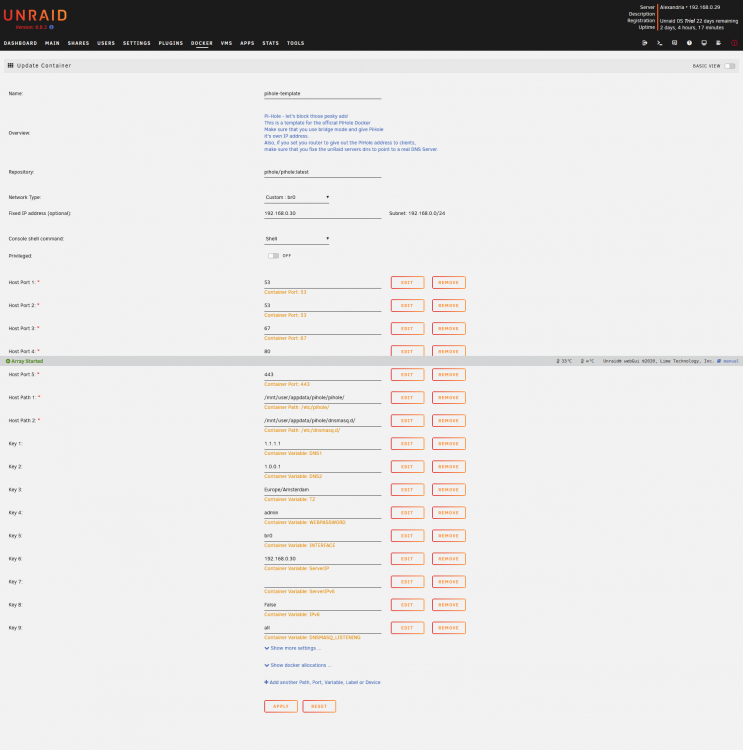
Hi all! I have tried installing the pihole-template docker app, following along with the tutorial of Spaceinvader One. All is well until I try to access the WebUI, which throws a timeout error! Has anyone else experienced similar difficulties and managed to resolve this? Any help is much appreciated! I have already tried: Rebooting Reinstalling the pihole-template app Different static IP addresses Different DNS's Below / attached you'll find a screenshot of my config, along with the output of the docker run command and the log. Output docker run command: root@localhost:# /usr/local/emhttp/plugins/dynamix.docker.manager/scripts/docker run -d --name='pihole-template' --net='br0' --ip='192.168.0.30' -e TZ="Europe/Berlin" -e HOST_OS="Unraid" -e 'TCP_PORT_53'='53' -e 'UDP_PORT_53'='53' -e 'UDP_PORT_67'='67' -e 'TCP_PORT_80'='80' -e 'TCP_PORT_443'='443' -e 'DNS1'='1.1.1.1' -e 'DNS2'='1.0.0.1' -e 'TZ'='Europe/Amsterdam' -e 'WEBPASSWORD'='admin' -e 'INTERFACE'='br0' -e 'ServerIP'='192.168.0.30' -e 'ServerIPv6'='' -e 'IPv6'='False' -e 'DNSMASQ_LISTENING'='all' -v '/mnt/user/appdata/pihole/pihole/':'/etc/pihole/':'rw' -v '/mnt/user/appdata/pihole/dnsmasq.d/':'/etc/dnsmasq.d/':'rw' --cap-add=NET_ADMIN --dns 127.0.0.1 --dns 1.1.1.1 --restart=unless-stopped 'pihole/pihole:latest' WARNING: Localhost DNS setting (--dns=127.0.0.1) may fail in containers. ce5b4d51962bd9dc4406debf9500f5b2f3aac685513104ab3a34b3af5a86e4d3 The command finished successfully! Log: [s6-init] making user provided files available at /var/run/s6/etc...exited 0. [s6-init] ensuring user provided files have correct perms...exited 0. [fix-attrs.d] applying ownership & permissions fixes... [fix-attrs.d] 01-resolver-resolv: applying... [fix-attrs.d] 01-resolver-resolv: exited 0. [fix-attrs.d] done. [cont-init.d] executing container initialization scripts... [cont-init.d] 20-start.sh: executing... ::: Starting docker specific checks & setup for docker pihole/pihole [i] Existing PHP installation detected : PHP version 7.3.19-1~deb10u1 [i] Installing configs from /etc/.pihole... [i] Existing dnsmasq.conf found... it is not a Pi-hole file, leaving alone! chown: cannot access '': No such file or directory chmod: cannot access '': No such file or directory chown: cannot access '/etc/pihole/dhcp.leases': No such file or directory Converting DNS1 to PIHOLE_DNS_ Converting DNS2 to PIHOLE_DNS_ Setting DNS servers based on PIHOLE_DNS_ variable ::: Pre existing WEBPASSWORD found DNSMasq binding to custom interface: br0 Added ENV to php: "PHP_ERROR_LOG" => "/var/log/lighttpd/error.log", "ServerIP" => "192.168.0.30", "VIRTUAL_HOST" => "192.168.0.30", Using IPv4 ::: Preexisting ad list /etc/pihole/adlists.list detected ((exiting setup_blocklists early)) ::: Testing pihole-FTL DNS: FTL started! ::: Testing lighttpd config: Syntax OK ::: All config checks passed, cleared for startup ... ::: Enabling Query Logging [i] Enabling logging... ::: Docker start setup complete [i] Neutrino emissions detected... [i] Using libz compression [i] Target: https://raw.githubusercontent.com/StevenBlack/hosts/master/hosts [i] Received 58866 domains [i] Number of gravity domains: 58866 (58866 unique domains) [i] Number of exact blacklisted domains: 0 [i] Number of regex blacklist filters: 0 [i] Number of exact whitelisted domains: 0 [i] Number of regex whitelist filters: 0 [✓] DNS service is listening [✓] UDP (IPv4) [✓] TCP (IPv4) [✓] UDP (IPv6) [✓] TCP (IPv6) [✓] Pi-hole blocking is enabled Pi-hole version is v5.2.3 (Latest: v5.2.3) AdminLTE version is v5.3 (Latest: v5.3) FTL version is v5.4 (Latest: v5.4) [cont-init.d] 20-start.sh: exited 0. [cont-init.d] done. [services.d] starting services Starting crond Starting lighttpd Starting pihole-FTL (no-daemon) as root [services.d] done.
-
Hi! Did you manage to resolve this issue? I happen to be in the same boat, unfortunately...

