




.jpg.cd0ee2faf0b1ddf75893cc24e561601d.jpg)
ZappyZap
Members
-
Joined
Everything posted by ZappyZap
-
reserved
-
Overview: Support for Docker image Docmost Application Name: Docmost Application Site : https://docmost.com/ Application repository: https://github.com/docmost/docmost Documentation: https://docmost.com/docs/ Overview : Open-source collaborative wiki and documentation software Create, collaborate, and share knowledge seamlessly with Docmost. Ideal for managing your wiki, knowledge-base, documentation and a lot more. Make sure to look at the complete documentation Please post any questions/issues relating to this docker template you have in this thread.
-
great news. thanks for the update
-
Just made a fresh install to see and all works smoothly is the image running ?
-
interesting....
-
Doh.... i was sure i update it .... damn , will be done tomorrow Thanks to found out
-
Pihole container do not use DNS1 and DNS2 anymore but PIHOLE_DNS_ https://github.com/pi-hole/docker-pi-hole
-
open a shel in the container and check : /myspeed/build/assets/locales open a issue on their github, first time seeing this errors
-
Thanks @bmartino1 let me know if you found anything , i am still trying to reproduce.
-
just tested : Checking if custom gravity.db is set in /etc/pihole/pihole-FTL.conf Starting unbound Starting stubby Starting cloudflared [i] Neutrino emissions detected... [✓] Pulling blocklist source list into range [✓] Preparing new gravity database [✓] Creating new gravity databases [i] Using libz compression [i] Target: https://raw.githubusercontent.com/StevenBlack/hosts/master/hosts [✓] Status: Retrieval successful [✓] Parsed 158918 exact domains and 0 ABP-style domains (ignored 1 non-domain entries) Sample of non-domain entries: - "0.0.0.0" [i] List stayed unchanged [i] Target: https://s3.amazonaws.com/lists.disconnect.me/simple_tracking.txt [✓] Status: No changes detected [✓] Parsed 34 exact domains and 0 ABP-style domains (ignored 0 non-domain entries) [i] Target: https://s3.amazonaws.com/lists.disconnect.me/simple_ad.txt [✓] Status: No changes detected [✓] Parsed 2701 exact domains and 0 ABP-style domains (ignored 0 non-domain entries) [i] Target: https://v.firebog.net/hosts/Easyprivacy.txt [✓] Status: No changes detected [✓] Parsed 37674 exact domains and 0 ABP-style domains (ignored 0 non-domain entries) [i] Target: https://big.oisd.nl [✓] Status: Retrieval successful [✓] Parsed 0 exact domains and 273526 ABP-style domains (ignored 0 non-domain entries) [i] List has been updated [✓] Building tree [✓] Swapping databases [✓] The old database remains available [i] Number of gravity domains: 472853 (469770 unique domains) [i] Number of exact blacklisted domains: 0 [i] Number of regex blacklist filters: 14 [i] Number of exact whitelisted domains: 2 [i] Number of regex whitelist filters: 0 [✓] Cleaning up stray matter [✓] FTL is listening on port 53 [✓] UDP (IPv4) [✓] TCP (IPv4) [✓] UDP (IPv6) [✓] TCP (IPv6) [✓] Pi-hole blocking is enabled Pi-hole version is v5.18.2 (Latest: v5.18.2) web version is v5.21 (Latest: v5.21) FTL version is v5.25.2 (Latest: v5.25.2) Container tag is: 2024.06.0
-
i can see the warning from cloudflare version outdated , and this will get push tonight , but that's not your main issue but for your over issue , i cannot reproduce at all
-
i will have a look , but so far i am not able to reproduce
-
Yes that , what you need to do and image do exist now , so you can go, and it is a drop in replacement. I did it on mine to test and update the template. new image : ghcr.io/sysadminsmedia/homebox:latest
-
Ok seems to be back.... give it an other try and let me know
-
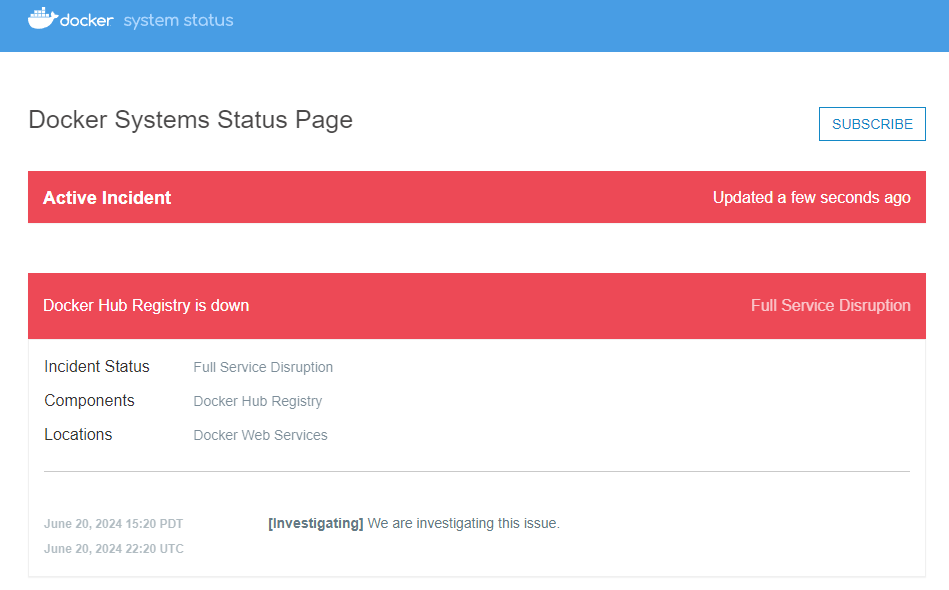
well i think the issue come from docker hub : $ docker pull ubuntu:latest Error response from daemon: Head "https://registry-1.docker.io/v2/library/ubuntu/manifests/latest": received unexpected HTTP status: 503 Service Unavailable confirmed :
-
hmmm weird let me check that
-
Support for Docker image Myspeed.dev template Application Name: Myspeed.dev Application: https://myspeed.dev/ Documentation: https://docs.myspeed.dev/ Overview : MySpeed is a speed test analysis software that stores the speed of your internet for up to 30 days. This can also be useful if you want to know when your network might have drops or if you want to check if your internet matches the booked values from your contract. It is recommended to install the software at home. Of course, it can also be installed on a server in a data center, if you wish Make sure to look at the complete documentation Please post any questions/issues relating to this docker template you have in this thread.
-
Actually , i completly forgot. @alex.justesen asked me to deprecate my template..... so i still update this template anyway but please use the LSIO template - Goodluck
-
I will have a look and update
-
@grtgbln thanks for the head up I will check that and update when ready
-
Nice
-
you must stop the container and make sure the glance.yml is a file not a directory
-
please do : stop the container then cd /mnt/user/appdata/glance/ rm -rf glance.yml then vi or nano glance.yml and paste the content of the exmeple then chown nobody:users glance.yml
-
can you do a : ls -al /mnt/user/appdata/glance/
-
Overview: Support for Docker image Glance Application Name: Glance Application repository: https://github.com/glanceapp/glance Application site : https://github.com/glanceapp/glance Overview : What if you could see everything at a... Glance Make sure to look at the complete documentation Please post any questions/issues relating to this docker template you have in this thread.
.thumb.jpg.bec61e4e919a9235cc4475f8cb53d5e3.jpg)



