





DrFeelgood
Members
-
Joined
-
Last visited
Everything posted by DrFeelgood
-
Thanks this worked perfectly a lot lower CPU Usage, and much more stable download speeds
-
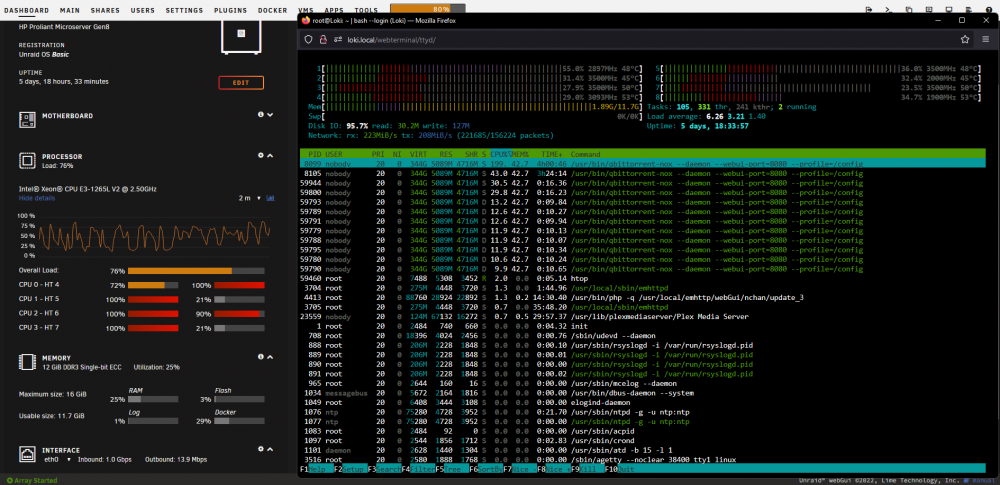
Hello all I'm still new to UnRaid, and Linux in general, but i have been having a problem with Binhex qBittorentVPN for over a year. I have just done a reinstall of UnRaid 6.10.3. Before i was on 6.9.2, but QB has the same issue in the new version. I have a 1Gbps Internet Connection over Fiber, but when I download at full speed 6 Cores out of 8 is pined at 100% most at the time on the Dashboard. I have done the command htop where i can see QB using over 200% CPU often. How is that even possible? In UnRaid 6.10.3 the download speed will jump very quickly up to 1Gbps and then back down to like 350-450Mbps, and then completely stop for 10-15Sec, and then repeat. I only have 49 torrents seeding and 1 Downloading when this happens. I should mention that i have set "VPN_ENABLED" = no in the Docker Template, but it was the same issue with it enabled on 6.9.2 using PIA VPN, but the connection was more stable, and topping out at 850Mbps. I have just noticed in the syslog.txt from the diagnostics zip when writing this: Line 195 "Jun 23 21:14:18 Loki kernel: Performance Events: PEBS fmt1+, IvyBridge events, 16-deep LBR, full-width counters, Broken BIOS detected, complain to your hardware vendor." Line 196 "Jun 23 21:14:18 Loki kernel: [Firmware Bug]: the BIOS has corrupted hw-PMU resources (MSR 38d is 330)" what is this? Could this be the culprit? loki-diagnostics-20220629-1939.zip
-
Hello all I have just installed this and it seems to be working fine with Steam, XBox Live, but I have one question and problem. Question: With WSUS In the acces.log I'm getting a lot where there is a "MISS" does this mean anything? [wsus] 192.168.1.115 / - - - [02/May/2022:23:44:36 +0200] "GET /d/msdownload/update/others/2022/05/36721787_77f10687b94b9715d3cb74277d1656426030b21d.cab HTTP/1.1" 200 10703 "-" "Windows-Update-Agent/10.0.10011.16384 Client-Protocol/2.60" "MISS" "download.windowsupdate.com" "-" The Problem: I'm trying to Install Microsoft Flight Simulator 2020, but the way Microsoft have decided to do installation wia Steam is weird. First you Install MFS2020 from Steam some what. Steam Downloads about 900MB this i can see works with Lancache, then you start MFS2020 from Steam and is prompted with the rest of the installation of over 130GB+ which it downloads from Microsoft, but this does not work. I have sent the last 5 Hours researching and figuring this out, but I don't know what to do now. Can anyone help me? PS: While MFS2020 is downloading from Microsoft there is nothing new in any of the logs, the same for the Minecraft Launcher! Have done "Docker Stats" in the Console and there is nothing going on with the Lancache-Bundle when MFS2020 or Minecraft Launcher is Downloading.
-
Thank you JorgeB you are a life saver ^^ It worked
-
okay thank you... I will try that
-
Hello I made a mistake when setting up a Windows 10 WM, now i don't have access to my Unraid Server. I was i Settings - Network Settings under ETH0 which is pluged into my Router. Somewhere under ETH0 i have set the IP to 192.168.1.114 / 24, but i changed 24 to 30 "I Think" and hit apply, then realizing my mistake the server stoped communicating with my Firefox browser. I can see the server on my Router Network map with the correct IP, and through HP iLO 2 the server reports the correct IP (192.168.1.114) when booted successfully, but i can't get access via Firefox on 192.168.1.114 or http://******.local/ I need to somehow change that / 30 number back to 24, and then i think it will work again Can you help me?

