





Agamemnon
Members
-
Joined
-
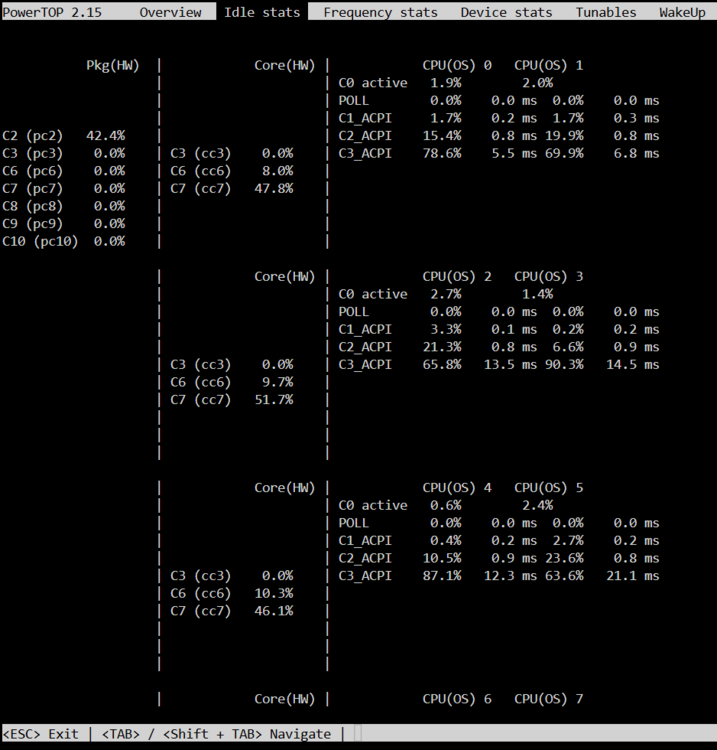
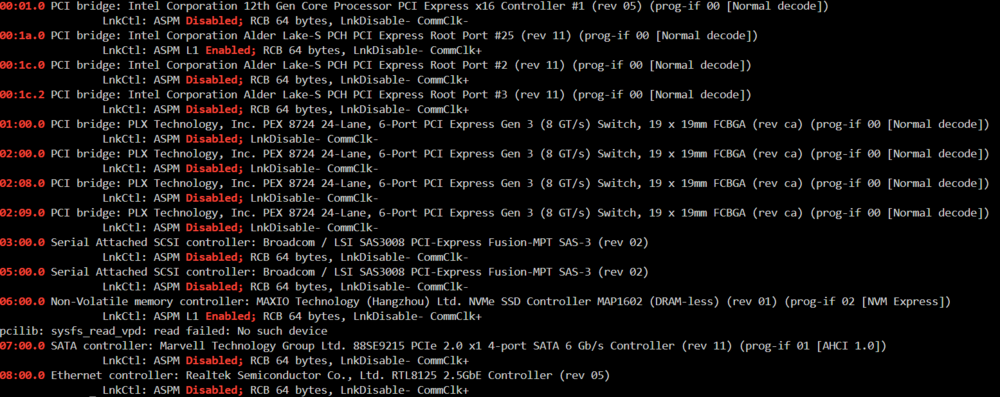
Last weekend my server kinda died. Boot loop before OS, probably a mainboard issue. Since the Hardware is 10 years old (Supermicro X10SL7-F, Xeon 1230v3, 16GB ECC, 650W Seasonic Focus Gold PSU) I didn't do much troubleshooting figuring it was time for some new hardware anyways. The Supermicro Board has an onboard 8i HBA and 6 SATA ports. For the additional needed ports I was using a 4 port SATA PCIe x1 card and a LSI SAS 9300-16i (8 disks attached). For that old server I never did much power consumption optimization with powertop. Only thing I did was Tips And Tweaks set to Power save. Idle was 65W with all drives spun down (24 HDDs and 1 SATA SSD for Cache). New Build: Asrock Z690 Steel Legend (has 8 onboard SATA ports) Intel i3-14100 (iGPU for Plex HW transcoding) 16GB DDR4 Kingston Memory I already had 2x 2TB Viper VP4300 Lite NVMe SSDs for new cache pool (were on sale, to eventually replae the old single SATA SSD as cache) Corsair RM850e ATX Power Supply (to have some room to max out the HDDs to 30, I know I probably don't need the wattage but with that many disks I was more concerned with the max load on the 12V rail) LSI SAS 9300-16i from the old server, now with 16 disks attached 4 port SATA PCIe x1 card (because I was missing one SATA port) same amount of 120mm Arctic PWM fans The new server now draws 85W in idle with all disks spun down. This is with powertop --auto-tune (gave about 4W less) and one of the NVMe SSDs as unassigned (won't spin down). I currently removed the second NVMe from the CPU M.2 Slot thinking that might be the cause to prevent deeper c-states. I am on Unraid 7.1.4, I installed the RTL8125(B) PCI Drivers App. I disabled CPU Turbo in BIOS, activated all ASPM settings (although I think the 9300-16i and the 4 Port SATA card don't support it anyways), enabled all c-states and package c-states settings in BIOS, enabled SATA Aggressive Link Power Management in BIOS, Tips And Tweaks set to Power save. Unraid dashboard always shows the CPU at 3465 MHz, which I think is just a visual bug because powertop is showing lower frequencies. Current powertop and lspci ASPM output screenshots are attached. I have found the reddit posting on how to enable hidden ASPM settings using Windows, which would be the next thing I would try but I am unsure that would really do much with the HBA and PCIe SATA controller potentially not supporting ASPM at all. I was expecting new hardware to have less power consumption than 10 year old components. I don't think the difference in PSU (potentially less efficient at idle load because of more wattage), 1 additional NVMe SSD and more disks attached to the 9300-16i should account for 20W more power usage. What else can I do?
-
Thank you, I appreciate both of your help on this. I somehow was thinking about data corruption protection like ZFS or BTRFS to fix potentially broken files, which parity doesn't give me.
-
I am just unsure if I need to run a parity check before upgrading the parity disk because of the I/O errors the data disk showed when the CRC errors occured. I acknowledged the SMART warning and will set up email notifications.
-
So far no more UDMA CRC Errors occured. Should I run a parity check (without writing corrections) before updating Parity drive to 20TB? I am currently preclearing the disk and it will be done tomorrow. Last parity check was 2 weeks ago before the CRC Errors came up.
-
Ok, thank you for looking at the diagnostics. I thought I would have to do a parity check to get rid of the disk errors. What about the parity swap to use the new 20TB as parity and the parity drive to replace the data disk with issues?
-
Here are the diagnostics. EDIT: Attachment removed
-
I just want to make sure what the best course of action is for my situation. Currently my parity drive is 18TB. I have a new 20TB drive ready and was planning to update the parity with it. Now one of my 14TB data drives threw 12,310 Errors and disk log shows a lot of the following errors: Tower kernel: I/O error, dev sdh, sector 26866835136 op 0x0:(READ) flags 0x4000 phys_seg 128 prio class 2 At the same time UDMA CRC error count jumped to 1813. So far it hasn't gone higher after switching to a different SATA cable. When I switch out the drive with a new one the errors would get fixed from parity? Problem is, I can't use the 20TB on hand unless I do a procedure I found that's called a parity swap, but I am unsure if this is advisable or even still supported. Alternative would be to get another 18TB to replace the data disk first and then upgrade parity later.
-
Beautiful clean build. Do you know how much power the whole system is drawing?
-
Looks great. How are the HDD temps?
-
Thank you. I canceled the parity check and started a new one with the option to write corrections to parity enabled. EDIT: Parity check fixed all errors. Ran an additional parity check afterwards to make sure which came up with 0 errors. All good, thx.
-
I had an unclean shutdown while files where being written to the array (download docker was running). After restarting the server it automatically started a parity check and 4031 Errors where found. Default setting in parity Options is to write corrections to parity but that didn't happen. After parity check was finished I rebooted the server and ran another parity check without the option to write corrections to parity ticked to make sure all is fine now. It shows the same 4031 Errors at the same sectors. I know parity sync errors are to be expected on hard shitdown when files where being written to the array but why didn't the sync errors get fixed during the first parity check, are auto parity checks run without the option to fix and I should just run another parity check with the option enabled? None of the drives show any errors in the column on the main page and SMART looks good on all drives.
-
When I move files from one share to another with Krusader, they get moved OK and are accessible through SMB but the files are actually not moved to the correct disc assigned to the share. I don't know where this behaviour comes from. source folder: /mnt/user/Downloads/extracted Downlaods share assigned to disk 4 destination folder: /mnt/user/Movies Movies share assigned to disks 1-3 Krusader mount: /mnt/user/ assigned to /media In Krusader I move the files from on panel to the other using the /media folder on both panels but the files stay on disk 4.
-
Thanks. I will check that out. Would this method be in any way better than just using the qbittorrentvpn Docker with its own vpn connection?
-
Hello, I set up the sabnzbd docker with PIA and everything is working great so far. Next I want to add a qbittorrent Docker to my Unraid Server. My question now is what would be better, use the qbittorrentvpn Docker or use Privoxy on the sabnzbdvpn Docker and route the traffic through there?

