TallMan206
Members
-
Joined
-
Last visited
-
I’ve recently been going through my servers and network, updating, checking, improving, and securing the overall setup. My main Unraid server has been running for many years, and during that time quite a lot has changed in Unraid itself. While reviewing the configuration, ChatGPT and I noticed that some of my Docker networking settings were still based on older Unraid defaults and recommendations. My backup server is much newer and has a cleaner configuration, so we compared both systems and went through the relevant Docker and network settings. We found several older configuration choices that were no longer necessary with Unraid 7.3.2 and changed them to match the current recommended setup. One of the more noticeable differences appeared to be related to “Host access to custom networks.” As I understand it, this introduced an additional networking layer that was no longer needed in my setup. After removing that extra layer and simplifying the Docker networking configuration, the responsiveness of the Unraid GUI improved noticeably. The main server now feels just as responsive as my newer, cleanly configured backup server. It was a good reminder that a server which has been upgraded through many Unraid versions can still carry configuration choices that made sense years ago, but are no longer necessary or optimal today.
-
ChatGPT helped me further with troubleshooting, and we found out that there was a trailing space behind my email address. I got that checked my Limetech support, and they changed it. Registering now works right away. Thanks for the help.
-
Yes, i also tried that. Router with 1.1.1.1 and no pihole/unbound interference. Also Chrome with secure DNS off, so that also does not intervere. Brave browser has the same problem, both browsers also with Incognito. I am really lost in what else I can try.
-
I’m having the same Unraid Connect registration issue on both of my Unraid servers: Epic-Alpha and Epic-Bravo. The symptoms are the same on both systems. When I try to register either server with Unraid Connect, the Unraid Account side appears to accept the registration, but the process fails when it returns to the local server. The GUI shows: Something went wrong Sign In Failed On Epic-Alpha I investigated this in detail. Server details: Unraid OS 7.3.2 Unraid API 4.37.2+a00c99a5 Unraid Connect plugin 2026.08.20.1609 The API itself is running normally: status: online Using Chrome DevTools, I found that the registration request to account.unraid.net succeeds with HTTP 200 and the returned data contains: validated: true The failure happens afterwards when the local server processes the Connect sign-in. The browser console shows: GraphQL error: Bad Request Exception and: unraid-api failed to update Connect account configuration The failing operation is: connectSignInMutation The local API log also repeatedly shows: ConfigFileHandler:connect.json: Migration failed. Using defaults. We have already done quite a lot of troubleshooting. First, we found a real DNS issue in my local network. I use Pi-hole together with Unbound, and Unbound had DNS rebinding protection enabled for RFC1918 ranges, including: private-address: 192.168.0.0/16 This caused the unique *.myunraid.net hostname to lose its private IPv4 result. Directly querying Cloudflare DNS returned the correct result: myunraid.net hostname -> 192.168.100.30 but querying through Pi-hole/Unbound initially did not return the IPv4 address. We fixed this properly by adding: private-domain: "myunraid.net" to Unbound. After restarting Unbound, Pi-hole correctly returned the local Unraid IP for the myunraid.net hostname. We also verified the complete DNS path through the router, and the server now resolves its own myunraid.net hostname correctly. In addition, I temporarily removed Pi-hole from the MikroTik DNS path entirely to exclude Pi-hole/Unbound as the cause. The Unraid Connect registration still failed exactly the same way. Other things already tested: Confirmed the Unraid API is online. Restarted the Unraid API. Installed/reinstalled the Connect API component with: unraid-api plugins install unraid-api-plugin-connect Confirmed the Connect plugin loads correctly. Provisioned the Unraid Let's Encrypt myunraid.net certificate. Confirmed the unique myunraid.net hostname resolves to the correct LAN IP. Confirmed the HTTPS myunraid.net URL opens successfully in Chrome. Chrome reports the connection as secure. Tested registration from the local Unraid WebGUI. Tested registration through the Unraid Account page. Tested normal Chrome sessions and private/clean sessions. Tested after flushing DNS/browser state. Remote Access has remained disabled. Temporarily removed connect.json and allowed Unraid API to create a fresh one. The newly generated connect.json still immediately produced: Migration failed. Using defaults. The original Connect configuration was restored afterwards. Monitored: /var/log/graphql-api.log nginx access logs nginx error logs Chrome Network Chrome Console An important observation is that while the registration to account.unraid.net succeeds, the failure happens during the local Connect account update. So at this point the sequence appears to be: Register server with Unraid Account Unraid Account returns HTTP 200 Response contains validated: true Browser returns to the local Unraid server Local connectSignInMutation runs Local Unraid API returns Bad Request Exception GUI shows Sign In Failed The fact that the same problem occurs on both Epic-Alpha and Epic-Bravo makes me think this may not be a single-server configuration issue. Diagnostics for Epic-Alpha have been uploaded to this forum thread. At this point I have stopped changing the local configuration because DNS, Pi-hole/Unbound, HTTPS, certificates, browser state, API status and the Connect plugin have all been checked or ruled out. Any guidance on what could cause connectSignInMutation to return Bad Request Exception, or what additional logging/debugging would be useful, would be greatly appreciated. Many thanks. Ronald epic-alpha-diagnostics-20260826-1529.zip
-
Done. Everything is out of the GO file and into user scripts. Thanks.
-
Hi, where should I put them then? I do not want multiple settings in multiple files over my systems where in 3 months I don't know where I changed what. Therefore I did this in ONE file, the GO file. Please, advice me, if you have a better option. Thanks!
-
Hi @trurl stock go file does indeed help to bring it back to under 2 seconds! The strange thing is, the Go file on my backupserver Epic-Bravo, is the same, except for the starting of the dockers, and the ZFS settings. Epic-Bravo IS quick, so I am very curious what settings cause Epic-Alpha to be slow.
-
Before I do that, I would love to understand your thoughts why a stock go file would make a difference? No to challenge, but to understand where your thoughts come from?
-
I have a Dell R720 (main server (Epic-Alpha) and my backupserver is a Supermicro with a X9SCL/X9SCM motherboard. I've added both diagnostics, so they can be compared. epic-alpha-diagnostics-20260401-1628.zip epic-bravo-diagnostics-20260401-1442.zip
-
I have removed all plugins that could cause the GUI to be slow, but with the dockers that I am running I'm at 7 seconds load, on my Mainserver, and with the same configuration (but without dockers) my backupserver loads in lower than 1 second. What is docker doing that it causes the GUI to be so slow?
-
How come my Spotweb looks like this now?
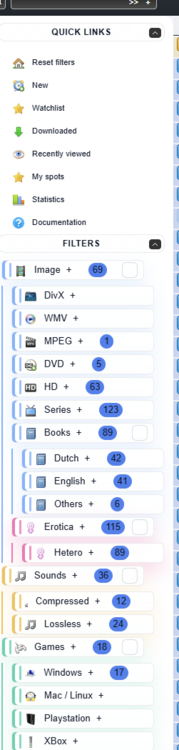
-
EDIT Solved: Issue : version : 9.5.0 edition : MySQL Community Server - GPL log_bin : 1 ← binary log ON binlog_format: ROW gtid_mode : ON ← GTID ON enforce_gtid_consistency: ON So your MySQL is strict GTID + binlog = ON, which does not like what Spotweb’s retrieve code is doing, and that’s why it keep getting: Statement violates GTID consistency: Updates to non-transactional tables... This MySQL config itself will keep breaking Spotweb. I've created a file zz-spotweb-gtid.cnf chmod 644 with the following lines: log_bin=0 skip_log_bin=1 gtid_mode=OFF enforce_gtid_consistency=OFF In UnRAID: Go to Docker → click on mysql-spotweb → Edit. Add a new Path mapping: Host path: /mnt/user/appdata/mysql-spotweb/zz-spotweb-gtid.cnf Container path: /etc/mysql/conf.d/zz-spotweb-gtid.cnf Access mode: Read-only and restart the mysql docker. What is causing my Spotweb to crash with this error? It this related to the mysql DB? SpotWeb v0.68.38.34 on PHP v8.3.27 crashed Fatal error occured during retrieve: HY000: 1785: Statement violates GTID consistency: Updates to non-transactional tables can only be done in either autocommitted statements or single-statement transactions, and never in the same statement as updates to transactional tables. #0 /var/www/spotweb/lib/dbeng/dbeng_pdo.php(86): dbeng_pdo->exec() #1 /var/www/spotweb/lib/dao/Mysql/Dao_Mysql_Spot.php(51): dbeng_pdo->modify() #2 /var/www/spotweb/lib/services/Retriever/Services_Retriever_Spots.php(656): Dao_Mysql_Spot->removeSpots() #3 /var/www/spotweb/lib/services/Retriever/Services_Retriever_Base.php(239): Services_Retriever_Spots->process() #4 /var/www/spotweb/lib/services/Retriever/Services_Retriever_Base.php(340): Services_Retriever_Base->loopTillEnd() #5 /var/www/spotweb/retrieve.php(142): Services_Retriever_Base->perform() #6 {main} Finished retrieving spots.
-
EDIT Solved: Issue : version : 9.5.0 edition : MySQL Community Server - GPL log_bin : 1 ← binary log ON binlog_format: ROW gtid_mode : ON ← GTID ON enforce_gtid_consistency: ON So your MySQL is strict GTID + binlog = ON, which does not like what Spotweb’s retrieve code is doing, and that’s why it keep getting: Statement violates GTID consistency: Updates to non-transactional tables... This MySQL config itself will keep breaking Spotweb. I've created a file zz-spotweb-gtid.cnf chmod 644 with the following lines: log_bin=0 skip_log_bin=1 gtid_mode=OFF enforce_gtid_consistency=OFF In UnRAID: Go to Docker → click on mysql-spotweb → Edit. Add a new Path mapping: Host path: /mnt/user/appdata/mysql-spotweb/zz-spotweb-gtid.cnf Container path: /etc/mysql/conf.d/zz-spotweb-gtid.cnf Access mode: Read-only and restart the mysql docker. What is causing this crash? SpotWeb v0.68.38.34 on PHP v8.3.27 crashed Fatal error occured during retrieve: HY000: 1785: Statement violates GTID consistency: Updates to non-transactional tables can only be done in either autocommitted statements or single-statement transactions, and never in the same statement as updates to transactional tables. #0 /var/www/spotweb/lib/dbeng/dbeng_pdo.php(86): dbeng_pdo->exec() #1 /var/www/spotweb/lib/dao/Mysql/Dao_Mysql_Spot.php(51): dbeng_pdo->modify() #2 /var/www/spotweb/lib/services/Retriever/Services_Retriever_Spots.php(656): Dao_Mysql_Spot->removeSpots() #3 /var/www/spotweb/lib/services/Retriever/Services_Retriever_Base.php(239): Services_Retriever_Spots->process() #4 /var/www/spotweb/lib/services/Retriever/Services_Retriever_Base.php(340): Services_Retriever_Base->loopTillEnd() #5 /var/www/spotweb/retrieve.php(142): Services_Retriever_Base->perform() #6 {main} Finished retrieving spots.
-
Clearly, the Unassigned Devices plugin, especially the Preclear, and the settings of the plugin, caused a lot of polling, making the GUI slow. Also, the IPMI plugin for my Dell R720, polling for temps and fan speeds, adds up to this slowness of the GUI. Removing Preclear (I don't need it at the moment), and changing some settings in the Unassigned Devices plugin made the GUI quicker to a bearable level.
-
Same plugins like before. Never had a problem. It's the last couple of weeks, after updating to 7.2 that it is slow. You can see my main and backupserver next to each other. Where my main takes 4-5 seconds, the backupserver take less then a second. 2025-11-06 22-48-30.mp4